

Vibes for Traktor.
Traktor's playlists and Smartlists are powerful filters, but they can only filter what your metadata already says. Vibes adds mood and energy as a first-class layer, then exports it back as a clean NML playlist tree Traktor reads natively.
$49$79USD one-time purchase. First 250 licenses at this price. 14-day free trial.
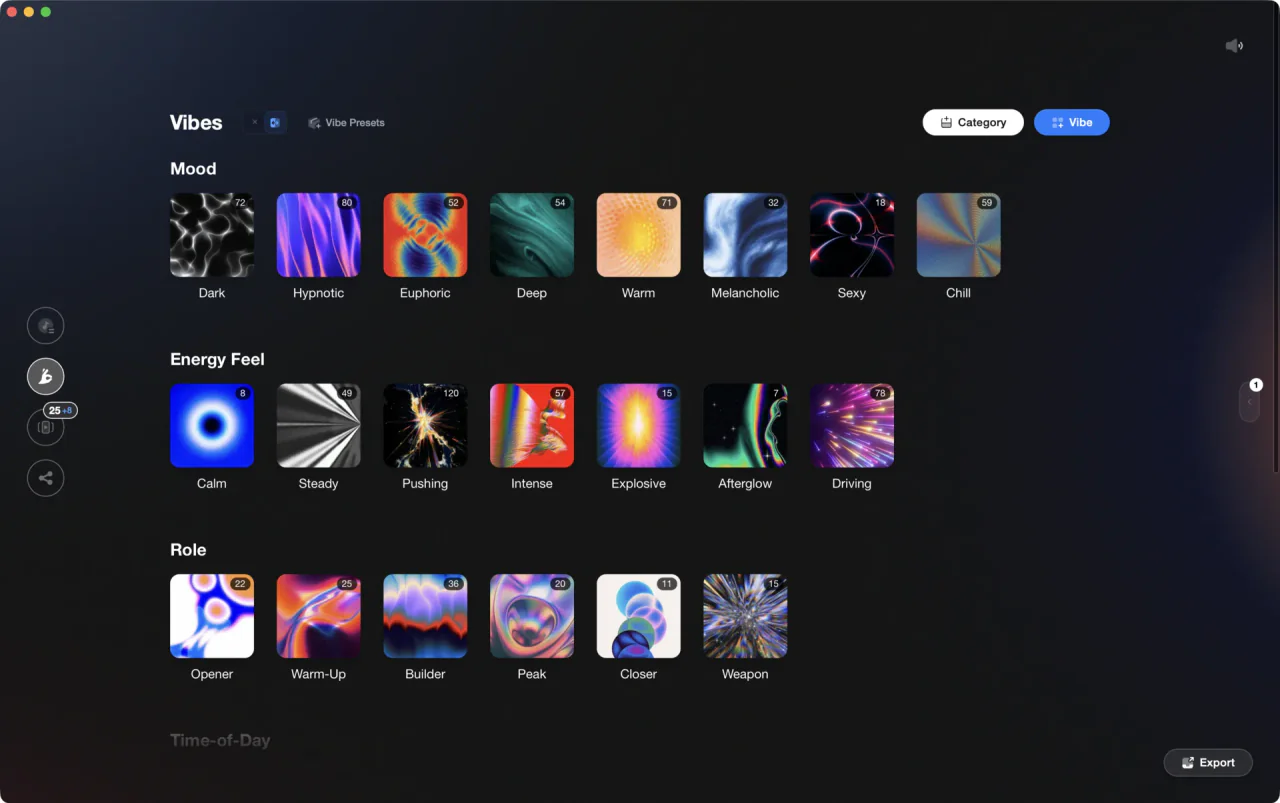
Vibes & categories are fully customizable.
Vibes works with Traktor both ways: it reads your collection.nml, leaves it untouched while you tag, then exports an NML playlist tree you load into Traktor, carrying ratings, cue points, and vibe comments.
From Traktor and back, in three steps.
01
Import your Traktor collection
Vibes reads your NML collection file directly, the same collection.nml where Traktor keeps track metadata, cues, and playlist structure. Playlists come in intact, you can map any of them to vibes during import, and the read is strictly read-only, so nothing in your collection changes.
02
Organize and prepare
Build your own vibe system in Vibe Creator, tag your collection at speed in Vibe Sort, and design sets on the Set Designer canvas with suggestions by BPM, key, and vibe. Every track is keyed in Camelot inside Vibes, which Traktor itself does not display, so harmonic prep happens on the wheel instead of converting Open Key in your head.
03
Export back as NML
Vibes exports a Vibes Library playlist tree as NML: one playlist per vibe nested under your category names, your sets in their exact order, combination playlists, with ratings, cue points, and vibe comments included. Optional subdivision folders split each vibe by BPM range or Camelot key.


Step one
Zero setup, one source picker.
No browsing for files: your collection shows up in the source picker the moment Vibes spots your Traktor install. Select it and the whole thing lands, ready to tag, while Traktor keeps running like nothing happened.
What Vibes adds on top of Traktor.
Traktor stays your performance software. Vibes covers the preparation layer.
| Traktor alone | With Vibes | |
|---|---|---|
| Library organization | ||
| Mood and energy tagging | Playlists, folders, and metadata fields | Unlimited vibes in your own categories |
| Rule-based organization | Smartlists: up to 8 conditions, one AND or OR per list | Combinations: auto-detected vibe overlaps as ready-made playlists |
| Key display | Musical and Open Key notations, no Camelot | Every track keyed on the Camelot wheel |
| Rapid sorting workflow | Manual tagging in the collection | Vibe Sort: keyboard-first sorting with progress tracking and AI suggestions |
| Set preparation | ||
| Set building | Playlists and the Preparation list | Visual canvas with chapters, connections, and energy flow sorting |
| Next-track suggestions | Weighted by BPM, key, vibe, and audio similarity, with harmonic key intents | |
| Track analysis | BPM, key, and beatgrids | Plus multi-band waveforms, energy curves, and auto-detected sections |
| Cost | ||
| Price | Traktor Pro 4: one-time license | $49 one-time, works offline |
What lands back in Traktor.
Vibes exports a standard NML file, so the structure imports cleanly into your Traktor playlist tree.

Track 001
Artist A
Afterhours Mysterious
 Introspective
Track 002
Artist B
 Cozy FloorPeaceful
 Home
Home
Track 003
Artist C
Rave Aggressive
 Festival
 Build & Release
- A Vibes Library tree with one playlist per vibe, nested under your category names
- Your DJ sets as playlists with the exact track order you designed
- Combination playlists for tracks that share multiple vibes
- Star ratings mapped to Traktor ratings
- Auto-detected cue points for intro, buildup, drop, breakdown, and outro
- Vibes written into the comment field, like [House] [Peak Time], ready for Smartlist filters
- Optional BPM-range or Camelot-key subfolders inside each vibe playlist
The export arrives as regular playlists: Traktor Smartlists cannot be created from outside the app, so build your own Smartlist rules on top of the vibe comments, like comment contains Peak Time.
The preparation layer
DJ library management, finally done right.
Turn your collection into clear categories. Moods, functions, or your own system, so every track feels ready to play.
Afterhours
Aggressive
Build & Release

Club
Cozy Floor

Euphoric

Evolving
Festival
Home
Introspective

Melancholic
Mysterious
Peaceful

Playful
Rave

Sectional

Sustained

Tense
Afterhours
Aggressive
Track 001
Artist A
AfterhoursMysteriousIntrospectiveTrack 001
Artist A
AfterhoursMysteriousIntrospectiveTrack 002
Artist B
Cozy FloorPeacefulHomeTrack 002
Artist B
Cozy FloorPeacefulHomeTrack 003
Artist C
RaveAggressiveFestivalBuild & ReleaseTrack 003
Artist C
RaveAggressiveFestivalFrequently asked questions
The honest answers, including the trade-offs.
From a Vibes customer
The import worked perfectly. Have created several sets now and my life is so much easier
One-time purchase
Get Vibes with a single payment. No subscription.
Vibes is the step before you open your DJ software, not a replacement for it.
First 250 licenses at this price, then $79.
14 days • Full access
No strings attached
Secure checkout with Stripe
Already have Companion Pro? Upgrade instead


Methodology
How we keep this honest.

Verified against the app
What transfers both ways is tested against the current version of Traktor.
We own our bias
Vibes is our product, and we are upfront about format limits, like Serato's eight cue slots per track and its crate files not carrying star ratings.
Live pricing
The Vibes price shown comes straight from our checkout, never a hardcoded marketing number.
Kept current
Last reviewed September 2026.
How-to guides for Traktor
Step-by-step guides for organizing, fixing keys and cue points, harmonic mixing, and preparing your Traktor library.
Keep exploring
Compare Vibes
DJ apps head to head
Works with your software
Vibes for DJs
Vibes features
How-to guides
Best DJ software
Move between apps
Learn to DJ