





Rate every track by its energy.
DJ energy levels rate how hard a track hits the floor on a 1 to 10 scale, the one Mixed In Key popularized: 1 is beatless background music, 5 or 6 gets people dancing, 8 and up is peak time. None of rekordbox, Serato, or Traktor has an energy field of its own, so the number lives in a rating, a comment, or a playlist name, and you use it to shape a night from warm-up to peak and back down.
$49$79USD one-time purchase. First 250 licenses at this price. 14-day free trial.
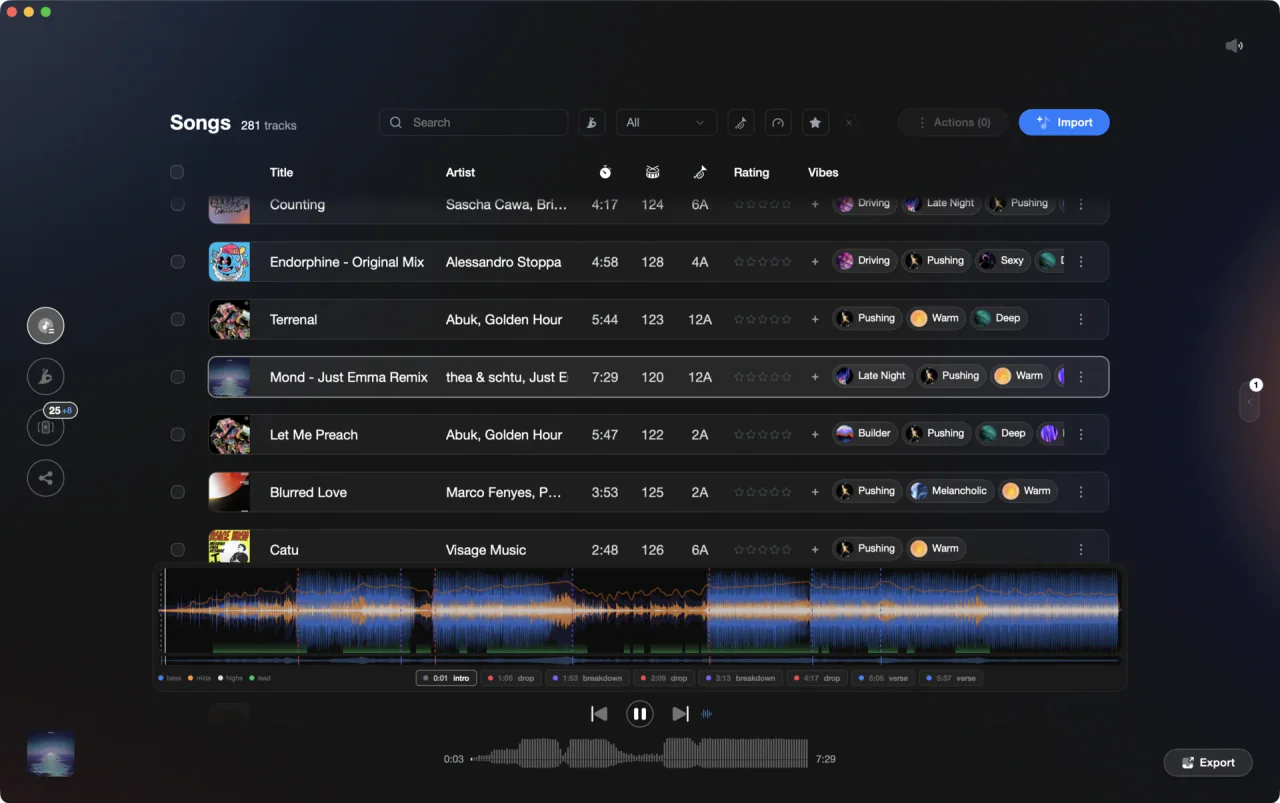
Energy rides the waveform as its own layer, alongside beats, sections, and cues.
Energy levels rate how hard a track hits, usually 1 to 10, and Vibes keeps yours as a manual field beside the analyzed energy curve, so you can shape a set while the number stays in your library.
How it works.
Select one track or a hundred, press E to open the Track Inspector, and type an energy value from 1 to 10. Press Enter or click away and it is stored, with no Save step: only title, artist, BPM, and key are staged and written back into the file's tags.
Open the waveform and the energy layer traces loudness end to end, with intro, buildup, drop, breakdown, and outro marked, so you can see where a track really peaks before you commit to a number.
In Set Designer, Energy Flow sorts a chapter by tempo: ascending, descending, or an arc that peaks in the middle. On the two straight sorts, same-tempo ties go to the closest harmonic key. Then export the order.
Select one track or a hundred, press E to open the Track Inspector, and type an energy value from 1 to 10. Press Enter or click away and it is stored, with no Save step: only title, artist, BPM, and key are staged and written back into the file's tags.
Open the waveform and the energy layer traces loudness end to end, with intro, buildup, drop, breakdown, and outro marked, so you can see where a track really peaks before you commit to a number.
In Set Designer, Energy Flow sorts a chapter by tempo: ascending, descending, or an arc that peaks in the middle. On the two straight sorts, same-tempo ties go to the closest harmonic key. Then export the order.
Energy you can set, see, and sort by.
A number you control, a curve from the analysis, and a set that climbs the way you planned it.

Your number
A value you set, not one guessed for you.
Energy sits next to the star rating in the Track Inspector as a plain 1 to 10 field. Set it on a single track or on a whole selection at once, with mixed values shown as mixed so a bulk edit never hides what you are overwriting.
See Track InspectorAnalysis
See the shape before you rate it.
Every import is analyzed on your machine: an energy curve across the whole track, plus sections labeled intro, buildup, drop, breakdown, and outro. A track can average out flat and still hold a monster in its last two minutes, and the curve is where you catch that.
See Track AnalysisOpening

Track 002
Artist B

Track 004
Artist D

Track 001
Artist A
Track 003
Artist C
Set Designer
Build the climb instead of hoping for it.
Drop a chapter of tracks on the canvas and sort it into the shape you want: slow to fast, fast to slow, or an arc that peaks in the middle. The two straight sorts break same-tempo ties toward the closest harmonic key, so the climb still mixes.
See Energy FlowTags and export
Levels that travel to the booth.
The number stays in your library, so give energy a home your DJ app can read: tag tracks into an energy category, using the ready-made Energy Feel pack of Calm, Steady, Pushing, Intense, Explosive, and Afterglow, then export. Each level lands as its own playlist or crate, nested under the category name.
See Vibe OrganizationFrequently asked questions
The honest answers, including the trade-offs.
From a Vibes customer
The import worked perfectly. Have created several sets now and my life is so much easier
One-time purchase
Get Vibes with a single payment. No subscription.
Vibes is the step before you open your DJ software, not a replacement for it.
First 250 licenses at this price, then $79.
14 days • Full access
No strings attached
Secure checkout with Stripe
Already have Companion Pro? Upgrade instead


Methodology
How we keep this honest.

Verified against the app
Energy Levels is described from the shipping version of Vibes, not a roadmap.
We own our bias
Vibes is our product. We call out where a feature has limits or where another tool does something differently.
Live pricing
The Vibes price shown comes straight from our checkout, never a hardcoded marketing number.
Kept current
Last reviewed September 2026.