
Resources
Everything in one place.
Guides, tools, free downloads, and references for organizing your library and getting more out of your DJ software. Start anywhere.
Guides & reference
Learn the craft and keep your library in order.
Learn to DJ
Techniques, tutorials, and gear, explained.
Tools & comparisons
Free utilities and an honest look at the alternatives.
DJ directory
Discover DJs by the music they actually play, and browse every track by key, tempo, and genre.
Featured tools
Instant, free utilities for tempo, key, and harmonic mixing.
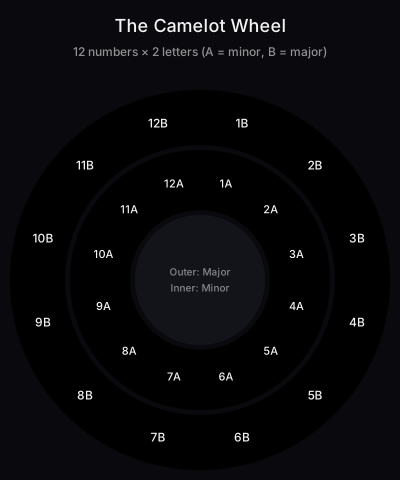
Camelot Wheel
Interactive Camelot wheel for harmonic mixing
BPM Tapper
Tap to detect BPM in real-time
Set Time Calculator
Plan how many tracks you need for your set
Music Genre Tree
Complete electronic music genre taxonomy with BPM ranges
Key Compatibility Checker
Check if two keys mix well together
Harmonic Mixing Chart
Complete reference chart for all key notations
Beats to Time Calculator
Convert bars and beats to seconds at any BPM
DJ Name Generator
Generate random DJ names by style
Attribution-only license
Camelot Wheel: SVG pack & printable PDF
High-resolution vector diagrams and a printable cheat sheet, yours to use in blog posts, courses, and tutorials.
Frequently asked questions
The honest answers, including the trade-offs.


