
Camelot Wheel Set Builder
Plan a harmonic set on the wheel itself: click any of the 24 keys to light up its compatible moves, then chain key by key into a route for your whole set. Numbers and letters follow the Camelot system your DJ software already shows.
- Interactive reference
- Keyboard friendly
- No sign-up
Click any key on the wheel to explore mix relationships.
13 named transitions: safe, energy, advanced.
Next stepVibes detects every track's key on import and places it on this same Camelot wheel automatically, across your whole library at once. Track analysis in Vibes
Free downloads
Camelot Wheel: SVG Pack & Printable PDF
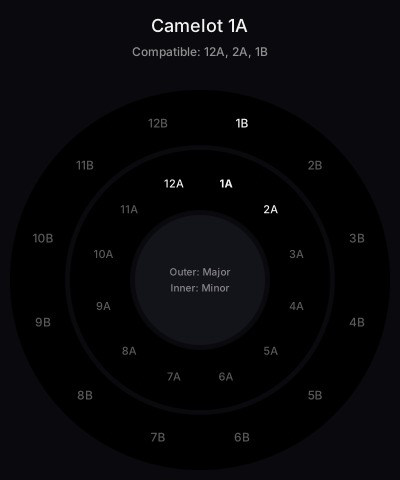
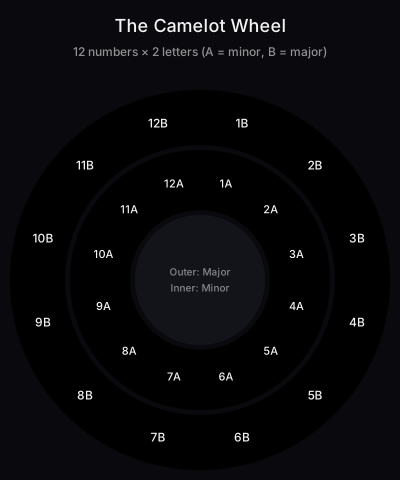
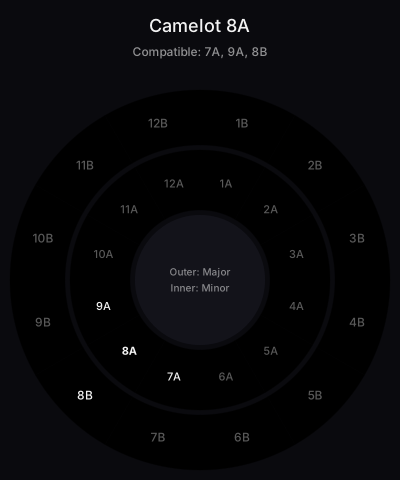
29 high-resolution SVGs (24 per-key compatibility diagrams plus 5 rule explainers) and a one-page A4 cheat sheet PDF. Attribution-only license: use them in blog posts, courses, and tutorials.
Plan a set
Chain Keys Into a Harmonic Route
Start from your opening track's key, click it, and pick the next move from its highlighted neighbors: same code for a seamless blend, ±1 for a subtle lift, or A↔B for a mood flip. Repeating that key by key gives you a harmonic route through a whole set before you touch a deck. New to the system? Read the complete Camelot wheel guide for the theory, grab the printable cheat sheet for the booth, or use the free SVG pack for your own posts.
Camelot Wheel in DJ Software
| Software | Notes |
|---|---|
| Rekordbox | Displays Camelot codes natively. Sort your library by key to plan harmonic sets |
| Traktor | uses Open Key notation (1m-12d), which maps 1:1 to Camelot. Use the DJ key chart to translate |
| Serato | supports both Camelot and standard musical keys. Check our harmonic mixing chart for the full reference |
| Mixed In Key | The original Camelot software. Analyzes your tracks and writes the Camelot code to the file metadata |
Browse Each Key
Each Camelot code has its own page with the musical key, compatible keys, real tracks in that key, and the genres that live there:

Hey, it's Ben Modigell 👋
I've been DJing and producing music as "so I so," focusing on downtempo, minimal, dub house, tech house, and techno. My background in digital marketing, web development, and UX design over the past 6 years helps me create DJ tutorials that are clear, practical, and easy to follow.
Methodology
Last updated
Author and Methodology
Maintained by Ben Modigell, founder of Vibes. Ben builds DJ library, preparation, BPM, and harmonic-mixing tools for working DJs.
- Source
- Vibes DJ-tool taxonomy and page logic maintained by Vibes.
- Evidence
- Page output checked against the current tool behavior and internal DJ reference data.
- How this page is made
- Tool pages are built from reusable page logic, internal DJ reference data, and visible on-page calculations. Programmatic reference pages are generated from structured data rather than hand-written one by one.
BPM, key, and genre labels can vary by edit, remaster, detection engine, and DJ software. Use these pages as a practical mixing reference, then verify important tracks in your own library.
Report a correctionThe visual way to organize your DJ library
Tag tracks by vibe. See everything at once. Export to rekordbox, Serato, Traktor or Engine DJ.
14-day free trial. Full access, no strings attached.
or see how it works
Frequently Asked Questions
Related Tools
Song Key & BPM Finder
Analyze any audio file: key, Camelot code, and BPM detected in your browser
Key & BPM Changer
Change a song's key, tempo, or speed in your browser with exact BPM targets
Harmonic Mixing Chart
Complete reference chart for all key notations
Key Compatibility Checker
Check if two keys mix well together
Camelot Wheel Cheat Sheet
Printable reference of all 24 Camelot keys and compatible keys
Camelot Wheel SVG Pack
29 free Camelot Wheel SVG diagrams for blog posts, courses, and tutorials
Key Transposer
Transpose keys by semitones with Camelot and Open Key notation
Scale Finder
See the notes of any scale with Camelot and relative keys
Semitone Calculator
Count semitones between notes and transpose by any interval
Note Frequency Chart
Convert Hz to note and note to frequency, with the full chart