
Design your set on a canvas.
Lay tracks on a visual canvas, connect them into a flow, and get next-track suggestions weighted by BPM, key, vibe, and how the audio actually sounds. Then export the order straight to your DJ software.
$49$79USD one-time purchase. First 250 licenses at this price. 14-day free trial.
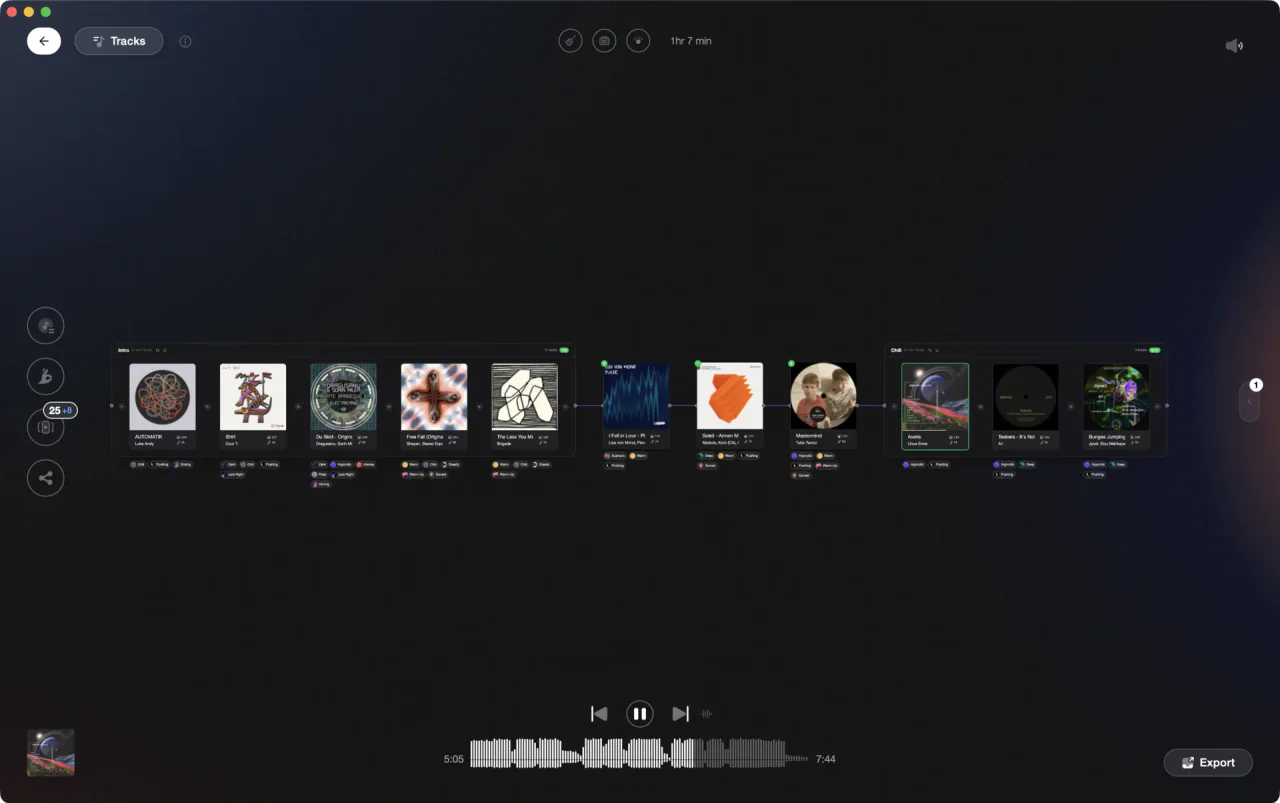
Shape your set on a visual canvas.
Set Designer is the Vibes canvas where you lay tracks out, connect them into a flow, and get next-track suggestions ranked by BPM, key, vibe, and sound, then export the exact order to rekordbox, Serato, Traktor, or Engine DJ.
How it works.
Open the track library, filter by BPM, key, rating, or vibe, and drag tracks onto the Set Designer canvas.
Draw connections between tracks, group them into named chapters, or paint a chain across several at once to lock the order of your set.
Walk the whole set end to end to hear how it flows, then export the exact order to Rekordbox, Serato, Traktor, or Engine DJ.
Open the track library, filter by BPM, key, rating, or vibe, and drag tracks onto the Set Designer canvas.
Draw connections between tracks, group them into named chapters, or paint a chain across several at once to lock the order of your set.
Walk the whole set end to end to hear how it flows, then export the exact order to Rekordbox, Serato, Traktor, or Engine DJ.
Everything you need to shape a set.
From the first track to the last, with suggestions that actually fit.


Suggestions
The next track, suggested for you.
Pull a track's handle and Vibes ranks what comes next by BPM, key, and vibe, with seven harmonic key intents from a safe match to a dramatic energy lift. Turn on Sound Match and it also weighs how similar the tracks actually sound, not just their tags.
See Track AnalysisOpening

Track 002
Artist B

Track 004
Artist D

Track 001
Artist A
Track 003
Artist C
Chapters and flow
Structure a set, not just a playlist.
Group tracks into chapters for the arc of your night, connect them with directed edges, sort a chapter by key or BPM into a clean arc, and let Reorder lay the whole canvas out. Your canvas position and zoom are saved per set, so a set in progress is always where you left it.

Track 001
Artist A

Track 002
Artist B

Track 003
Artist C



Built for digging
Collect now, build later.
Stash tracks in the QuickSave sidebar while you browse, then drop a whole page of them onto the canvas in one gesture when you are ready to build the set.
See DJ LibraryPairs
Save the transitions that work.
Mark two tracks as a pair and Vibes remembers it. Saved pairs surface on the canvas as you build and feed your next-track suggestions, so a transition you nailed once is never lost.
Frequently asked questions
The honest answers, including the trade-offs.
From a Vibes customer
The import worked perfectly. Have created several sets now and my life is so much easier
One-time purchase
Get Vibes with a single payment. No subscription.
Vibes is the step before you open your DJ software, not a replacement for it.
First 250 licenses at this price, then $79.
14 days • Full access
No strings attached
Secure checkout with Stripe
Already have Companion Pro? Upgrade instead


Methodology
How we keep this honest.

Verified against the app
Set Designer is described from the shipping version of Vibes, not a roadmap.
We own our bias
Vibes is our product. We call out where a feature has limits or where another tool does something differently.
Live pricing
The Vibes price shown comes straight from our checkout, never a hardcoded marketing number.
Kept current
Last reviewed September 2026.