

Tag your music library fast.
The fast way to tag a music library is one track at a time from the keyboard: hear the track, press a key for each label, press another key for the next one. Editing rows in a library grid is slower, because you first have to work out what a whole selection has in common before you can tag any of it. Vibe Sort turns your untagged tracks into that queue, with hotkeys, star ratings, and AI suggestions you accept or reject as you go.
$49$79USD one-time purchase. First 250 licenses at this price. 14-day free trial.
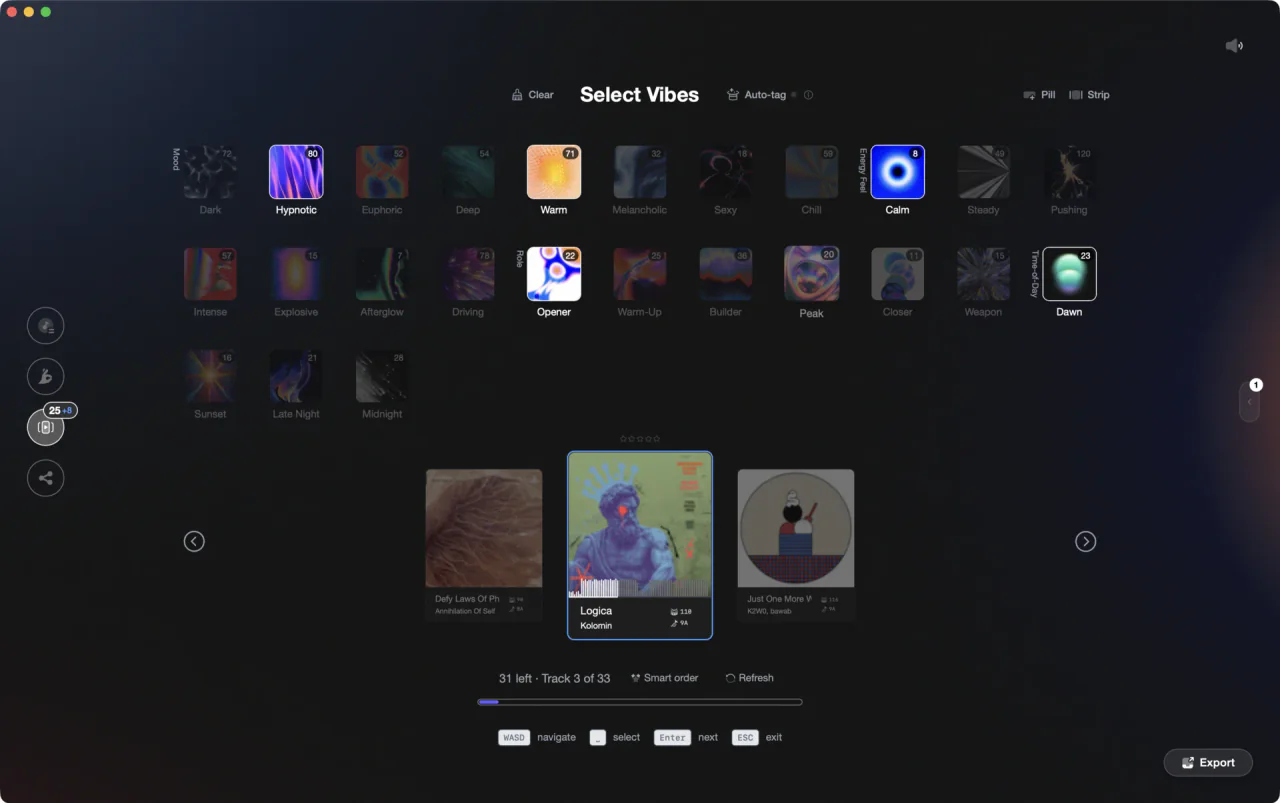
One track on screen, your vibes below, keys to assign them.
Vibe Sort queues your untagged tracks in Vibes one at a time, so you hear a track, press a key to tag and rate it, and move on, and every vibe exports later as a playlist or crate.
How it works.
Vibe Sort loads the tracks in your library that have no vibes yet, newest first. A counter shows how many are left and a progress bar fills as you work, so a backlog has a visible end.
Hit P or hover the card to hear the centered track. Focus your vibes with A and D, assign with space, rate with 1 to 5, then press enter for the next one. While audio is running, Next drops into the following track a third of the way in, past the intro.
Every vibe exports as a playlist or crate, nested under your own category names, into rekordbox, Serato, Traktor, or Engine DJ.
Vibe Sort loads the tracks in your library that have no vibes yet, newest first. A counter shows how many are left and a progress bar fills as you work, so a backlog has a visible end.
Hit P or hover the card to hear the centered track. Focus your vibes with A and D, assign with space, rate with 1 to 5, then press enter for the next one. While audio is running, Next drops into the following track a third of the way in, past the intro.
Every vibe exports as a playlist or crate, nested under your own category names, into rekordbox, Serato, Traktor, or Engine DJ.
Tag music library fast, track by track.
A dedicated screen for the backlog: your keys, your own vibe system, and suggestions that learn your picks.
Hotkeys
Both hands stay on the keyboard.
A and D move across your vibes and W and S move between rows, space assigns the focused vibe, P plays and pauses, the arrow keys step between tracks, and 1 to 5 sets a star rating. Press the same number again to clear it. The navigation and playback keys are all rebindable in Settings; the rating keys are fixed.
 Afterhours
 Mysterious
 Introspective
 Evolving
Auto-Tag
Suggestions you accept or reject.
Hit Auto-Tag on the centered track and Vibes proposes vibes straight from the audio, on your machine. Keep the ones that fit, drop the ones that miss, and the model sharpens on your picks instead of a generic taste profile.
See Auto-Tagging
Ratings
Rate in the same pass.
Sorting is the one moment you are actually listening, so the star rating sits on the centered card. Press 1 to 5 while the track plays, press the same number again to clear it. Ratings become a filter later, next to BPM, key, and vibe. One caveat the export dialog flags: Serato crate files cannot carry ratings, so that one stays inside Vibes.
Euphoric MelancholicMysterious
 Aggressive
 Peaceful
 RaveAfterhours
 Club
Club Home
HomeYour system
Tag with your own vibes, not a fixed list.
The vibes on screen are the ones you built in Vibe Creator, grouped under categories you named. Switch between the grid and the strip layout, and between cards and pills, depending on how many vibes you sort with.
See Vibe OrganizationFrequently asked questions
The honest answers, including the trade-offs.
From a Vibes customer
The import worked perfectly. Have created several sets now and my life is so much easier
One-time purchase
Get Vibes with a single payment. No subscription.
Vibes is the step before you open your DJ software, not a replacement for it.
First 250 licenses at this price, then $79.
14 days • Full access
No strings attached
Secure checkout with Stripe
Already have Companion Pro? Upgrade instead


Methodology
How we keep this honest.

Verified against the app
Vibe Sort is described from the shipping version of Vibes, not a roadmap.
We own our bias
Vibes is our product. We call out where a feature has limits or where another tool does something differently.
Live pricing
The Vibes price shown comes straight from our checkout, never a hardcoded marketing number.
Kept current
Last reviewed September 2026.