

Organize by genre in Serato DJ.
In Serato DJ Pro, organizing by genre is a tagging job before it is a crate job: fill the Genre field on every track, then build one crate per genre and let smart crates read the field for you. The rule that does the work is Genre contains, so a file tagged Deep House lands in your House crate the moment you import it. Here is how to organize Serato by genre without dragging thousands of tracks by hand.
$49$79USD one-time purchase. First 250 licenses at this price. 14-day free trial.
Get the tag right once and every crate downstream fills itself.
Tagging tracks by genre in Serato DJ, step by step.
Serato reads the Genre field straight out of each file's tags, so nothing sorts by genre until that field is right. These steps cover Serato DJ Pro 4.0; crates, subcrates and smart crates work the same way in Serato DJ Lite 4.0.
Show the Genre column
Click the triangle at the top right of the library, just under the search box, or right-click any library column header. Both open the same column list. Tick Genre, and tick Grouping and Comment while you are there, since those two hold the sub-genre notes most DJs end up writing. Drag a column edge to resize it.
Fix the Genre tag in bulk
Double-click the Genre field in the library to edit it. Select several tracks first and the edit is applied to every track in the selection, so a hundred mislabeled files take one entry instead of a hundred. Filename, length, size, bit rate and sampling rate cannot be edited, because they belong to the file itself. On Serato DJ Pro 3.3.5 and below, uncheck Protect Library in Setup first.
Sort by genre, then by tempo
Click the Genre column header once to sort ascending and again for descending. Hold Cmd on macOS or Ctrl on Windows and click a second header, BPM for example, to assign it as a secondary sort, so each genre block is ordered by tempo inside itself. Cmd or Ctrl plus Shift on that second header switches secondary sorting off again.
Build one crate per genre
Click Add Crate in the crate panel and double-click the new crate to name it. Drag a second crate a little to the right, onto the name of the first, and it becomes a subcrate: House at the top with Deep House and Tech House nested under it. Drag it to the far left of the crate panel instead and it stays at the top level.
Let a smart crate fill each genre crate
Click Add Smart Crate, then Add Rule. Choose Genre from the field menu, choose Contains, and type the genre. Contains beats Is here, because Deep House and Tech House both match a House rule while Is would skip them. Tick Match all of the following Rules to stack a second rule such as BPM. Smart crates can be nested as subcrates like any other crate.
Add a second signal, and leave the files alone
In Serato DJ 4.0 the third library column is a track color label. Click it and pick a color so warm-ups and peak-time cuts separate at a glance inside one genre crate. Right-click a crate and choose Add To Favorites to pin it to the top of the list. Never move or rename music in Finder or Explorer: Serato stores a path, and moved files show up yellow and missing.
The catch
A genre tag is only as good as whoever typed it, and a store label like Dance or Electronic tells you nothing about whether a track opens a night or closes it. Smart crates can only match text that is already in the field, so a library with blank, inconsistent or plain wrong genres has to be re-tagged before any of this pays off.
 Afterhours
 Mysterious
 Introspective
 Evolving
The faster way
Do the tagging once, export it back as crates.
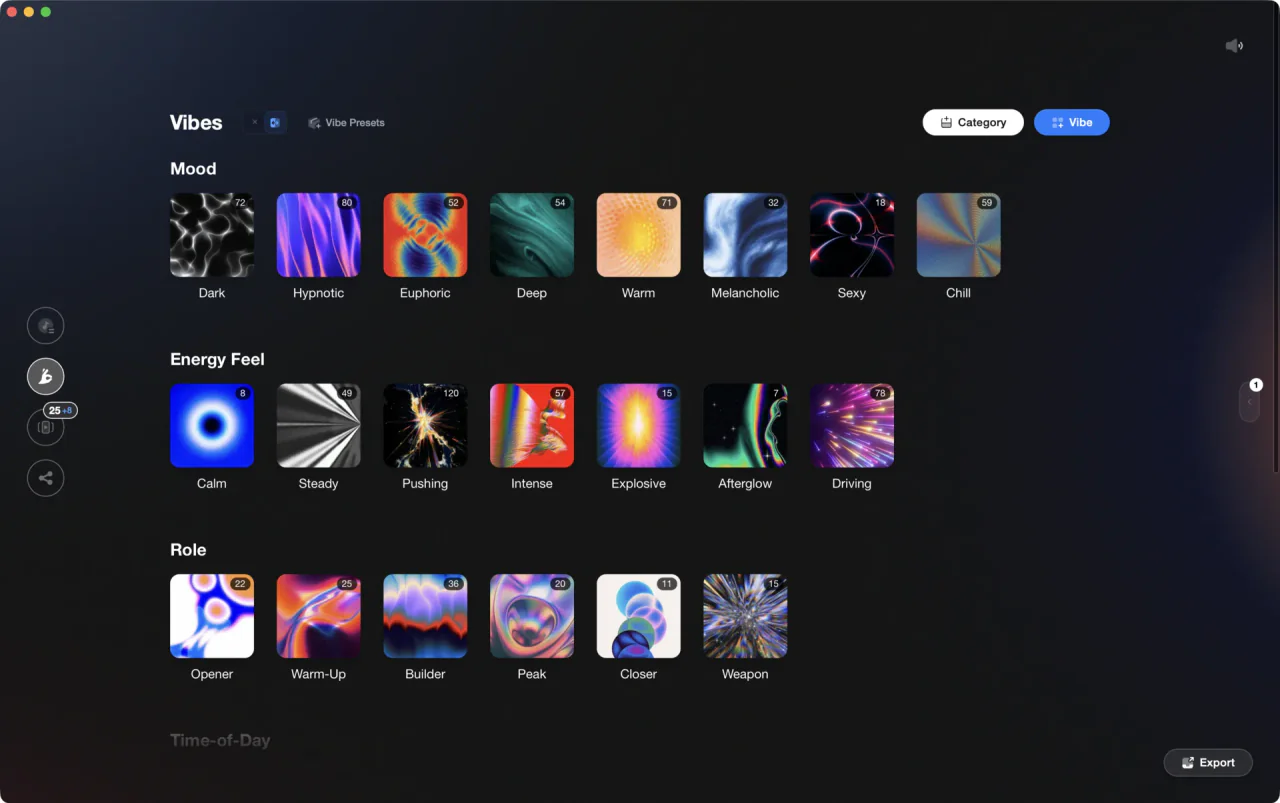
Vibes imports your Serato library and reads your existing Genre, Mood and Grouping fields in as tags on the way through. Auto-Tagging then listens to each track and suggests a vibe for everything that arrived blank or wrong, and Vibe Sort walks the rest of the library past you with hotkeys, so confirming replaces typing. When the tagging is done, export the result straight back into Serato as crates.
See how it worksOrganize in Vibes, export to Serato DJ.
Your playlists, tags, ratings, and cue points travel back to the gear you play on, so nothing you do in Vibes is locked away.
Track 001
Artist A
AfterhoursMysteriousIntrospective
Track 002
Artist B
 Cozy FloorPeaceful
 Home
Home
Track 003
Artist C
Rave Aggressive
 Festival
 Build & Release
Frequently asked questions
The honest answers, including the trade-offs.
From a Vibes customer
The import worked perfectly. Have created several sets now and my life is so much easier
One-time purchase
Get Vibes with a single payment. No subscription.
Vibes is the step before you open your DJ software, not a replacement for it.
First 250 licenses at this price, then $79.
14 days • Full access
No strings attached
Secure checkout with Stripe
Already have Companion Pro? Upgrade instead


Methodology
How we keep this honest.

Verified against the app
Every step is checked against the current version of Serato DJ.
We own our bias
We make Vibes. We show the native way first and honestly, then where Vibes genuinely helps, and we say when it does not.
Live pricing
The Vibes price shown comes straight from our checkout, never a hardcoded marketing number.
Kept current
Last reviewed September 2026.
Keep exploring
DJ apps head to head
Works with your software
Vibes for DJs
Vibes features
How-to guides
Best DJ software
Move between apps
Learn to DJ