Watch Dubspot’s tutorial above (485K views on YouTube).
Harmonic mixing is the practice of choosing the next track by musical key, so the melodies and basslines of both tracks fit together while they overlap. DJs use it to avoid clashes and, more importantly, to raise or lower energy on purpose. This harmonic mixing guide shows how to plan Camelot moves, prepare a key-aware library, and build smoother live set workflows.
After reading, you will mix in key on purpose, steer energy with intent, and organize tracks so compatible options are always one scroll away.
- Quick start: label keys consistently. Use Camelot or musical notation, not both.
- Turn on Key Lock only when needed. Large tempo shifts can add artifacts.
- Practice three transitions: same key, ±1 on the Camelot wheel, and relative major/minor.
Harmonic Mixing Basics
Harmonic mixing means aligning musical keys so melodies and basslines cooperate. You combine key-compatible tracks to reduce dissonance and unlock cleaner transitions.
The Camelot Wheel maps keys into numbers and letters. Same number, same key. Plus or minus one number means closely related keys. Switching letter A/B moves between minor and major relatives.
The underlying theory mirrors the circle of fifths, which organizes keys by harmonic proximity. Adjacent keys share tones and usually blend smoothly.
For a concise refresher on the theory, see Britannica’s circle of fifths overview for relationships between major and minor keys.
In practice, you will lean on a few reliable moves and avoid roulette with distant keys. For the full set of compatible-key rules and how to handle mismatches, see the dedicated guide. Build your library and set plans around those moves.
How Does Harmonic Mixing Work?
You pick the next track using its key compatibility with the current track. Then you match tempo and phrase, engage Key Lock if needed, and transition during stable sections.
Same-key transitions glue melodies. ±1 Camelot number gives subtle lift or depth. Relative major/minor swaps reframe the mood while keeping shared tones.
Energy boosts come from deliberate key distance. Small jumps add tension. Half‑step moves and letter swaps add more intensity. Use them sparingly and at clear section changes.
When to Mix in Key: A Decision Framework
Harmonic mixing is a tool, not a rule. Reach for it when the payoff is real, and skip it when it adds nothing.
In the melodic techno sets I play as so I so, and earlier as Persomnia, key is doing most of the heavy lifting. The pads and leads sit out front for bars at a time, so a clash is not subtle. Choosing the next track by key is what keeps a long blend feeling intentional instead of accidental.
Mix in key when:
- Both tracks expose melodic content at the same time (overlapping vocals, pads, or lead lines).
- You want a long, blended transition where two musical layers coexist for 16 bars or more.
- You are building rising or resolving energy and want the harmony to support that arc.
Do not force key when:
- The transition is a percussion-only handoff. Drums have no key, so any tracks work.
- One track is in a sparse breakdown while the other carries the melody. There is nothing to clash with.
- The arrangements are both dense. Key compatibility does not fix a crowded mix.
The decision is about overlap, not labels. Ask what is actually playing at the same time. If two tonal layers meet, key matters. If they do not, key is a non-issue and you have full freedom.
Camelot Wheel: Practical Rules That Hold Up Live
This section is your day‑to‑day rulebook. Treat it as defaults, not dogma.
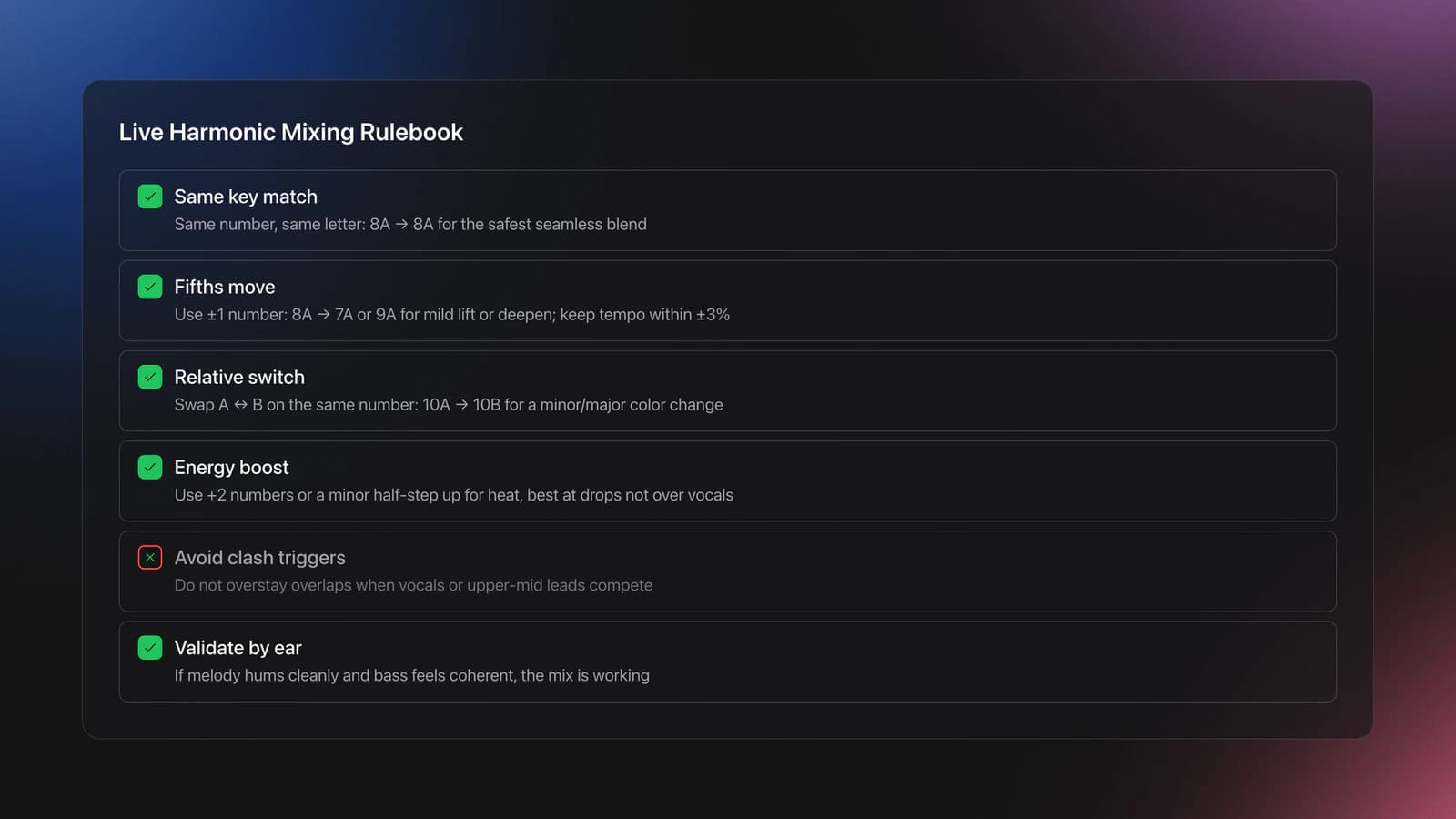
Rule 1. Same number, same letter. Example: 8A to 8A. This sounds seamless and works everywhere.
Example: Track A in 8A at 126 BPM, Track B in 8A at 124 BPM. Sync to 125 BPM, Key Lock optional. Result is glue with no tonal shift.
Rule 2. ±1 number for fifths. Example: 8A to 7A or 9A. Expect mild uplift or deepen. Keep tempos within ±3% when possible.
Worked example: 8A to 9A. Current track 126 BPM. Next track 128 BPM. Bring next down to 126. Mix on a 16‑bar phrase boundary. The bass moves up a fifth, raising perceived brightness.
Rule 3. Relative switch A↔B for color change. Example: 8A to 8B. Mood flips between minor and major. Maintain phrase discipline to avoid whiplash.
Worked example: 10A to 10B late‑set. Keep drums riding and swap the lead. The crowd perceives a lift without a tempo jump.
Rule 4. Energy boost moves. Add +2 numbers or minor half‑step up when you want heat. Use at drops, not during vocals.
Worked example: 7A to 9A during a fill. Filter lows on incoming track, swap on the snare hit. Open filter post‑drop to reveal the brighter harmony.
Failure mode: upper‑mid clashes. Symptom: synth lead sounds sour despite matched grids. Cause: you jumped too far or overlapped vocal phrases. Fix: shorten overlap or return to same‑key mixout.
Validation: if the top line hums along comfortably and bass feels coherent, you are fine. If you hear beating or a “chorus gone wrong,” re‑check key labels or switch to a same‑number escape.
Note: the Camelot approach is derived from key proximity ideas in the circle of fifths. For a deeper Camelot Wheel reference for DJs covering notation, codes, and live mixing, see the dedicated guide. If you need a primer, Mixed In Key's Camelot Wheel guide summarizes the DJ-oriented rules.
Key Detection: Software vs Manual Confirmation
Use software to scan your library, then spot‑check by ear or with a simple instrument plugin. Trust but verify. False detections happen.
Mixed In Key remains a common choice. It writes key data to tags and maps to Camelot numbers. That speeds sorting and selection.
If you DJ with TRAKTOR, Key Lock preserves pitch while you change tempo. It can still introduce artifacts at large shifts. Toggle it intentionally, not by default.
Manual check method: loop the hook, play the likely root note on a Rhodes or sine patch, and confirm minor/major scale fit. When the root stabilizes the bass and the scale matches the melody, label it confidently.
For background and vendor docs: read Mixed In Key’s Camelot Wheel explanation for rules, and Native Instruments’ article on Key Lock behavior in TRAKTOR for pitch behavior at different tempos. Pair those with a circle of fifths reference to understand underlying relationships.
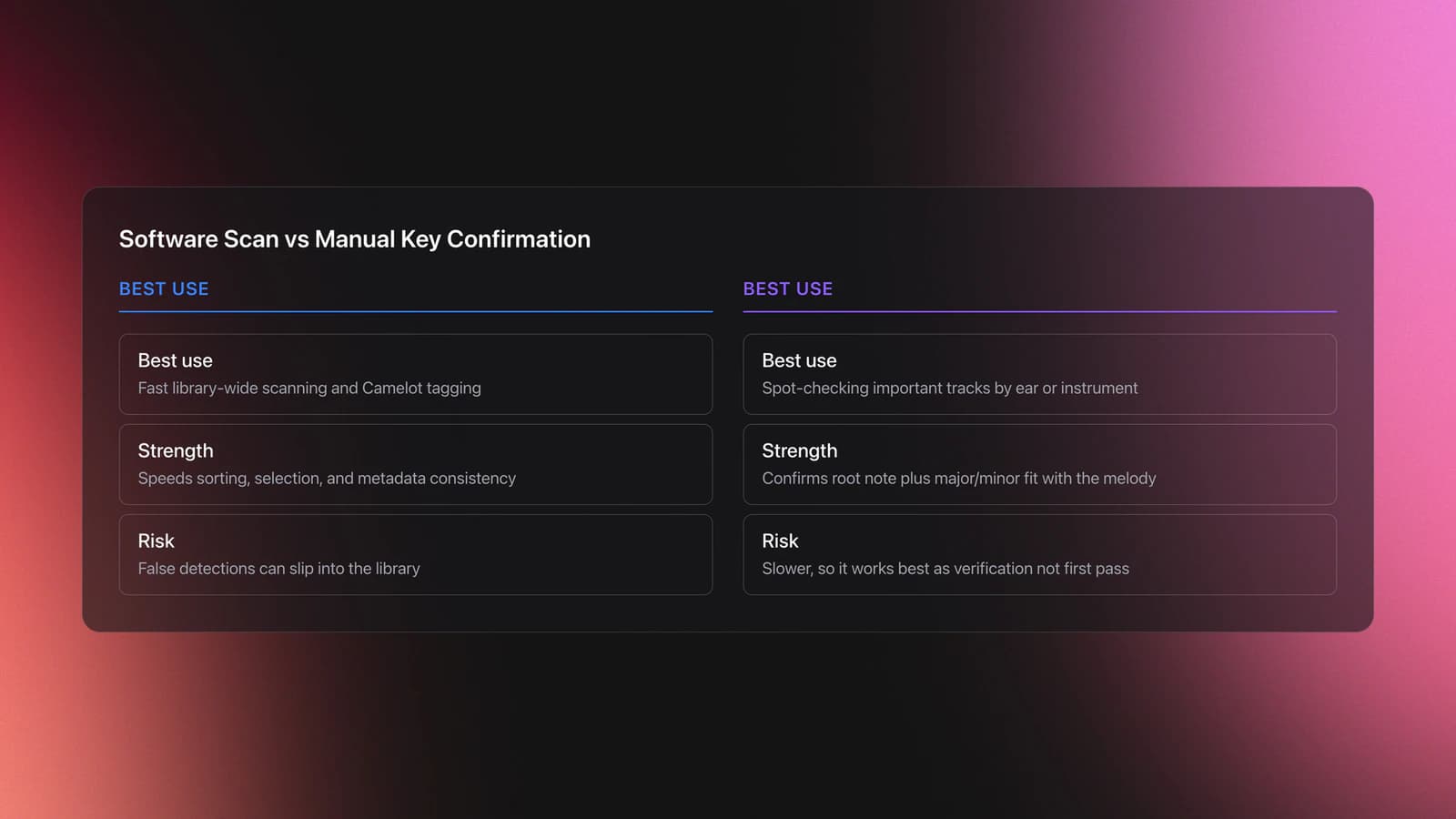
Practical defaults: scan everything, lock the tags you verify, and keep one notation system. Camelot is fastest on the fly.
Library Setup for Harmonic Mixing
Clutter kills harmonic mixing. You need fast access to compatible options at performance tempo.
Organize by key first, then by energy and function. Mirror that structure in your DJ software.
One workable pattern: Key folder → Energy tiers → Function. Example: 8A → Medium → Warm‑up; 8A → High → Peak. You always know what fits and what it’s for.
Dedicated tools can make this less tedious. You can build custom hierarchical categories and playlists, use keyboard shortcuts to sort quickly, and track progress while you work.
Whether you use spreadsheets or a dedicated app, keep it strict: one key notation, consistent energy labels, and an obvious fallback path for emergency exits.
Energy Control With Key Changes
Think in an energy ladder. Small moves change shade. Big moves change temperature. Use both, but place them deliberately.
Example 1: Gradual build. Start 7A at 124 BPM, then 8A, then 9A. Keep each transition on phrase boundaries with short overlaps. Result: rising brightness without shocking the crowd.
Example 2: Peak swap. Hold in 9A, then jump to 10B on a drop. The relative major shift brightens the mood while drums maintain continuity. Works well with vocal hooks that land after the swap.
Example 3: Depth move. From 8A down to 7A with a longer blend. Filter incoming lows first to avoid muddy bass interaction, then release post‑drop for a deeper feel.
Failure mode: the half‑step trap. D♭ minor to D minor can hype the room, but it is fragile. Symptom: grating top‑line when both leads overlap. Fix: reduce overlap to 4 bars or swap during a percussion fill.
Validation: the crowd’s sing‑along stays in tune. The sub remains punchy without flab. Your own ear relaxes rather than braces. If those signals fail, revert to same‑key and repair momentum with drums.
Mood and Tension: Major, Minor, and the Emotional Flip
Key is not only about avoiding dissonance. It is the main lever you have for mood. Minor keys read as darker, more driving, and more serious. Major keys read as brighter and more uplifting. That contrast is a tool, not a side effect.
The cleanest mood change is the relative major-minor flip. A minor key and its relative major share the same seven notes, so moving between them, for example 8A to 8B, changes the emotional color without any harmonic clash. This is the move that turns a moody groove euphoric, or pulls a bright section back toward something more introspective, while staying perfectly in key.
That gives you a way to shape an emotional arc across a set, not just a clean blend. Build tension by staying in minor keys through a long stretch, then release it by flipping to a major key when you want the payoff. Hold a single mode too long and even compatible tracks start to feel flat. The flip is how you reset the room's emotional weather without breaking harmony.
Worked example: run three or four minor-key tracks to build pressure, sitting in the same Camelot number family. When the floor is leaning in, flip to the relative major on a drop for a lift that feels earned. Then step back into minor to rebuild. The harmony never clashes, but the mood swings on purpose.
Failure mode: changing mode every other track. Constant major-minor flipping flattens the contrast, because the room never settles into either feeling long enough to register the change. Save the flip for moments that deserve a turn.
Four‑Deck Harmonic Mixing: Practical Constraints
Four decks demand discipline. Phase, key, and spectrum must be managed together.
Keep one or two decks melodic. Use the others for drums, textures, or acapellas. Avoid stacking three competing leads.
Engage Key Lock selectively. Large tempo offsets plus Key Lock can smear transients. If you hear artifacts, bring tempos closer or shorten the overlap. Native Instruments documents how Key Lock behaves at different shifts.
Genre Considerations: What’s the Hardest Genre to Mix?
Difficulty comes from arrangement density and modulation, not genre labels. Melodic bass with frequent key changes is harder than linear minimal techno at the same tempo.
Fast drum and bass can be demanding if you jump keys while making big tempo moves. Piano house with strong functional harmony needs tighter phrase discipline. Minimal and dub techno usually tolerate longer blends.
Test your library. Note genres where harmonic rules fail more often. Build genre‑specific escape playlists within each key to recover quickly.
When Not to Mix Melodies
Two full drops over each other rarely work, even in key. Arrangement density is the limiter. Drums, bass, chords, riffs, and vocals stacked together mask articulation.
- If both tracks have vocals, only overlap ad-libs or one-line hooks.
- If both have heavy bass movement, keep the outgoing bass muted during the blend.
- If both have fast chords, use a 16-bar drum loop from one track as a bridge.
Techno and stripped house often give you long drum-only intros and outros. Use them. You will keep groove intact and avoid harmonic crowding.
Set Preparation: From Organized Library to Stage
Plan core runs by key and energy. Then mark two escape routes per run. That prevents dead ends when a request or crowd turn forces a pivot.
A pre‑gig canvas helps you see sequences instead of isolated tracks. Tools that combine structure with recommendations based on BPM, key, and your categories reduce prep time.
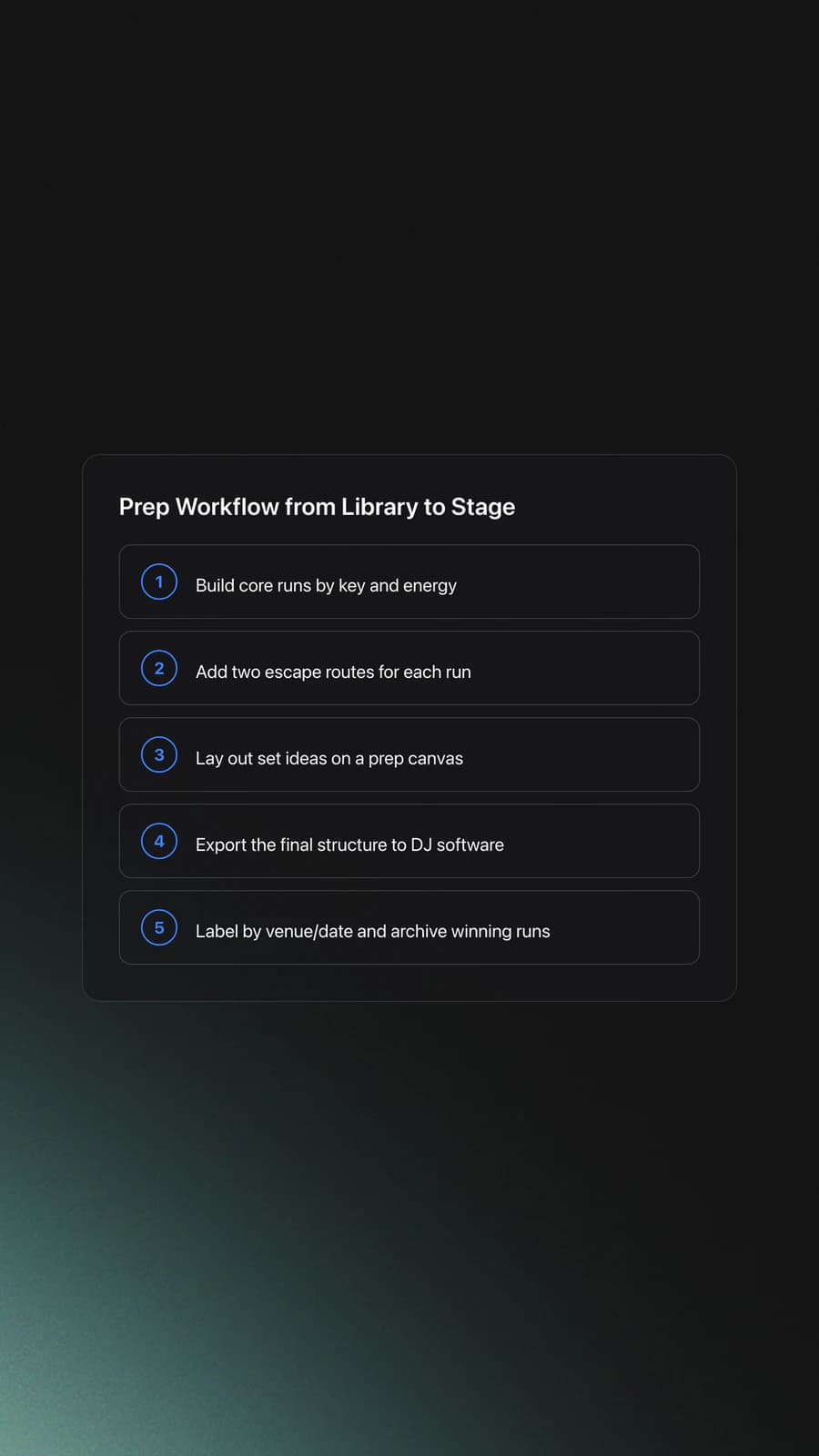
Whatever tool you use, label sequences by venue and date. Archive winning runs so you can reuse them with minor changes.
Common Harmonic Mixing Mistakes
| Mistake | Why It Happens | How to Avoid |
|---|---|---|
| Mixing distant keys mid‑phrase | Overconfidence after a few clean blends | Jump at drops or fills. Use same‑key to recover. |
| Relying 100% on software detection | Edge cases fool analyzers | Spot‑check roots and scales on a simple instrument patch. |
| Key Lock always on | Habit from BPM changes | Enable only when needed. Minimize large tempo offsets. |
| Two melodic leads overlapping | Four‑deck enthusiasm | Keep two decks melodic maximum. Use drums/textures on others. |
| Inconsistent key notation | Mixed tags from different tools | Pick Camelot or musical keys. Standardize before gigs. |
Practical failure points you can fix this week.
Try This Now: 20‑Minute Harmonic Drill
Notes on Learning and Gear
Self‑taught works. Many DJs start with a controller on a borrowed table and learn by playing. Curiosity and flow matter more than formal training.
For underground gigs, prioritize readable screens in dim rooms, responsive jogs, and stable audio drivers over flashy features. Portability is nice, but reliability under low light decides whether you keep the slot.
Worked Example: A Harmonic Transition Walkthrough
Here's a 4-track sequence, 8A → 9A → 9B → 10B, annotated step by step. It demonstrates a clockwise arc, a letter flip, and a final +1 jump, hitting three of the most common harmonic mixing moves in roughly twenty minutes of DJ time.
- 1
Track 1: 8A (A minor)
Start with a track in 8A. This is the most-used key in modern dance music, so your library probably has plenty of options. Play it straight to the breakdown. While it plays, queue the next track and confirm the Camelot code on the deck display.
- 2
Transition 1 → 2: 8A → 9A (Simple Mix Upper)
Move clockwise on the wheel: same letter, +1 number. The keys are a perfect fifth apart and share six of seven notes. Start the blend during the breakdown of Track 1 (drums dropped, pad sustained); bring in Track 2 on the bar before the drop. Listen for the lift, the new key should feel like a step up without a noticeable shift.
- 3
Track 2: 9A (E minor): settle in
Run the new track for at least two phrases (32 to 64 bars). Don't stack moves, the audience needs time to register the energy lift before the next change. Mid-track, queue Track 3 and verify it's tagged 9B.
- 4
Transition 2 → 3: 9A → 9B (Tonal Shift)
Same number, flip letter. The root note stays on E but the mode flips from minor to major. Mood reads as a release, minor-to-major is an emotional uplift even though the energy stays level. Use a longer blend here; the harmonic content overlaps so the two tracks can run in parallel for many bars without clashing.
- 5
Transition 3 → 4: 9B → 10B (Simple Mix Upper)
Back to clockwise +1, same letter. Now in major, the lift reads as a brighter step up rather than the moodier minor-key climb of the first move. End the sequence here, on Track 4 in 10B (D major). You've completed a four-track arc that's harmonically continuous, energy-positive, and uses three different rules, your audience felt the journey without knowing the technique behind it.
DJ Harmonic Mixing Software: Mixed In Key and the Built-In Options
Mixed In Key is the program most DJs associate with harmonic mixing. It analyzes your files, detects the key of each track, and writes the result into the file tags as a Camelot code such as 8A, along with an energy rating. Most DJ software reads that tag on import and shows the key in the browser, so you can sort your library by it. If your software then runs its own key analysis, it can overwrite what Mixed In Key wrote, so decide which result you trust and keep only one.
The Mixed In Key harmonic mixing workflow is short: analyze the library once, keep the Camelot tags, then build playlists by key and energy in your DJ software. Everything in this guide applies from that point on. Mixed In Key tells you what key a track is in. You still decide which move to make and when. For a closer look at the software itself, see the Mixed In Key 11 review.
Paid analysis software is optional. Rekordbox, Serato DJ Pro, Traktor Pro, Engine DJ, VirtualDJ, and djay Pro all detect key on their own, and on straightforward dance tracks the results usually agree. Where they disagree, it is often a relative major or minor call, so tricky tracks are worth a quick check by ear. For converting between Camelot codes, Open Key, and musical key names while you tag, keep the harmonic mixing chart open.
To speed up the workflow, use the key compatibility checker to confirm blends before you commit, the key transposer to shift a stubborn track into range, or walk through mixing in key step by step for a deeper drill.
Keep building your system. For organizing principles, see the library structure playbook and export workflows. For deeper key work, study the circle of fifths and practice small energy moves before big jumps.
Never play a clashing track again
Sort by key. See what's compatible at a glance. Build harmonic journeys that sound like you planned them all along.
14-day free trial. Full access, no strings attached.
or see how it works
Techniques Covered

Camelot Wheel Guide for DJs
Phrase Mixing

Beat Matching

Camelot Key Display Setup in Rekordbox, Serato and Traktor

Auto BPM Transitions Across Genres

Bass Shift Transition

Track Selection

DJ System Configuration

Stem Separation
Crossfader Use
DJ Rig Setup
Equipment & Software
Featured Gear
Continue Your Learning Journey


Frequently Asked Questions

Hey, it's Ben Modigell 👋
I DJ and produce as so I so: downtempo, minimal, dub house, tech house, and techno (releases on Spotify and SoundCloud, links above). Everything I write here comes from my own gigs, studio sessions, and library cleanups: the rules I follow, the failure modes I have actually hit, and the workflow I use when nobody is watching. If a technique did not earn its place in my own sets, it does not make it into a tutorial.