
Precision Blend Technique
A systematic advanced DJ mixing method that combines phrase alignment, harmonic mixing, and disciplined gain/EQ to create seamless long blends, drop transitions, and energy-controlled sets.
Precision Blend Technique Tutorials

Advanced Method is an advanced DJ mixing method that fuses phrase alignment, harmonic key control, and tight gain/EQ discipline to create seamless long blends and high-impact drop transitions. Learn Advanced Method to move crowds with intent, not luck.
If you have beat matching down but your transitions still feel clunky, Advanced Method gives you a repeatable pathway. It turns bar counting, Camelot-aware selection, and meter management into one clean workflow. Mastering this unlocks confident club sets and polished recorded mixes.
What Is Advanced Method?
Advanced Method is a structured approach to mixing that aligns 8–16–32 bar phrases, matches musical keys for consonant blends, and controls energy with EQ, filters, and gain staging. Phrasing fundamentals are well established in DJ education and emphasize starting the incoming track at a phrase boundary to preserve musical form. See the DJ TechTools phrasing explainer and its 32-count guidance ("[DJ TechTools guide on phrasing and 8–16–32 structures](https://djtechtools.com/2009/01/26/phrasing-the-perfect-mix/)") and the concise overview on "Wikipedia overview of phrasing in DJing".
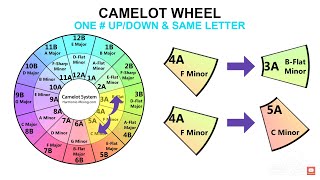
It also relies on harmonic mixing so melodies and bass lines cooperate instead of clash. The Camelot system describes compatible key moves such as staying in key, moving ±1 on the wheel, or switching relative major/minor. See the "Mixed In Key Harmonic Mixing Guide and Camelot system" for compatibility rules used by many DJs.
Why Master This Technique
- Cleaner transitions. Bar-aligned mixes avoid vocal clashes and structural shocks.
- Musical cohesion. Key-matched blends sound intentional and raise perceived quality.
- Energy control. EQ, filters, and planned timing shape the room arc.
- Versatility. Works for long blends, drop swaps, and double-drop moments.
Core Technique Breakdown
1) Map the structure. Count bars and label likely mix points. Most club tracks change layers every 16 or 32 counts. Respect the chorus and start the new track at a phrase boundary to keep form intact, as detailed in the DJ TechTools article above.
2) Check key compatibility. Use Camelot moves: same key, ±1 number, or same number switching A/B. Plan when harmonic lifts or drops support the story of the set. Reference the "Mixed In Key Harmonic Mixing Guide and Camelot system" for common progressions.
3) Decide transition type. Long blend for groove continuity, drop mix for impact, or drop swap for modern bass styles. Pioneer’s quick tutorials define drop mixing and drop swapping in practical controller terms. See "Pioneer DJ tutorials on drop mix, drop swap, FX and looping".
4) Stage the gain. Keep deck meters in the yellow and prevent clipping. Set channel trims using the loudest section, and avoid running the master into the red. Serato’s "Gain Structure for DJs" explains headroom, clipping, and meter targets.
5) Execute with EQ and filters. Duck overlapping lows during blends to prevent masking and let drums lock. Use high-pass or low-pass sweeps to reveal the incoming groove without mud.
Organize tracks into phrase-ready and key-compatible groups before show time. Many DJs build hierarchical, vibe-based folders in their preparation tools; others prefer crate systems in performance software. You can also use Vibes as an option to create custom categorical systems and export a hierarchical playlist tree, so phrase- and key-ready material is at your fingertips without searching mid-set.
| Step | Action | Key Point |
|---|---|---|
| 1 | Find phrase boundary on Track A; cue Track B at its phrase start | Align 16 or 32 counts to keep structure intact |
| 2 | Verify harmonic fit | Same key, ±1 Camelot step, or relative major/minor |
| 3 | Choose transition style | Long blend, drop mix, or drop swap as context demands |
| 4 | Set gains and EQ | Meters in yellow, trim per loudest section, duck lows |
| 5 | Commit on the downbeat | Start on bar 1; adjust filters and faders with intent |
Practice Drills
Through daily 15–30 minute sessions over several years, I found that short, repeatable reps build timing faster than occasional marathon practice. Use these drills to convert concepts into muscle memory.
Keep a rotating library of practice examples. Some DJs use color-coded crates inside their performance software; others prefer dedicated preparation tools that support categorical organization and export. Vibes can serve here as one option to maintain drill playlists and pull BPM- and key-compatible suggestions based on your custom categories, while you remain in control of curation.
Add one conceptual focus at a time: one week on phrase starts, one on Camelot transitions, then blend them. Check your progress with timed reps and saved recordings.
Equipment You Need
Any two-deck setup with a mixer and 3-band EQ works. Headphones with isolation help you hear phrase starts cleanly. Optional samplers and FX expand transitions.
For drop mixes and drop swaps, controller workflow mirrors club gear. Pioneer’s tutorial series shows drop mixing and drop swapping as cue-based, downbeat moves that rely on phrase alignment and confident fader action. See "Pioneer DJ tutorials on drop mix, drop swap, FX and looping".
Common Mistakes
| Mistake | Why It Happens | Solution |
|---|---|---|
| Starting mid-phrase | Impatience or miscounting bars | Wait for bar 1; use visual bar markers and count 8–16–32 as in the DJ TechTools phrasing guide |
| Key clashes in the break | Ignoring melodic compatibility | Follow Camelot rules or switch to percussive sections before reintroducing melody |
| Mud during long blends | Overlapping low end | Cut incoming lows until the handoff; reintroduce gradually after the swap |
| Clipping on drops | Master pushed to red | Trim per loudest section; keep meters in yellow per Serato’s gain structure guidance |
Troubleshooting
Vocals collide at the chorus. Solution: move the start so the new verse lands after the outgoing chorus, or loop an intro to extend to a full 16 or 32 bars. This mirrors best practice in phrasing education.
Drop swaps feel late. Solution: rehearse countdowns from 8 with a metronome click and trigger on the downbeat. Review Pioneer’s drop mix definitions to lock the gesture.
Audience fatigue. Solution: vary transition types and plan harmonic lifts and rests. Walk the Camelot wheel for lift, then stabilize in the same key to reset the ear.
Noisy rooms and ringing ears. Solution: wear earplugs and keep average exposure within safe limits. NIOSH recommends about 85 dBA for eight hours, halving duration for each +3 dB increase. See "NIOSH guidance on safe noise exposure and 85 dBA REL".
For deeper background on phrase alignment, see the "DJ TechTools guide on phrasing and 8–16–32 structures" and "Wikipedia overview of phrasing in DJing". For harmonic planning, consult the "Mixed In Key Harmonic Mixing Guide and Camelot system".
The visual way to organize your DJ library
Tag tracks by vibe. See everything at once. Export to any DJ software.
14-day free trial. Full access, no strings attached.
or see how it works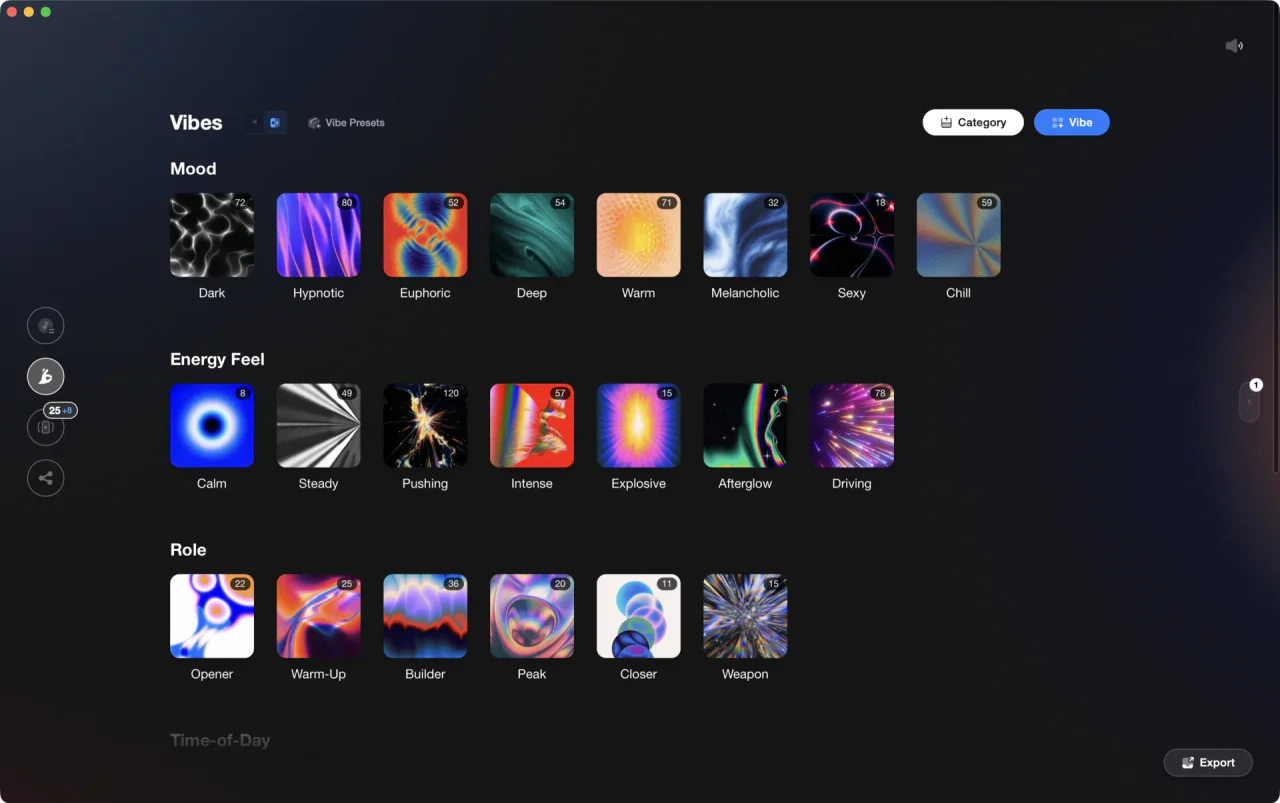
More Tutorials
Transition DJ Online: Browser Mixer Workflow
Mixed In Key Manual for DJs
House Trance: Sound, Structure, Mixing
DJing in Key for Better Transitions
DJ Transitions: The Three-Layer Handoff for Beginners
How To Mix In Key Live: Worked Transitions And Failure Fixes
How to DJ: First Mix, Step by Step
Progressive House Music: How It Works

How Can I Be a DJ and Start Strong
Mix and Key: Practical Guide to Melodic DJ Mixing
Beginner DJ Setup: Wire Your Controller, Then Play Your First Mix
How to Mix and Edit Songs Together
Camelot Wheel DJ: Layered Deck Mixing With EQ and Phrase

House DJs: What Sets the Best Apart
When Mix and Key Actually Matters: A DJ's Guide to Harmonic Decisions
DJ Key Wheel Decision Framework: Four Safe Moves and Advanced Jumps
DJ Library Organization System: Tags, Crates, Keys
Equipment You'll Need
Native Instruments FM8
optionalNative Instruments FM8 is a powerhouse FM synthesizer for hybrid DJ sets and live performance. Its low CPU usage and bright, cutting tones make it ideal for layering over tracks in a live mix. Bounce FM8 basslines as audio loops for Traktor Remix Decks or Ableton clips.
Pioneer CDJ-400
optionalA discontinued digital DJ media player that plays CDs and MP3 files from USB storage, and can also work as a MIDI controller and USB audio interface.
Cockos REAPER
optionalA lightweight, deeply customizable digital audio workstation for recording, editing, mixing, MIDI production, and post work on Windows, macOS, and Linux.
Native Instruments Traktor Pro 4
optionalA professional 4-deck DJ software platform with stem separation, flexible beatgrids, effects, DVS support, and broad controller integration.
iTunes
optionalApple iTunes is a Windows media library, playback, device sync, and store application for managing music, video, podcasts, and Apple purchases.
Pioneer DJ DDJ-FLX4
optionalA compact 2-channel DJ controller with built-in audio interface, USB-C connectivity, and beginner-friendly smart mixing features.
Beatport
optionalBeatport is a DJ-focused electronic music store and streaming platform for discovering, buying, and streaming tracks into supported DJ software and hardware.
VirtualDJ
optionalDJ software for Windows and macOS that handles audio mixing, video mixing, karaoke, stems, and broad hardware support.
Serato DJ Pro
optionalProfessional DJ software for mixing, performance, library management, recording, and hardware-integrated club workflows.
Pioneer DJ DDJ-1000
optionalA 4-channel rekordbox DJ controller with full-size jog wheels, onboard displays, and club-style mixer controls.
Pioneer DJ CDJ-3000
optionalProfessional flagship DJ media player with a 9-inch touchscreen, advanced MPU processing, and club-standard Pro DJ Link workflow.
DJControl Inpulse 200 MK2
optionalCompact 2‑deck USB DJ controller with built‑in audio, Beatmatch Guide LEDs, and Serato DJ Lite/DJUCED integration.
Traktor MX2
optionalA 2-channel DJ controller with integrated audio interface and tight Traktor Pro 4 integration for mixing, stems, effects, and performance pads.
Mixed In Key 11
optionalStandalone harmonic-mixing and library-prep software that detects keys, energy levels, cue points, and tags for DJ sets.
rekordbox DJ
optionalCloud-connected DJ software for music management, performance, export prep, and club-standard hardware integration.
AlphaTheta rekordbox
optionalProfessional DJ software for library management, USB export, cloud sync, and live performance tightly integrated with Pioneer DJ/AlphaTheta hardware.
Pioneer DJ DDJ-400
optionalA compact 2-channel USB DJ controller built for rekordbox with a club-style layout aimed at new and progressing DJs.
Numark Mixtrack Pro FX
optionalA 2-deck USB DJ controller with a built-in audio interface, capacitive jog wheels, performance pads, and Serato DJ Lite support.
VirtualDJ 7
optionalA legacy DJ software platform for audio and video mixing, controller mapping, and DVS playback on Windows and Mac.
Mixed In Key Camelot Wheel
optionalA numeric key notation system for DJs that labels musical keys 1A–12A (minor) and 1B–12B (major) to simplify harmonic mixing.
Numark Mixtrack Pro II
optionalA two-channel USB DJ controller with a built-in audio interface, touch-activated jog wheels, and performance pads for Serato-compatible mixing.
Platinum Notes 10
optionalPlatinum Notes 10 evens loudness, repairs clipped peaks, and prepares DJ files for more consistent playback in Serato, rekordbox, and Traktor.
Image-Line Soundgoodizer
optionalA simple stereo maximizer-enhancer plugin for FL Studio that applies one-knob processing based on the Maximus engine.
FL Studio
optionalA pattern-based digital audio workstation for beatmaking, recording, arrangement, mixing, and music production on Windows and macOS.
Traxsource
optionalTraxsource is a digital music download store focused on house and underground dance music for DJs.
Serato DJ Lite
optionalFree two-deck DJ software for Mac and Windows that introduces Serato’s workflow, controller support, and basic mixing tools.
Frequently Asked Questions

Hey, it's Ben Modigell 👋
I DJ and produce as so I so — downtempo, minimal, dub house, tech house, and techno (releases on Spotify and SoundCloud, links above). Everything I write here comes from my own gigs, studio sessions, and library cleanups: the rules I follow, the failure modes I've actually hit, and the workflow I use when nobody's watching. If a technique didn't earn its place in my own sets, it doesn't make it into a tutorial.