
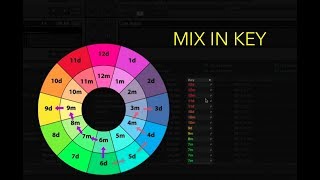
Watch Sound of Arman’s tutorial above (119K views on YouTube).
This guide is for working DJs who want cleaner blends and fewer key clashes. You are stuck hearing melodies fight or dropping to drums to hide transitions. After reading, you will mix harmonically with the Camelot Wheel, keep energy up, and prep libraries that support fast decisions.
Quick win: when unsure, keep the same number or move ±1 number, and you can switch A/B for major–minor. That alone prevents most clashes.
Camelot Wheel DJ Basics: Numbers, Letters, Moves
The Camelot Wheel labels the 24 keys with a number and letter. Numbers 1–12 mark position. A means minor. B means major. Adjacent numbers are closely related and usually blend cleanly. According to Mixed In Key’s Camelot explanation, 8A can move to 7A, 9A, or 8B for smooth results. camelot wheel
This mirrors the circle of fifths where adjacent keys share most notes. That is why same number A/B or ±1 number works reliably. For the full harmonic mixing fundamentals including energy control and multi-deck constraints, see the pillar guide. If you like the theory behind it, read the circle of fifths overview for context on harmonic distance. Circle of fifths
Core moves you can trust: same key (e.g., 9A → 9A), relative switch (9A ↔ 9B), and adjacent numbers in the same letter (9A → 8A or 10A). These cover the bulk of club mixing. For what to do when keys don't match and how to plan around mismatches, see the rules guide.
Example set fragment: run a minor lane like 7A → 8A → 9A for a steady, moody arc. Or hold 8A for two tracks by staying same-number, then brighten the vibe with 8A → 8B for a major switch.
“2A Camelot” refers to E-flat minor. If a playlist shows 2A, compatible moves include 2A → 1A or 3A, or 2A → 2B for a relative feel change without harshness. wheel
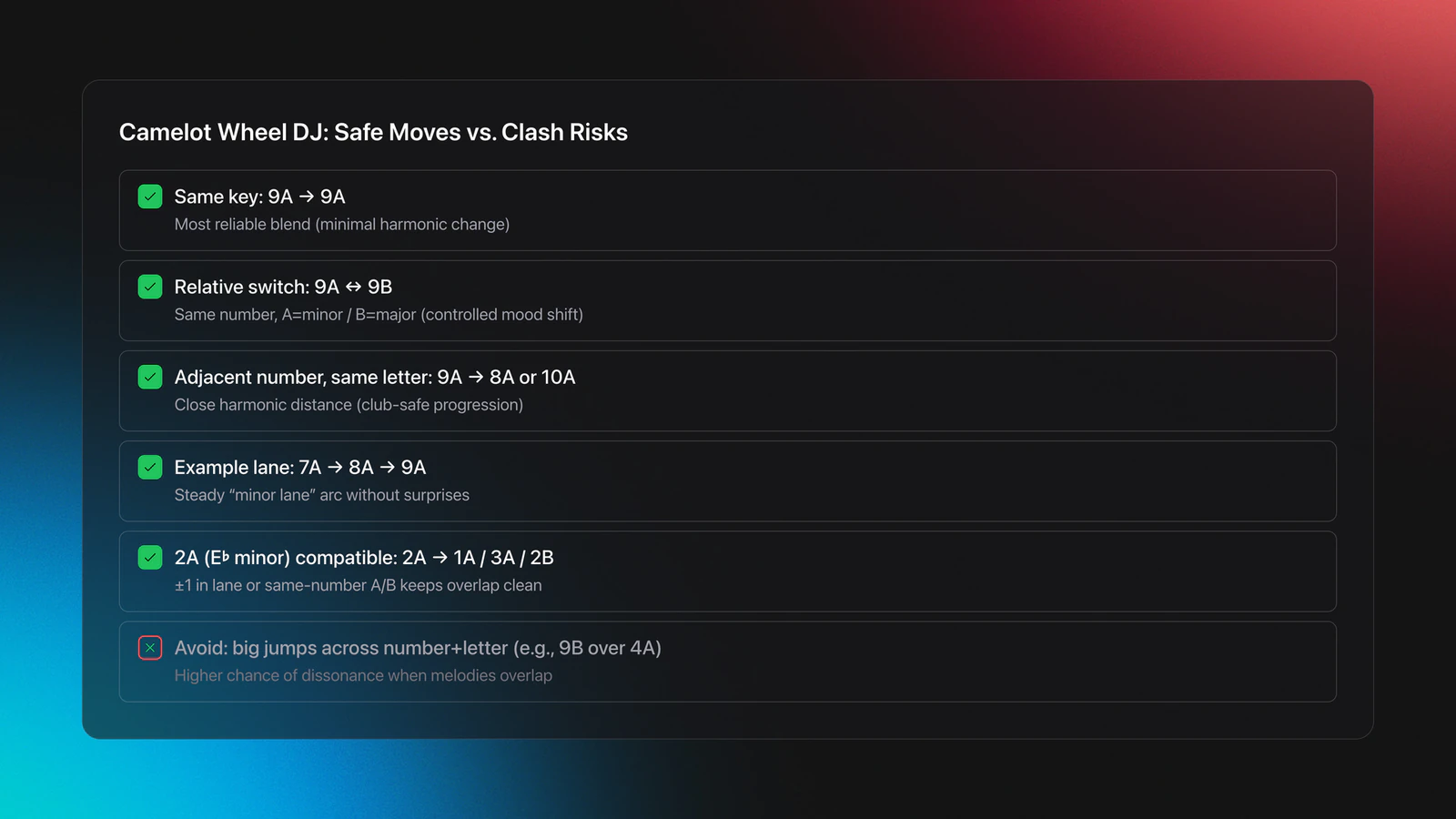
What to avoid when melodies overlap: jumping to unrelated numbers and letters in one go. For instance, layering 9B over 4A often produces dissonance because the scales share fewer tones.
Library Prep For Harmonic Mixing: Notation, Tags, Workflow
Harmonic precision starts before you press play. Get key information into your library, standardize the display, and group compatible material so decisions are automatic under pressure.
If you use Rekordbox, set the key display to Alphanumeric so the interface shows 1A/1B style notation. In Preferences → View → Key display format, choose Alphanumeric. This is supported in Rekordbox 5.4.3 and later. Can I change the display format for keys
Engine DJ users will see similar guidance and examples for Camelot usage in Denon’s help center. The idea is the same: one code per key, easy matching, smoother transitions. denon dj what is the camelot wheel
Next, structure your collection so compatible material sits close. Some DJs maintain color-coded key lanes inside their DJ software. Others prefer a dedicated preparation layer that supports hierarchical category systems and BPM/key-matched suggestions, Vibes is one such option alongside manual foldering.
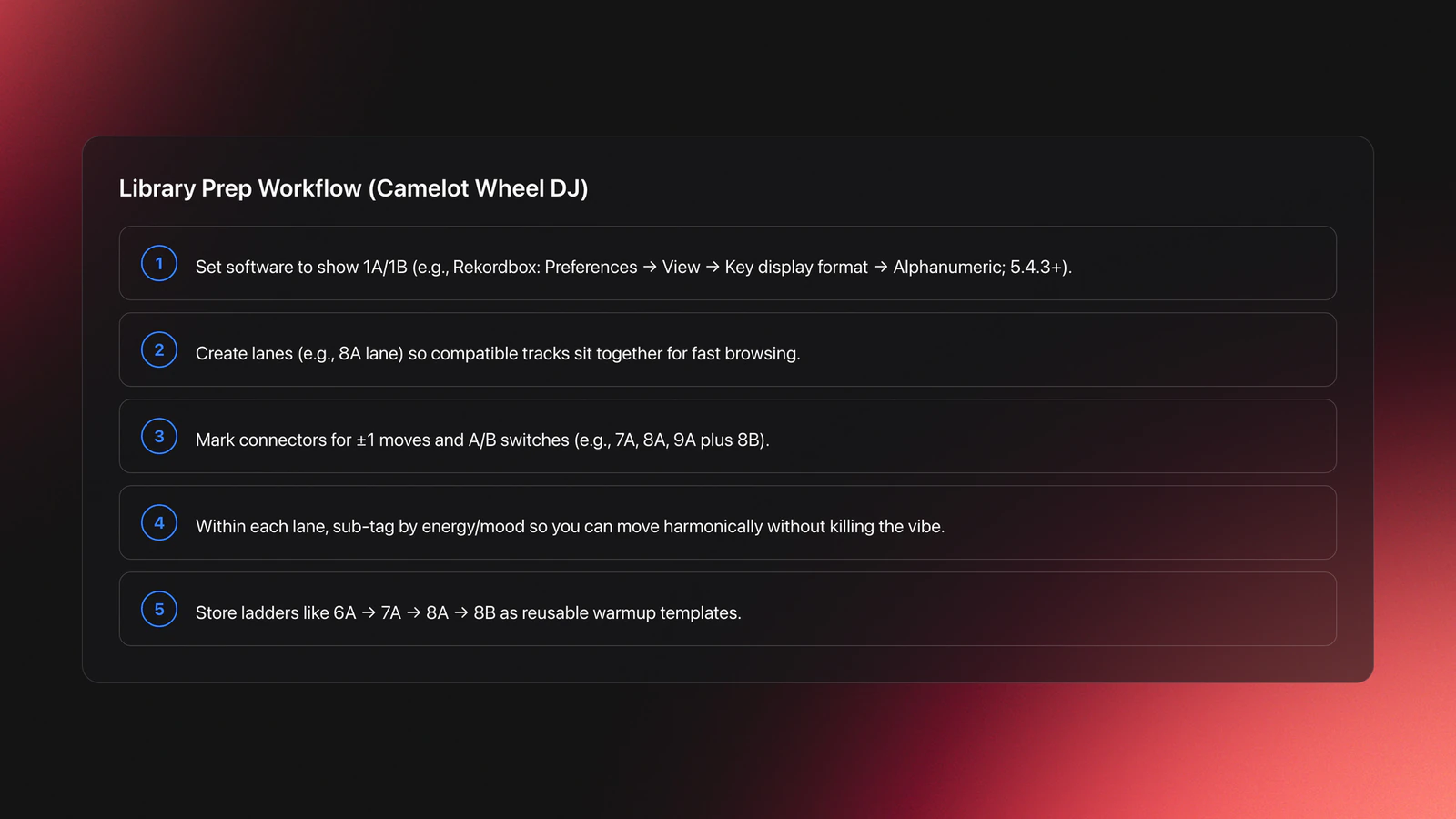
Aim for multi-attribute organization. Group by key lane first, then by energy or mood. Keep a short list of “bridge” tracks that connect adjacent numbers or same-number A/B. Those cuts save shaky moments in crowded transitions.
You can also build pre-planned sequences for different venues. For example, a warmup ladder: 6A → 7A → 8A → 8B. Label it and keep it parked for early doors.
Camelot Wheel DJ In Practice: Layered Mixing On Decks
Here is how to apply the rules with overlapping melodies. Treat each blend as two checks: tonal fit, then energy intent.
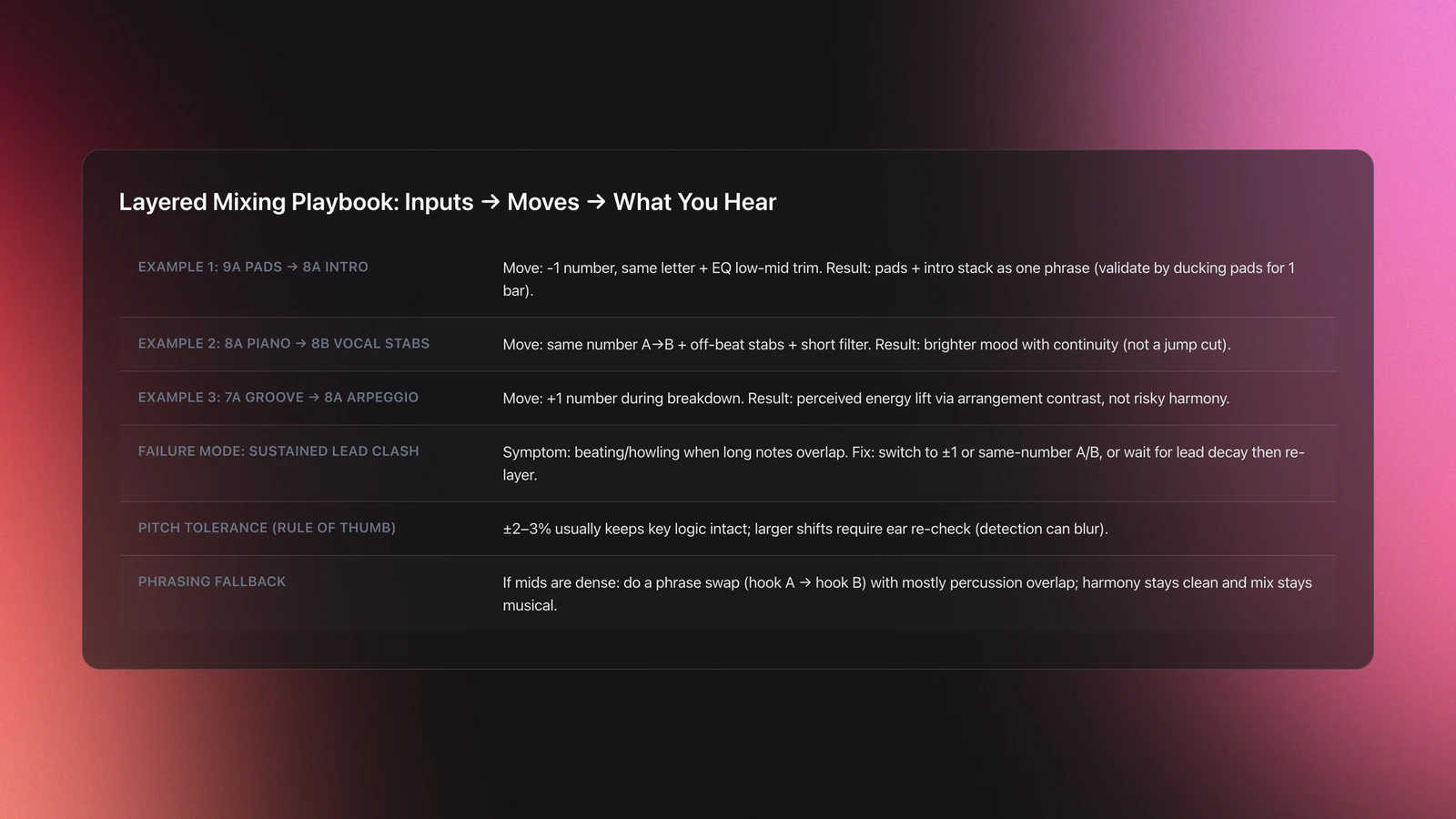
Example 1 (input → process → output). Input: Track A at 124 BPM, 9A with a strong pad hook. You want Track B at 124–125 BPM, 8A with a low synth intro. Process: sync tempo, cue B’s intro under A’s pads, keep EQ low-mid trimmed to avoid buildup. Output: pad and intro stack without beating; leads feel like one phrase extending.
Validation: if you duck Track A’s pads for a bar and nothing grates, you are good. If the lead note in B creates a rough minor third against A’s pad, you went too far on pitch or picked the wrong number.
Example 2. Input: Track A at 123 BPM, 8A with a piano motif; Track B at 8B with a vocal stab. Process: switch letter, same number. Bring B’s stabs on off-beats first. Use a short filter sweep to frame the tonal shift. Output: brighter mood with continuity, not a jump cut.
Failure mode: clashing long notes. Symptom: a beating or “howling” layer when two sustained leads overlap. Fix: move to adjacent numbers or same-number A/B. Alternatively, wait until the lead decays, then re-introduce harmony.
Example 3 (energy lift). Input: A is 7A groove with little melody. B is 8A with a busier arpeggio. Process: enter B during A’s breakdown, emphasize the arpeggio. Output: perceived lift through +1 number and arrangement contrast, not a risky leap.
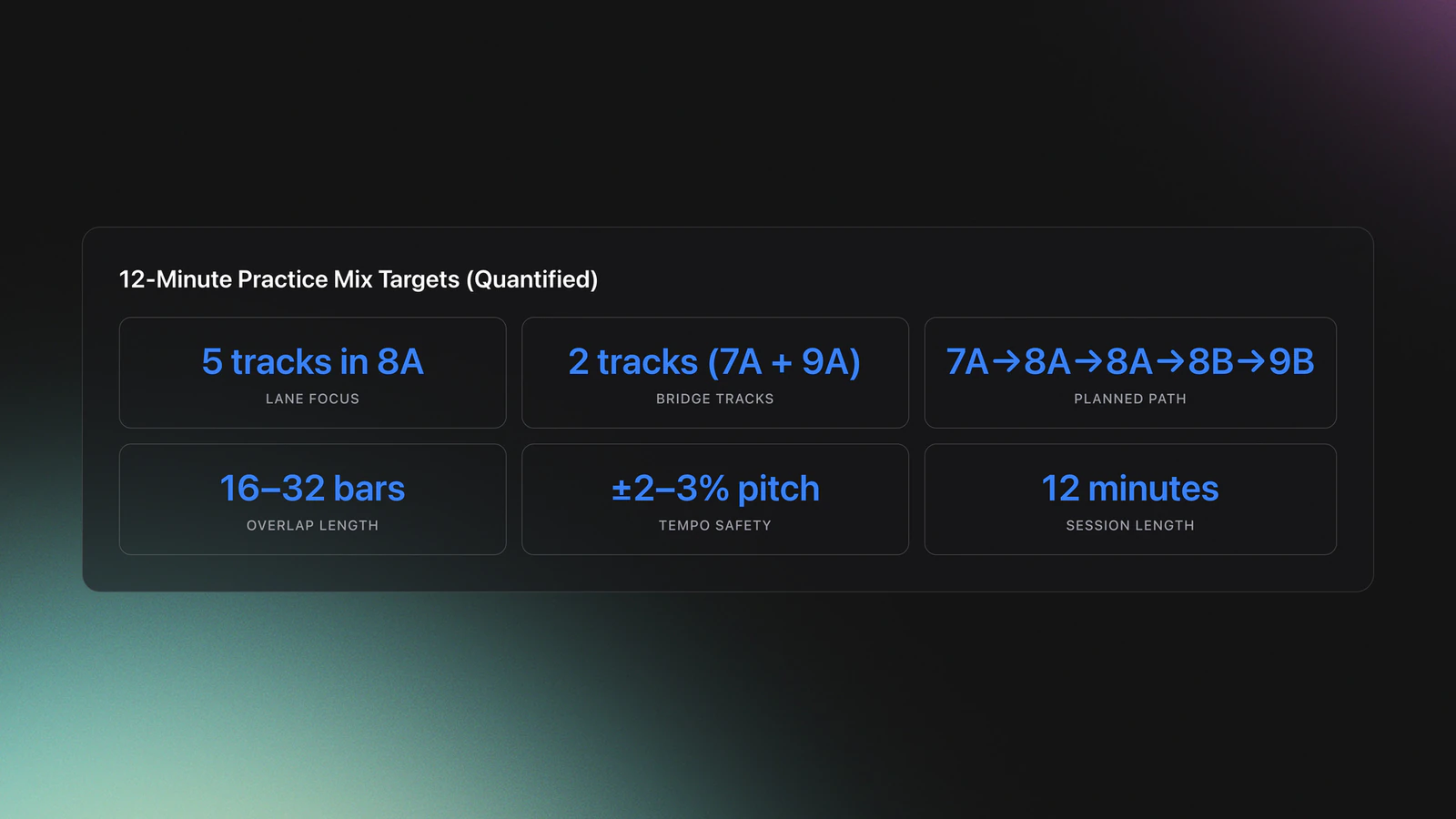
Pitching tracks by small amounts is fine. ±2–3% usually preserves key enough for dance music. Larger shifts can blur detection and break the Camelot logic. If you must pitch wide, re-check with your ears.
Arrangement awareness helps. If both tracks present dense mid leads at once, delay the layer. Use a phrase swap: hook from A, then hook from B, with only percussive overlap. The wheel keeps harmony honest; phrasing keeps the mix musical.
Validation Check
Energy Management: Smooth, Lift, or Contrast
Use adjacent numbers for smooth progress. Switch A/B on the same number to brighten or darken without losing cohesion. Reserve bigger clockwise steps for deliberate lifts when melodies are sparse.
If the floor feels flat, try a same-number letter switch paired with a percussion swap. If the room is tense, ride adjacent numbers for a few transitions to stabilize the mood.
Avoid back-to-back energy spikes with dense hooks. The crowd perceives that as clutter, not excitement. Space your big moments with percussive sections or breakdowns.
Notation Cheatsheet: Common Keys And Their Codes
- A minor = 8A. E minor = 9A. D minor = 7A. G minor = 6A. (Adjacent numbers blend.) mixormiss.com
- C major = 8B. G major = 9B. D major = 10B. F major = 7B. (Same-number A/B are relatives.) mixormiss.com
- 2A = E-flat minor. 2B = C major. Start with ±1 moves before attempting larger jumps. mixormiss.com
Common Mistakes And How To Avoid Them
| Mistake | Why It Happens | How to Avoid |
|---|---|---|
| Layering unrelated keys with long leads | Jumping multiple numbers and switching letters during melodic overlap | Blend during percussive sections or use same-number A/B or ±1 numbers first |
| Relying on key labels without listening | Analysis errors or extreme pitch shifts | Audition overlaps in headphones; keep pitch within ±2–3% for tonal material |
| Ignoring phrasing while following the wheel | Two hooks collide even in compatible keys | Stagger hooks. Swap phrases. Use filters and EQ to frame the handoff |
| Inconsistent key notation across tools | Library shows classic in one place, alphanumeric in another | Standardize to Alphanumeric in Rekordbox Preferences and re‑export devices. support.pioneerdj.com |
| No prebuilt bridges between lanes | You get stuck in one number and force a harsh jump | Tag and store a few bridge tracks for each lane to pivot cleanly |
Focus on behavior you can observe in the booth. Fixes are structural and repeatable.
Practice Plan: Build Your Ear Beyond The Chart
Spend two weeks mixing with the Camelot rules visible. Record everything. Then hide the chart and practice by ear, checking the result later. The goal is internalized judgment, not dependence on the wheel.
This mirrors the path many self-taught DJs followed: start with a simple setup, play a lot, and refine by listening. The flow comes from repetition, not rules alone.
The visual way to organize your DJ library
Tag tracks by vibe. See everything at once. Export to any DJ software.
14-day free trial. Full access, no strings attached.
or see how it works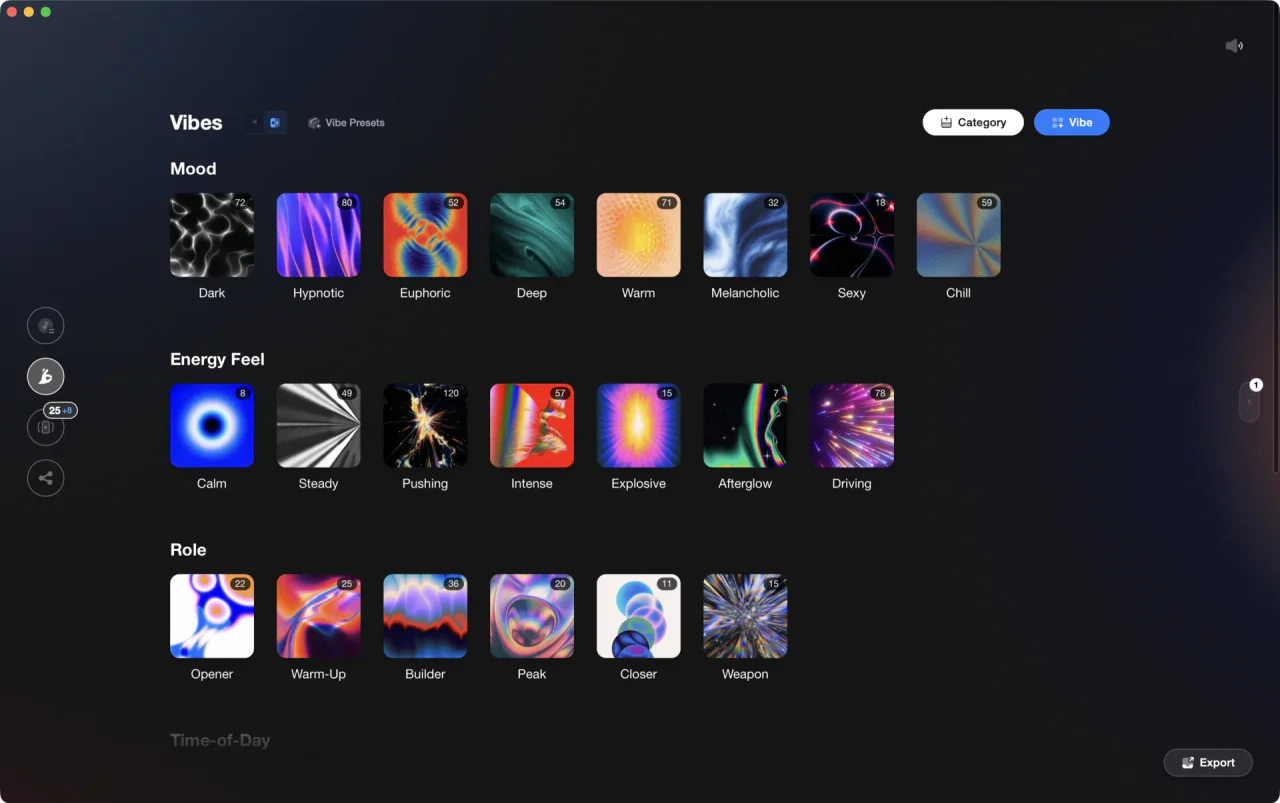
Techniques Covered

Camelot Key Display Setup in Rekordbox, Serato and Traktor

Precision Blend Technique
Camelot Wheel Guide for DJs
Transition Technique
Phrase Mixing

Crossfading

Library Optimization
Auto BPM Transitions Across Genres
Beat Matching

DJ System Configuration

Track Selection
Crossfader Use
Equipment & Software
Featured Gear
Official Manuals
Documentation
Continue Your Learning Journey
Start Here First


Frequently Asked Questions

Hey, it's Ben Modigell 👋
I DJ and produce as so I so — downtempo, minimal, dub house, tech house, and techno (releases on Spotify and SoundCloud, links above). Everything I write here comes from my own gigs, studio sessions, and library cleanups: the rules I follow, the failure modes I've actually hit, and the workflow I use when nobody's watching. If a technique didn't earn its place in my own sets, it doesn't make it into a tutorial.



