
DJControl Inpulse 200 MK2
·HerculesCompact 2‑deck USB DJ controller with built‑in audio, Beatmatch Guide LEDs, and Serato DJ Lite/DJUCED integration.
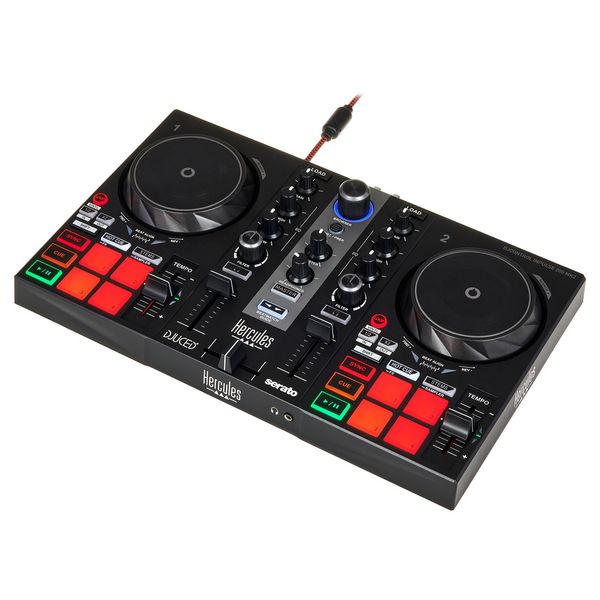
Hands-On Control
DJ controllers give you tactile control over your software. From basic mixing to advanced performance features, the right controller shapes your workflow and creative possibilities.
The Hercules DJControl Inpulse 200 MK2 is a compact 2‑deck controller designed to help you learn real DJ skills fast. It keeps costs low while adding Serato DJ compatibility, on‑pad stems control, and Hercules’ signature Beatmatch Guide LEDs. If you want a first controller that teaches manual beatmatching, the DJControl Inpulse 200 MK2 is one of the easiest ways to start without sacrificing core technique. According to the manufacturer’s official page, you get built‑in audio with RCA master and headphone monitoring, plus tutorials in the DJ Academy. See the Manufacturer’s official specs for details.
Product Overview
This controller targets first‑time DJs who want guided learning inside DJUCED or Serato DJ Lite. The DJControl Inpulse 200 MK2 is small, bus‑powered, and includes built‑in audio, so you can plug straight into powered speakers and headphones. Hercules’ page confirms two 90 mm jog wheels, eight pads per deck, 2‑band EQ with filter, and Stems mode on the pads for creative mashups. See Manufacturer’s official specs.
If you’re deciding between the Hercules DJControl Inpulse 200 MK2 and stepping up to a bigger beginner controller, the core question is workflow. The 200 MK2 excels at teaching timing and phrasing. It keeps the mixer simple. The result is a forgiving learning curve with fewer distractions, and a price that stays well below typical mid‑range gear.
Key Features
- Beatmatch Guide LEDs. Arrows by the tempo faders and under each jog wheel coach you through manual beatmatching, so you learn real skills quickly. Documented on the official product page.
- On‑pad Stems mode. Split vocals and instrumentals in supported software, then trigger creative blends and transitions with one touch. Confirmed in Hercules’ MK2 announcement.
- Improved jog wheels. High‑resolution jogs with clearer vinyl‑style top surfaces feel smoother for nudging and simple scratches. Cited in the Hercules press release.
- Built‑in 24‑bit audio. RCA stereo master out and 3.5 mm headphone cue make setup simple with powered speakers. Specs listed by Thomann.
- DJ Academy integration. Tutorials and tips guide your first mixes without leaving the ecosystem. Listed on the Hercules product page.
Technical Specifications
| Specification | Details |
|---|---|
| Dimensions | 320 x 195 x 49 mm (12.6 x 7.7 x 1.9 in) |
| Weight | 0.9 kg (2.0 lb) |
| Audio I/O | RCA stereo master; 3.5 mm stereo headphone out |
| Audio Resolution | 24‑bit / 44.1 kHz |
| Decks / Jogs | 2 decks; 90 mm touch‑sensitive jog wheels |
| Pads | 8 per deck; Hot Cue, Stems, FX, Sampler |
| Mixer | Gain, 2‑band EQ, bipolar filter, volume faders, crossfader |
| Power | USB bus‑powered (attached braided cable) |
| Software | Includes Serato DJ Lite and DJUCED; works with Serato DJ Pro (upgrade) |
Specs verified from Hercules and Thomann.
Who Is This For
Perfect for a beginner who wants clear visual guidance while learning by ear. The DJControl Inpulse 200 MK2 rewards practice with features that transfer to larger rigs.
Not ideal if you need a mic input, a 3‑band EQ, or stand‑alone mixing. If those matter, look at the Hercules DJControl Inpulse 300 MK2 or Pioneer DDJ‑FLX4.
In Practice
Set the DJControl Inpulse 200 MK2 on a desk, connect the attached USB cable to your laptop, run RCA to powered speakers, and plug your headphones into the front. The Beatmatch Guide LEDs show whether to nudge the jog or adjust tempo, so you can focus on phrasing and EQ choices instead of staring at waveforms.
Pads feel responsive for cues and simple rolls. Stems mode on Serato DJ Lite lets you isolate vocals or instrumentals for quick mashups. Day to day, the two‑band EQ works, but you’ll miss a mid knob once you start layering vocals or dense arrangements. That’s the right moment to consider an upgrade to the Inpulse 300 MK2.
Under real club conditions, workflow speed and low-light clarity tend to matter more than headline features. Bright pad labels and simple layouts help in low light, and the 200 MK2 keeps both. When space is tight, the small footprint is an asset.
Pros and Cons
Pros
- Beatmatch Guide accelerates learning.
- Serato DJ Lite and DJUCED included.
- On‑pad stems for creative blends.
- Built‑in 24‑bit audio and USB power.
- Light, portable, affordable.
Cons
- -No mid EQ or mic/line inputs.
- -Not a stand‑alone mixer.
- -Limited FX controls compared with larger units.
Price and Value
Typical US street price is $119.99 at Sweetwater, with periodic sales near major holidays. See the Sweetwater product page for current pricing. In Europe, Thomann lists it around 89 €; in the UK, Hercules’ shop has run promotions as low as £74.99. Used units commonly appear around $85–$100 at Guitar Center’s used listings.
Value is strong if you’re learning on Serato or DJUCED and want stems without paying mid‑range prices. If you already know you need a fuller mixer and 3‑band EQ, the step up to the Inpulse 300 MK2 or the DDJ‑FLX4 is worth the extra cash.
Alternatives
| Product | Price | Key Difference |
|---|---|---|
| Hercules DJControl Inpulse 300 MK2 | $214.99 | Bigger jogs, 3‑band EQ, more room to grow |
| Numark Party Mix II | $129 | Built‑in light show, simple layout |
| Pioneer DJ DDJ‑FLX4 | $329 | Rekordbox/Serato, fuller mixer, better upgrade path |
Prices verified at major US retailers.
Bottom Line
If you want an affordable way to learn real DJ skills, the Hercules DJControl Inpulse 200 MK2 is hard to beat. Beatmatch Guide LEDs shorten the learning curve, Stems on the pads unlock creative blends, and the built‑in interface makes setup simple. It’s best for beginners who value coaching and portability over inputs and deeper mixer controls.
If you outgrow the two‑band EQ or need a mic, upgrade to the DJControl Inpulse 300 MK2 or step into the broader ecosystem with the Pioneer DDJ‑FLX4. For the price, the 200 MK2 delivers real practice value and a smooth path to more advanced gear.
Where to Buy
Authorized retailers with current pricing: Sweetwater (US), Thomann (EU), Guitar Center (US), and the Hercules shop in the UK. See our links in the references below for real‑time availability.
Organize for Live Performance
Tag tracks by set position, energy level, and key. When you're performing live, every second counts, find what you need instantly.
14-day free trial. Full access, no strings attached.
or see how it works
Tutorials Using DJControl Inpulse 200 MK2






DJ Techniques Using This Gear
See how DJs and live performers incorporate DJControl Inpulse 200 MK2 into their workflow.





Frequently Asked Questions

Hey, it's Ben Modigell 👋
I DJ and produce as so I so: downtempo, minimal, dub house, tech house, and techno (releases on Spotify and SoundCloud, links above). Everything I write here comes from my own gigs, studio sessions, and library cleanups: the rules I follow, the failure modes I have actually hit, and the workflow I use when nobody is watching. If a technique did not earn its place in my own sets, it does not make it into a tutorial.