
Watch Thozi’s tutorial above (1.4M views on YouTube).
This is for new DJs choosing their first rig. You know you want to mix but feel lost between controller, CDJ, turntable, and laptop-only setups. After reading, you will know which DJ setup type fits your goals and budget, which starter equipment to get, how to wire it, and how to make your first clean transition.
You do not need a studio. You need a reliable signal path, sensible monitoring, and a library you can navigate fast. Start simple. Add only when the bottleneck moves.
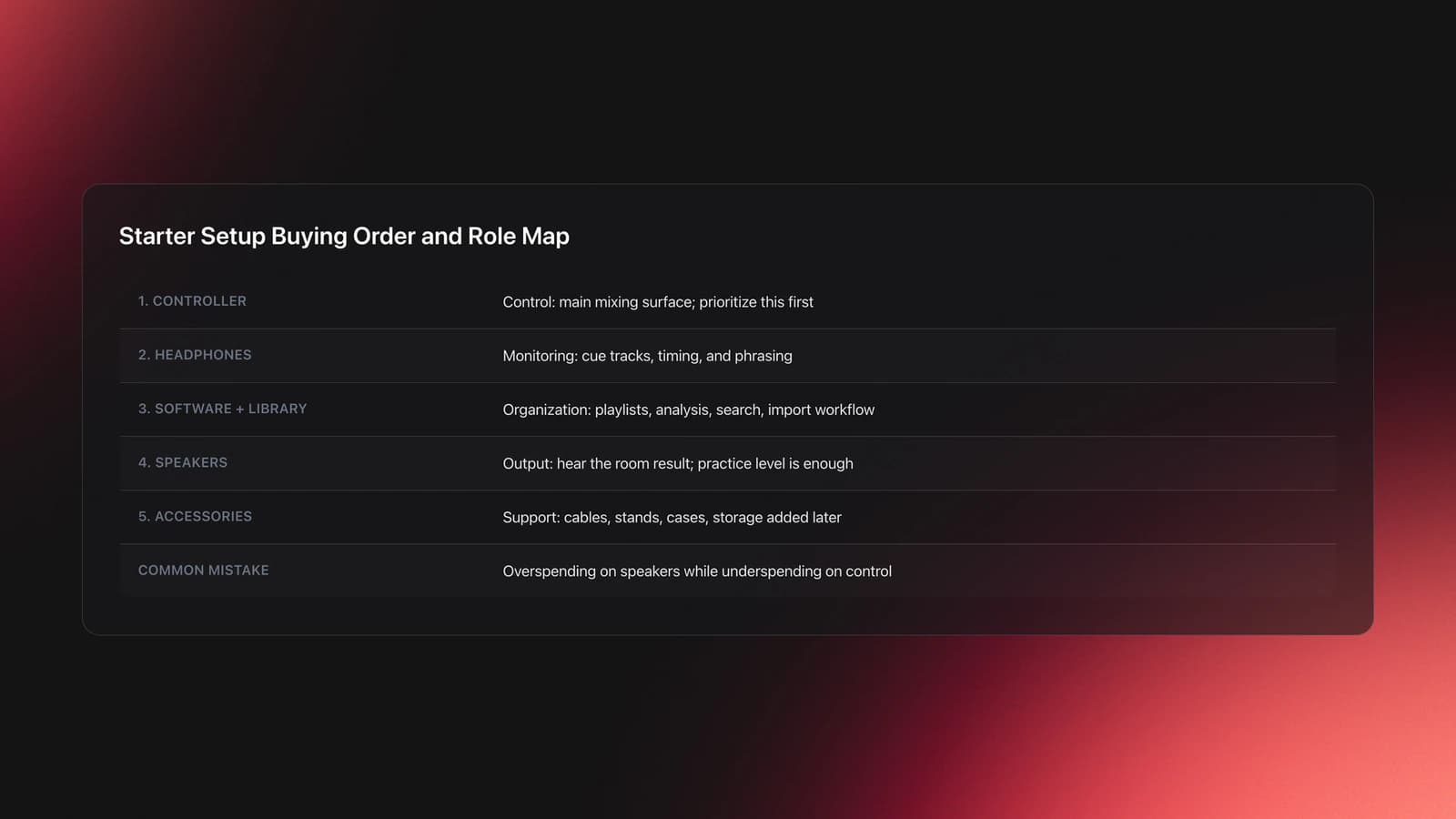
Core DJ Starter Equipment Checklist
A basic dj setup has five parts: source, mixer section, headphones, monitoring, and computer/software.
- Two-channel DJ controller with built-in audio interface.
- Laptop running current DJ software.
- Closed-back, isolating DJ headphones.
- Powered speakers or quality studio monitors.
- Cables: USB for controller, balanced TRS/XLR to speakers, and power.
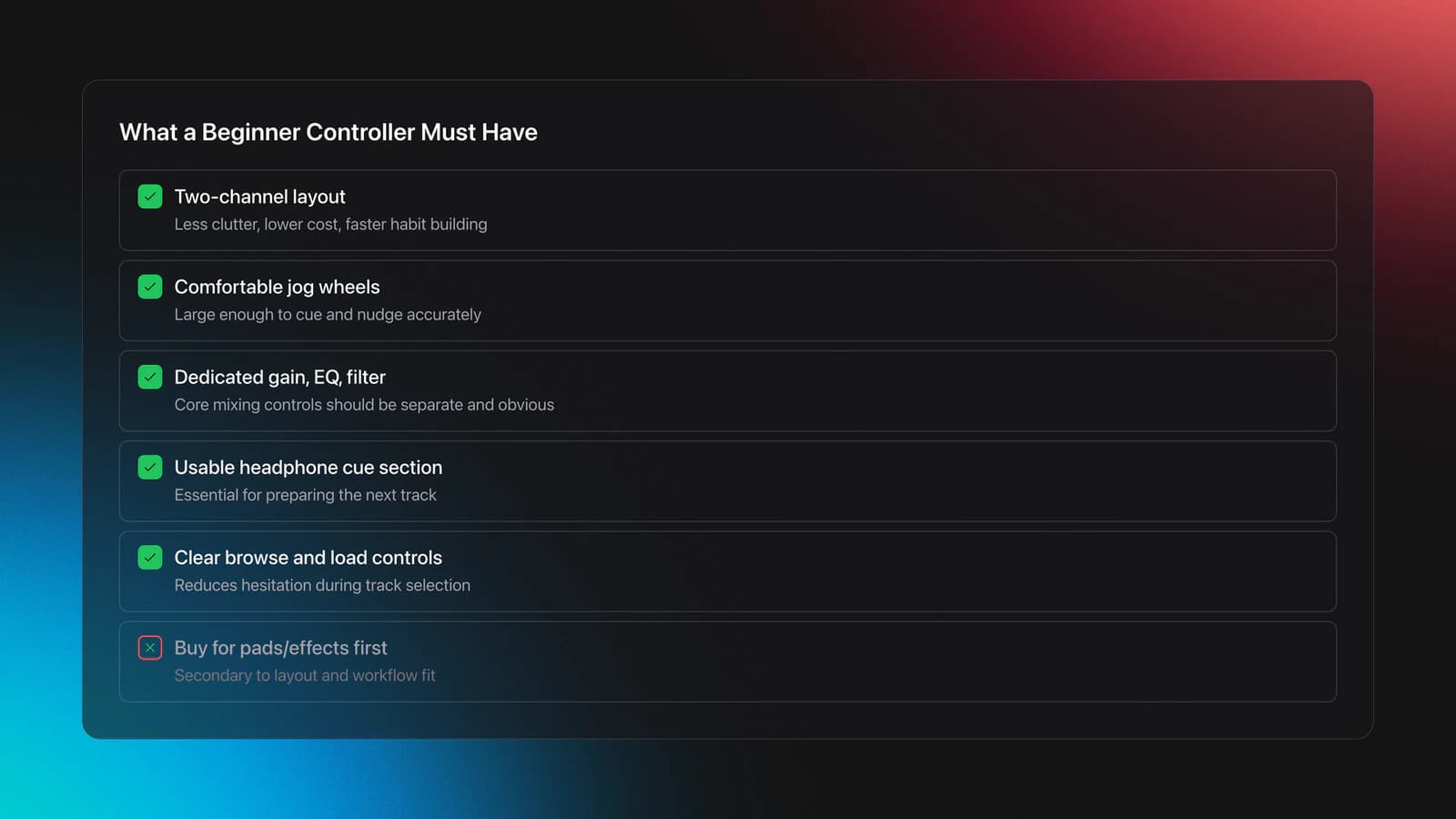
A 2-channel controller covers 95% of beginner use. It combines decks and mixer, reduces mess, and keeps your hands where they should be.
Look for a controller that is bus-powered, class-compliant, and supports the software you plan to use. Built-in sound card simplifies cabling and headphone cueing.
Example reference: Pioneer DJ's DDJ-FLX4 is a two-channel controller with a built-in sound card and USB bus power. It supports popular DJ apps across desktop and mobile. Always confirm software compatibility for your OS version.
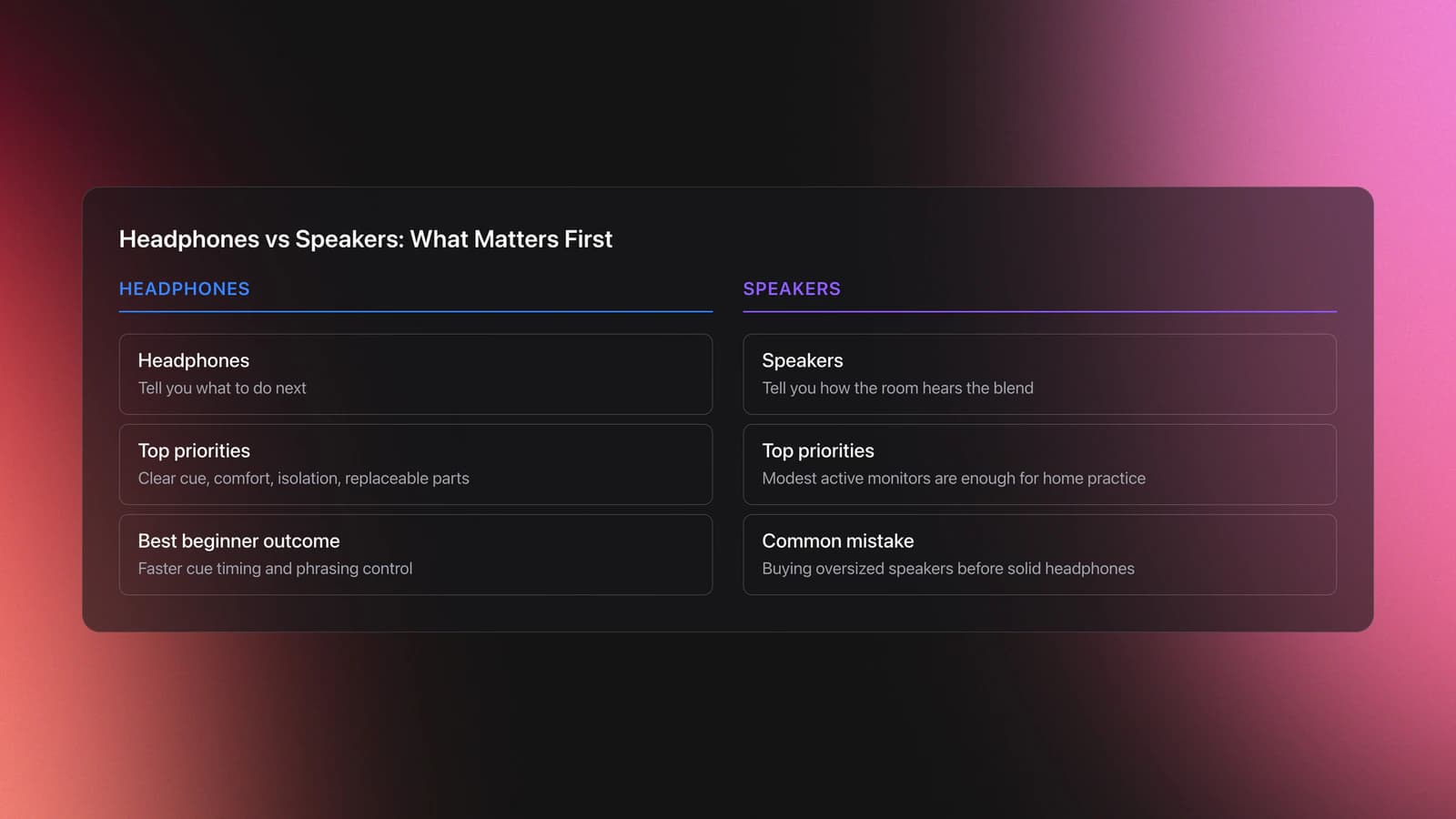
Headphones matter more than many think. Prioritize clamp force and isolation over brand lore. You need to hear kick and hats clearly while booth speakers are running. DJ headphones with swivel cups let you monitor with one ear while hearing the room with the other.
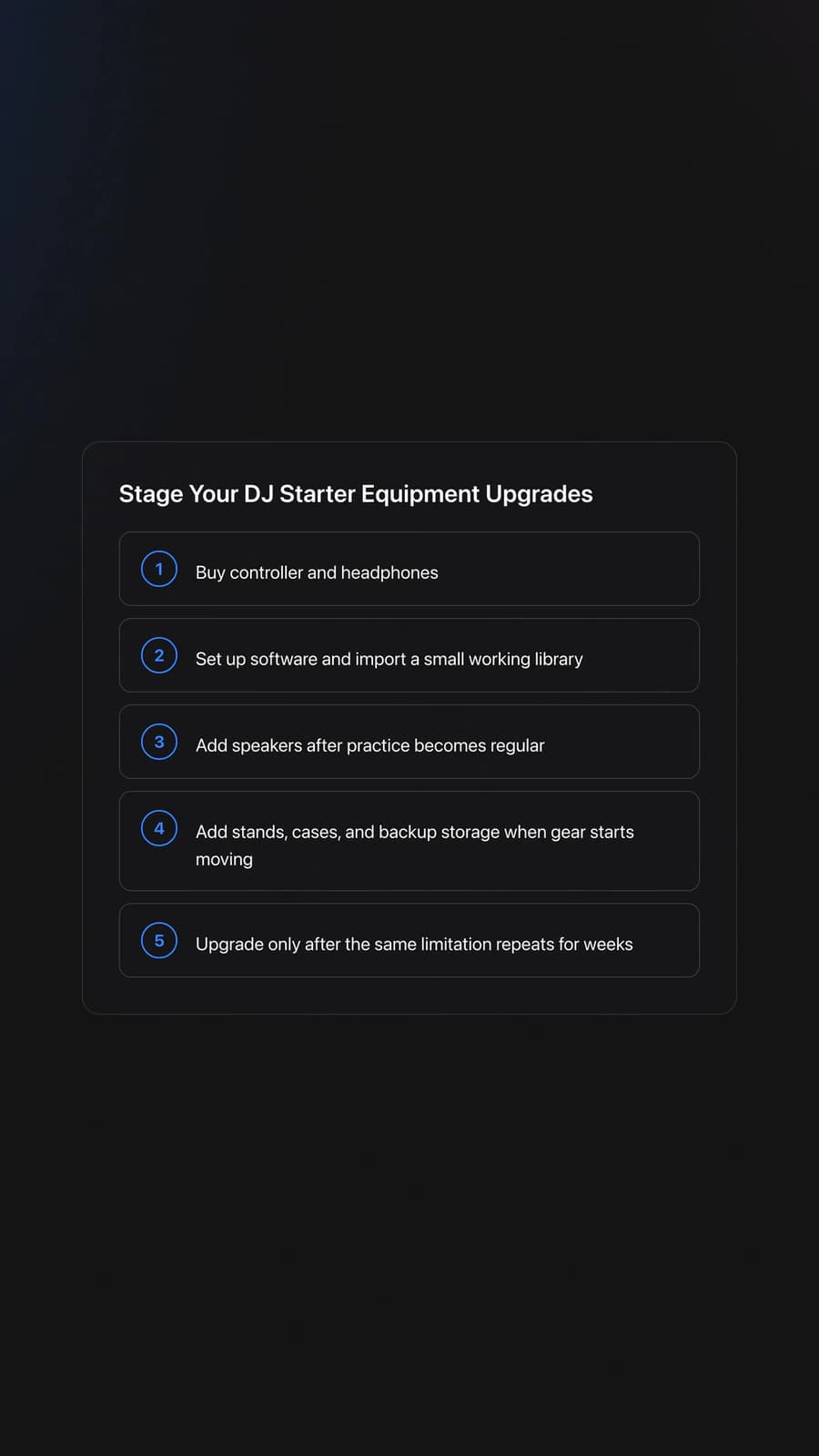
For speakers, powered nearfields are fine at home. Place them at ear height, pointed at you, not the neighbors. Keep gains conservative and let the room breathe. If your space or budget doesn't allow monitor speakers, start with headphones only, you can add speakers later.
Optional now, later maybe: an external USB hub with power, a laptop stand, and short balanced cables to avoid ground loops. For vinyl setups, you'll also need RCA cables and possibly a phono preamp if your mixer lacks a phono stage.
DJ Setup Types: Which Path Fits You?
Before buying, understand the main DJ setup categories. Each has trade-offs in cost, portability, and workflow.
Controller Setup (Recommended for Beginners)
The all-in-one path. A DJ controller combines decks, mixer, and audio interface in one unit. Connect it to a laptop running DJ software like Serato DJ Pro, Rekordbox, or Traktor. This is the fastest route from zero to mixing. Controllers offer tactile control for music manipulation, portable sizing, and software sync features that accelerate learning. You can customize controller setup mappings in most DJ software to match your workflow. Most beginners should start here.
Computer-Only DJ Setup
The minimal path. An all computer dj setup requires just a laptop and DJ software, no controller required. Use keyboard shortcuts or mouse to trigger cues, adjust EQ, and blend tracks. This setup costs nothing beyond the software (some apps are free). It's slower and less tactile than a controller, but works for learning song structure, phrasing, and basic transitions. You may want an audio interface for better sound quality and separate headphone output. Upgrade to a controller when you want fader precision and jog control.
Turntable DJ Setup
The vinyl path. Two direct drive turntables, a DJ mixer with phono inputs, cartridges, slipmats, and a collection of vinyl records. This is how DJing started. Turntables teach pitch control and manual beatmatching without visual waveforms. The gear costs more, takes up space, and vinyl is heavy. Most beginners skip this unless they specifically want to scratch or collect records.
Components for a turntable setup: direct drive turntables, DJ mixer, phono preamp (if mixer lacks phono stage), DJ cartridges and needles, slipmats, monitor speakers, DJ headphones, and isolation feet for vibration control.
Turntable + DJ Software Setup (DVS)
The hybrid path. Connect DJ turntables to a computer via an audio interface running a DVS system (Digital Vinyl System) like Serato Scratch Live or Traktor Scratch. You manipulate digital files with real vinyl, timecoded DJ software control vinyl sends position data to the software. This gives the tactile feel of vinyl with the convenience of a digital library.
A complete turntable setup with DJ software requires: DJ turntables, DJ mixer with USB or a separate computer DJ interface package, DVS-compatible audio interface (such as Rane Sixty-Two for Serato or Native Instruments Traktor Audio 2 for Traktor), DJ software control vinyl, DJ cartridges, DJ headphones, slipmats, USB cable, and RCA cables. The DJ mixer routes your turntable signal through the interface to the software, which reads the timecode and plays your digital files in response.
This is intermediate territory, learn on a controller first, then add turntables when you want vinyl feel with your digital library.
CDJ Setup
The club-standard path. A CDJ DJ setup uses standalone media players found in most professional DJ booths. Modern CDJs read USB drives containing digital files and can link to laptops. A CDJ setup includes two CDJ units and a standalone DJ mixer. No laptop required for basic playback, export your library to USB using Rekordbox. Some older CDJs still play CDs. CDJs are expensive and designed for club installation. Most beginners practice at home on controllers and learn CDJ workflow later for club gigs.
CDJ + DJ Software Setup
CDJs can also connect to laptops via HID mode, letting you use CDJ hardware to control DJ software like Rekordbox or Serato. The CDJs become large, high-quality controllers for your digital files. This hybrid approach is useful when you want the club-standard feel at home or need software features alongside CDJ playback.
Ableton Live DJ Setup
The producer-DJ path. Some DJs use Ableton Live instead of traditional DJ software. Ableton treats tracks as clips in a session view, allowing nonlinear arrangement, live remixing, and deep effects processing. An Ableton Live DJ setup typically includes: laptop, Ableton Live software, an audio interface, and an Ableton software controller like Push or a Novation Launchpad.
This workflow differs from deck-based mixing, you launch clips, layer loops, and build DJ sets in real time with full control over effects and track setup. Best for DJs who also produce or want maximum creative flexibility. Steeper learning curve than traditional DJ software.
Which Setup Should You Choose?
| If you want... | Choose |
|---|---|
| Fastest path to mixing | Controller + laptop |
| Zero cost to start | Computer-only (laptop + free software) |
| Vinyl feel, manual skills | Turntables |
| Digital library + vinyl control | Turntables + DVS |
| Club-standard workflow | CDJ + mixer |
| Live remixing, production crossover | Ableton Live setup |
Most readers of this guide should start with a controller. It's the best balance of cost, learning speed, and transferable skills.
Beginner DJ Setup: Wiring And Configuration
Keep signal flow linear: Laptop to Controller to Speakers. Headphones plug into the controller for cueing.
- Connect the controller to your laptop using the supplied USB cable. Prefer a direct port over a flaky hub.
- Power your speakers off. Connect controller master outputs to speakers using balanced cables where possible.
- Plug headphones into the controller's headphone jack. Set their volume to minimum.
- Launch your DJ software. Select the controller as the audio device. Set Master to the controller's main out and Headphones to the controller's cue out.
- Set trim, EQ, and filters to neutral. Faders down. Master around 10 to 11 o'clock to start.
Set your software buffer high enough to avoid pops. Drop it later if latency bothers you. Stability first. In practice, start the buffer around 256 or 512 samples. If you hear pops, clicks, or crackle, raise it; if the controls feel laggy and the audio is clean, lower it toward 128. Lower buffer means lower latency but more CPU strain, so find the balance your laptop holds steadily.
If you get no sound at all, work the routing before the cables. Confirm the controller is selected as the audio device, that Master is assigned to its main out and Headphones to its cue out, and that channel faders and master are actually up. A direct USB port beats an unpowered hub, and closing browsers and background apps frees the CPU the audio engine needs.
Cue workflow: enable the headphone cue on the silent deck, set the cue/mix knob to cue, and adjust headphone level until you can hear transients without strain.
Validation signal: with channel faders down and cue enabled, you hear music only in headphones. Audience hears nothing. If they do, your routing is wrong.
Worked example A: Controller to powered monitors. USB from laptop to controller. Two XLR cables from controller master out to monitors. Headphones into controller. That's it.
Worked example B: Small room, no speakers. Use headphones only while learning phrasing and beatmatching. Keep master muted. This saves hearing and neighbor goodwill.
Failure mode: monitoring bleed. Symptom: your headphones need to be uncomfortably loud to hear the cue. Fix: move speakers farther apart, reduce room volume, and use more isolating headphones.
Clean Audio and Power: Hum and Gain Staging
Noise, hum, and clipping come from wiring and gain staging, not from the gear itself. Keep the signal path short and balanced. Use XLR or TRS for long runs and avoid long RCA cables unless there is no alternative.
Ground loops sound like a steady buzz at 50/60 Hz. They happen when gear grounds sit at different potentials. Balanced wiring and proper interconnection break that loop. Rane’s classic Note 110 shows correct wiring for mixed balanced/unbalanced systems. note110
Diagnose a hum methodically rather than guessing. Disconnect every input from your speakers or amp. If the hum stops, a ground loop is confirmed. Reconnect one device at a time, listening after each, until the offending connection appears. Once you find it, prefer balanced XLR or TRS on that run, and if a device has a ground-lift switch, lift the ground on one end only. Never lift the safety ground on a power plug; a floating chassis ground can be dangerous. Avoid tangled or coiled cable runs, which can act as antennas and add noise of their own.
Gain staging is simple. Set input trims so loud sections sit around -6 dB on the channel meters. Keep the master out of the red and leave headroom for the room’s system EQ. If highs turn crunchy at the drop and red LEDs flash on the channels, back off the trim until peaks hover below 0 dB and use the master for room level.
Power. Use one circuit when possible. Keep wall-warts off power strips that feed speakers. Coil slack, but don’t choke cables.
Organize Music First: Playlists Before Purchases
Gear is nothing without a navigable library. Build playlists by energy, mood, and function so you can grab the next track under pressure.
Method: define a small set of categories, keep names literal, and test your bins during short practice mixes. Delete or merge categories that you never use.
You can create hierarchical folders and playlists in your DJ software. Or use a dedicated organizer to build a transferable structure you can export into performance tools; Vibes is built for this, letting you sort your first library by energy, mood, and function and carry that structure straight into your DJ software.
Validation signal: you can find three compatible tracks for any playing tune in under 15 seconds. If not, simplify your bins or add missing metadata.
Your First Transition On A Basic DJ Set
Your job is to play tracks in series so they feel like one continuous record. Beatmatching and level control make that happen.
Load Track 1 on Deck A. Set channel fader up. Master at a safe level. Load Track 2 on Deck B with fader down. Enable cue on B.
Match tempos with the tempo fader. Bring the BPMs within a few tenths. Ignore the decimal fetish. Get close. Use your ears.
Start Track 2 in your headphones at a musical phrase boundary. If it drifts behind, nudge the jog wheel forward briefly. If it runs ahead, nudge backward. These nudges are temporary. The tempo fader is permanent.
What a phrase boundary means: most dance tracks group beats into 4-bar and 8-bar units, with a standard phrase running 8 bars, or 32 beats. Count beats in fours and bars in eights, and bring the new track in at the start of a phrase, usually right after a breakdown or where a new section enters. Aligning the kicks but ignoring phrasing causes a "phrase wreck," where the beats match but the song sections clash and the floor feels the awkwardness even if it cannot name it.
When kicks align for eight bars without correction, you're ready to blend. Lower Deck B's low EQ slightly. Bring B's fader up slowly over 8 to 16 bars. Then bring A down. Restore B's low EQ. Done.
Worked example 1: Track 1 at 120 BPM, Track 2 at 122 BPM. Set both to 121. Start on bar 1 of a 16-bar phrase. Jog nudge every few beats until hats stay locked.
Worked example 2: Track 1 at 100 BPM, Track 2 at 104 BPM. Meeting in the middle may sound strained. Keep the range within about plus or minus 5 BPM. If it sounds unnatural, choose a different pairing.
Failure mode: the "horses" effect. Symptom: chaotic flamming and galloping when two downbeats land out of time. Fix: stop the mix, realign BPMs, and re-enter on the phrase. Don't force it in public.
Validation signal: kick and snare transients are not smearing. You can let go of the jog for at least eight bars without audible drift.
Exporting Playlists To DJ Software And USB
Most beginners practice at home with a controller and play out on club gear. That means your library needs to move cleanly between systems.
Plan for Export mode workflows. Rekordbox supports playlist management and USB export, with Sync Manager and Link Export available in Export mode. That's the path to performance-ready sticks.
If you organize outside your DJ app, keep the structure compatible. For example, you can export a hierarchical folder and playlist layout into Rekordbox, then write it to USB for supported players. Preserve the same folder to category to playlist hierarchy on export so it appears predictably in the player after import.
Before a show, test on the target firmware. The CDJ-3000’s recent OneLibrary updates changed behavior for some users. Check firmware notes and advisories before the weekend. If in doubt, stick to a known-good firmware and re-export. cdj 3000
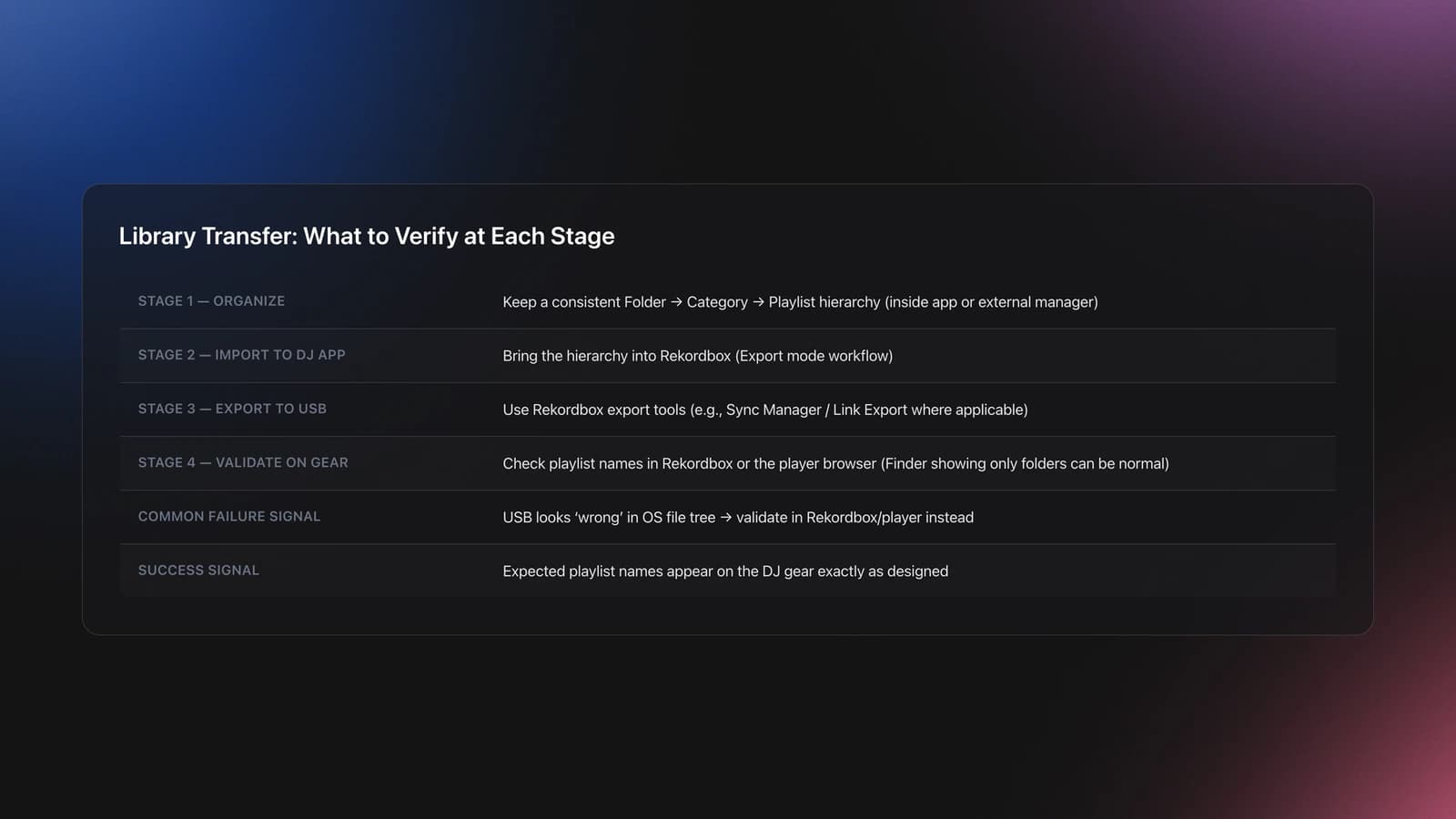
Validation signal: your USB shows the expected playlist names in the DJ gear's browser. If you only see folders on the stick in Finder, that's normal. Verify inside the player or Rekordbox, not the OS file tree.
Bedroom DJ Setup: Room, Monitoring, and Neighbors
Small rooms exaggerate bass and reflections. Keep speakers away from corners. Angle them at ear height, form an equilateral triangle to your head, and listen quietly.
Headphone isolation is your friend. You should not need painful volumes to hear cue material. If you do, reduce room level and reposition monitors.
Protect your ears. Treat 85 dBA as a working average. As volume climbs, reduce time. Night after night exposure adds up.
Take breaks every 45 to 60 minutes, especially on loud systems or long practice sessions. Your future self will thank you.
Lighting and Atmospherics With DMX
DMX is a broadcast control protocol. One universe carries 512 channels, and each fixture consumes a set of channels, so addressing must be unique. Set a starting address per fixture. If a laser uses 16 channels and starts at 001, the next device should start at 017. Overlaps cause nothing to respond or random behavior.
Auto modes look flashy, but they rarely hit accents in your track. A simple controller or software unlocks chases and timed hits. Start there before full timecode shows.
Use proper DMX cable and termination. Daisy chain out of the controller, through fixtures, and end with a terminator. The current DMX512-A standard defines the protocol that pro gear follows. published docs
Fog: Water-based fluid is the default for indoor rooms. It disperses quicker and leaves less residue than oil-based. Follow the ANSI atmospheric effects guidance when planning haze or fog.
Lasers: Treat beams with respect. Class 3B and Class 4 units can injure eyes. The FDA explains laser hazard classes and pro-use requirements. If you don’t have the training or a variance, don’t deploy high-power lasers. frequently asked questions about lasers
Example A: Small room chain. Controller → two pars (001-012 each) → laser (025-040). Address pars at 001 and 013. Laser starts at 025. End the line with a terminator. Validate by moving one fader at a time.
Validation: Each fader moves exactly one parameter on one fixture. Blackout works on all fixtures. No flicker when audio peaks hit.
Failure mode: fixtures ignore the controller. Symptom: nothing responds, even in auto. Fix: check addresses, universe, and that auto/sound modes are off. Replace mic cables with DMX cable and add termination. If a device only has 3-pin XLR, use proper adapters and keep runs short.
Concept diagram: DMX controller → PAR 1 (001) → PAR 2 (013) → Laser (025) → terminator. One universe, no overlaps.
A Practice Path That Builds Skill Fast
My first mixes were on a borrowed Traktor setup and then my own Pioneer DDJ-400, and what made it stick was working one skill at a time rather than fighting the whole instrument at once. Sequence your learning so each session targets one skill: first reliable monitoring, then beatmatching, then a single clean transition before you chase anything fancier. Keeping the focus narrow keeps your momentum high and prevents the early overwhelm that stalls most beginners.
Common Mistakes With Starter DJ Setup
| Mistake | Why It Happens | How to Avoid |
|---|---|---|
| Buying complex gear first | Too many features create decision fatigue | Get a twoâchannel controller with builtâin audio. Upgrade when you outgrow it. |
| No library structure | Scrolling during pressure moments | Create simple mood/energy playlists. Test them in practice. |
| Hot headphone levels | Poor isolation and loud room | Choose closedâback cans. Lower room volume. Adjust cue/mix balance. |
| Skipping buffer tuning | Lowâlatency obsession | Start safe. Lower buffer only after stability. |
| OverâEQing mixes | Using EQ to fix timing | Match timing first. Use EQ subtly to blend spectra. |
Concrete problems you can prevent on day one.
The visual way to organize your DJ library
Tag tracks by vibe. See everything at once. Export to rekordbox, Serato, Traktor or Engine DJ.
14-day free trial. Full access, no strings attached.
or see how it works
Techniques Covered




Equipment & Software
Documentation
Continue Your Learning Journey
Level Up Next


Frequently Asked Questions

Hey, it's Ben Modigell 👋
I DJ and produce as so I so: downtempo, minimal, dub house, tech house, and techno (releases on Spotify and SoundCloud, links above). Everything I write here comes from my own gigs, studio sessions, and library cleanups: the rules I follow, the failure modes I have actually hit, and the workflow I use when nobody is watching. If a technique did not earn its place in my own sets, it does not make it into a tutorial.




