DJ Playlist Spotify: Mixing With Streaming Inside Rekordbox
Watch Digital DJ Tips’s tutorial above (108K views on YouTube).
This guide is for DJs who want to use a dj playlist spotify workflow without guessing what the setup can actually do. If you are stuck between Spotify playlists, Rekordbox limits, and controller compatibility, this will show you what works, what breaks, and how to build a reliable workflow.
A dj playlist spotify setup means using Spotify playlists inside supported DJ software, not loading Spotify directly into standalone gear. Right now, Spotify DJ integration works only in selected software, requires Spotify Premium, and still depends on a live internet connection for playback.
If you also want to clean up your broader prep workflow, start with a simple library system before show day. That is the same logic behind organized DJ music library workflows, solid Rekordbox playlist structure, and consistent set preparation habits.
DJ Playlist Spotify: What It Actually Means
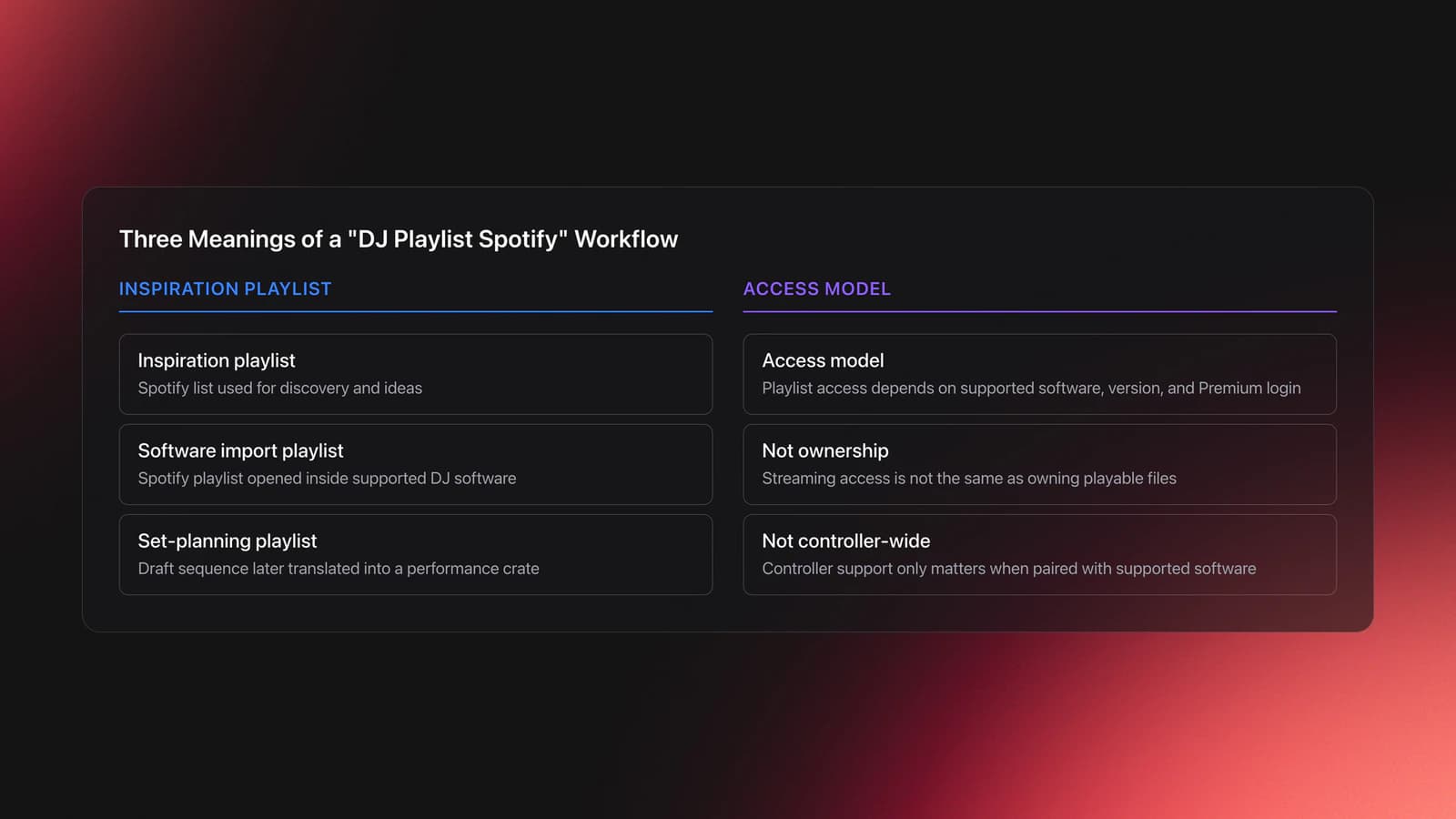
Most people use the term loosely. In practice, a dj playlist spotify workflow can mean one of three different things.
- A Spotify playlist you listen to for inspiration.
- A Spotify playlist you import inside supported DJ software.
- A playlist you built for DJ set planning, then translate into a performance crate.
That distinction matters because each use case has different limits. Inspiration playlists are easy. Live mixing from Spotify is narrower, software-specific, and not the same as owning files.
The transcript is mainly about the second case. It shows Spotify playlists being used inside Rekordbox on a laptop, with BPM and key data visible in the browser and tracks loading directly into decks.
As of September 24, 2025, AlphaTheta added Spotify support to rekordbox for Mac/Windows, and Spotify says DJ integration is available only in selected apps rather than across all DJ platforms. Spotify also states that you need a Premium account and the latest version of the DJ software. According to Spotify's DJ integration help and AlphaTheta's rekordbox announcement, Spotify access is software-based and version-dependent, not a universal controller feature. dj integration
This is the first mental model to keep straight. Playlist access is not the same as track ownership. And controller support is not the same as software support.
Use Rekordbox With Spotify Playlists
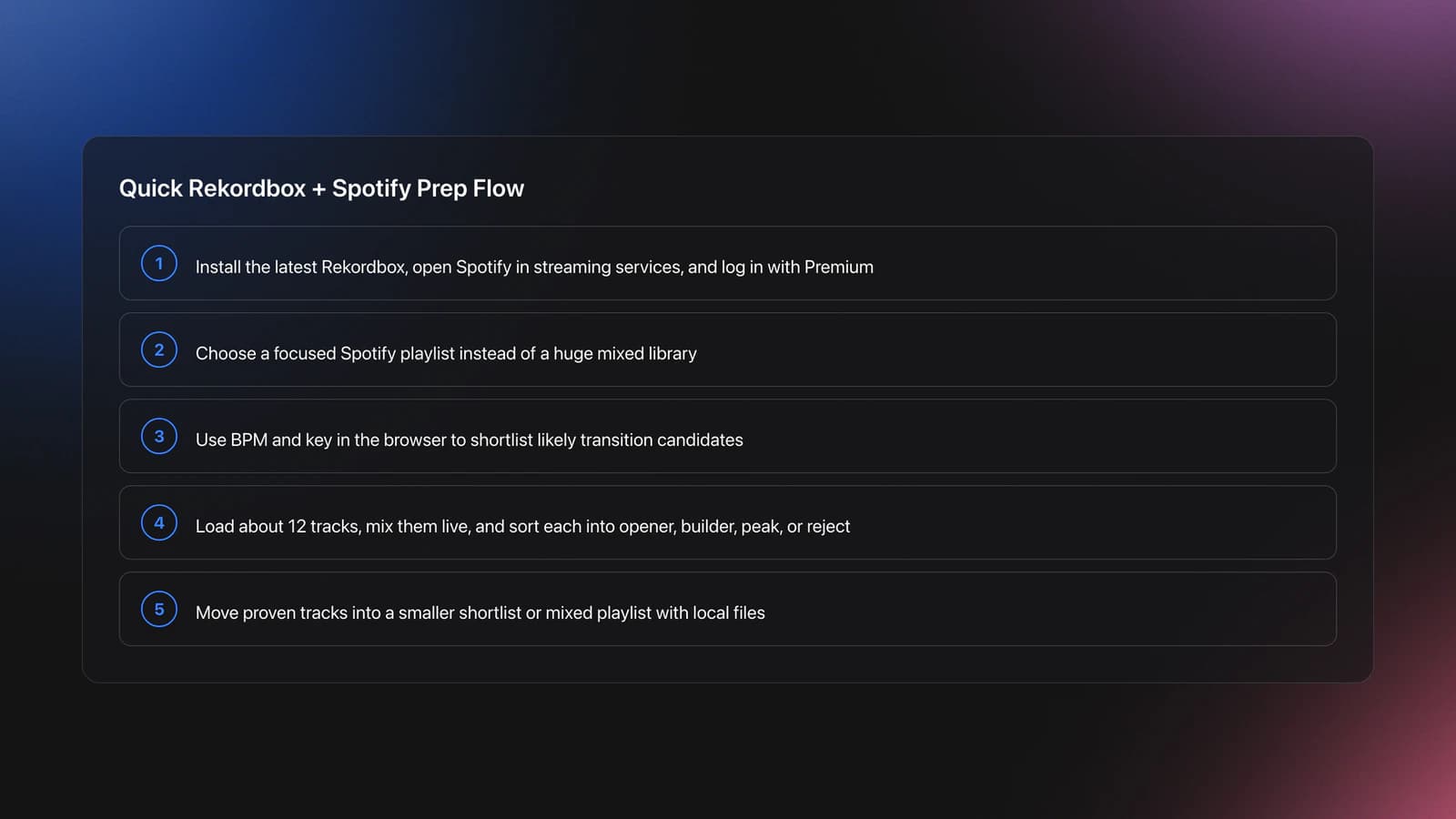
If your goal is simple, the path is simple. Open Rekordbox on a laptop, sign into Spotify Premium, and work from the streaming pane inside the software.
That is the core setup shown in the transcript. It is useful if you already keep warm-up, after-hours, or genre playlists in Spotify and want to test transitions quickly.
The current Rekordbox support page says Spotify playback is available in rekordbox for Mac/Windows, requires Spotify Premium, and needs an internet connection for playback. Spotify's own help page also says you must use the latest version of supported DJ software and sign in from inside that software. rekordbox for mac win spotify support
- Update Rekordbox to the latest version.
- Open the streaming services area and select Spotify.
- Log in with your Spotify Premium account.
- Open your Spotify library or curated playlists.
- Load tracks to decks and test transitions in real time.
- Build mixed playlists in Rekordbox if you also use local files.
One useful detail from the transcript is that BPM and key data appear in the browser view. That speeds up shortlisting because you can scan for likely transitions before loading tracks.
Experienced DJs usually care less about the login step and more about what happens next. The real value is faster auditioning. You can move from genre exploration to transition testing without buying tracks first.
Example one. You are preparing a house warm-up set. Your Spotify library has a 118 to 122 BPM playlist. You load three tracks around 120 BPM, check their keys, then test whether they sit together over a 32-bar blend. The output is not a finished crate yet. It is a shortlist.
Example two. You are trying a new subgenre before a bar gig. Instead of buying twenty unknown tracks, you pull a Spotify playlist into Rekordbox, sort by BPM, and test which records actually survive cueing, looping, and phrasing. Five stay. Fifteen go.
That is where workflow friction shows up. Once you start testing lots of streaming tracks, memory becomes unreliable. A large pool of maybe-tracks quickly turns into a blurry mess unless you separate candidates, keepers, and proven set tools.
Validation Check
Software and Controller Support for Spotify DJing
This is where most confusion starts. DJs often ask what DJ controller works with Spotify, but the controller is not the deciding factor.
The software decides whether Spotify is available. The controller only matters if it is being used with that supported software.
Spotify currently lists djay, rekordbox, and Serato as supported DJ integrations, with support varying by device type. Spotify says desktop support includes djay, rekordbox, and Serato, while mobile support includes djay and rekordbox. support.spotify.com
That means a better question is this: What DJ software works with Spotify right now? Based on official sources, the answer is selected versions of Rekordbox, Serato, and djay, not every major DJ platform. support.spotify.com
- Works when supported: laptop-based DJing in compatible software.
- May work on a controller: if the controller is connected to that software.
- Does not mean standalone support: USB-only or fully standalone workflows are different.
The transcript is accurate on that point. It describes Spotify working in Rekordbox software on a laptop, not in a standalone USB-stick workflow.
There is one date detail worth clarifying. The transcript frames Spotify in Rekordbox as a fresh change, and that matches the official rollout date of September 24, 2025 for Mac/Windows support in Rekordbox. By April 21, 2026, that support is no longer brand new, but it is still current. rekordbox.com
The same distinction matters for mobile. AlphaTheta later announced Spotify support for rekordbox on iOS and Android on December 11, 2025. So if you see older advice saying Rekordbox plus Spotify is desktop-only, that was true before December 11, 2025, but it is no longer the full picture. rekordbox for ios android now support...
Failure mode: you buy a controller expecting Spotify access, then discover your workflow is standalone or tied to unsupported software. The symptom is simple. There is no Spotify pane in the software, or the hardware cannot access streaming without a laptop.
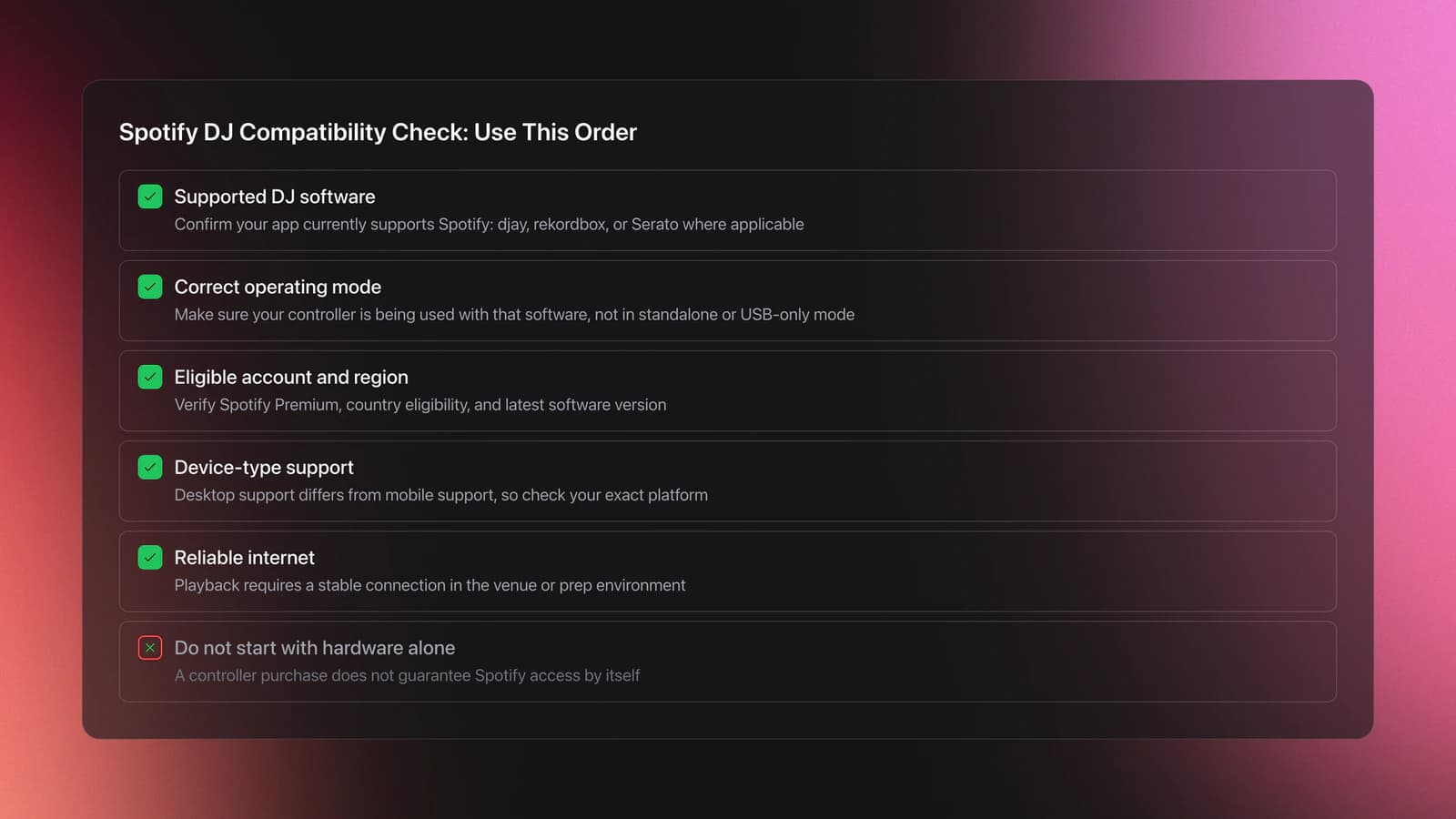
In practice, compatibility checking should happen in this order:
- Check the software's current streaming support.
- Check whether your device is using that software mode.
- Check whether your country and subscription tier are eligible.
- Check whether your venue internet is reliable enough.
If you skip that order, you will solve the wrong problem. Many DJs chase hardware answers when the limit is actually account access, app version, or playback mode.
Build a DJ Set Spotify Playlist That Holds Up
A useful dj set spotify playlist is not just a list of songs you like. It is a testable sequence with a job.
That job can be warm-up, crossover peak, after-hours drift, or genre scouting. But the playlist needs a role first. Otherwise every selection decision becomes random.
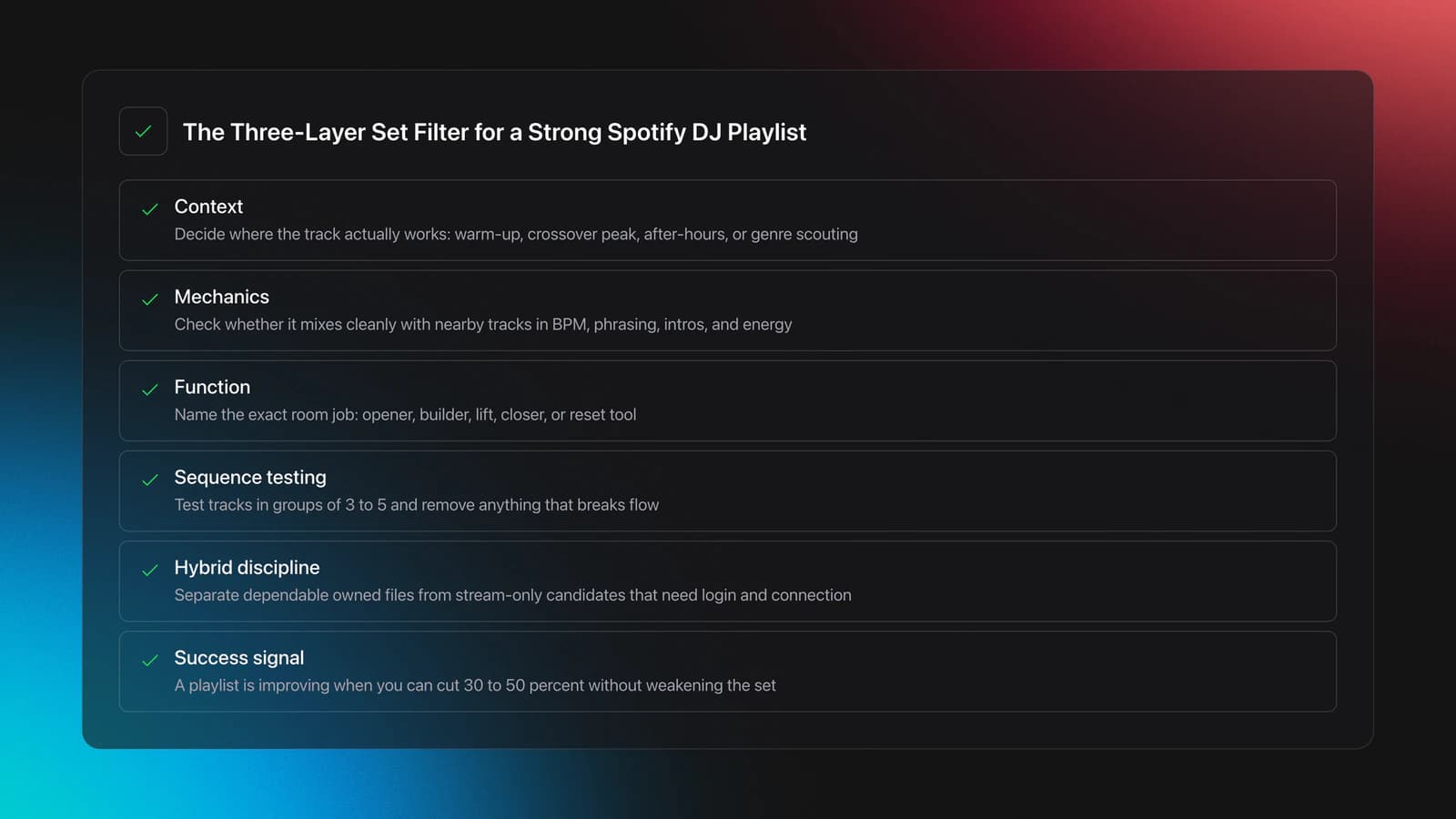
I use a simple framework here. Call it the three-layer set filter.
- Layer 1: Context. Where would this track actually work?
- Layer 2: Mechanics. Can it mix cleanly with nearby tracks?
- Layer 3: Function. What exact job does it do in the room?
Most Spotify DJ playlists fail at layer three. They contain tracks with a shared genre label but no shared function. That looks organized until you start mixing.
Example one. You build a melodic house playlist with forty songs. Ten are true warm-up records around 120 BPM with sparse intros. Fifteen are bigger vocal tracks that demand attention. The rest are peak-time records. Genre matches. Function does not.
Example two. You create a party playlist with open-format energy. Half the tracks have hard intros and quick hooks. The others need long blends. The result is not flexible. It forces constant technique changes, which usually feels messy in a short set.
This is why BPM and key help, but only to a point. They improve scanning and recommendation logic, but they do not tell you whether the breakdown arrives too early, whether the vocal conflicts, or whether the tune over-commits the room.
That limitation is worth stating clearly. Technical metadata reduces search time. It does not replace listening.
A practical Spotify playlist DJ workflow usually looks like this:
- Start with a broad source playlist.
- Pull out only tracks that fit one set role.
- Test transitions in groups of three to five tracks.
- Remove tracks that break flow, even if they are good alone.
- Promote survivors into a smaller performance-ready list.
The transcript points to one more advantage in Rekordbox. It allows playlists that mix Spotify tracks, local files, and tracks from other streaming sources in one environment. AlphaTheta's announcement also says you can mix Spotify with tracks from your Rekordbox music library inside the software. rekordbox.com
That hybrid setup is powerful, but it creates another organization problem. Once you combine owned files and stream-only candidates, you need a hard line between "tracks I can depend on anywhere" and "tracks I can play only with the right login and connection."
Validation Check
A common symptom of failure is over-saving. If every decent track stays in the playlist, the playlist is not curated. It is just a holding bin.
How to Get the DJ Playlist on Spotify?
If by "DJ playlist" you mean Spotify's own curated material, start inside Spotify and search by genre, mood, or activity. If you mean playlists usable for mixing, the better route is to open Spotify from supported DJ software and browse either your own library or the software's featured collections.
The transcript highlights two useful starting points inside Rekordbox. One is a featured area with ready-made playlists. The other is your own Spotify library, where existing playlists become available inside the software after login.
Spotify's official DJ integration page says you can access playlists from Your Library and from the Spotify catalog directly inside supported DJ software. It also says playlist editing is limited to the Spotify app itself. support.spotify.com
That means the cleanest workflow is split in two. Discover and edit in Spotify. Test and mix in DJ software.
If you try to do both in one place, you usually hit the current limit. Spotify playlists can be loaded for performance testing, but management actions are still more restricted than in the native Spotify app.
Limits, Legality, and Reliability
This is the section people skip, then regret skipping. Spotify integration is convenient, but it comes with real constraints.
First, playback is online-dependent. Spotify says you can play Spotify content only while online in DJ software, and AlphaTheta also states that an internet connection is needed for Spotify playback in Rekordbox. support.spotify.com
Second, playlist editing is limited. Spotify says you can add or remove songs from playlists only through the Spotify app, not freely from inside DJ software. support.spotify.com
Third, use rights matter. Spotify states that its content and DJ integration are for personal, non-commercial use, and public performance in clubs, venues, events, or live streams is not permitted under its terms. That does not replace local venue or licensing rules, but it does mean you should not assume Spotify streaming equals unrestricted club-use permission. support.spotify.com
This is where limitation transparency matters. A Spotify workflow is strong for discovery, practice, home sessions, and early set design. It is weaker when your night depends on offline certainty, edit control, or clear public-performance rights.
After years of changing practice rhythms and testing different DJ setups, one pattern stays consistent: streaming makes exploration faster, but owned files make performance risk lower. Those are different priorities. Good DJs decide which one matters for the job in front of them.
| Mistake | Why It Happens | How to Avoid |
|---|---|---|
| Treating Spotify support like controller support | DJs focus on hardware before checking software mode | Confirm software compatibility first, then device mode |
| Assuming playlists are available offline | Streaming access feels like local access during testing | Keep backup local files for any important set |
| Trying to edit Spotify playlists inside DJ software | The library looks integrated, so editing seems implied | Do playlist management in Spotify, then return to DJ software |
| Building oversized test playlists | Saving tracks is easier than rejecting them | Cut aggressively and assign each track a role |
| Ignoring terms of use | Convenience makes the workflow feel fully performance-ready | Read current software and platform terms before public gigs |
Common mistakes in a dj playlist spotify workflow
Choose Between Streaming and Owned Files
You do not need one answer for every situation. You need a decision rule.
Use streaming when discovery speed matters most. Use owned files when reliability, editing freedom, and performance certainty matter more.
| Scenario | Best Choice | Why | Next Action |
|---|---|---|---|
| Testing a new genre at home | Spotify in DJ software | Fast access beats file ownership at this stage | Build a shortlist of 5 tracks worth buying or keeping |
| Preparing a paid club set | Owned files first | You need dependable access and fewer legal gray areas | Move must-play tracks into a local performance crate |
| Practicing transitions with many options | Hybrid workflow | Streaming helps exploration while local files anchor the session | Pair each streamed candidate with 1 local fallback track |
| Playing in unstable internet conditions | Owned files only | Connection risk is the main failure point | Test your full opening 30 minutes from local storage |
| Organizing a large library for recurring gigs | Structured local system | Long-term retrieval matters more than quick discovery | Use categories by mood, function, and energy before export |
Quick decision guide for Spotify playlists in DJ workflows
This decision framework also helps answer related searches like what dj app works with Spotify or what free dj apps work with Spotify. The practical answer is not just which app supports Spotify. It is which app supports Spotify in the exact context you need.
A free tier, if available, may be enough for testing. It may not be enough for your real workflow. Always check current feature limits inside the specific software before building a whole setup around it.
For the broader prep side of that workflow, the same principle applies to your collection structure. A playlist can get you through one session. A category system gets you through fifty. If your local library is scattered across folders and half-finished crates, an organized prep tool like Vibes can reduce search friction by keeping custom categories and set plans separate from the pressure of live mixing.
Wrap Up Your DJ Playlist Spotify Workflow
A dj playlist spotify workflow is useful when you treat it as a discovery and testing system, not a magic replacement for owned music. Spotify inside DJ software can speed up crate building, genre exploration, and transition practice. It cannot remove the need for curation, reliability planning, or terms awareness.
Keep three takeaways in front of you:
- Check software support before you check controller support.
- Use Spotify playlists to shortlist tracks, not to avoid selection discipline.
- Separate exploratory streaming workflows from performance-ready local crates.
If you do that, Spotify becomes a fast front end for ideas instead of a weak point in your set. The next step is simple: test one playlist, cut it hard, and promote only proven tracks into your real DJ system.
The visual way to organize your DJ library
Tag tracks by vibe. See everything at once. Export to rekordbox, Serato, Traktor or Engine DJ.
14-day free trial. Full access, no strings attached.
or see how it works
Techniques Covered

Cross-Platform Playlist Integration

Spotify BPM and Key Analysis

Smart Playlists for DJs

Track Selection

Types of DJ Transitions

DJ Rig Setup

Cue Button Usage
EQ Adjustments
Equipment & Software
Featured Gear
Continue Your Learning Journey
Start Here First



Related Content
DJ Record Pool Guide for Working DJs
intermediateHow To Mix In Key Live: Worked Transitions And Failure Fixes
intermediateDJ Library Organization System: Tags, Crates, Keys
intermediateTransition DJ Online: Browser Mixer Workflow
intermediate
DJ Transitions: The Three-Layer Handoff for Beginners
intermediate
Harmonic Mixing Guide for DJs: Energy & Workflow
intermediateFrequently Asked Questions

Hey, it's Ben Modigell 👋
I DJ and produce as so I so: downtempo, minimal, dub house, tech house, and techno (releases on Spotify and SoundCloud, links above). Everything I write here comes from my own gigs, studio sessions, and library cleanups: the rules I follow, the failure modes I have actually hit, and the workflow I use when nobody is watching. If a technique did not earn its place in my own sets, it does not make it into a tutorial.