
Smart Playlists for DJs
Smart playlists are rule-based DJ crates that update automatically by BPM, key, rating, tags, or date added.
Smart Playlists for DJs Tutorials


Smart playlists are rule-based crates that update automatically by BPM, key, rating, tags, or date added. For DJs, they solve a common problem: too many tracks, weak recall, and slow browsing when you need the right next record fast.
Learn this technique if you want cleaner preparation, faster crate digging, and less manual sorting. Done well, smart playlist creation helps you surface warm-up tracks, peak-time tools, recent downloads, and transition records without rebuilding the same playlists every week.
The big payoff is not automation for its own sake. It is better decisions in the booth. When your rules reflect BPM, key, genre, energy tags, play count, or date added, your library starts behaving more like a working system than a storage pile.
This technique works best after you build a cleaner DJ library system. Once your metadata is consistent, smart playlists become one of the fastest ways to prepare sets and keep your collection usable as it grows.
What Is Smart Playlist Creation?
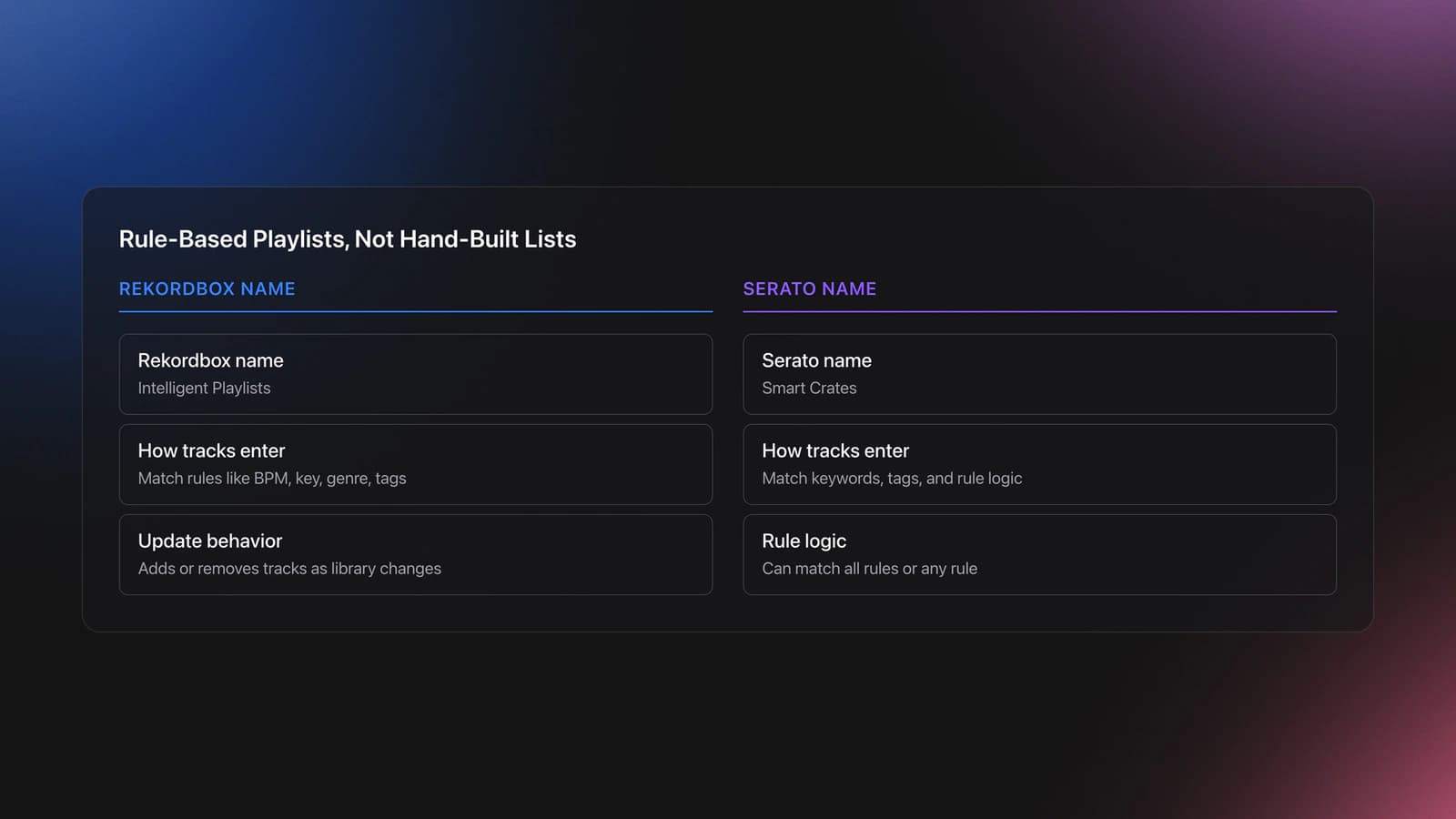
Smart Playlist Creation means defining rules once so software adds or removes tracks automatically. In Rekordbox, these are Intelligent Playlists. In Serato, they are Smart Crates. The core idea is the same: tracks appear because they match criteria, not because you dragged them there by hand. If you use Rekordbox, set up Intelligent Playlists step by step to put this into practice.
Official Serato documentation says Smart Crates update their contents by matching keywords and selected track tags, with options to match all rules or any rule. Rekordbox describes Intelligent Playlists as automatically assembled from shared qualities such as tempo, key, genre, and custom tags. Educational tutorials explain that tracks are added or removed as your library changes. Serato Smart Crates guide, rekordbox operation FAQ on Intelligent Playlists, and the DeeJay Plaza intelligent playlist tutorial all describe this rule-based behavior clearly.
In practice, that means you can create playlists like "New House 122–126 BPM," "Three-Star Warm-Up Cuts," or "Low-Vocal Transition Tools." If a new track meets the rules, it appears automatically.
That is why this is a technique, not just a feature. The skill is in choosing rules that reflect how you actually DJ.
Why Smart Playlist Creation Matters
Smart Playlist Creation matters because it shortens the gap between finding music and using it. Instead of re-sorting the same collection before every gig, you build a rule system once and refine it over time.
Most DJs benefit in three ways. First, browsing gets faster. Second, new music gets absorbed into the library with less friction. Third, set preparation becomes more focused because you start from filtered pools rather than the full collection.
- Cuts browsing time by narrowing choices before a set.
- Keeps new tracks visible through date-based rules.
- Supports stronger flow with BPM, key, and energy filters.
- Reveals forgotten tracks through play count and rating logic.
- Makes repeatable preparation easier across gigs.
Pioneer DJ's library management guidance encourages using intelligent playlists for tracks that share tempo, key, genre, or custom tags. DJ TechTools also recommends smart playlists for creating cohesive energy-based pools rather than relying on memory alone. See the Pioneer DJ library management guide and the DJ TechTools energy playlist guide.
Equipment and Data You Need
You only need three essentials: DJ software that supports rule-based playlists, local tracks in a stable folder structure, and metadata you trust. Without clean data, smart playlists become noisy and unreliable.
Rekordbox supports Intelligent Playlists, but its official FAQ notes you cannot create them directly on a device and that exporting one to a device creates a regular playlist version instead. Serato supports Smart Crates with rule fields such as BPM, key, genre, year, artist, and added date. The rekordbox operation FAQ on Intelligent Playlists and the Serato Smart Crates guide outline those capabilities.
Optional tools help, but they are not required. Color systems, star ratings, comments, custom tags, and third-party library tools make the technique stronger because they give your rules more precise inputs.
If you use multiple DJ platforms, check compatibility before you build a complex system. Lexicon notes that not every DJ app supports every smartlist rule, and unsupported rules may convert to normal playlists on sync. The Lexicon smartlists manual is useful here.
How to Build Smart Playlists
To build effective smart playlists, start broad, then layer filters that reflect real performance choices. The goal is not to create hundreds of tiny lists. The goal is to create a few reliable pools you will actually browse.
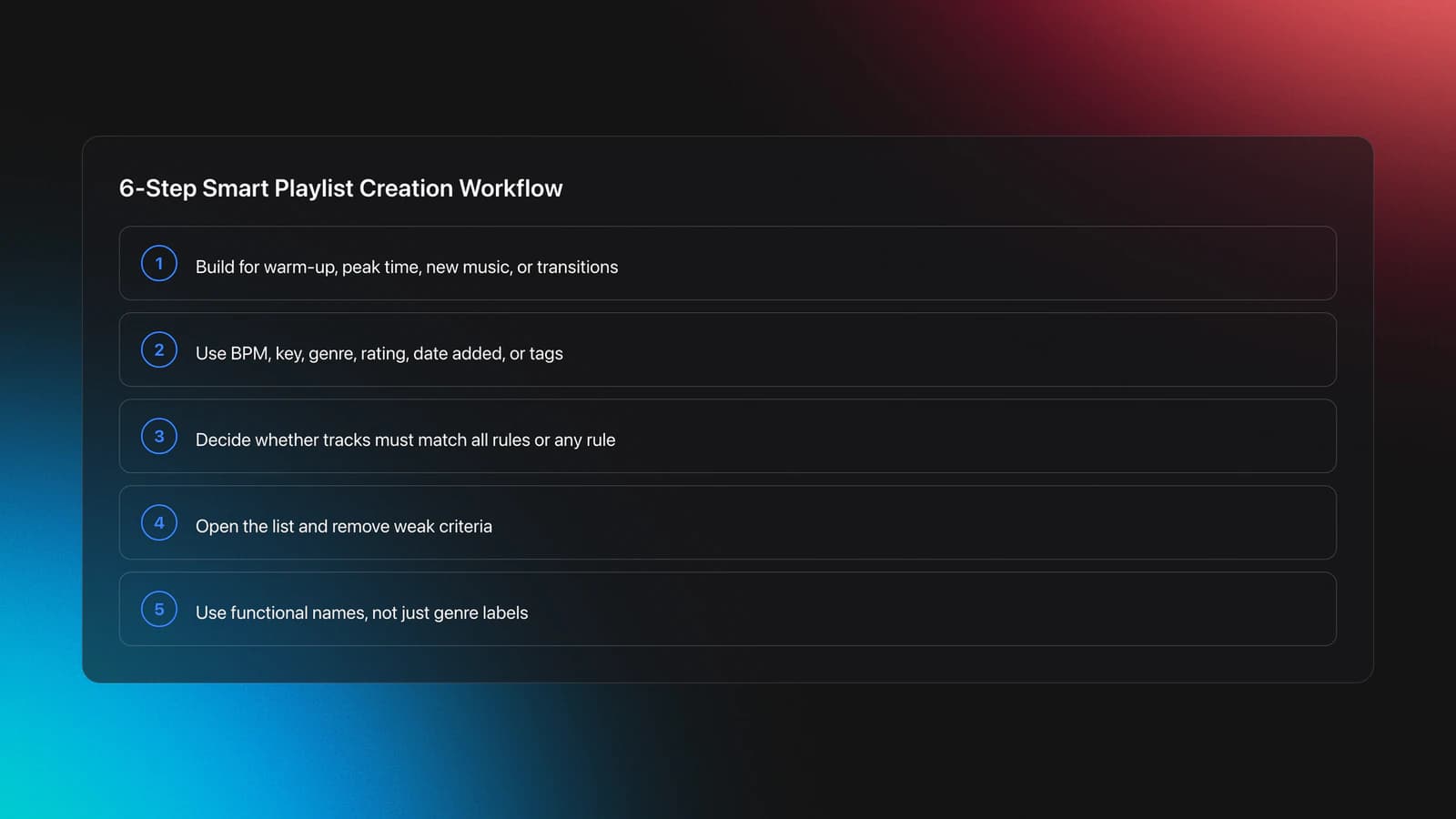
Use this basic sequence:
| Step | Action | Key Point |
|---|---|---|
| 1 | Choose one purpose | Build for warm-up, peak time, new music, or transition tools |
| 2 | Pick 2–4 fields | Use BPM, key, genre, rating, date added, or custom tags |
| 3 | Set rule logic | Decide whether tracks must match all rules or any rule |
| 4 | Test the results | Open the playlist and remove weak criteria |
| 5 | Rename clearly | Use names that describe function, not just genre |
| 6 | Create a manual shortlist | Turn the best matches into a gig-specific playlist |
A simple first smart playlist might be: Genre contains House, BPM between 122 and 126, Rating is 3 stars or higher, Date Added is within 90 days. That gives you a focused pool for recent, usable house tracks.
After that, add context rules. You might build one for tracks with long intros, one for low-vocal transitions, or one for closing tracks. This is where smart playlist creation starts to reflect your taste and set structure.
If you are already comfortable with key-based prep, you can use harmonic mixing rules in playlists to create harmonic-compatible starting pools. Just do not let key override feel, arrangement, and crowd response.
Most instructors and software guides show the feature setup, but the deeper practice is editorial. You are training your library to answer useful questions.
Rule Ideas That Actually Help DJs
The best smart playlist rules map to decisions you make in real sets. If a playlist does not support a real decision, it usually becomes clutter.
Useful categories include new tracks, unplayed tracks, warm-up windows, peak-time ranges, genre families, energy tiers, playable keys, and utility tools. Pioneer DJ specifically highlights shared qualities like tempo, key, genre, and custom tags, while Serato's Smart Crates support text and numeric rule matching across common metadata fields. See the Pioneer DJ library management guide and the Serato Smart Crates guide.
Examples that tend to work well:
New music review playlist: Date Added in the last 30 days, Play Count equals 0.
Warm-up playlist: Energy tag low or medium, BPM 118–124, Rating 3 stars or higher.
Peak-time house playlist: Genre contains House, BPM 124–128, custom tag includes peak.
Transition tools playlist: Comment contains intro or tool, track length under 4 minutes, low vocal density tag.
Recovery playlist: Color equals green, Rating 4 stars or higher, familiar crowd-response tracks.
Practice Routine for Smart Playlist Creation
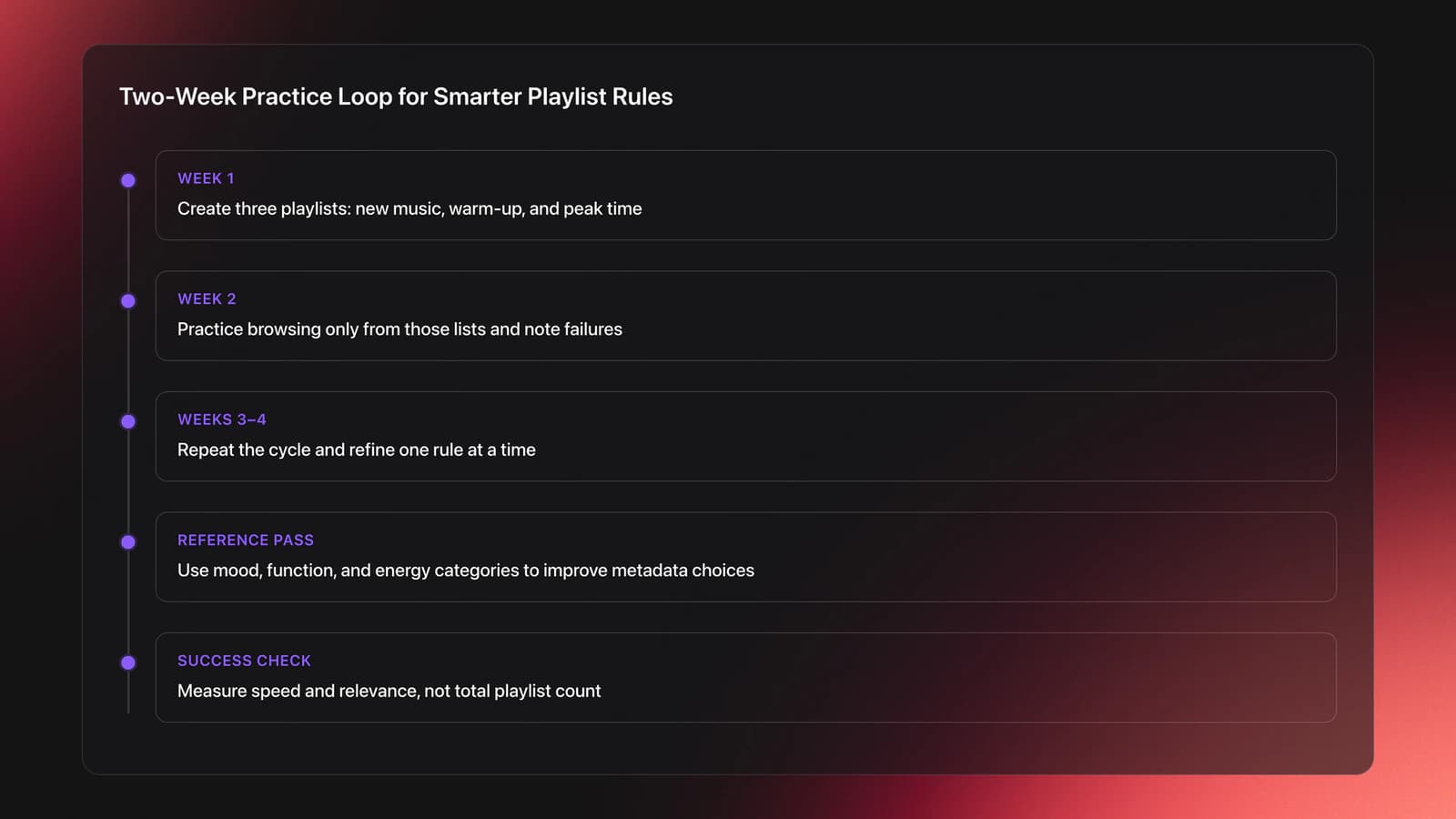
The fastest way to learn this technique is to build, test, and refine a few playlists in short cycles. In practice, short review loops beat marathon library overhauls every time. Smart playlist creation improves when you adjust one rule, check the results, and keep only what helps in real browsing.
Start with a two-week cycle. In week one, create three playlists: new music, warm-up, and peak time. In week two, browse only from those lists during practice mixes and note where they fail.
This is also where organized reference material helps. In Vibes, a DJ can keep local tracks grouped by mood, function, and energy, then use those categories as a clean reference when deciding which metadata should drive a smart playlist rule set.
Repeat that cycle for two to four weeks. Measure success by speed and relevance, not by playlist count.
Once your smart lists produce dependable pools, you can plan stronger sets with preparation workflows and stop treating each event as a full library search.
Common Mistakes
Most smart playlist problems come from weak metadata or overly ambitious rules. If the input data is inconsistent, the output will be inconsistent too.
| Mistake | Why It Happens | Fix |
|---|---|---|
| Too many rules | The playlist becomes so narrow that useful tracks disappear | Start with 2–4 fields and tighten only after testing |
| Bad metadata | Genre, key, or comments are inconsistent across tracks | Clean tags first and use controlled naming |
| Genre-only playlists | Genre alone rarely reflects energy or function | Add rating, color, era, or use-case tags |
| No manual review | Automatic lists still include mismatches | Audit results weekly and build manual shortlists for gigs |
| Platform assumptions | Rules do not transfer the same way between apps | Check software limits before syncing or exporting |
Another common mistake is treating smart playlists as final crates. In many workflows, they are better used as dynamic source pools. From there, you pick the strongest matches into fixed playlists for a specific event.
Troubleshooting Smart Playlists
If a smart playlist feels wrong, diagnose the rule inputs before changing the whole system. Ask three questions: is the metadata correct, is the logic too broad or too narrow, and does this playlist reflect a real use case?
If too many tracks appear, tighten the rule set with one more field, often rating or custom tags. If too few tracks appear, remove one field and see which rule was doing the damage.
If exported playlists behave differently on hardware, check the software limitation first. Rekordbox states that Intelligent Playlists exported to devices become regular playlists, and Lexicon notes that unsupported rules may convert to normal playlists during sync. The rekordbox operation FAQ on Intelligent Playlists and Lexicon smartlists manual are the key references.
If smart playlists keep surfacing weak tracks, the problem is usually not the playlist feature. It is that your metadata does not yet describe how you hear and use those tracks.
Examples of Real-World Smart Playlists
Real-world use is usually simple. Pioneer DJ gives examples based on new music and shared track qualities, while Serato DJs often combine traditional crates with smart crates for genre, era, energy, and cleanup tasks. The Pioneer DJ library management guide and Serato's artist feature, How Serato DJs Organize Their Crates, show this hybrid approach.
A club DJ might use a smart playlist for fresh promos, another for warm-up deep cuts, and a third for tested crowd records above a certain rating. An open-format DJ might build rule sets by decade, energy tier, and event type.
The pattern is consistent. Smart playlists narrow the field. Manual playlists shape the final story.
Smart Playlist Creation Wrap-Up
Smart Playlist Creation helps DJs turn metadata into faster decisions. The technique is simple at first, but powerful once your rules reflect real set needs like energy, function, timing, and familiarity.
Keep these takeaways in mind:
- Start with broad, useful playlists before building niche ones.
- Clean metadata matters more than clever rule logic.
- Use smart playlists as dynamic pools, then shortlist manually for gigs.
Your first step is easy: build one playlist for new music and one for warm-up tracks, then test both in practice this week. From there, refine the rules that actually support your ears and your workflow.
The visual way to organize your DJ library
Tag tracks by vibe. See everything at once. Export to rekordbox, Serato, Traktor or Engine DJ.
14-day free trial. Full access, no strings attached.
or see how it works
More Tutorials


Equipment You'll Need
Native Instruments Traktor Pro 4
optionalA professional 4-deck DJ software platform with stem separation, flexible beatgrids, effects, DVS support, and broad controller integration.
Pioneer CDJ-400
optionalA discontinued digital DJ media player that plays CDs and MP3 files from USB storage, and can also work as a MIDI controller and USB audio interface.
Pioneer DJ CDJ-3000
optionalProfessional flagship DJ media player with a 9-inch touchscreen, advanced MPU processing, and club-standard Pro DJ Link workflow.
Platinum Notes 10
optionalPlatinum Notes 10 evens loudness, repairs clipped peaks, and prepares DJ files for more consistent playback in Serato, rekordbox, and Traktor.
Pioneer DJ DDJ-1000
optionalA 4-channel rekordbox DJ controller with full-size jog wheels, onboard displays, and club-style mixer controls.
Pioneer DJ DDJ-400
optionalA compact 2-channel USB DJ controller built for rekordbox with a club-style layout aimed at new and progressing DJs.
VirtualDJ
optionalDJ software for Windows and macOS that handles audio mixing, video mixing, karaoke, stems, and broad hardware support.
DJControl Inpulse 200 MK2
optionalCompact 2‑deck USB DJ controller with built‑in audio, Beatmatch Guide LEDs, and Serato DJ Lite/DJUCED integration.
Numark Mixtrack Pro II
optionalA two-channel USB DJ controller with a built-in audio interface, touch-activated jog wheels, and performance pads for Serato-compatible mixing.
Traktor MX2
optionalA 2-channel DJ controller with integrated audio interface and tight Traktor Pro 4 integration for mixing, stems, effects, and performance pads.
rekordbox
optionalCloud-connected DJ software for music management, performance, export prep, and club-standard hardware integration.
Numark Mixtrack Pro FX
optionalA 2-deck USB DJ controller with a built-in audio interface, capacitive jog wheels, performance pads, and Serato DJ Lite support.
Serato DJ Pro
optionalProfessional DJ software for mixing, performance, library management, recording, and hardware-integrated club workflows.
Mixed In Key 11
optionalStandalone harmonic-mixing and library-prep software that detects keys, energy levels, cue points, and tags for DJ sets.
Pioneer DJ DDJ-FLX4
optionalA compact 2-channel DJ controller with built-in audio interface, USB-C connectivity, and beginner-friendly smart mixing features.
VirtualDJ 7
optionalA legacy DJ software platform for audio and video mixing, controller mapping, and DVS playback on Windows and Mac.
Frequently Asked Questions

Hey, it's Ben Modigell 👋
I DJ and produce as so I so: downtempo, minimal, dub house, tech house, and techno (releases on Spotify and SoundCloud, links above). Everything I write here comes from my own gigs, studio sessions, and library cleanups: the rules I follow, the failure modes I have actually hit, and the workflow I use when nobody is watching. If a technique did not earn its place in my own sets, it does not make it into a tutorial.