Music Library Management for DJs: Tags, Folders & Backups
Watch Super* Review’s tutorial above (495K views on YouTube).
Music library management for DJs starts with clean sources, reliable tags, predictable folders, and backups. This guide shows how to keep a local file collection searchable, trustworthy, and recoverable over time.
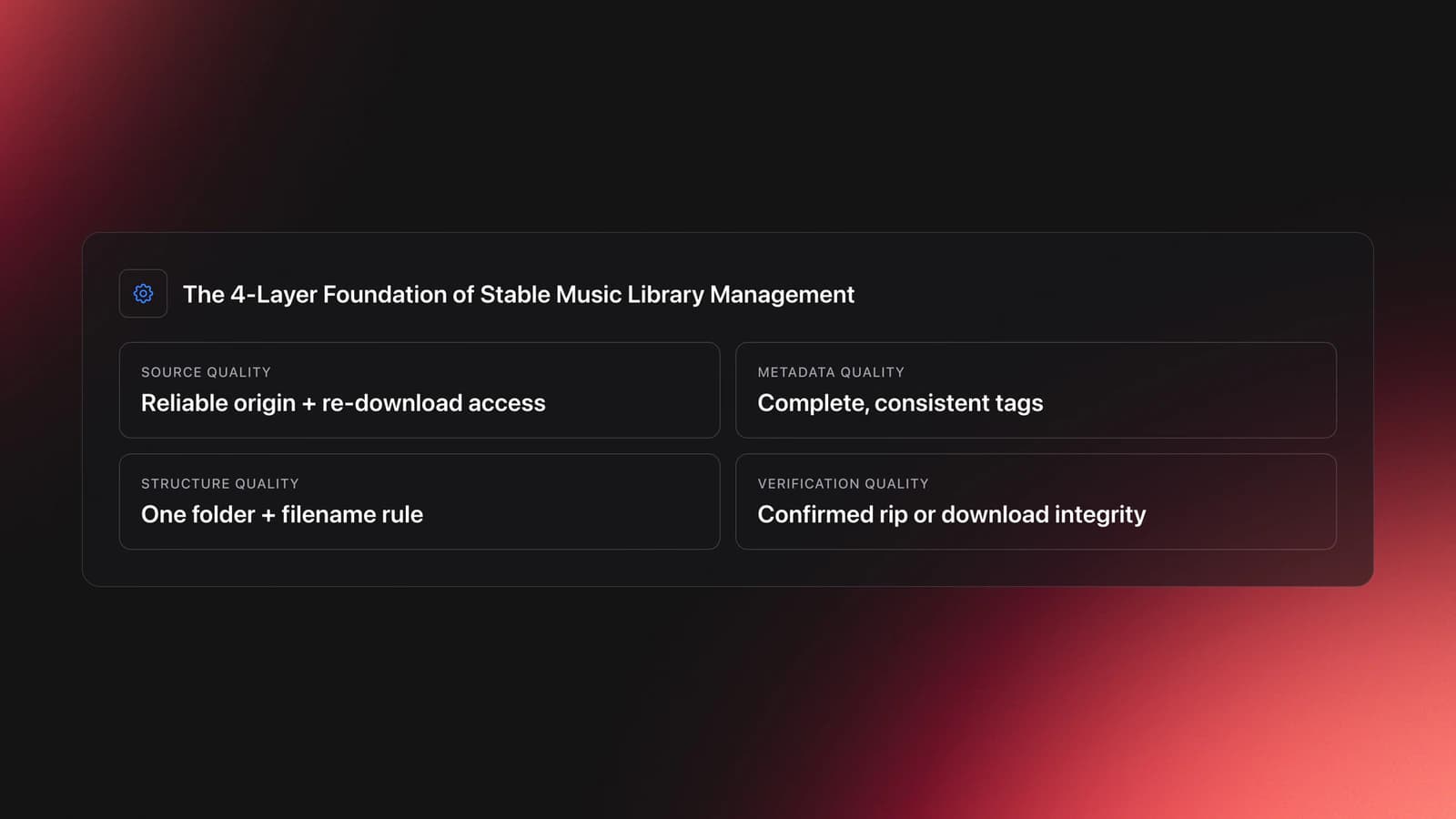
The core idea is simple. Good music library management is not just collecting files. It is controlling four layers in one pipeline: source quality, metadata quality, folder consistency, and verified backups. Think of it as four stages that each have one job: Intake, Cleanup, Archive, and Playback.
This article stays upstream. It is about building a clean archive. Once that archive exists, turning it into role, rating, and key based performance views is a separate job. That is the next step: performance prep.
If you already use local files, you may also want a stronger system for Rekordbox playlist structure, music tagging workflow, and set preparation for DJs. Those topics connect directly once your library stops fighting you.
The Four-Stage Pipeline Is the Spine
Most libraries become messy for one reason. People treat acquisition, tagging, and storage as separate jobs. They are one workflow with one direction of travel.
Everything in this guide hangs off four stages:
- Intake: buy, rip, or download into a staging folder
- Cleanup: standardize tags, cover art, album artist, and filenames
- Archive: move only finished files into the main library
- Playback: sync, back up, and use your preferred player or device
Each stage has one job. That keeps errors local instead of spreading them through the whole collection. A bad tag caught in Cleanup never reaches the Archive. A file that fails verification at Intake never gets backed up everywhere.
This pipeline exists because my own collection started without one. Downloads piled up at random, and tracks I genuinely loved got buried instead of played. The four stages are the fix I wish I had used from the start: a single path that turns a growing pile into an archive you can actually find your way around.
A workable system starts with a decision: do you want convenience, or do you want version control? Streaming wins on convenience. A local library wins when you care about exact album versions, offline access, and keeping files that do not disappear when catalogs change.
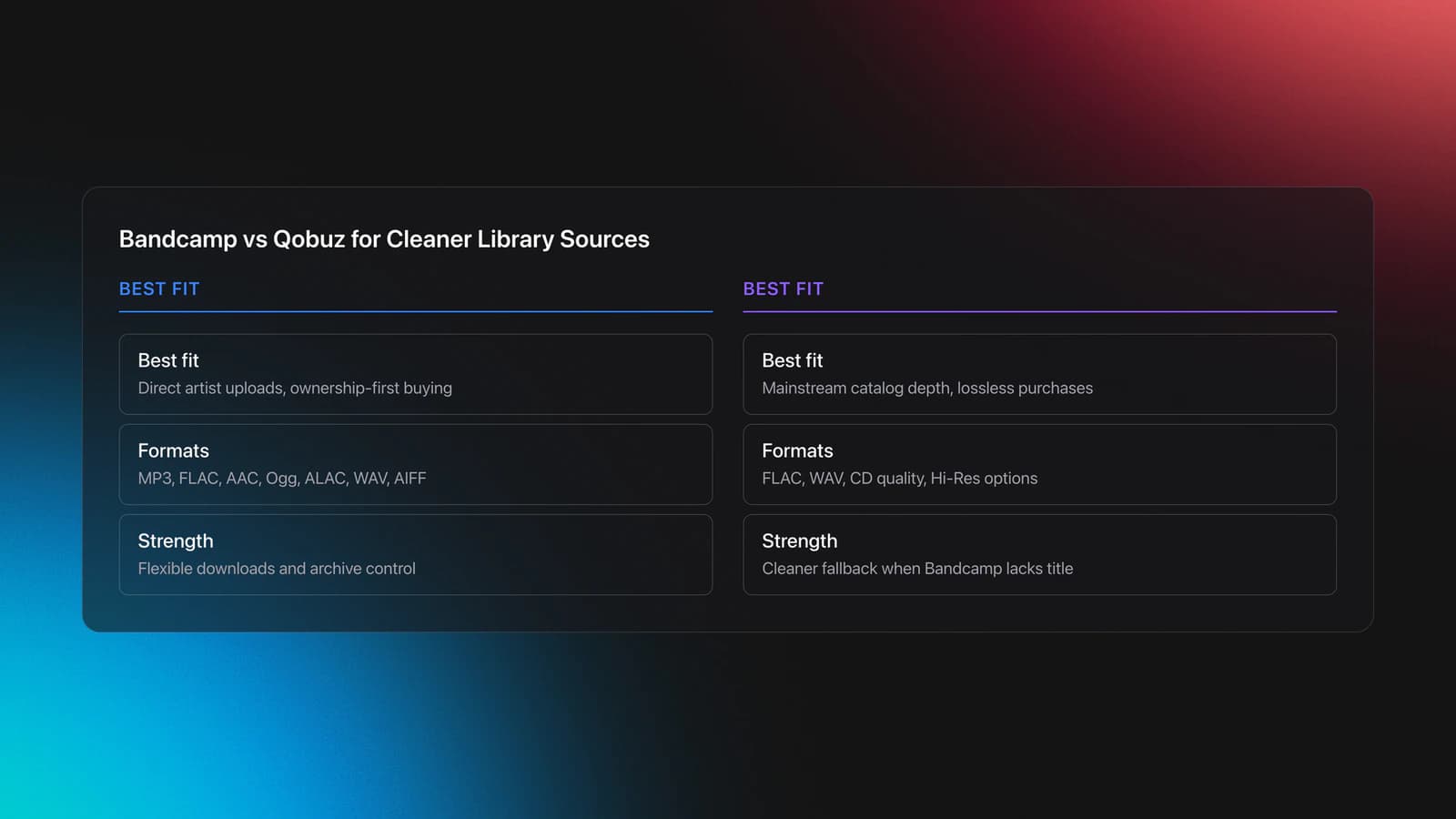
That matters more than many people realize. Bandcamp lets buyers download purchases in several formats, including FLAC, ALAC, WAV, AIFF, AAC, and MP3, which makes it useful when you want direct control over the files you keep. Qobuz also offers a download store for purchased music in lossless and Hi-Res formats, which makes it another practical source for a local collection.
This is the first mental model to keep. A music library is only as stable as its source. If the source is unstable, the library will be unstable too.
- Source quality: where the file came from and whether you can re-download it
- Metadata quality: whether tags are complete and consistent
- Structure quality: whether folders and filenames follow one rule
- Verification quality: whether you know the rip or download is correct
If one layer breaks, the others get harder to manage. Great tags on badly named folders still waste time. Clean folders with broken artist fields still split albums apart.
Validation Check
Intake: Choose Sources With Fewer Cleanup Problems
The easiest library to manage is the one that starts clean. That means choosing sources that give you reliable files, clear version information, and reusable downloads.
The transcript points to two practical download sources first: Bandcamp and Qobuz. That matches how many collectors work in practice. One tends to be strong for direct artist uploads and flexible format downloads. The other is strong for mainstream catalog depth and lossless purchase options.
Bandcamp's help documentation says buyers can download in MP3 V0, MP3 320, FLAC, AAC, Ogg Vorbis, ALAC, WAV, and AIFF. Bandcamp also says FLAC, WAV, and AIFF downloads retain the original upload's bit depth and sample rate, including 16-bit and 24-bit source files when provided.
Qobuz describes its store as offering albums in lossless CD quality and Hi-Res, and its help center explains that users can download purchases through Qobuz Downloader in formats such as FLAC and WAV. In practice, that makes both stores viable for collectors who want files they can archive rather than lease.
Example one is straightforward. If an album exists on Bandcamp in FLAC and you care about owning the file directly, buy there first. You can download once, archive it, and standardize the tags yourself.
Example two is a mainstream catalog case. If the album is missing from Bandcamp but available from Qobuz in CD-quality FLAC, Qobuz may be the cleaner source than settling for a lossy store download.
The failure mode here is buying first and checking later. You end up with mixed bit depths, different release versions, or a store-specific downloader you did not plan around.
You can reduce that risk with a simple pre-buy check:
- Confirm the release version, not just the album title
- Check available formats before purchase when possible
- Prefer stores that allow re-downloads of purchases
- Keep a note of where each album came from
This is also where transparency matters. A higher-resolution file is not automatically the better choice. Larger files increase storage and backup load. In many workflows, a clean 16-bit FLAC is the better tradeoff than collecting oversized files you will not hear a practical benefit from.
There is a reliability angle too. The most manageable source is not the highest spec one. It is the one that lets you re-download a verified copy if a drive fails or a backup goes wrong. A store that permits re-downloads of purchases is worth more to long-term library management than a marginal jump in bit depth you cannot reliably back up. The best format is the one your system handles cleanly and consistently.
Try this now. Pick ten albums from your current library. Write down the source, format, and release version for each one. If you cannot answer those three facts in five minutes, your acquisition layer needs work before you buy anything else.
Intake: Rip CDs Into a Verifiable Archive
CD ripping still matters because many albums exist in multiple masterings, and older discs can be the easiest way to get a preferred version. The goal is not just getting audio off the disc. The goal is getting a trustworthy rip with usable metadata.
dBpoweramp's official CD Ripper documentation says AccurateRip compares your rip with other users' results and that even a confidence of 1 can be enough to verify an error-free rip if it is not your own first submission. Its setup guide also notes that secure ripping can spend extreme time on damaged discs, which is useful context when a rip seems stuck.
The transcript recommends dBpoweramp on macOS and EAC on Windows. That is a reasonable split. dBpoweramp emphasizes secure ripping and metadata lookups. EAC is still widely used on Windows when users want tight control.
Example one is a clean disc. You insert the CD, let the ripper fetch metadata, rip to FLAC, and verify the result with AccurateRip or the software's equivalent confidence checks. If the rip matches known results, you can archive it immediately.
Example two is a scratched disc from eBay or a thrift store. The software may slow down, re-read frames, or flag an insecure result. In that case, clean the disc, try a different drive, or adjust secure-rip behavior before accepting the file.
This is where many libraries quietly go wrong. People assume the rip succeeded because the tracks play. That is not the same as a verified rip.
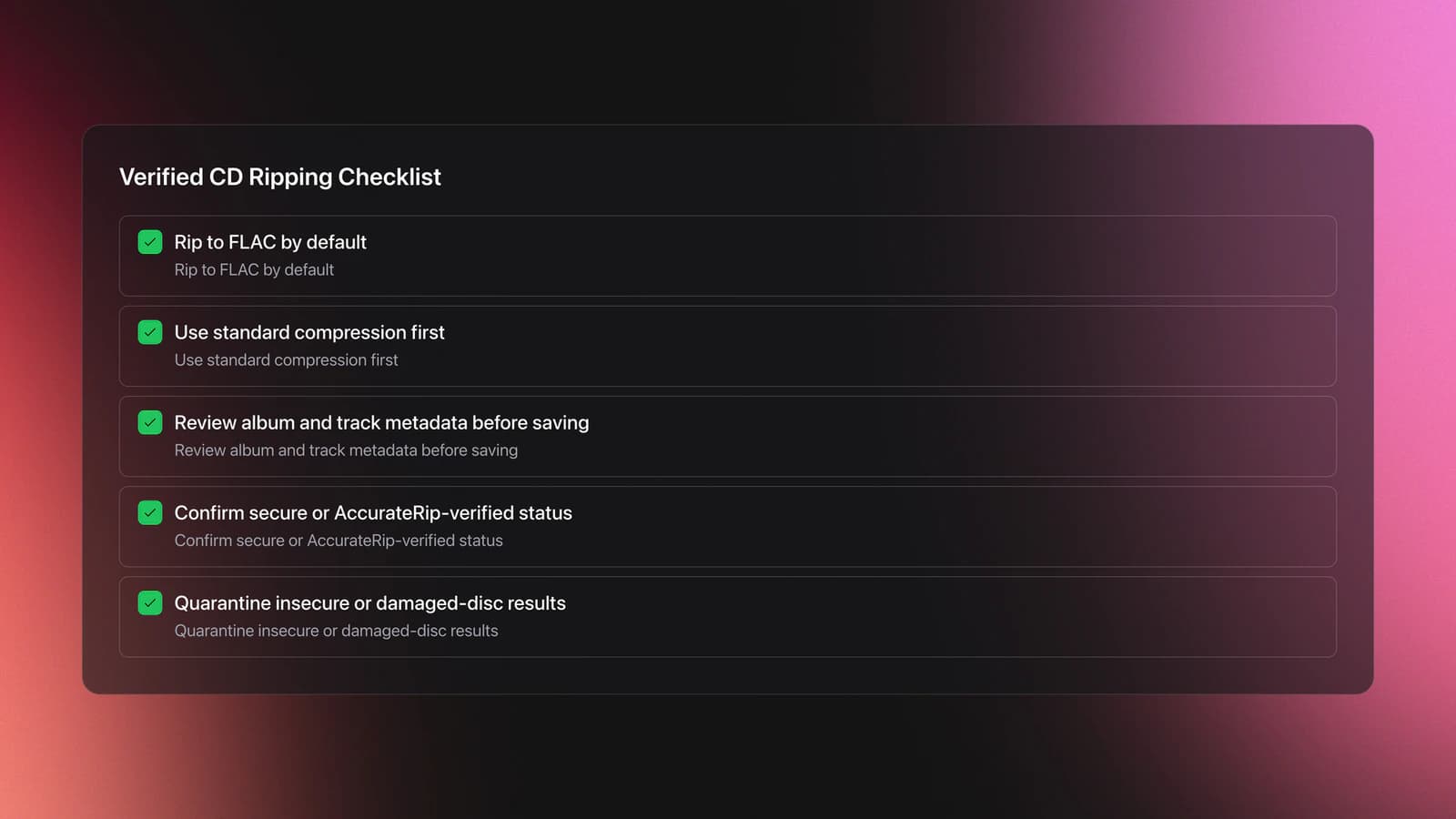
Use this basic ripping process:
- Rip to FLAC unless you have a specific compatibility reason not to
- Use the default FLAC compression setting first
- Review the fetched album, artist, year, and track titles before saving
- Check the rip report for secure or verified status
- Quarantine problem discs instead of mixing uncertain rips into the main library
A useful supporting source here is the Dynamic Range Database, which lets users compare reported dynamic-range values across different releases. It is a heuristic, not a final verdict. The transcript is right to treat it as directional evidence rather than proof of the best-sounding version.
That limitation matters. Dynamic range can help you narrow choices, but it cannot tell you whether a remaster sounds better to you overall. Use it to shortlist versions. Do not let it make the decision alone.
You will know your ripping workflow is healthy when three things happen consistently: the rip verifies, the tags arrive mostly correct, and the files land in the right folder automatically. Until a rip carries a verified status, it does not belong in the archive. Verification is the gate between Intake and Archive.
Cleanup: Standardize Archive-Level Tags
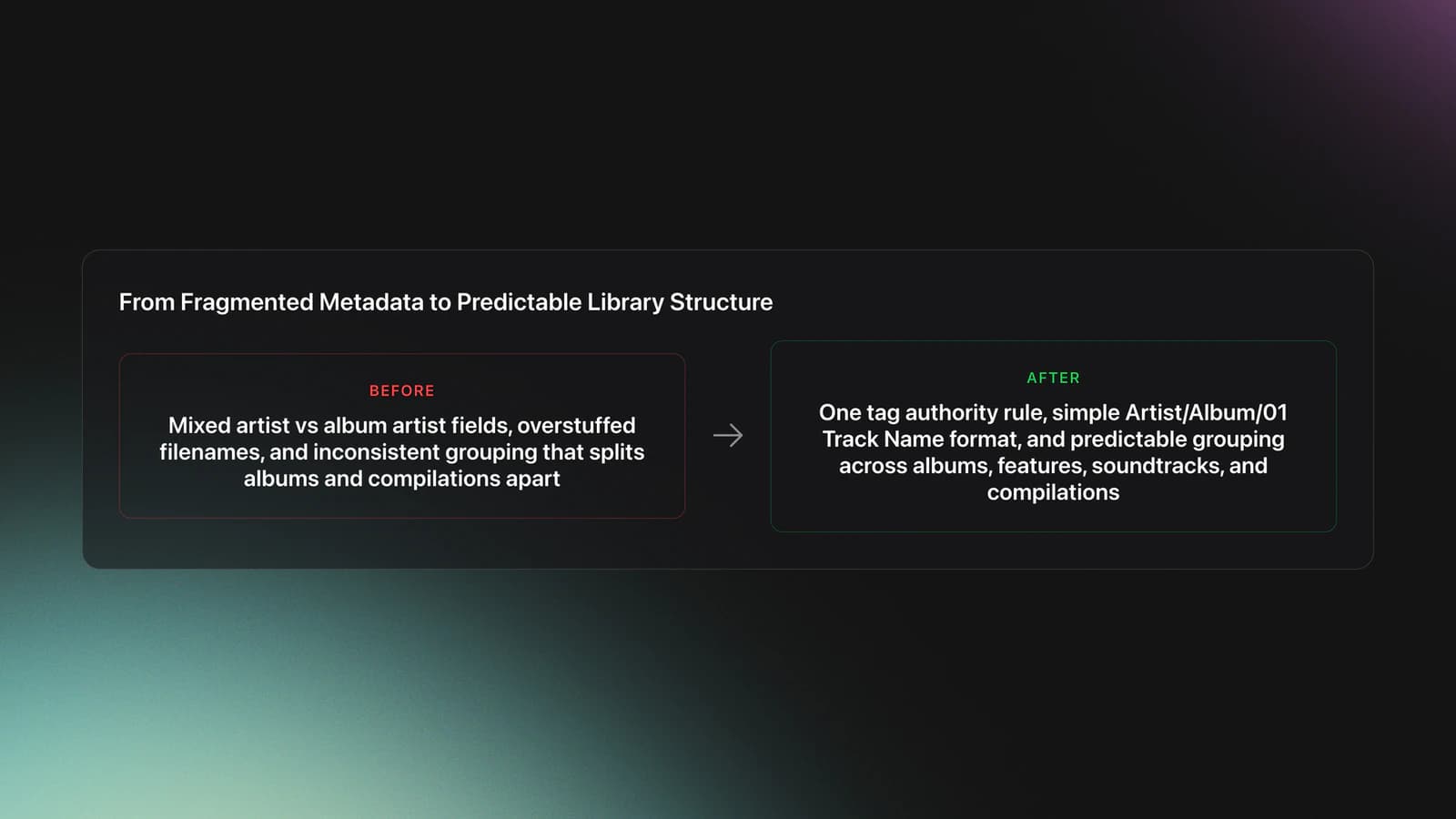
You manage your music library by standardizing tags, filenames, folder paths, and backup rules. The goal is not perfect metadata. The goal is predictable metadata.
This is the pillar section that most people skip. They buy or rip files, then trust whatever metadata came with them. That works until collaboration tags, compilation albums, featured artists, and inconsistent album artist fields split the library into fragments.
Keep this layer focused on archive-level fields only: the fields that decide how a file is identified, grouped, and stored. Artist, album artist, album, track number, year, disc number, and filename. These are the fields that keep one album from fragmenting into six. Functional and harmonic tagging for sets is covered in DJ library organization.
The transcript's approach is practical. Keep artist and album artist aligned when you want a stable library view, and move guest-artist detail into the track title if needed. That reduces unwanted album splits on players and library apps.
For tagging, one good path is a dedicated editor such as Mp3tag. Mp3tag's official site confirms it supports batch tag editing and cover art handling, which is exactly what you want when cleaning large folders instead of fixing files one by one.
MusicBrainz Picard is another strong option. MusicBrainz describes Picard as its official cross-platform tagger, and Picard documentation shows a lookup workflow built around clustering files, matching them to releases, and then saving corrected tags.
Example one is a standard studio album. Your source files may already have the right track titles, but the album artist field is inconsistent. Set album artist once across all tracks, confirm disc numbers, and save the batch.
Example two is a compilation or remix release. Here the track artist may vary on every song, but the album artist should still follow one library rule. If you do not decide that rule up front, your software will decide it for you, badly.
I call this tag authority. Tag authority means one field wins every time there is a conflict. If artist and album artist disagree, you already know which one controls shelf order, search behavior, and album grouping.
Build your naming scheme next. A simple format works best:
- Artist/Album/01 Track Name.flac
- Artist/Album/02 Track Name.flac
- Artist/Album/03 Track Name.flac
That pattern is boring on purpose. Good music library management depends on boring consistency.
The failure mode is over-customizing the scheme. People add year, bitrate, label code, version notes, and guest artists to filenames. The result becomes unreadable and fragile when tags change.
A better split is this:
- Use tags for descriptive detail
- Use folders for broad grouping
- Use filenames for order and readability
Validation is simple. Search for one artist with featured appearances, one soundtrack, and one compilation. If your library groups each case exactly the way you expect, your metadata rules are strong enough.
If not, stop importing new music for an hour and fix the schema first. Scale magnifies bad rules.
Archive: Build Folder Rules That Scale
Folders do not replace tags. They protect you when tags fail.
A scalable folder system should answer only broad questions: who is the artist, what is the release, and where does the file live. It should not try to carry every piece of music knowledge.
That means your root music folder should stay shallow. If you use too many nested folders, every import becomes a filing task.
A strong default looks like this:
- Music/Artist/Album/Tracks
- Music/Compilations/Album/Tracks
- Music/Unsure Metadata/Holding Area
- Music/Needs Re-Rip/Holding Area
Example one is a new purchase from Bandcamp. Download it into a staging folder, check tags, rename files, then move it into the main library. Never drop raw downloads straight into the archive.
Example two is a CD rip with messy metadata. Save it to a holding area first. Clean the tags there. Then promote it into the main folder only after the structure is correct.
This promotion model is the difference between a growing library and a growing mess. New files earn their place.
The failure mode is mixing trusted and untrusted files in one path. Then you cannot tell whether a missing cover image, split artist entry, or odd album title came from the source or from your edits.
Validation Check
Why the Pipeline Beats an Automatic Organizer
The best way to organize a music library is to separate intake, cleanup, archive, and playback. Each stage has one job. That keeps errors local instead of spreading them through the whole collection.
Most people search for an automatic music library organizer because they want the software to solve inconsistency after the fact. Some tools help, but no automatic music library organizer can fix unclear rules you never defined.
Use the four-stage workflow instead:
- Intake: buy, rip, or download into a staging folder
- Cleanup: standardize tags, cover art, album artist, and filenames
- Archive: move only finished files into the main library
- Playback: sync, back up, and use your preferred player or device
This workflow also explains why the best music library management software varies by task. A ripper is not a tagger. A tagger is not a player. A player is not a backup system.
In other words, stop looking for one app to do everything perfectly. Look for a clean handoff between apps.
Common Music Library Management Mistakes
| Mistake | Why It Happens | How to Avoid |
|---|---|---|
| Mixing raw downloads with finished files | There is no intake stage | Use a staging folder before archive import |
| Letting album artist vary track by track | Metadata came from different sources | Set one album artist rule and batch-edit it |
| Overloading filenames with too much detail | Folders and tags are not trusted | Keep filenames short and move detail into tags |
| Accepting every CD rip as correct | Playback seems fine at first listen | Review rip logs and verify secure results |
| Depending on one app for every task | All-in-one convenience feels simpler | Use separate tools for ripping, tagging, and playback |
Specific failure patterns that make a local library harder to search and maintain
Music Library Management Software Options
If you are comparing music library management software, match the tool to the job first. The transcript gives a sensible stack rather than a single winner.
- dBpoweramp: strong for CD ripping and secure verification
- EAC: Windows-focused ripping with detailed control
- Mp3tag: strong batch tag editing
- MusicBrainz Picard: release matching and metadata cleanup
That is why terms like best music management software or best music library organizer software can be misleading. Best depends on whether you need ripping, tagging, deduplication, or playback cleanup. Match the tool to the stage of the pipeline, not to a marketing claim.
Playback: Back Up and Sync Without Breaking Structure
A library is not managed until it is recoverable. Backup is part of music library management, not an afterthought. This is the stage where verification pays off, because you only want to back up files you trust.
The transcript mentions uploading the library to Google Drive for syncing across devices. That is a valid convenience layer, but it should sit on top of a local master folder, not replace it.
Keep one canonical library on a primary drive. Then back it up to at least one external copy and one cloud or off-site copy if the collection matters to you. The common 321 idea is a useful anchor: three copies, on two kinds of media, with one off-site.
- Primary library on local storage
- Secondary backup on an external drive
- Optional cloud sync for convenience and disaster recovery
The failure mode is syncing a bad edit everywhere. Cloud sync is fast. So are mistakes. A corrupt rip or a botched tag batch propagates to every device before you notice.
Use versioned backups if possible. That way a broken tag batch or folder move does not become permanent on every device. Versioning is the safety net that lets you undo a bad Cleanup pass after it has already reached the Archive.
You will know your backup plan is good when you can restore one album, one artist folder, or the whole library without rebuilding tags from memory.
Keep the System Boring
The best music library management system is the one you can repeat without thinking. Keep your source rules clear. Keep your tags consistent. Keep your folders plain. Verify before you archive, and back up before the collection grows.
Three takeaways matter most:
- Separate intake from archive
- Define one metadata rule for each conflict-prone field
- Verify and back up before the collection gets large
Once those pieces are stable, every later task gets easier. Search improves. Playback improves. Migration improves. And once the archive is clean, the next step is turning it into performance-ready views, which is the job a DJ-focused tool like Vibes is built for: it sits on top of a clean archive and turns it into set-ready, key-aware crates. That is where DJ library organization takes over.
The visual way to organize your DJ library
Tag tracks by vibe. See everything at once. Export to rekordbox, Serato, Traktor or Engine DJ.
14-day free trial. Full access, no strings attached.
or see how it works
Techniques Covered


Equipment & Software
Continue Your Learning Journey
Frequently Asked Questions

Hey, it's Ben Modigell 👋
I DJ and produce as so I so: downtempo, minimal, dub house, tech house, and techno (releases on Spotify and SoundCloud, links above). Everything I write here comes from my own gigs, studio sessions, and library cleanups: the rules I follow, the failure modes I have actually hit, and the workflow I use when nobody is watching. If a technique did not earn its place in my own sets, it does not make it into a tutorial.