Watch djlive408’s tutorial above (15K views on YouTube).
This guide is for DJs who need a better way to source music fast without losing control of quality or variety. If you are stuck comparing subscriptions, catalogs, and download workflows, this will show you how a dj record pool works, how to judge one, and how to build a system you can trust.
A dj record pool is a membership-based music source built for DJs. Most pools give you access to curated releases, edits, remixes, clean versions, and download tools that are easier to use in performance prep than general consumer platforms, according to <a href="What is a record pool%22>DJcity's record pool overview</a> and <a href="How do record pools work%22>its explanation of how record pools work</a>.
The real question is not whether a dj pool exists. It is whether the pool fits your gigs, your genres, and your prep style.
DJ Record Pool Basics
A good dj record pool solves three problems at once. It shortens music discovery, gives you DJ-friendly versions of tracks, and keeps your download process repeatable.
That matters more than beginners think. The bottleneck is rarely finding one song. It is building a usable library week after week.
Most services use a subscription model. You pay for access to a catalog, then download tracks or edits from that catalog. Some pools focus on a single lane, like club edits or mainstream crossover tracks. Others go wider across Latin, hip-hop, house, radio, and electronic music.
This is where many DJs make a bad choice. They buy the cheapest or most popular pool, then discover it only covers one slice of their actual work.
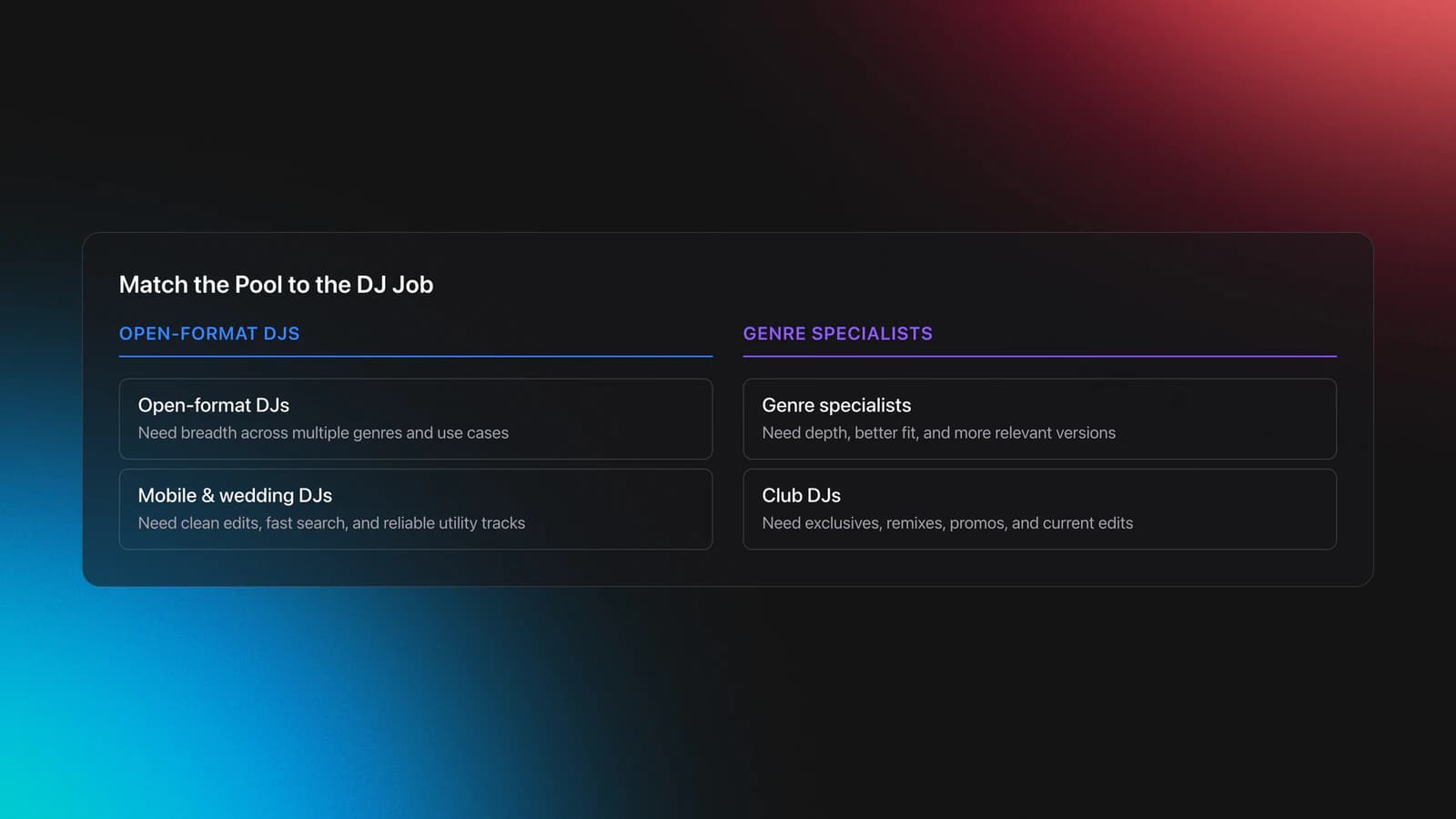
- Open-format DJs usually need breadth.
- Genre specialists usually need depth.
- Mobile and wedding DJs often need clean edits and fast search.
- Club DJs often care more about exclusives, remixes, and current promos.
According to <a href="Why every DJ needs a record pool in 2...>DJcity's 2026 overview of why DJs use record pools</a>, the core value is curated DJ-ready music, time savings, and access to edits that are not usually front and center on mainstream listening services.
In practice, a dj music pool is less like a store and more like an intake system. You are not shopping track by track. You are feeding your performance library.
Choose a DJ Record Pool by Workflow
The best dj record pool for you depends on the type of sets you play. That sounds obvious, but many DJs still compare pools by headline price instead of workflow fit.
Start with your set demands. If your nights move from downtempo to minimal, then into dub house, tech house, and techno, you need a pool that supports energy progression instead of just giving you chart singles. Experienced DJs usually learn this through curation, not theory. The pool has to serve the story you want to tell.
The transcript points to a common friction point. Single-brand pools can feel narrow if you like a lot of styles. A broader digital dj record pool can be more useful when you want remixes, label promos, and multiple source catalogs in one place.
This is also where library structure starts to matter. If you pull large batches from different suppliers, you need a way to organize by function, mood, and energy before the files disappear into one hard drive folder. Some DJs use spreadsheets. Others use library tools like Vibes to create custom categories, track sorting progress, and export a clean playlist structure to DJ software later.
A broad music pool for DJs is useful only if you can retrieve what you downloaded. Variety without structure becomes clutter.
Use this checklist before you subscribe to any dj download pool:
- List your main gig types.
- Write down your core genres and edge genres.
- Check whether the pool offers clean, intro, remix, and instrumental versions.
- See if downloads are website-based, app-based, or FTP-based.
- Confirm whether limits are monthly, traffic-based, or catalog-based.
- Estimate how much duplicate content you can tolerate.
You will know you picked the right dj pool when new downloads land in your set prep process without friction. You should be able to sort, test, and retrieve tracks in minutes, not hours.
How Do You Use a DJ Record Pool?
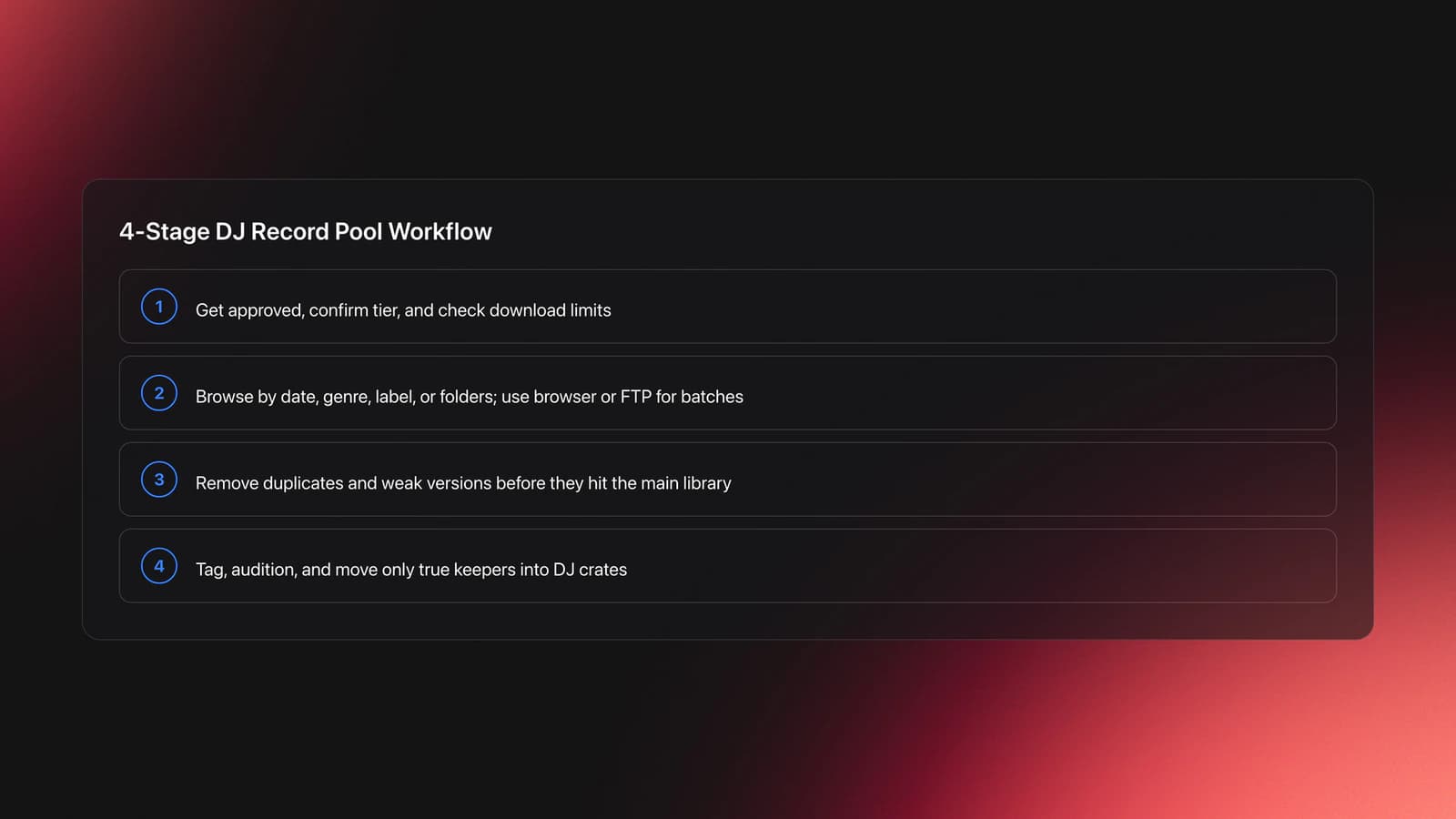
Most DJs use a dj record pool in four stages. Access, download, sort, then test.
The transcript shows a slightly older but still useful pattern. Instead of downloading only through a browser, some services provide credentials for a separate transfer method such as FTP. That gives you another way to move larger batches of music onto your drive.
FTP sounds technical, but the workflow is simple once configured. You install a client, paste in the host, username, password, and port, connect to the server, browse folders, then queue downloads. <a href="filezilla-project.org>FileZilla's official documentation and download page</a> is the standard reference for this style of workflow.
That setup method matters because it changes your pace. Website downloads are fine for singles. FTP-style access is better when you want complete folders, date-based batches, or larger archive pulls.
A practical workflow looks like this:
- Get approved and confirm your access tier.
- Check your remaining download allowance or traffic cap.
- Browse by date, genre, label, or collection.
- Download folders or selected tracks.
- Remove duplicates and weak versions.
- Tag, test, and move keepers into your DJ library.
The failure mode is easy to spot. You download faster than you review. That creates a bloated archive full of duplicates, alternate versions, and tracks you will never play.
The fix is batching. Download one date range or one genre block at a time. Then review immediately.
You will know the process is healthy when each session ends with a smaller, better library than you started with. Intake should improve your selection, not just increase file count.
Evaluate Catalog Depth and File Quality
This is the pillar section most DJs skip. They look at brand names, not at what actually lands on disk.
Catalog depth means more than having many tracks. It means having useful versions of tracks, across useful genres, at a useful refresh rate.
The transcript highlights why breadth can matter. A DJ who plays Latin, hip-hop, house, electronic, and crossover edits gets more value from a pool that aggregates many remixers and promo sources than from a narrower site with one editorial voice.
But breadth creates its own problem. More source catalogs often mean more duplicate tracks. The same hit may appear in several folders, with tiny naming differences and multiple edits.
Treat this as a catalog math problem. Your goal is not maximum volume. Your goal is highest usable yield.
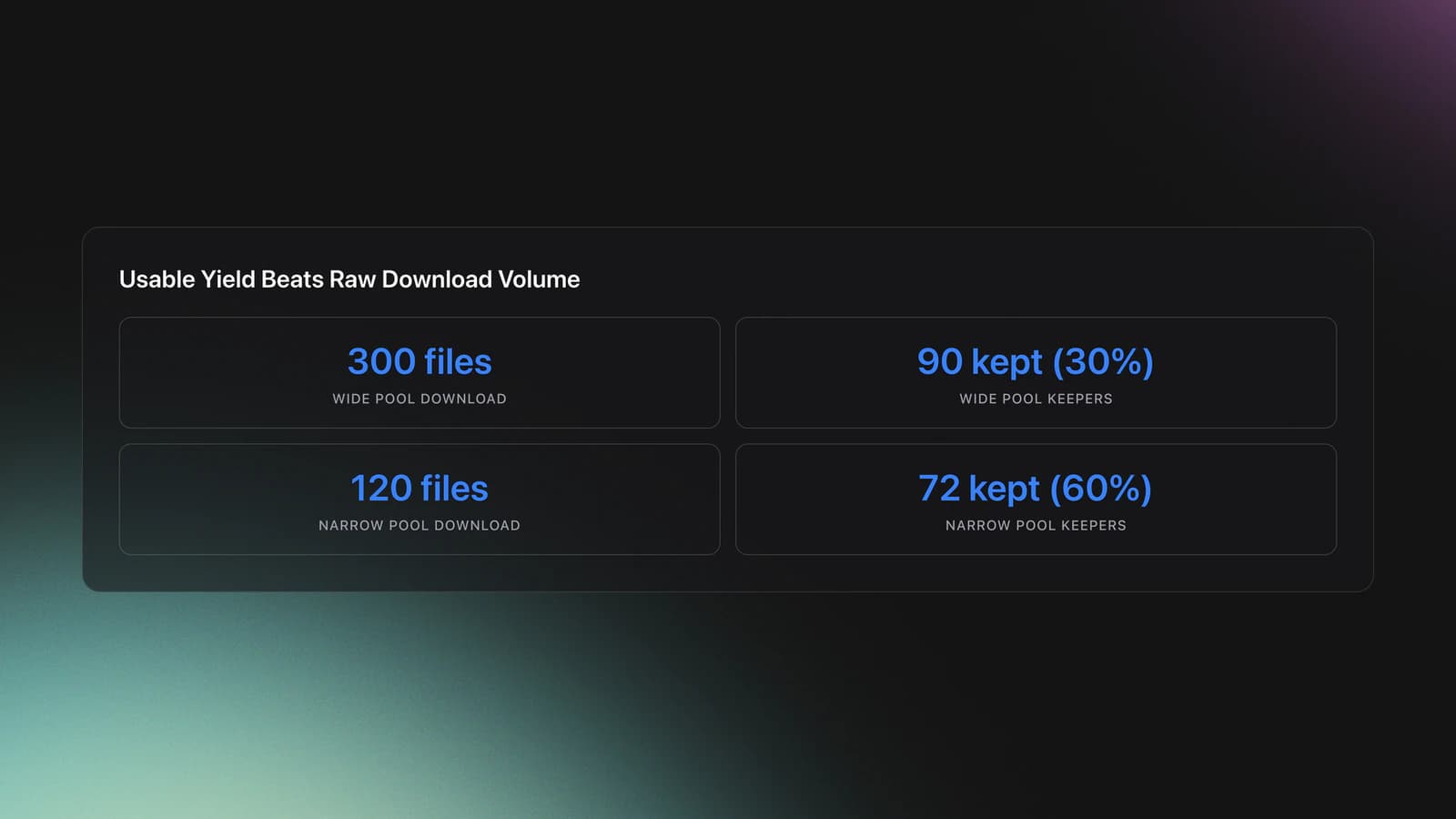
I call this the usable yield rule. Usable yield is the share of downloaded files that actually earn a place in your prepared library.
Example one. You download 300 files from a wide mp3 dj pool. After review, 90 are real keepers, 60 are duplicates, 80 are off-brand for your gigs, and 70 are weak edits. Your usable yield is 30 percent.
Example two. You download 120 files from a narrower pool built around your style. You keep 72, reject 18 duplicates, and discard 30 that do not fit. Your usable yield is 60 percent.
The second pool may be the better investment even if it looks smaller on paper.
File quality needs the same practical lens. The transcript notes 320 kbps MP3 files as a typical top-end download format in that workflow. That is common for record pools, though available formats vary by service and release.
Do not reduce quality to bitrate alone. Check these four things:
- Whether files are consistently tagged.
- Whether clean and explicit versions are clearly labeled.
- Whether intro and remix names are distinct.
- Whether the same track appears with conflicting metadata.
Here is a practical validation method. Download one small batch from a dj music pool site and inspect ten files. Check bitrate, naming consistency, version labeling, and genre relevance. Then load those files into your DJ software and see whether you can identify the right version without opening every track.
If you cannot tell the clean edit from the dirty edit in your browser or software, the pool is already costing you time.
The symptom of a weak system is simple. You know you downloaded the right track, but you still cannot find it when building a set.
The result is not just wasted time. It breaks flow. DJs who play by feel still need structure underneath that intuition.
You will know your catalog review process works when each new download session produces a smaller shortlist with clear tags, obvious versions, and direct set use cases.
Build a Download and Sorting Routine
A dj record pool only pays off if you turn downloads into decisions. That means you need a repeatable intake routine.
The transcript shows a date-based folder approach. That is a good start because it gives you a review queue. You know what is new, what arrived this month, and what still needs a pass.
Go one level further. Separate intake folders from approved performance folders.
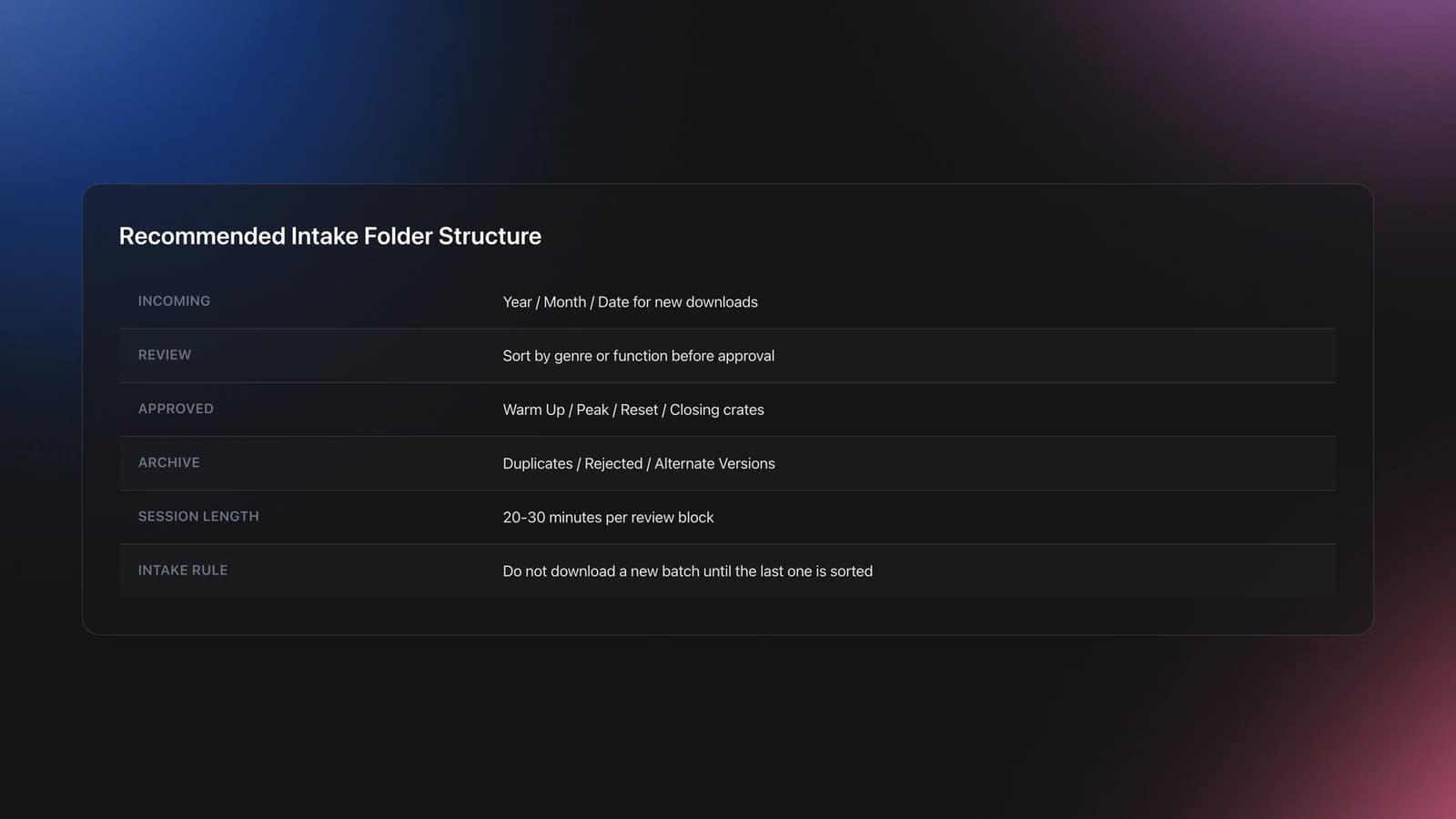
A simple structure could look like this:
- Incoming / Year / Month / Date
- Review / Genre or Function
- Approved / Warm Up, Peak, Reset, Closing
- Archive / Duplicates, Rejected, Alternate Versions
Example one. You grab a folder of mainstream edits and crossover tracks for a mobile set. During review, move only the clean, high-energy keepers into Approved / Peak. Move alternate intros and weaker remixes into Archive.
Example two. You download minimal and dub house promos for a club warm-up. During review, keep tracks with controlled groove and room to build. Move big-room outliers away from the warm-up crate even if they are good tracks.
That second example is where self-taught DJs often improve fastest. Many people start by playing whatever they like. Over time, they learn selection by function. A lot of working DJs built that instinct informally, just playing with friends, uploading sets, and learning by feel. The useful lesson is not nostalgia. It is that your sorting system should reflect set purpose, not just genre names.
Keep each review session short. Twenty to thirty minutes is enough.
If you review too long, standards drop. Everything starts sounding playable.
The main failure mode is backlog. Incoming folders pile up, gig pressure rises, and you start dragging unreviewed files straight into sets.
Prevent that by setting an intake cap. Do not download another batch until the last batch is sorted.
Are DJ Record Pools Worth It?
Yes, a dj record pool is worth it when your usable yield is high and your prep time drops. It is not worth it when you pay for access but still spend hours digging through irrelevant files.
This is the right way to judge value:
- How many gig-ready tracks did you keep this month?
- How often did you find clean or DJ-friendly versions you needed?
- How much time did the pool save compared with buying track by track?
- Did the catalog match your actual events?
If the answer is strong on all four, the subscription is doing its job.
If not, the fix is not always to cancel. Sometimes you need a narrower pool, a broader pool, or a tighter sorting routine.
Common DJ Record Pool Mistakes
| Mistake | Why It Happens | How to Avoid |
|---|---|---|
| Choosing by price alone | A cheap plan looks efficient but may not fit your gigs | Compare catalog fit, edits, and workflow first |
| Downloading everything | Large catalogs create false urgency | Work in small batches and review immediately |
| Ignoring duplicates | Wide-source pools often repeat tracks across folders | Run duplicate checks and archive alternate versions |
| Mixing intake with performance files | New downloads go straight into your main library | Keep separate Incoming, Review, and Approved folders |
| Judging quality by bitrate only | Bitrate is visible, metadata quality is not | Inspect naming, edits, tags, and version clarity |
Most dj record pool problems come from workflow, not access.
Conclusion
A dj record pool is not just a place to get music. It is part of your performance system.
If you choose a pool that matches your gigs, review downloads in batches, and organize by function instead of file volume, the value becomes obvious.
- Pick a pool by workflow fit, not headline price.
- Measure value by usable yield, not raw download count.
- Turn every download session into sorting and set prep.
From there, your next step is simple. Audit your current source, test one better intake routine, and make your library easier to play by feel.
The visual way to organize your DJ library
Tag tracks by vibe. See everything at once. Export to rekordbox, Serato, Traktor or Engine DJ.
14-day free trial. Full access, no strings attached.
or see how it works
Techniques Covered

Equipment & Software
Featured Gear
Continue Your Learning Journey
Start Here First






Frequently Asked Questions

Hey, it's Ben Modigell 👋
I DJ and produce as so I so: downtempo, minimal, dub house, tech house, and techno (releases on Spotify and SoundCloud, links above). Everything I write here comes from my own gigs, studio sessions, and library cleanups: the rules I follow, the failure modes I have actually hit, and the workflow I use when nobody is watching. If a technique did not earn its place in my own sets, it does not make it into a tutorial.