
Pioneer CDJ-400
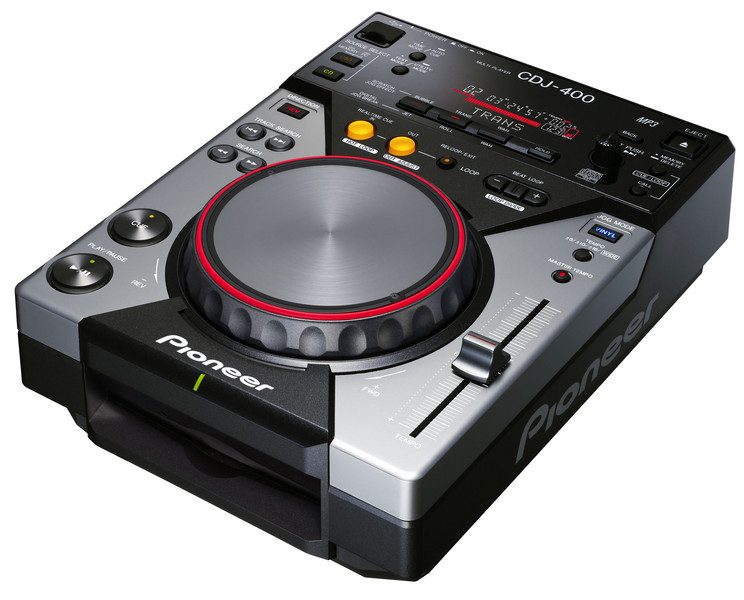
·Pioneer DJA discontinued digital DJ media player that plays CDs and MP3 files from USB storage, and can also work as a MIDI controller and USB audio interface.
Quick Answer
The Pioneer CDJ-400 still makes sense for one type of buyer: the DJ who wants real media-player workflow without paying modern club-gear prices. It is discontinued, but the Pioneer CDJ-400 remains relevant on the used market because it combines CD playback, USB MP3 playback, MIDI control, and a built-in USB audio path in one compact deck.
If you are weighing a used pair against a controller, the big question is simple. Do you want to practice on separate players and a mixer, or do you want the cheapest path into digital DJing? The Pioneer CDJ-400 favors the first route.
CDJ-400 Overview
The CDJ-400 is a compact digital media player aimed at aspiring club DJs who want hands-on deck control at home. Pioneer positioned it as an affordable performance player inspired by the CDJ-1000 line, with support for CD, CD-R/RW, USB mass storage, MIDI over USB, and third-party DJ software.
That mix of old and new is the whole story here. You get a physical deck with a 115 mm jog wheel, pitch fader, cue buttons, looping, and digital outputs, but you do not get the modern rekordbox workflow people now expect from newer Pioneer players.
For that reason, the CDJ-400 is best understood as a bridge product. It sits between the CD era and the fully networked USB library era.
According to Pioneer DJ official product page, the deck was built for home use by aspiring club DJs and supports MP3 playback from both discs and USB devices. The same page also confirms MIDI output over USB and compatibility with external DJ software.
Pioneer CDJ-400 Features
The Pioneer CDJ-400 stands out because it does more than basic disc playback. It adds USB media support, MIDI control, onboard creative effects, and memory functions that made it unusually flexible for its generation.
The most important feature is USB playback. You can load MP3 files from USB mass storage devices formatted in FAT16 or FAT32, which was a major step forward at launch. The limitation is equally important: this is an MP3-era deck, so it is not a modern high-resolution file or full library-management machine.
The 115 mm jog wheel is another core feature. It supports pitch bend, scratch play in Vinyl mode, frame search, and fast search. In practice, that means the deck feels much closer to a proper CDJ than cheap tabletop players from the same era.
Pioneer also included Scratch Jog Effects and Digital Jog Break functions. You get BUBBLE, TRANS, and WAH in Scratch Jog Effect mode, plus JET, ROLL, and WAH in Digital Jog Break mode. Those effects feel dated next to current performance features, but they still add character for home mixing and older-school digital sets.
MIDI and computer integration matter just as much. The CDJ-400 can send control data over USB and output computer audio through the deck, which helped it work with DJS, Traktor, and Serato Scratch Live. The AlphaTheta CDJ-400 firmware page notes that later firmware also improved controller use and internal sound-card behavior.
If your goal is modern club prep, a newer Pioneer CDJ-350 or XDJ-700 is the cleaner path. If your goal is low-cost deck-and-mixer practice, the CDJ-400 still has a case.
Technical Specifications
The core CDJ-400 specs are still easy to verify because Pioneer manuals remain online. They show a compact player with proper analog and digital outputs, USB computer connection, and stronger audio specs than many entry controllers.
| Specification | Details |
|---|---|
| Dimensions | 217.9 x 107.5 x 296.3 mm |
| Weight | 2.7 kg |
| Jog wheel | 115 mm diameter |
| Frequency response | 4 Hz to 20 kHz |
| Signal-to-noise ratio | 115 dB or more (JEITA) |
| Distortion | 0.006% (JEITA) |
| Power consumption | 17 W |
| Analog outputs | Stereo RCA |
| Digital output | RCA coaxial digital out |
| Computer connection | USB for MIDI/control and audio-driver support |
| Media support | CD, CD-R, CD-RW, MP3 on CD-ROM, MP3 on USB |
The operating manual confirms the analog RCA outputs, coaxial digital output, control port for relay play and fader start, and USB connection to a computer. It also lists USB mass storage support, up to eight folder levels, and a maximum of 20,000 files on USB media.
One detail worth noting is driver support. The current AlphaTheta CDJ-400 Windows driver page still lists the CDJ-400 among supported models for the common Windows 10 and Windows 11 driver package. That is useful, but it does not turn the unit into a modern first-party software deck.
Who Is This For
The CDJ-400 is best for DJs who want separate decks and a mixer, but do not need modern club-standard networking or rekordbox prep. It suits home practice, small bar setups, and buyers who enjoy older Pioneer hardware.
It makes the most sense for intermediate DJs. Beginners can use it, but a modern controller such as the DDJ-FLX4 is usually easier, cheaper, and better integrated with current software.
It also works for budget-conscious vinyl or hybrid DJs who want digital decks beside an external mixer. The analog RCA and digital out options make setup straightforward, and the control port supports simple Pioneer mixer integration.
It is less ideal if you are training specifically for current club booths. You will not get Pro DJ Link, large waveform displays, USB library browsing like newer CDJs, or the screen behavior most venues now expect.
In Practice
In real use, the CDJ-400 feels more serious than its size suggests. The deck layout is direct, the pitch control is long enough to work with, and the jog wheel is large enough to make cueing and nudging feel intentional rather than cramped.
That matters more than headline features. Under real club conditions, workflow speed and low-light clarity tend to matter more than headline features.
The CDJ-400 handles that side well. Its screen is simple, but the controls are clearly grouped, and the deck does not ask you to dive through modern layers of menu logic.
The tradeoff is library speed and media format limits. USB playback is useful, but file browsing is nowhere near as fluid as newer players, and the system was built around MP3 workflows rather than today's broader file support and metadata habits.
Software control is a second use case, not the main one. If you already use Traktor or other legacy-friendly software, the deck can still be part of a fun hybrid setup. If you want plug-and-play laptop DJing in 2026, newer controllers are easier.
The result is a deck that still teaches solid habits. You work with separate sources, manual cueing, physical pitch control, and mixer-based decisions. That is why older CDJs like this still appeal to people who want a more deliberate workflow than a compact controller offers.
Pros and Cons
The CDJ-400 remains appealing because it gets the essentials right. It also shows its age in ways that matter before you spend used-market money.
Pros
- Compact but serious deck layout.
- USB and CD playback in one unit.
- MIDI and computer-audio flexibility.
- Analog and digital outputs.
- Good used-market route into mixer-and-deck workflow.
Cons
- -Discontinued product with legacy support.
- -MP3-focused media support.
- -No rekordbox ecosystem or Pro DJ Link.
- -Older display and slower browsing.
- -Value depends heavily on used condition.
Price and Value
The CDJ-400 is a used-market buy, not a current mainstream retail product. Sweetwater still shows a legacy reference page with a $699 price, but also states that the model is no longer available, so that figure works best as historical street-price context rather than a realistic buying baseline.
Current value is shaped by used listings. Recent Reverb and eBay results show that single units can still appear in the low hundreds, while cleaner pairs or bundles can push much higher depending on condition, accessories, and whether a matching DJM-400 is included.
That means the CDJ-400 is only good value at the right price. If you can buy a well-kept pair cheaply, it is a fun and practical way to learn deck-based mixing. If the asking price gets too close to newer entry gear, the math changes fast.
In other words, buy the CDJ-400 for workflow, not for future-proofing. If you want modern software integration and easier resale, a newer digital DJ controller is usually the smarter spend.
Alternatives
The obvious alternatives depend on what you actually need. Some buyers want newer Pioneer media players. Others simply want the cheapest reliable route into digital DJing.
| Product | Price | Key Difference |
|---|---|---|
| Pioneer CDJ-350 | Varies used | Adds rekordbox-era workflow and feels closer to modern Pioneer players. |
| Pioneer XDJ-700 | Current retail product | Touchscreen, network features, and stronger club-transfer value. |
| Pioneer DJ DDJ-FLX4 | Budget current product | Controller format is simpler, cheaper, and better for laptop-based beginners. |
If you want a stepping-stone to club booths, the CDJ-350 and XDJ-700 are the better alternatives. If you just want to mix at home for the least money and effort, a controller wins.
Pioneer CDJ-400 vs CDJ-2000
These are different generations, not just different sizes. The CDJ-400 (2007) is a compact home/practice player; the CDJ-2000 is the big club-standard unit built around the rekordbox ecosystem.
| CDJ-400 | CDJ-2000 | |
|---|---|---|
| Era / use | 2007, home and practice | Pro club and festival standard |
| Screen | Small text-only display | Large full-color screen, shows waveforms |
| Media | CD + USB (FAT32 MP3), slower USB | Fast modern USB, links multiple players |
| rekordbox | Not part of the rekordbox ecosystem | Full rekordbox support |
| Price today | Cheap used | Much more expensive |
CDJ-400 vs CDJ-2000, verified against Pioneer DJ and reviews. The CDJ-400 was one of the last CDJs before Pioneer moved fully to the rekordbox/USB workflow.
Choose it if
- You want a cheap used USB and CD player for home practice or a simple second deck, and you value big transport controls over screens.
Skip it if
- -You need rekordbox, waveform displays, fast USB, or club-standard reliability.
- -Look at a modern CDJ or standalone player instead.
Watch
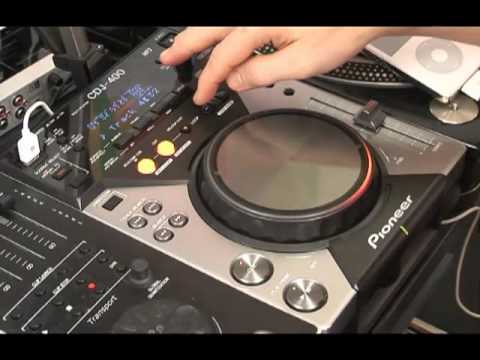
Bottom Line
The Pioneer CDJ-400 is not a hidden modern bargain. It is a legacy deck with a specific kind of value.
If you want the feel of separate DJ players, a proper pitch fader, a real jog wheel, and simple mixer-based workflow, it still delivers. The hardware design remains practical, compact, and more teachable than many cheap all-in-one options.
But you should buy it with clear eyes. The CDJ-400 is discontinued, limited by older media support, and no substitute for current club-standard Pioneer gear.
For the right buyer, though, that is fine. It is a useful used-market deck, not a future-proof investment.
Continue readingNext: the Pioneer CDJ-3000What a modern club-standard player adds over the CDJ-400.The visual way to organize your DJ library
Tag tracks by vibe. See everything at once. Export to rekordbox, Serato, Traktor or Engine DJ.
14-day free trial. Full access, no strings attached.
or see how it works
Tutorials Using Pioneer CDJ-400




DJ Techniques Using This Gear
See how DJs and live performers incorporate Pioneer CDJ-400 into their workflow.



Frequently Asked Questions

Hey, it's Ben Modigell 👋
I DJ and produce as so I so: downtempo, minimal, dub house, tech house, and techno (releases on Spotify and SoundCloud, links above). Everything I write here comes from my own gigs, studio sessions, and library cleanups: the rules I follow, the failure modes I have actually hit, and the workflow I use when nobody is watching. If a technique did not earn its place in my own sets, it does not make it into a tutorial.