Watch ILLYA 2.0’s tutorial above (80K views on YouTube).
A portable DJ controller is for DJs who want to practice, prep, or play without carrying a full booth-sized setup. If you are stuck choosing between a mini DJ controller, a compact DJ controller, and a small controller that still feels usable, this guide will help you compare the tradeoffs and pick the right size for your workflow.
The core decision is not just portability. It is portability versus control density. The best portable DJ controller is the one you will actually carry, set up fast, and trust when you need to mix.
If you are still building your broader workflow, it helps to pair gear decisions with a clear prep system like a DJ library organization workflow, so the controller fits how you find and sequence tracks.
Portable DJ Controller: What Matters Most
Most buyers start with size. Experienced DJs start with use case.
A portable DJ controller usually solves one of four jobs: hotel-room practice, travel content creation, backup performance, or ultra-light mobile DJing. Those jobs need different things. A controller that works well on a train tray table may feel cramped in a live set.
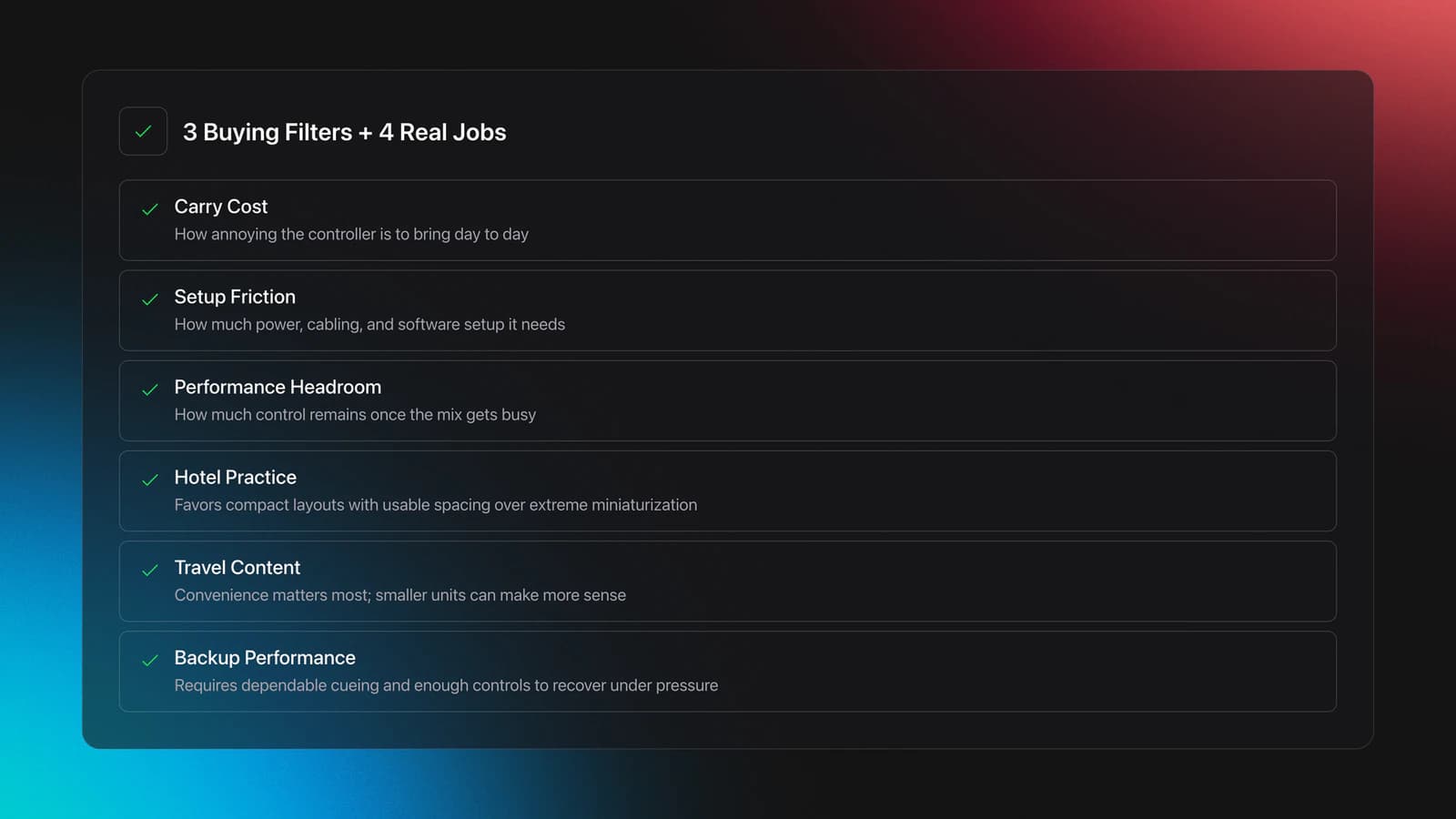
I use a simple frame here: carry cost, setup friction, and performance [headroom](/glossary/headroom). Carry cost is how annoying the unit is to bring. Setup friction is how much extra power, cabling, and software setup it needs. Performance headroom is how much control you still have once the mix gets busy.
This is where many reviews go wrong. They rank the smallest unit highest because it is tiny, but ignore whether you can cue, mix, and recover smoothly under pressure.
For example, the AlphaTheta DDJ-FLX2 is positioned as its lightest and most compact controller, weighs 1.2 kg, and supports desktop and mobile DJ apps including rekordbox, djay, and Serato DJ Lite according to AlphaTheta's DDJ-FLX2 specifications and the related software compatibility documentation. That makes it a strong travel-practice option, but it still sits in the "compact controller" class, not the true pocket class.
At the smaller end, the Hercules DJControl Starlight is marketed as an ultra-portable controller with a built-in sound card and touch-sensitive jog wheels in Hercules product documentation. That changes the value proposition. You give up surface area, but gain a controller you will actually throw in a bag.
In practice, your buying decision gets easier once you stop asking, "What is the best portable DJ controller?" and start asking, "What is the smallest controller I can use without fighting it?"
Portable DJ Controller Sizes Compared
The market is easier to read if you split it into three size bands.
| Size Band | What It Feels Like | Best Use | Main Compromise |
|---|---|---|---|
| Pocket / micro DJ controller | Fits in a small bag and works on tight surfaces | Travel practice, casual sessions, backup | Crowded controls and shorter faders |
| Mini DJ controller | Still small, but with more workable spacing | Practice, house parties, mobile streaming setups | Less rugged portability than true micro units |
| Compact DJ controller | Laptop-bag friendly, closer to standard layout | Serious prep, small gigs, travel with fewer compromises | Heavier and less spontaneous to carry |
Portable DJ controller categories work better than brand-by-brand shopping at the start.
A pocket DJ controller sounds ideal until you try long blends, quick EQ corrections, or tight cueing. Small controllers are efficient when your moves are simple. They become limiting when your transitions get layered.
A mini DJ controller often lands in the sweet spot. You still get genuine portability, but the controls have enough separation to avoid accidental hits.
A compact DJ controller is usually the right answer if you want one device for travel and real playing. It is less fun to carry, but more forgiving when the set gets messy.
You will know you picked the right size when you can perform basic tasks without looking down at every control. If you need constant visual confirmation, the controller is probably too small for your current level or intended use.
Best Portable DJ Controller Use Cases
The best portable DJ controller changes with the context. That is why generic ranking lists feel thin.
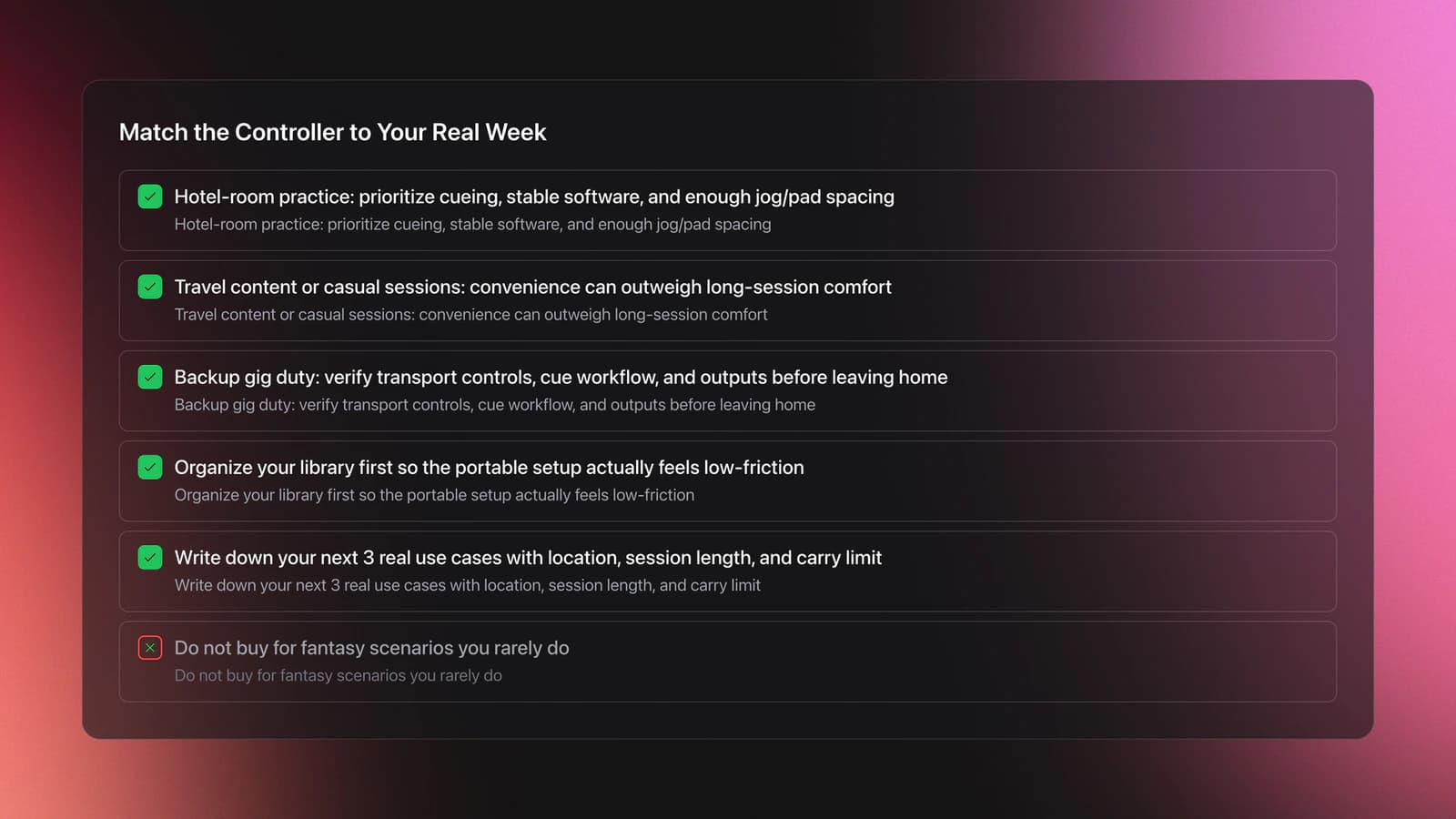
For hotel-room practice, prioritize headphone cueing, stable software support, and enough jog or pad spacing to rehearse transitions properly. You do not need huge outputs. You do need a layout that lets your hands build repeatable habits.
For travel content or casual sessions with friends, the threshold is lower. A small DJ controller can work well because convenience matters more than long-form performance comfort.
For backup gig duty, be stricter. You want clear transport controls, dependable cueing, and output options you understand before you leave the house.
This is also where organization starts to matter as much as hardware. When you are moving between practice spots, quick sessions, and real gigs, the friction often comes from finding the right tracks fast. Some DJs solve that with folder discipline. Others use tools like Vibes to build custom hierarchical categories, track sorting progress, and prep sets in advance before exporting that structure to DJ software. The method matters more than the app, but the principle is the same: a portable setup only feels portable if your library is already organized.
Example one. A beginner practicing two-track house blends in a dorm room can work well on a micro DJ controller because the demands are modest. They mainly need tempo control, cueing, and EQ.
Example two. A mobile DJ who wants one bag for train travel, guest mixes, and emergency backup will usually be happier with a compact controller. The extra size buys headroom when the environment is less controlled.
The failure mode is buying for fantasy. People buy for an imagined beach set or spontaneous rooftop session, then spend 95 percent of their time doing desk practice. Buy for the real week, not the aspirational one.
Portable DJ Controller Features That Actually Matter
Feature lists are easy to pad. The useful features are the ones that remove friction in real sessions.
Start with cueing and monitoring. If you cannot reliably preview the next track, the controller stops being a serious practice tool.
Then check power and connection requirements. USB bus power is simple. Battery-powered units are better for truly mobile use. Bluetooth can be convenient, but convenience is not the same as robustness.
The Hercules DJControl Mix Ultra illustrates this mobile-first design well. Hercules says it is made for smartphones and tablets, uses Bluetooth Low Energy, and has a built-in rechargeable battery with up to 10 hours of playtime in its official product page and store listing. That is a real portability advantage when power outlets are uncertain.
Now look at software compatibility. A portable DJ controller is only as useful as the software environment you will actually open. The DDJ-FLX2 supports rekordbox for Mac and Windows, rekordbox for iOS and Android, djay Pro for desktop, djay for mobile, Serato DJ Lite, and Traktor Play according to AlphaTheta's specifications. Broad support lowers risk if your workflow changes.
Finally, consider usable surface area. This is the feature nobody lists clearly, but it decides whether a compact unit feels sharp or cramped.
- Headphone cueing that is easy to access
- Stable power setup for where you will actually play
- Software support that matches your laptop or mobile workflow
- Enough spacing to ride EQ and faders cleanly
- Outputs that fit your real use, not your imagined edge case
You will know a feature matters when it either prevents mistakes or speeds setup. If it does neither, treat it as secondary.
Mini DJ Controller vs Compact DJ Controller
This is the comparison most buyers actually need.
| Comparison Point | Mini DJ Controller | Compact DJ Controller |
|---|---|---|
| Bag space | Very easy to carry | Still portable, but more noticeable |
| Desk footprint | Works on tight surfaces | Needs more stable space |
| Control spacing | Can feel crowded | Usually easier to mix on |
| Long transitions | More error-prone | More comfortable |
| Backup gig use | Possible, but limited | Much stronger option |
| Phone or tablet pairing | Common in this class | Less central, but still available |
| Learning transfer to club gear | Partial | Closer |
| Best buyer type | Travel-first DJ | One-controller compromise buyer |
The real tradeoff is not price. It is carry convenience versus mix comfort.
If your sessions are short and frequent, a mini DJ controller often wins. The lower activation energy matters. You can pull it out, connect quickly, and practice for 20 minutes.
If your sessions are longer or more performance-oriented, a compact DJ controller usually wins. The extra size gives your hands room to work.
A common mistake is assuming you will adapt to any layout. You will adapt somewhat, but adaptation has a cost. Tiny faders and compressed controls can teach sloppy habits if they constantly force workarounds.
This is where self-taught DJs often learn fastest by doing, not by over-planning. Many people start with whatever is available, sometimes literally on a makeshift surface with a friend, downloaded tracks, and no formal training. That intuitive start is valid. But once you know you will keep DJing, it makes sense to choose a controller that supports repeatable technique rather than just novelty portability.
The validation test is simple. Record a 20-minute practice session. If your mistakes come from musical decisions, fine. If they come from hitting the wrong control or struggling to monitor, the controller is working against you.
Best Portable DJ Controller by Buyer Type
You do not need one universal winner. You need the right fit.
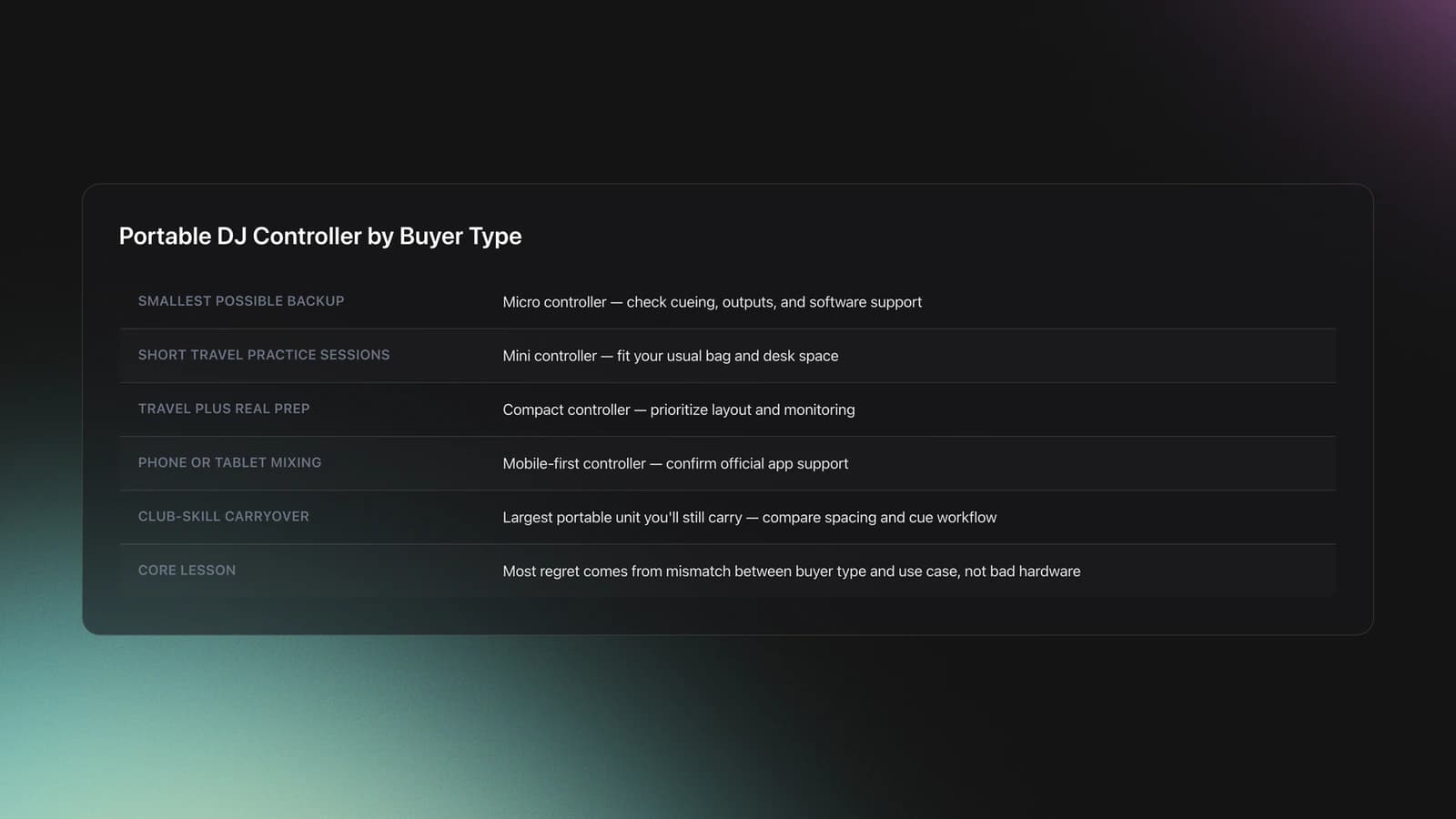
| Scenario | Best Choice | Why | Next Action |
|---|---|---|---|
| You want the smallest possible backup | Micro DJ controller | Carry cost matters more than layout comfort | Check cueing, outputs, and software support before buying |
| You practice in short sessions while traveling | Mini DJ controller | Easy setup keeps practice consistent | Choose a model that fits your usual bag and desk space |
| You want one device for travel and real prep | Compact DJ controller | Better control spacing gives more performance headroom | Prioritize layout and monitoring over pure size |
| You mix mostly from phone or tablet | Mobile-first portable controller | Battery and wireless features reduce setup friction | Confirm your preferred app is officially supported |
| You want club-skill carryover | Largest portable unit you will still carry | Closer layout transfers better | Compare fader spacing and cue workflow, not just dimensions |
Quick decision guide for choosing a portable DJ controller.
This decision framework matters because most regret comes from mismatch, not bad hardware. The controller may be good. It may just be wrong for the job.
For DJs managing multiple contexts, library structure becomes part of the hardware decision too. A small controller does less harm when your crates, mood groupings, and set plans are already clean. Some DJs keep that in folders and playlists. Others use Vibes to create custom category systems, prepare multiple named sets on a visual canvas, and export the resulting structure to their DJ software. Either way, the controller feels more capable when track access is friction-free.
If you are also comparing workflow stages, DJ set preparation methods, Rekordbox playlist structure, and energy-based track tagging are the related topics that usually sharpen this choice.
Portable DJ Controller Buying Mistakes
| Mistake | Why It Happens | How to Avoid |
|---|---|---|
| Buying the smallest unit by default | Size is easy to compare, usability is not | Match size to session type, not just bag size |
| Ignoring software support | Buyers assume all apps work equally well | Check official compatibility pages before purchase |
| Overvaluing novelty features | Marketing highlights unique extras first | Prioritize cueing, power, spacing, and outputs |
| Using a backup controller you never practiced on | It feels interchangeable with the main setup | Record at least three sessions on it before trusting it live |
| Forgetting library friction | Hardware feels like the main bottleneck | Clean up crates and set prep so the small controller stays usable |
Most portable DJ controller mistakes come from buying around specs instead of workflow.
Notice the pattern. None of these mistakes are about brand loyalty. They are about underestimating context.
The best small DJ controller on paper can still be the wrong buy if it adds setup steps you will skip. Consistency beats theoretical capability.
How Do You Choose a Portable DJ Controller?
Choose a portable DJ controller by ranking your real use cases first, then filtering for monitoring, power, software support, and control spacing. Start with where you will use it, how long your sessions are, and whether it needs to serve as a backup performance unit.
That order matters because portability is not one thing. A battery-powered phone-first controller solves different problems than a laptop-oriented compact controller with more surface area.
In practice, narrow the field to two classes, not ten products. Compare one micro or mini option against one compact option. Then judge which one creates fewer compromises for your actual week.
You will know the answer when one option clearly reduces either carry cost or performance friction without creating a bigger new problem.
Portable DJ Controller: Final Take
A portable DJ controller is worth buying when it removes enough friction that you practice or play more often. That is the whole point.
Keep three ideas in view:
- Buy for your real use case, not the most exciting hypothetical one.
- Prioritize monitoring, software support, and usable spacing before novelty features.
- Match the controller to an organized library so the small format stays workable.
If you get those right, even a very small setup can feel focused and musical. If you get them wrong, even the best portable DJ controller will feel like a compromise you keep fighting.
For the next step, compare two candidates side by side, then run a 20-minute test mix on each setup path you expect to use most.
The visual way to organize your DJ library
Tag tracks by vibe. See everything at once. Export to rekordbox, Serato, Traktor or Engine DJ.
14-day free trial. Full access, no strings attached.
or see how it works
Techniques Covered


Equipment & Software
Featured Gear
Official Manuals
Continue Your Learning Journey
Start Here First

How to Choose a DJ Controller for Your Workflow
beginner
Best DJ Controller: How to Choose
beginner
Starter DJ Controller Buying Guide
beginner
DJ Starter Equipment: What to Buy First (and What to Skip)
beginner
DJ Setup Types
beginner
What Is a House DJ?
beginner
How Can I Be a DJ and Start Strong
beginner
How to DJ: First Mix, Step by Step
beginner
Related Content
DJ Decks: 2 vs 4 Channel Buying Guide
intermediate
How to DJ With Just a Laptop (No Controller Needed)
intermediate
DJ Playlist Spotify: Mixing With Streaming Inside Rekordbox
intermediate
DJ Record Pool Guide for Working DJs
intermediate
Transition DJ Online: Browser Mixer Workflow
intermediate
How To Mix In Key Live: Worked Transitions And Failure Fixes
intermediate
DJ Key Wheel Decision Framework: Four Safe Moves and Advanced Jumps
intermediate
DJ Library Organization System: Tags, Crates, Keys
intermediateFrequently Asked Questions

Hey, it's Ben Modigell 👋
I DJ and produce as so I so: downtempo, minimal, dub house, tech house, and techno (releases on Spotify and SoundCloud, links above). Everything I write here comes from my own gigs, studio sessions, and library cleanups: the rules I follow, the failure modes I have actually hit, and the workflow I use when nobody is watching. If a technique did not earn its place in my own sets, it does not make it into a tutorial.