
Cross-Platform Playlist Integration
Cross-platform playlist integration keeps DJ playlists, folders, and core library structure usable across different DJ software ecosystems.
Cross-Platform Playlist Integration Tutorials



Cross-Platform Playlist Integration is the process of moving playlists, folders, and related DJ library structure between different software ecosystems without losing the logic behind your collection. If you use Rekordbox at home, Serato in one booth, and Engine DJ hardware elsewhere, Cross-Platform Playlist Integration helps you keep your playlists usable instead of rebuilding them from scratch.
This matters because playlist migration is rarely just about song order. It often touches file paths, crates, playlist folders, cue points, loops, and beatgrids. Done well, it saves hours and keeps your prep work intact. Done badly, it creates missing tracks, broken playlists, and gig-day stress.
If your library already feels messy, start by build a cleaner DJ library structure before you migrate anything. Cross-platform library work gets easier when folders, naming, and playlist purpose are already consistent.
What Is Cross-Platform Playlist Integration?
Cross-Platform Playlist Integration means transferring playlist structure from one DJ platform to another while preserving as much useful metadata as possible. In practice, that can include playlists, folders, crates, track references, and sometimes performance data such as hot cues, loops, and beatgrids.
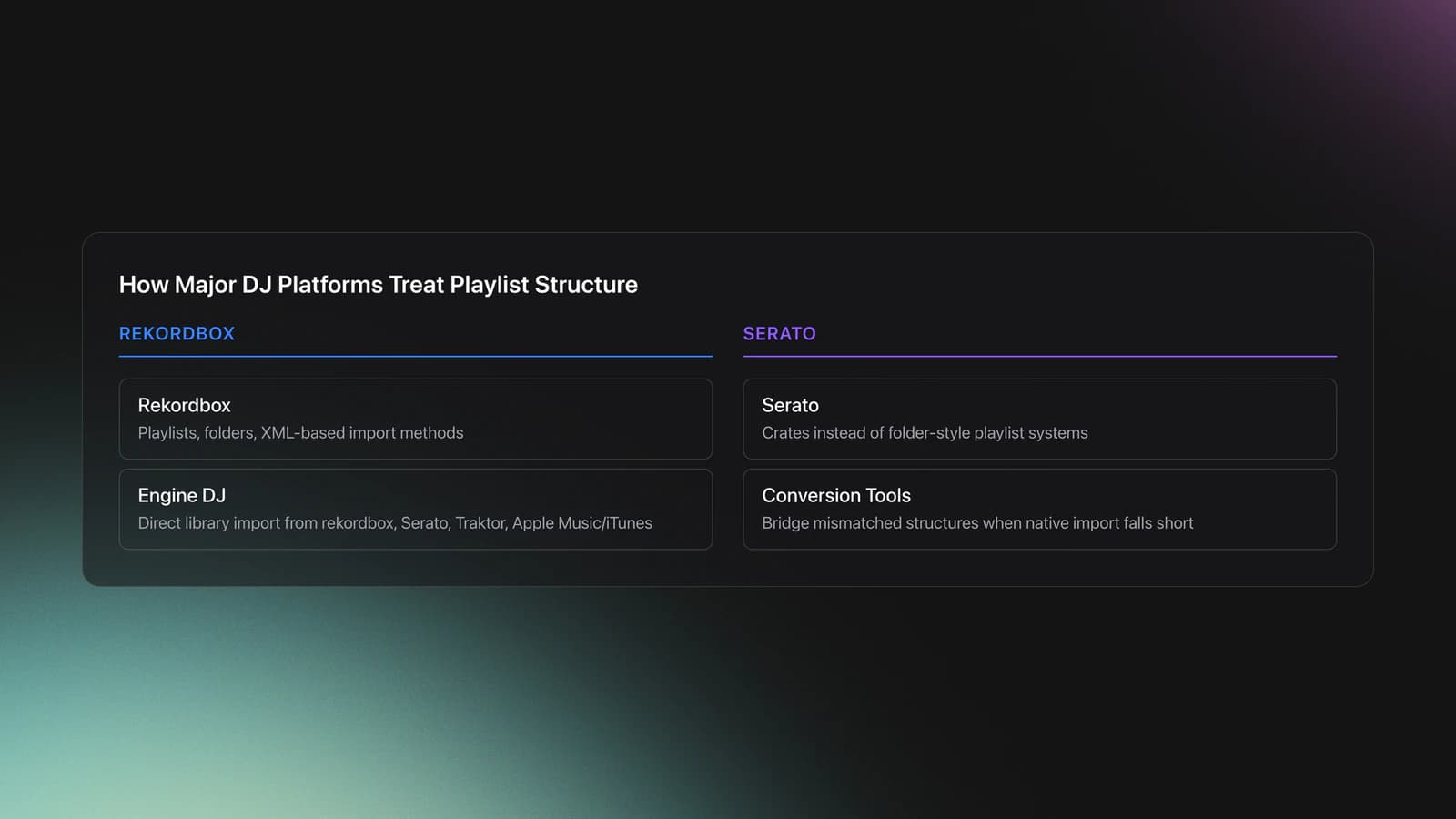
The exact result depends on the apps involved. Engine DJ Desktop states that it can directly import existing libraries from rekordbox, Apple Music or iTunes, Serato DJ, and Traktor, including playlists and some prep data. Serato, by contrast, can import music and lets you create crates from folders or migrated playlists, but its structure differs from folder-based systems in other apps. Educational migration workflows also rely on third-party conversion tools when native import falls short.
That difference is the whole challenge. A playlist is not always the same thing across platforms. Serato uses crates. Rekordbox supports playlists, folders, and XML-based import methods. Engine DJ emphasizes direct third-party library import. Some tools can translate between these systems, but no workflow guarantees a perfect one-to-one match in every case.
In other words, the real technique is not just clicking import. It is designing a migration path that protects the parts of your library that matter most.
Why DJs Use It
DJs use cross-platform playlist integration to avoid duplicate prep work. It becomes especially useful when venue gear, personal workflow, and backup system do not all live in the same software.
- Move from one DJ platform to another without rebuilding every set folder.
- Keep backup software ready if your main platform fails.
- Test new hardware ecosystems without abandoning your current library.
- Preserve gig playlists, warm-up folders, and practice crates across tools.
- Standardize library prep before exporting to USB or standalone devices.
Equipment and Software Needs
You need a stable local music library first. Serato support notes that the software references tracks where they live on your drive, so moved files can appear as missing. That same file-location problem affects nearly every migration workflow.
Essential gear is simple: one computer, one well-organized music drive, your DJ software, and a verified backup. Optional tools include a conversion app, a second SSD for mirrored testing, and a USB export target for device checks.
Before starting, document your source library. Count playlists. Note folder depth. Identify smart playlists, streaming tracks, and custom tags. Those items are often the first things to break or translate imperfectly during migration.
How to Approach the Integration
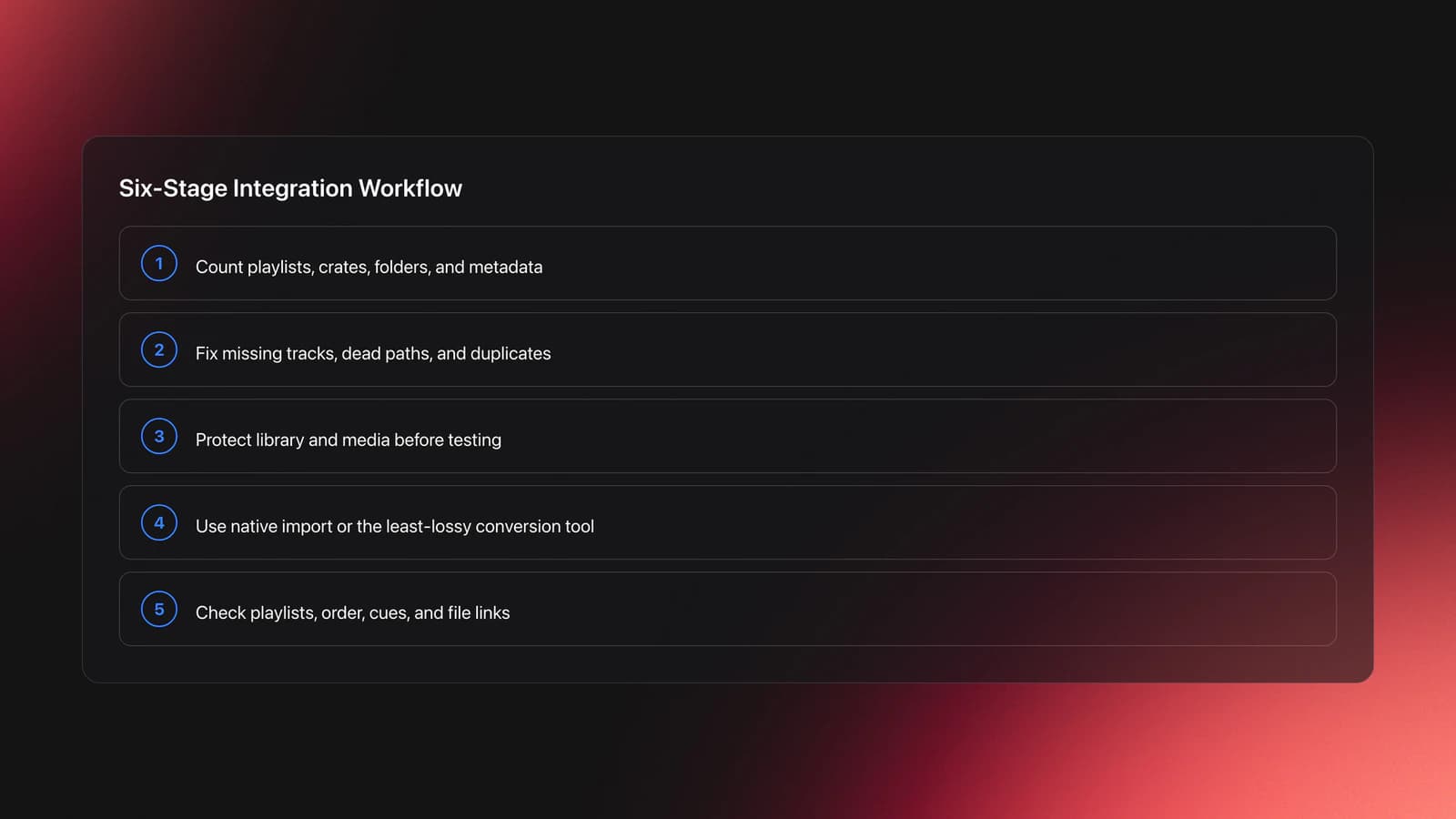
The safest Cross-Platform Playlist Integration workflow has six stages: audit, clean, back up, transfer, verify, and only then adopt. Most problems happen because DJs skip the verify stage.
| Step | Action | Key Point |
|---|---|---|
| 1 | Audit source playlists | Count playlists, crates, folders, and special metadata |
| 2 | Clean file paths | Fix missing tracks before migration |
| 3 | Back up library and media | Never test on the only live copy |
| 4 | Use native import or conversion tool | Choose the least lossy route |
| 5 | Verify in target software | Check playlists, order, cues, and file links |
| 6 | Test on hardware or export media | Confirm real-world usability before a gig |
Start with the source side. Remove dead tracks, empty playlists, and accidental duplicates. If your playlists already serve clear functions like opener, peak, reset, or afterhours, the transfer will stay more readable after conversion.
Next, choose the transfer method that matches your platforms. Rekordbox supports XML-based playlist import and export workflows through its bridge tools and XML documentation. Engine DJ Desktop advertises direct import from Rekordbox, Serato, Traktor, and Apple Music or iTunes libraries. Serato documentation focuses more on importing music and converting existing library views into crates. Third-party tools such as Lexicon are commonly used when DJs need broader conversion support across major platforms.
Then verify the target library in layers. First check whether every playlist appears. Then confirm track counts. Then open random playlists and inspect order, missing files, and prep data. Only after that should you trust it for performance.
Finally, validate on the endpoint that matters. That could be a club laptop, a standalone unit, or a USB device. Software-level success is not enough if your exported result behaves differently on hardware.
Native Import vs Conversion Tools
Native import is usually the safest first option because it follows the target platform's own rules. Conversion tools become useful when native import cannot read the source library directly or when you need to preserve more metadata across several ecosystems.
Engine DJ is strong here because its official overview says it can directly import existing libraries from Rekordbox, Serato DJ, Traktor, and Apple Music or iTunes. Rekordbox also supports XML playlist workflows. Serato supports importing local music and can build crates from imported folders or migrated playlist sources. Lexicon's manual documents direct import routes for Rekordbox 6 and 7, Engine DJ, and Traktor, along with merge settings that matter when combining libraries.
The tradeoff is predictability. Native import may preserve less, but it often fails in more understandable ways. Conversion tools may preserve more fields, but they also add another layer that you need to test carefully.
Native Import
- Best when the target app officially supports the source database.
- Usually simpler to troubleshoot.
- Often more limited in what metadata carries over.
Conversion Tool
- -Best when moving between several DJ ecosystems or merging libraries.
- -Often preserves more structure, but requires stricter verification and backups.
Practice and Preparation Workflow
Cross-platform playlist work is easier when you practice it on low-risk material first. In practice, short migration drills on small test playlists reveal structural issues faster than one huge conversion attempt. Ten playlists with clear purposes will teach you more than migrating your full archive in a panic.
Build a test pack with a few functional groups: warm-up, transition tools, peak tracks, and closers. Include playlists with different sizes and one folder with nested structure. If you also shape more useful practice playlists, the results are easier to audit after transfer.
This is one place where Vibes can help without changing the core technique. If you keep a stable category system for mood, function, and energy in Vibes, you can prepare repeatable source playlists before export and quickly see whether that logic survives the move into DJ software.
Run the same test cycle for 2 to 4 weeks. Each cycle should answer the same questions. Did every playlist arrive. Did order survive. Did file paths break. Did cue points and loops stay accurate. Measurable review beats guesswork.
Common Mistakes
Most failures come from library hygiene, not from the transfer button itself. Why do so many DJs struggle here? Because playlist structure looks stable until file references, metadata rules, and software assumptions collide.
| Mistake | Why It Happens | Fix |
|---|---|---|
| Migrating without backup | DJs assume import is reversible | Clone database and media first |
| Ignoring missing files | Broken paths already exist in source library | Relocate or replace tracks before transfer |
| Trusting smart playlists to convert perfectly | Rule logic differs across apps | Flatten key smart lists into static playlists |
| Testing only in software | Export behavior may differ on hardware | Run one full device or USB validation pass |
| Moving the music folder after migration | Target app references original locations | Lock file paths before and after integration |
Another common error is merging too early. Some tools allow merge options that update existing libraries field by field. That is powerful, but it can also overwrite information you wanted to keep. Test imports into a clean duplicate library first.
Troubleshooting Playlist Loss
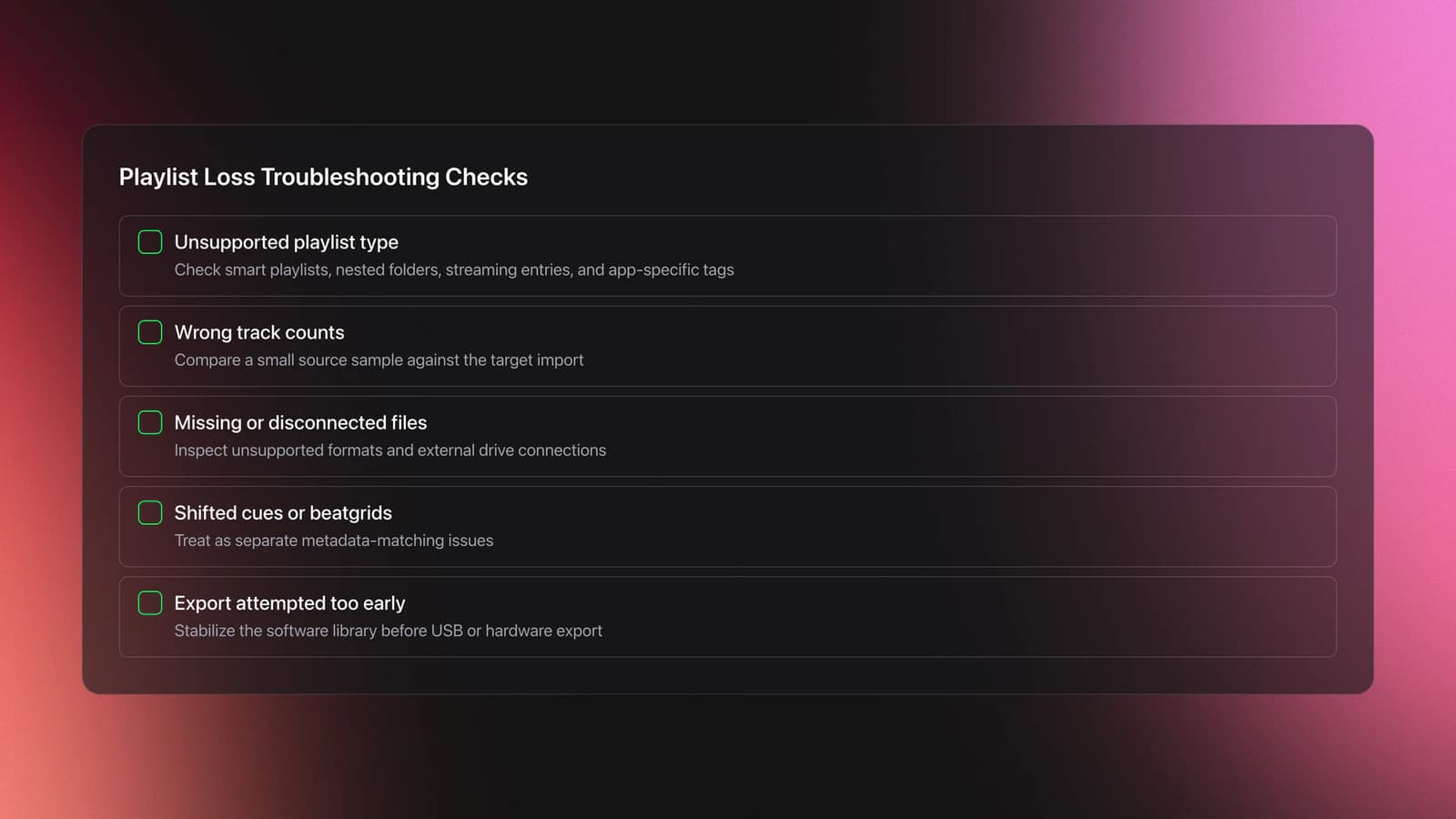
If playlists disappear, first check whether the target app supports that playlist type natively. Smart playlists, nested folders, streaming entries, and app-specific tags are the most likely trouble spots.
If track counts are wrong, compare the source playlist against the target import using a small sample. Look for missing files, unsupported formats, or tracks stored on disconnected drives. Serato's support pages note that disconnected external drives can make crates and tracks vanish from view.
If cues or beatgrids shift, treat that as a separate metadata problem, not just a playlist problem. Some migration tools can carry more prep data than native methods, but they still need track identity and file references to match correctly.
If you plan to prepare a safer USB export workflow, do that only after the software library looks stable. Exporting a broken target library only hides the real problem until soundcheck.
When Vibes Fits This Workflow
Vibes fits best before the migration stage, not instead of it. If you use Vibes as a central place to maintain mood, function, and set-prep structure for local files, it can make your source playlists more intentional and easier to rebuild when one platform handles folders or crates differently.
That is useful for DJs who work across multiple contexts. One software stack may be for home prep, another for venue compatibility, and another for standalone hardware. A clean organizational layer reduces the cost of translating between them.
Key Takeaways
Cross-Platform Playlist Integration is less about software loyalty and more about protecting your working library. The goal is simple: keep playlists, folders, and useful prep data usable when your workflow spans more than one DJ ecosystem.
Three ideas matter most.
- Clean the source library before you migrate.
- Test on duplicate libraries, not your live collection.
- Verify on the real endpoint, especially USB or hardware.
Start small. Migrate a handful of functional playlists first, document the result, and repeat until the workflow is predictable. From there, you can expand to full-library moves or pair this technique with build a cleaner DJ library structure and shape more useful practice playlists for a more durable setup.
The visual way to organize your DJ library
Tag tracks by vibe. See everything at once. Export to rekordbox, Serato, Traktor or Engine DJ.
14-day free trial. Full access, no strings attached.
or see how it works
More Tutorials

Music Library Management for DJs: Tags, Folders & Backups
Virtual DJ Library Setup That Sticks

Mixed In Key Manual for DJs

Franchise Record Pool Guide for DJs
Organize Spotify Library: Folders, Intake, Sub-Playlists
DJ Decks: 2 vs 4 Channel Buying Guide
Rekordbox Library Setup and Backup
Portable DJ Controller Buying Guide
Mixed In Key Database Guide
Equipment You'll Need
VirtualDJ
optionalDJ software for Windows and macOS that handles audio mixing, video mixing, karaoke, stems, and broad hardware support.
Pioneer DJ DDJ-1000
optionalA 4-channel rekordbox DJ controller with full-size jog wheels, onboard displays, and club-style mixer controls.
Serato DJ Pro
optionalProfessional DJ software for mixing, performance, library management, recording, and hardware-integrated club workflows.
Mixed In Key 11
optionalStandalone harmonic-mixing and library-prep software that detects keys, energy levels, cue points, and tags for DJ sets.
Pioneer DJ DDJ-400
optionalA compact 2-channel USB DJ controller built for rekordbox with a club-style layout aimed at new and progressing DJs.
Native Instruments Traktor Pro 4
optionalA professional 4-deck DJ software platform with stem separation, flexible beatgrids, effects, DVS support, and broad controller integration.
Platinum Notes 10
optionalPlatinum Notes 10 evens loudness, repairs clipped peaks, and prepares DJ files for more consistent playback in Serato, rekordbox, and Traktor.
Hercules DJControl Inpulse 500
optionalA 2-channel USB DJ controller with built-in audio interface, performance pads, and guided mixing features for home practice and small public sets.
Beatport
optionalBeatport is a DJ-focused electronic music store and streaming platform for discovering, buying, and streaming tracks into supported DJ software and hardware.
Pioneer DJ DDJ-SB
optionalA compact 2-channel USB DJ controller designed for Serato DJ Intro and later supported with Serato DJ Lite and Serato DJ Pro.
Pioneer DJ CDJ-3000
optionalProfessional flagship DJ media player with a 9-inch touchscreen, advanced MPU processing, and club-standard Pro DJ Link workflow.
DJControl Inpulse 200 MK2
optionalCompact 2‑deck USB DJ controller with built‑in audio, Beatmatch Guide LEDs, and Serato DJ Lite/DJUCED integration.
Pioneer CDJ-400
optionalA discontinued digital DJ media player that plays CDs and MP3 files from USB storage, and can also work as a MIDI controller and USB audio interface.
Numark Mixtrack Pro II
optionalA two-channel USB DJ controller with a built-in audio interface, touch-activated jog wheels, and performance pads for Serato-compatible mixing.
Traktor MX2
optionalA 2-channel DJ controller with integrated audio interface and tight Traktor Pro 4 integration for mixing, stems, effects, and performance pads.
Serato DJ Lite
optionalFree two-deck DJ software for Mac and Windows that introduces Serato’s workflow, controller support, and basic mixing tools.
Pioneer DJ DDJ-FLX4
optionalA compact 2-channel DJ controller with built-in audio interface, USB-C connectivity, and beginner-friendly smart mixing features.
Pioneer CDJ-1000
optionalA discontinued professional CD-based DJ player that helped define the modern club-standard jog-wheel workflow.
Numark Mixtrack Pro FX
optionalA 2-deck USB DJ controller with a built-in audio interface, capacitive jog wheels, performance pads, and Serato DJ Lite support.
VirtualDJ 7
optionalA legacy DJ software platform for audio and video mixing, controller mapping, and DVS playback on Windows and Mac.
rekordbox
optionalCloud-connected DJ software for music management, performance, export prep, and club-standard hardware integration.
Frequently Asked Questions

Hey, it's Ben Modigell 👋
I DJ and produce as so I so: downtempo, minimal, dub house, tech house, and techno (releases on Spotify and SoundCloud, links above). Everything I write here comes from my own gigs, studio sessions, and library cleanups: the rules I follow, the failure modes I have actually hit, and the workflow I use when nobody is watching. If a technique did not earn its place in my own sets, it does not make it into a tutorial.
