
Watch Club Ready DJ School’s tutorial above (67K views on YouTube).
This guide is for DJs comparing dj decks and trying to decide whether two decks are enough or whether four-channel DJ hardware will unlock better performance. If you feel stuck between simple workflow and creative flexibility, this will help you choose a setup that fits your mixing style, venue reality, and budget.
Most DJs do not need more features. They need the right features. The real question is not whether bigger dj decks are more professional. It is whether extra channels solve a real problem in your sets.
If you are still building core transitions, start with beatmatching fundamentals. If you already mix cleanly and want more movement inside a set, creative DJ transitions is the next useful layer.
DJ Decks: What Changes Between 2 and 4 Channels
The biggest difference between dj decks is not sound quality. It is workload. Two-channel decks ask you to manage one track in and one track out. Four-channel decks let you keep a third or fourth element ready while the main transition is still happening.
That extra element changes how you mix. You can layer a vocal over a breakdown, tease a familiar hook, hold a loop, or swap the incoming drop without abandoning your next transition.
This matters because timing pressure is real. On two decks, a creative detour can make you miss your mix-out point. On four decks, you can keep the detour and still have the next track ready.
That is the core decision model in this article. I call it the timing buffer. The more channels you have, the more timing buffer you create between creative play and structural responsibility.
Two-channel dj mixing decks give you a thin timing buffer. Four-channel digital dj decks give you a much wider one.
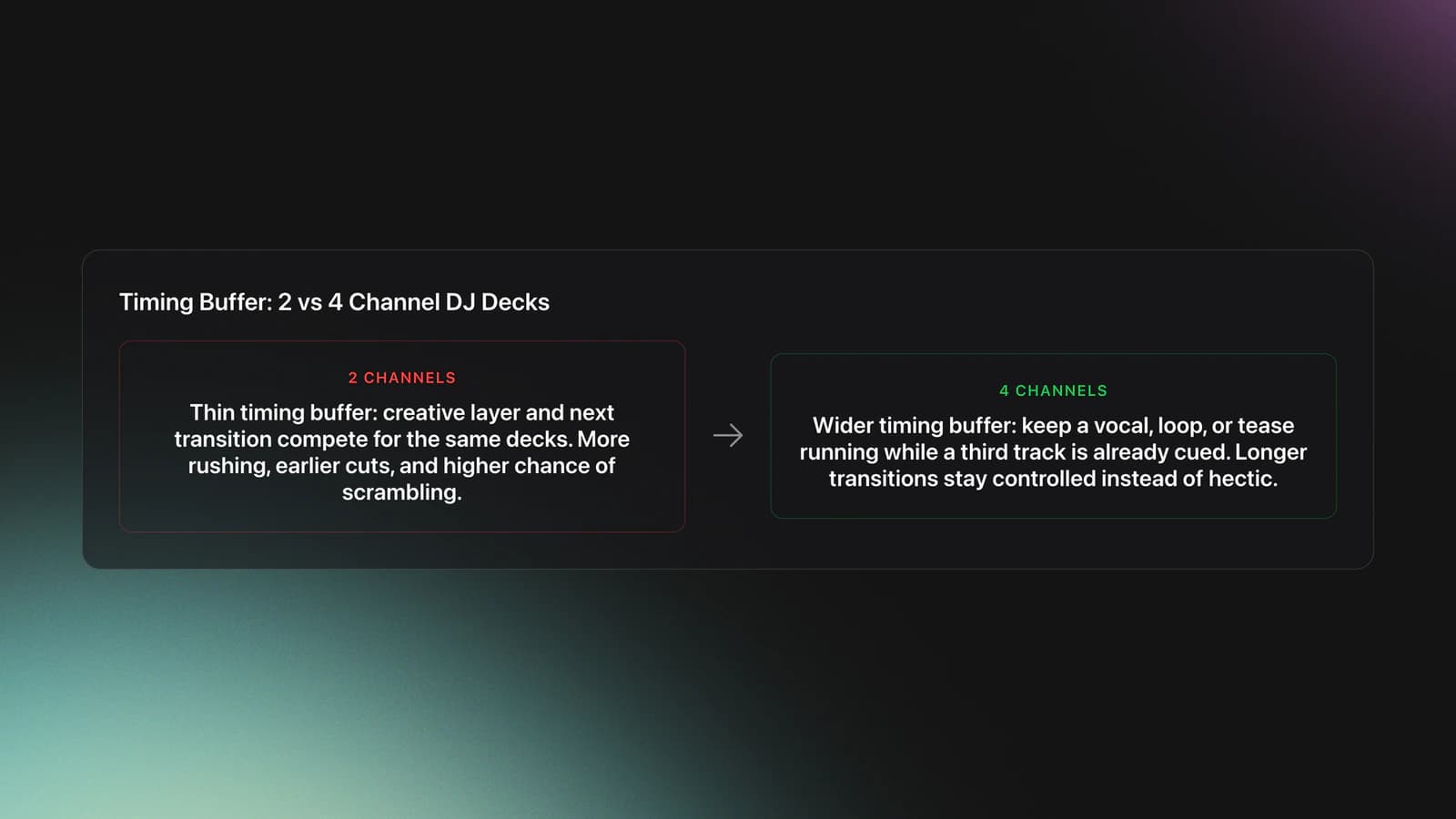
You see this clearly in practical mixing. Example one: Track A is in a breakdown at 124 BPM. You add a vocal phrase from Track B for 16 bars. If your new main track, Track C, needs to enter on bar 17, a two-deck setup forces you to cut Track B early or rush Track C.
Example two: the same sequence on four decks works differently. Deck 1 holds Track A. Deck 2 carries the vocal from Track B. Deck 3 is cued with Track C. You can let the vocal run to the edge of the phrase, then bring in Track C on time.
The failure mode is easy to spot. You get busy with loops, acapellas, or effects, then realize your next deck is still unloaded. The symptom is a flat recovery. Energy drops because you stop performing and start scrambling.
You will know four-channel dj decks are helping when your transitions get longer without getting messier. You should feel less rushed, not more impressed by the screen.
DJ Decks Comparison Table
If you are shopping commercially, compare dj decks by workflow, not by marketing tier. The table below focuses on what changes in actual use.
| Comparison Point | 2-Channel DJ Decks | 4-Channel DJ Decks |
|---|---|---|
| Learning curve | Lower cognitive load | Higher cognitive load |
| Creative layering | Limited | Strong |
| Recovery from missed timing | Harder | Easier |
| Booth footprint | Smaller | Usually larger |
| Club workflow similarity | Lower | Higher |
| Cost | Lower | Higher |
| Best for | Foundations and compact gigs | Hybrid, layered, performance-focused sets |
| Risk if overbought | Outgrowing creativity | Underusing channels |
Practical differences between common DJ decks setups
Professional DJ Decks: When Four Channels Actually Help
Professional dj decks make sense when you have a repeatable reason to use more than two active sources. That usually means one of four things: layered transitions, live edits, emergency recovery, or club-standard workflow practice.
Layered transitions are the clearest case. You keep the outgoing track running, add a vocal or loop, and still prepare the incoming track. That lets you extend tension instead of cutting ideas short.
Live edits are similar, but more deliberate. You might replace the expected drop with a new drop, hold a rhythmic loop under a vocal, or use a third deck to tease a chorus before committing to the full track.
Emergency recovery matters more than many DJs admit. If a crowd reaction shifts fast, four channels let you pivot without blowing up the transition already in motion. That can save a set.
Club-standard practice is the other reason. Many club booths center on multi-deck workflow. Even if you play at home on a controller, learning deck selection, channel discipline, and phrase awareness prepares you better for larger systems.
This is also where gear labels can confuse buyers. More expensive dj hardware is not automatically better for you. It is only better if your set structure regularly creates a timing problem that more channels solve.
A useful benchmark is transition density. Count how often, in a one-hour set, you wish you had a third source active. If it happens once or twice, stay simple. If it happens every few transitions, four-channel dj mixing decks are probably justified.
Worked example one: you play house at 124 to 126 BPM. You like using a vocal from Track B across the breakdown of Track A, then launching Track C on the next phrase. That is a three-source problem. Four channels fit.
Worked example two: you play straight open-format transitions with short blends and fast handoffs. Track A exits. Track B enters. You rarely hold loops or overlays for more than eight bars. That is still a two-source workflow.
The failure mode here is aspirational buying. DJs buy four-channel professional dj decks because they look serious, then use them as oversized two-channel controllers. The symptom is untouched channels, confusing screen shifts, and slower prep.
You will know the upgrade is paying off when your third deck appears in your sets naturally, not because you forced it in. The extra channel should remove stress, not create a performance puzzle.
For practice, one honest lesson from self-taught DJs still holds up. Starting on borrowed gear with a friend and just playing tracks, even on a rough setup, often teaches timing faster than obsessing over hardware tiers. Better dj decks help later. They do not replace reps.
Digital DJ Decks and Controller Workflow
Most digital dj decks now blur the line between controller and club workflow. The practical question is whether the unit gives you true four-channel control, easy deck switching, and a mixer layout you can trust under pressure.
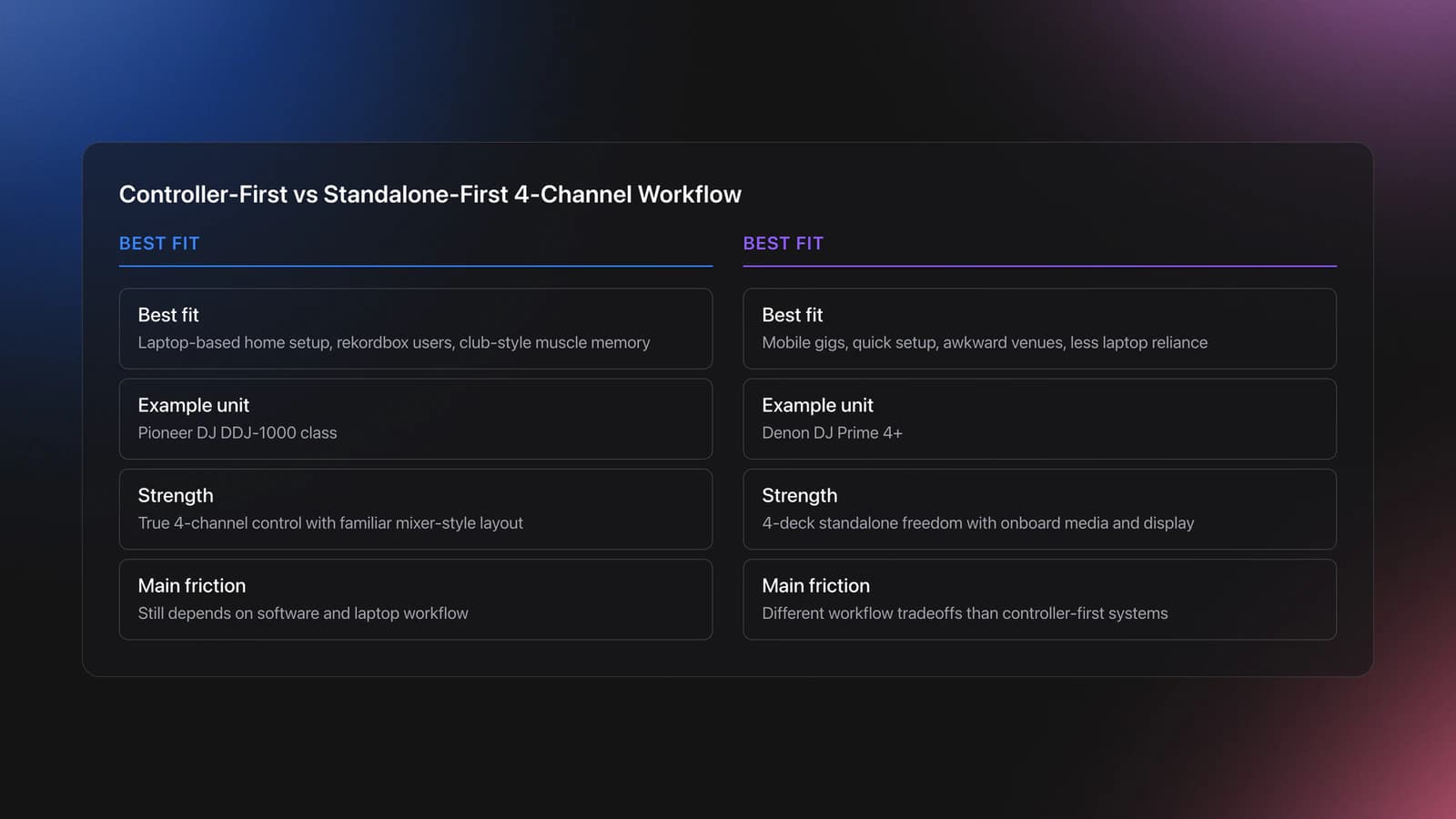
The Pioneer DJ DDJ-1000 is a 4-channel controller designed for rekordbox, with full-sized jogs and mixer-style Sound Color FX including Noise, Filter, Dub Echo, and Pitch, according to AlphaTheta's product and support documentation. A long-running reason DJs liked it is that it mirrors a club-style layout without moving straight to a full CDJ setup.
The Denon DJ Prime 4+ takes a different route. Denon lists it as a 4-deck, 4-channel standalone system with onboard media support, built-in display, and dedicated sweep FX. That matters if you want four-deck freedom without depending on a laptop.
Those are two different categories of digital dj decks. One leans controller-first. The other leans standalone-first. Both can support layered mixing. Your choice depends on whether your friction is software dependence, portability, or channel count.
Worked example one: a laptop-based home studio setup. You already use rekordbox, prep cues carefully, and want club-style muscle memory. A controller like the DDJ-1000 class of unit makes sense.
Worked example two: mobile gigs, casual sessions, or awkward venues where setup time matters. A standalone path can reduce dependencies. That tradeoff can matter more than brand familiarity.
A real gear-testing path makes this clearer. Moving from beginner controllers to a larger all-in-one unit can feel great at home, but smaller, battery-friendly or compact setups often win back practicality in tight booths and informal spaces. Happiness with gear and usefulness in a venue are not always the same thing.
This is where it gets practical. If you want to practice layered transitions, your library has to support fast decisions. Some DJs use notes and playlists. Others use structured category systems. Vibes, for example, lets DJs sort local tracks into custom hierarchies, track organization progress, and prepare named sets on a visual canvas before exporting to other DJ software. The method matters more than the app, but the goal is the same: reduce hesitation when deck three becomes necessary.
The failure mode with digital dj decks is feature overreach. A unit may offer pads, FX, deck layers, and routing options, but if switching decks is slow in your hands, you will miss phrases. That is not a spec problem. It is a workflow problem.
Validation Check
For broader setup context, DJ controller layouts, Rekordbox cue point setup, and how to organize a DJ music library all connect directly to this decision.
DJ Hardware Buying Criteria That Matter
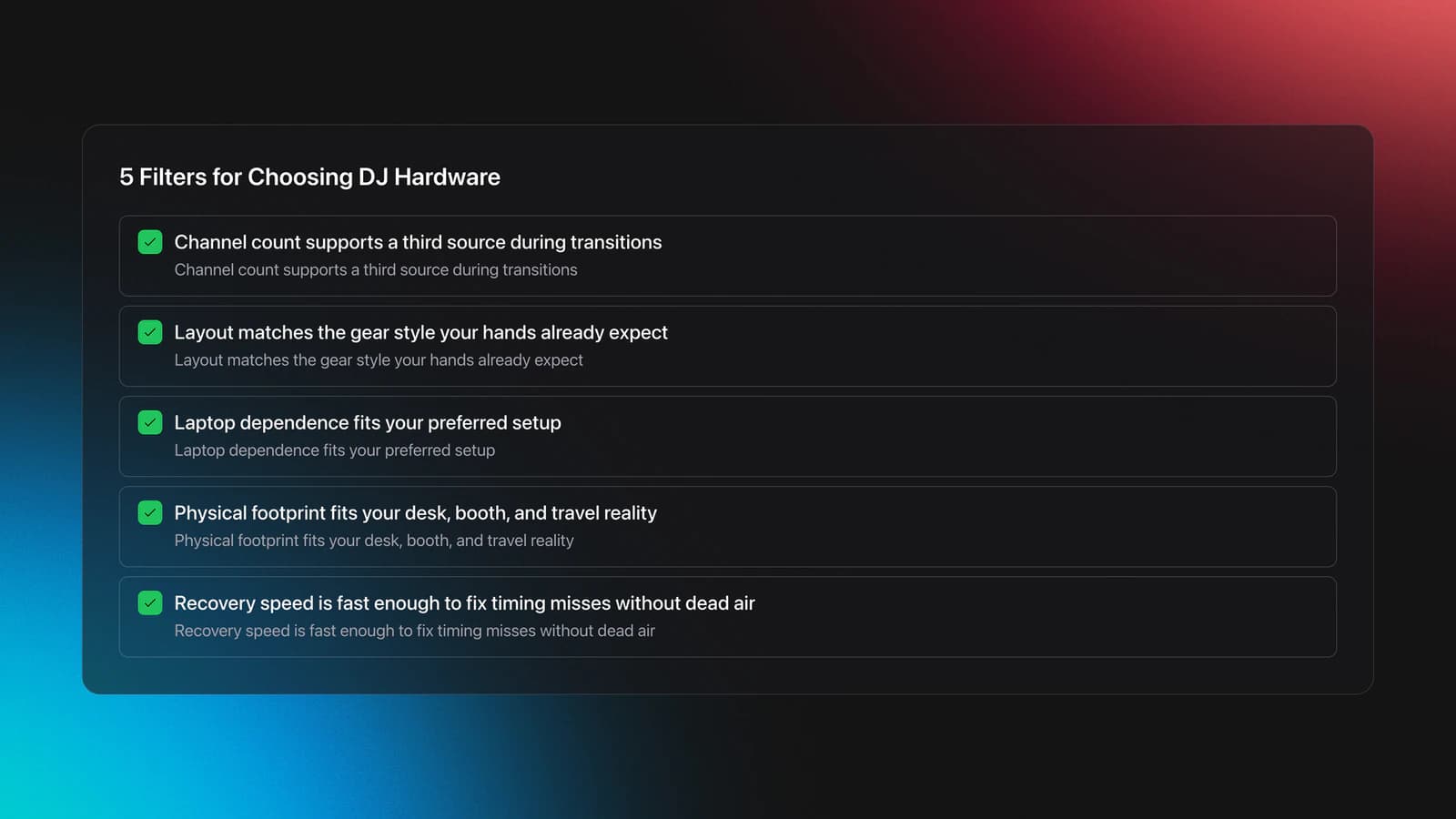
When comparing dj hardware, ignore vague labels like entry-level or pro unless they map to your workflow. Use five filters instead: channel count, layout familiarity, standalone vs laptop dependence, booth footprint, and speed of recovery.
- Channel count. Can you keep a third source ready while mixing?
- Layout familiarity. Does it resemble the gear you expect to play on?
- Computer dependence. Do you want a laptop in the chain?
- Physical footprint. Will it fit your desk, booth, or travel case?
- Recovery speed. Can you fix a timing miss without dead air?
Layout familiarity matters more than spec sheets suggest. If a controller places deck switching, FX assignment, and browsing where your hands expect them, you perform better with less mental friction.
Booth footprint is the hidden filter. Big professional dj decks look excellent on paper, but underground venues, bars, and shared booths often punish oversized setups. Compact gear is sometimes the more professional choice because it fits the room.
One venue lesson sticks with many DJs. A daytime festival set on a hay bale floor with a strong system and good atmosphere can feel better than a prestigious room with awkward energy. Hardware still matters, but context matters more.
Recovery speed is the buying criterion most people miss. If your deck switching, cueing, and phrase checks are slow, you will not use four channels well. A simpler unit that you control instantly often beats a larger unit you barely manage.
The failure mode is buying by image. The symptom is owning professional dj decks that match your fantasy set, not your actual bookings, room constraints, or preparation habits.
Validation Check
DJ Decks Decision Framework
If you are choosing between categories of dj decks, use this framework. It focuses on scenarios, not brand tribalism.
| Scenario | Best Choice | Why | Next Action |
|---|---|---|---|
| You are still learning phrasing and clean exits | 2-channel controller | Lower load helps core timing | Practice 30-minute sets with no effects for one week |
| You regularly layer vocals, loops, or drop swaps | 4-channel controller or standalone | Extra timing buffer supports creative structure | Record three transitions using a third deck |
| You want club-style practice at home | 4-channel club-style controller | Closer hand placement and mixer workflow | Map deck switching and FX assignment drills |
| You play small booths or travel often | Compact digital setup | Portability and footprint matter more than size | Measure booth and desk space before buying |
| You hate laptop dependence | Standalone 4-deck unit | Reduces setup dependencies | Test library export and media workflow first |
Quick decision guide for buying dj decks
Common DJ Decks Buying Mistakes
| Mistake | Why It Happens | How to Avoid |
|---|---|---|
| Buying four channels too early | More channels feel more advanced | Prove a real three-source use case first |
| Ignoring booth size | Specs overshadow venue reality | Measure your actual setup spaces |
| Comparing brands instead of workflows | Marketing frames the decision poorly | List your performance needs before models |
| Relying on features you never rehearse | Pads and FX look useful in demos | Test each feature in full transitions |
| Skipping library prep | Gear feels more exciting than organization | Build fast-recall playlists and category systems |
Common mistakes people make when choosing dj decks
Choose DJ Decks for the Set You Actually Play
The best dj decks are not the biggest or the most expensive. They are the ones that match your timing buffer, your room, and your actual set design.
If you mostly mix one track out and one track in, keep it simple. If you regularly layer vocals, loops, effects, and replacement drops, four-channel dj hardware can open up real creative room.
- Choose by workflow, not prestige.
- Upgrade when a third deck solves a repeat problem.
- Prepare your library as seriously as you compare hardware.
From there, the next useful move is simple. Audit your last three recorded mixes. Mark every moment where you wanted a third source active. That count will tell you more than another hour reading spec sheets.
The visual way to organize your DJ library
Tag tracks by vibe. See everything at once. Export to rekordbox, Serato, Traktor or Engine DJ.
14-day free trial. Full access, no strings attached.
or see how it works
Techniques Covered




Equipment & Software
Featured Gear
Official Manuals
Continue Your Learning Journey
Start Here First




Related Content

How to DJ With Just a Laptop (No Controller Needed)
intermediate
DJ Playlist Spotify: Mixing With Streaming Inside Rekordbox
intermediate
DJ Library Organization System: Tags, Crates, Keys
intermediate
DJ Record Pool Guide for Working DJs
intermediate
How To Mix In Key Live: Worked Transitions And Failure Fixes
intermediate
DJ Transitions: The Three-Layer Handoff for Beginners
intermediate
Transition DJ Online: Browser Mixer Workflow
intermediate
DJ Key Wheel Decision Framework: Four Safe Moves and Advanced Jumps
intermediateFrequently Asked Questions

Hey, it's Ben Modigell 👋
I DJ and produce as so I so: downtempo, minimal, dub house, tech house, and techno (releases on Spotify and SoundCloud, links above). Everything I write here comes from my own gigs, studio sessions, and library cleanups: the rules I follow, the failure modes I have actually hit, and the workflow I use when nobody is watching. If a technique did not earn its place in my own sets, it does not make it into a tutorial.


