
Traktor MX2
·Native InstrumentsA 2-channel DJ controller with integrated audio interface and tight Traktor Pro 4 integration for mixing, stems, effects, and performance pads.
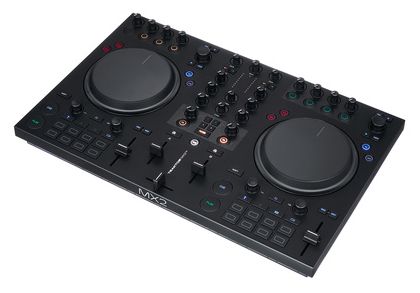
Hands-On Control
DJ controllers give you tactile control over your software. From basic mixing to advanced performance features, the right controller shapes your workflow and creative possibilities.
The Traktor MX2 is a compact 2-channel DJ controller for DJs who want real Traktor control without jumping to a larger four-channel unit. It combines jog wheels, performance pads, onboard effects access, and a built-in 24-bit/96 kHz [audio interface](/glossary/audio-interface) in one portable layout. If your sets revolve around Traktor Pro 4, stems, and fast hands-on workflow, the Traktor MX2 makes immediate sense.
Traktor MX2 Overview
The Traktor MX2 is best for DJs who want a portable all-in-one controller with room to grow. It starts as an approachable two-deck unit, but its real value is deeper access to Traktor tools like stems, Pattern Player, Mixer FX, and Deck FX through a layout that stays readable in dark booths.
Native Instruments launched the MX2 in October 2025 as its next-generation 2-channel Traktor controller. The product page, launch article, and user guide all position it as an all-in-one option for newer DJs and for experienced Traktor users who want a smaller rig instead of a full booth-sized controller. See the Native Instruments official product page and Native Instruments launch article for the base positioning.
That positioning matters. Many entry-level controllers give you basic mixing and little else. The Traktor MX2 gives you the fundamentals first, then layers in tools that reward better technique. You get a standard mixer section, touch-sensitive jog wheels, 16 RGB pads, dedicated effect access, USB-C connectivity, and Traktor Pro 4 in the box.
For buyers comparing ecosystems, the key question is simple: do you want broad software compatibility or deep Traktor integration? The MX2 leans hard into the second option. If you already like Traktor's library tools, looping, FX logic, and stem workflow, that focus is a strength rather than a limitation.
It also fills a real gap in the Native Instruments range. The modular Traktor Z1 MK2 and Traktor X1 MK3 suit custom setups, but they do not replace a true all-in-one unit. The MX2 does.
Traktor MX2 Features
The Traktor MX2 stands out because its feature set goes beyond basic beatmatching. The most important additions are stem control, Pattern Player access, a full Mixer FX section, dual Deck FX access, and strong visual feedback, all packed into a controller that still feels beginner-friendly on first use.
The hardware layout is familiar in the right way. You get channel faders, level meters, a crossfader, 3-band EQ, filter-style effect access, and jog wheels with Turntable and Jog modes. That makes the learning curve manageable if you are moving up from software-only mixing or a simpler controller.
The creative side is where the Traktor MX2 earns its name. Native Instruments gives you stem separation control, 16 RGB pads with Hotcues, Stems, Flux Loops, and Pattern Player modes, plus more than 40 Deck FX inside Traktor. In practice, that means quick edits, vocal cuts, loop builds, and live percussion without touching the laptop every few seconds.
The built-in audio interface is another real plus. Official material and retailer listings confirm 24-bit/96 kHz operation, plus RCA and 3.5 mm main outputs, both 1/4 inch and 3.5 mm headphone outs, a 1/4 inch mic input, and USB-C connection. For home setups, streams, bars, and smaller club rooms, that is enough I/O to stay flexible without extra boxes.
Low-light usability deserves mention too. Native Instruments designed the MX2 with customizable pad colors and underlighting, and that is not just cosmetic. In dark venues, clear LEDs and strong layout separation reduce mistakes. In practice, what matters in a live booth is reliability, fast recovery, and low-light readability, not marketing extras. It helps you stay locked into the mix.
If you want a broader ecosystem comparison, start with a DDJ-FLX4 comparison guide and a DJ controller buying guide. The MX2 makes the most sense when creative Traktor features matter more than multi-software compatibility.
Technical Specs
The Traktor MX2 specs are solid for a mid-priced controller. Official Native Instruments specifications confirm the core hardware, dimensions, weight, software bundle, and system requirements, while the user guide confirms the physical connections used in real setup.
| Specification | Details |
|---|---|
| Controller type | All-in-one 2-channel DJ controller |
| Included software | Traktor Pro 4 full version |
| Audio interface | 24-bit/96 kHz integrated interface |
| Dimensions | 511.4 x 323.1 x 61.9 mm |
| Weight | 2.73 kg |
| Main outputs | RCA stereo pair, 3.5 mm stereo mini jack |
| Headphone outputs | 1/4 inch and 3.5 mm |
| Microphone input | 1/4 inch |
| Computer connection | USB-C |
| Pads | 16 RGB pads |
| Pad modes | Hotcues, Stems, Flux Loops, Pattern Player |
| Effects | 9 Mixer FX, 40+ Deck FX |
| Power | External power supply included |
| OS support | macOS 12-15, Windows 10-11 |
One useful detail is the size-to-workflow ratio. At just over 20 inches wide and 2.73 kg, the Traktor MX2 stays portable but does not feel toy-like. The jog wheels, pad spacing, and mixer section have enough room to avoid cramped hand placement.
The output section is practical, not luxurious. You do not get balanced XLR outs, booth outs, or the deeper I/O found on larger professional controllers. Still, for the target user, the included connections cover the most common real-world jobs.
Who Is This For
The Traktor MX2 is for DJs who want a serious two-channel controller with creative headroom. It suits beginners who want proper software included, intermediate DJs who are growing into Traktor’s deeper tools, and experienced users who need a smaller controller without giving up stems, FX, and hands-on control.
It is especially good for home mixing, livestreams, practice rigs, and compact venue sets. The layout is clear enough for learning, but the software bundle and performance features keep it relevant after the beginner phase ends.
It also makes sense for DJs who prefer building expressive transitions rather than just smooth blending. The stem controls, Pattern Player, and effect access encourage active performance. That gives the MX2 a more creative identity than many starter controllers.
It is less ideal if you need four hardware channels, balanced outputs for demanding club installs, or native support across several DJ platforms. In those cases, a larger Traktor controller or a more ecosystem-neutral option may fit better.
In Practice
In practice, the Traktor MX2 feels designed around speed. The first win is not some flashy feature. It is the way browsing, cueing, looping, and effect access sit close together, so less of your attention gets pulled back to the laptop.
That matters in dark rooms and tight booths. Workflow efficiency often beats raw feature count. A controller can have every spec on paper and still slow you down. The MX2 avoids that problem better than many compact units.
The jog wheels look aimed at practical use rather than turntablist theater. They are there for beatmatching, cue correction, and quick rewinds, not for pretending this is a battle setup. That feels honest.
The performance pads broaden the controller’s range. Hotcues and loops are expected. Stem edits and step sequencing are what make the MX2 more interesting over time. You can start simple, then grow into more layered sets without changing hardware.
If your setup expands later, the MX2 can still sit beside modular Traktor pieces or companion gear. That makes it easier to build toward a fuller rig with tools like a modular FX controller or a compact DJ mixer controller.
Pros and Cons
The Traktor MX2 gets the basics right while adding creative depth. Its tradeoffs are also clear. You get portability, software value, and expressive performance features, but you give up broader I/O and the flexibility of larger multi-channel systems.
Pros
- Tight Traktor Pro 4 integration.
- Full software included.
- Useful stem and Pattern Player workflow.
- Portable size with solid feature density.
- Good low-light visibility and practical I/O for mobile or home use.
Cons
- -Only two mixer channels.
- -No balanced XLR master outputs.
- -Best fit mainly for Traktor users.
- -Some buyers may prefer broader software support at this price.
Price and Value
The Traktor MX2 sits in the mid-range and offers strong value if you actually want Traktor. Current pricing found across major sellers puts it around $449 in the US, £349 in the UK, and roughly €359 to €399 in Europe depending on retailer and VAT handling.
That price looks fair when you factor in the included full version of Traktor Pro 4. Cheaper controllers often rely on lighter software packages or push you into upgrades later. Here, the software value is part of the argument from day one.
Used pricing is still settling because the controller is new. Listings spotted at Guitar Center show used examples around $269.99 to $399.99 depending on condition, included accessories, and how quickly local stores want to move stock. That spread is normal for a recent release.
Is it worth it? Yes, if you want Traktor-specific creative workflow in a compact format. If you just need an inexpensive first controller with wider software support, there are cheaper options.
Alternatives
The most obvious Traktor MX2 alternatives fall into three camps: cheaper cross-platform controllers, older Traktor all-in-one models, and smaller modular Traktor units. Your best option depends on whether you value ecosystem flexibility, more channels, or maximum portability.
| Product | Price | Key Difference |
|---|---|---|
| AlphaTheta DDJ-FLX4 | $299 | Lower cost and wider software compatibility |
| Native Instruments Traktor Kontrol S3 | $484 | Four-channel Traktor control with older design |
| Native Instruments Traktor Z1 MK2 | $229 | Ultra-portable modular option, not all-in-one |
The DDJ-FLX4 is the easiest alternative for buyers who are not committed to Traktor yet. The S3 makes more sense if four channels matter more than the MX2's newer design language. The Z1 MK2 is for DJs building compact modular rigs rather than wanting jog wheels and an integrated controller.
Bottom Line
The Traktor MX2 is a well-judged 2-channel controller for DJs who want to stay inside the Traktor ecosystem and do more than basic mixing. It is approachable enough for newer users, but its real strength is how much creative control it packs into a manageable footprint.
It will not replace a larger club-focused controller with balanced outputs and four hardware channels. It does not need to. Its job is to give you a portable, expressive, modern Traktor setup that feels serious from the start.
If that is your lane, the Traktor MX2 is easy to recommend.
Organize for Live Performance
Tag tracks by set position, energy level, and key. When you're performing live, every second counts, find what you need instantly.
14-day free trial. Full access, no strings attached.
or see how it works
Tutorials Using Traktor MX2




DJ Techniques Using This Gear
See how DJs and live performers incorporate Traktor MX2 into their workflow.




Frequently Asked Questions

Hey, it's Ben Modigell 👋
I DJ and produce as so I so: downtempo, minimal, dub house, tech house, and techno (releases on Spotify and SoundCloud, links above). Everything I write here comes from my own gigs, studio sessions, and library cleanups: the rules I follow, the failure modes I have actually hit, and the workflow I use when nobody is watching. If a technique did not earn its place in my own sets, it does not make it into a tutorial.