
Cue Button Usage
Cue button usage covers setting temporary cue points and launching tracks on the beat using the deck cue button, the hardware control for drop-in timing.
Cue Button Usage Tutorials



Cue Button Usage is one of the first DJ skills that pays off in every set. It teaches you how to set a temporary start point, preview a track in headphones, and launch that track on the beat instead of guessing. If your transitions feel late, rushed, or messy, cue button usage usually fixes the root problem.
For beginners, cue button usage builds timing and confidence. For experienced DJs, it improves cleaner entries, faster recovery, and tighter control when waveforms or sync are not doing the work for you. In short, cue button usage turns track loading into a repeatable performance move.
What Is Cue Button Usage?
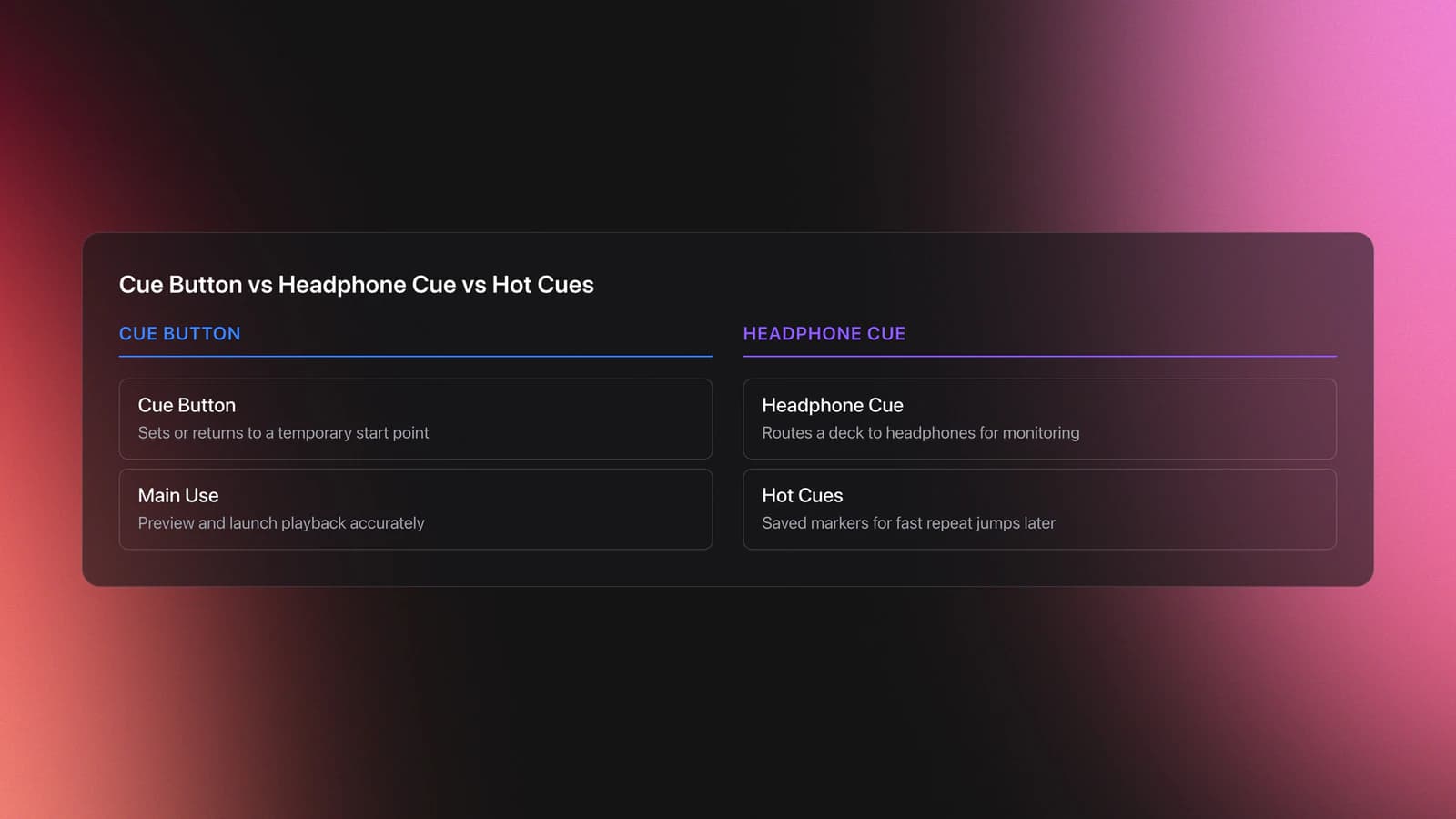
Cue button usage is the practice of setting or returning to a temporary cue point, listening from that point in headphones, and using it to start playback accurately. On CDJ-style systems, the cue button is separate from headphone cue selection and separate from Hot Cues, which are saved markers you can trigger later.
That distinction matters. AlphaTheta documentation describes the CDJ cue button as a control for setting and jumping to temporary cues, while the rekordbox manual treats Hot Cues and headphone cueing as different functions. Educational guides also separate Hot Cues from regular cue points because Hot Cues are saved, while the standard cue button is mainly for immediate start control and previewing.
In practice, this means you tap or hold the cue button to return to your chosen start point, listen for the right beat, then press play or do a cue start at the exact moment you want the track to enter.
Why Cue Button Usage Matters
Cue button usage matters because it connects preparation to execution in one small movement. You are not just marking a beat. You are training your ears, hands, and timing so the next track enters where you intended.
- Starts tracks on the beat with less panic
- Lets you preview intros privately in headphones
- Improves manual transitions when sync is off
- Helps recover quickly after a missed entry
- Builds better timing for learn beat matching by ear
You also hear track structure more clearly. When you repeatedly cue the first kick, first vocal, or first clean downbeat, you start noticing intros, pickup notes, and phrase boundaries much faster.
Cue Button Basics on DJ Gear
On most DJ gear, the cue button has three practical jobs: set a temporary cue point, return playback to that point, and preview from that point while paused. This is different from the headphone cue button on a mixer, which simply routes a channel into your headphones.
The usual workflow is simple. Load a track, find the exact beat where you want it to start, pause there, and press cue to store that temporary point. From there, pressing cue returns you to that start spot, and holding cue often lets you listen from that point until you release.
Many controllers and media players also include Hot Cue pads. Those are faster for performance jumps, but the standard cue button remains the core tool for precise starts, especially when you want to rehearse an entry several times before committing.
| Function | What It Does | When To Use It |
|---|---|---|
| Cue button | Sets or returns to a temporary start point | Previewing and launching a track cleanly |
| Headphone cue | Routes a deck or channel to headphones | Private monitoring before the audience hears it |
| Hot Cue | Jumps to a saved marker in the track | Fast performance jumps and repeatable sections |
| Play/Pause | Starts or stops transport | Committing to playback after timing is ready |
How To Use the Cue Button
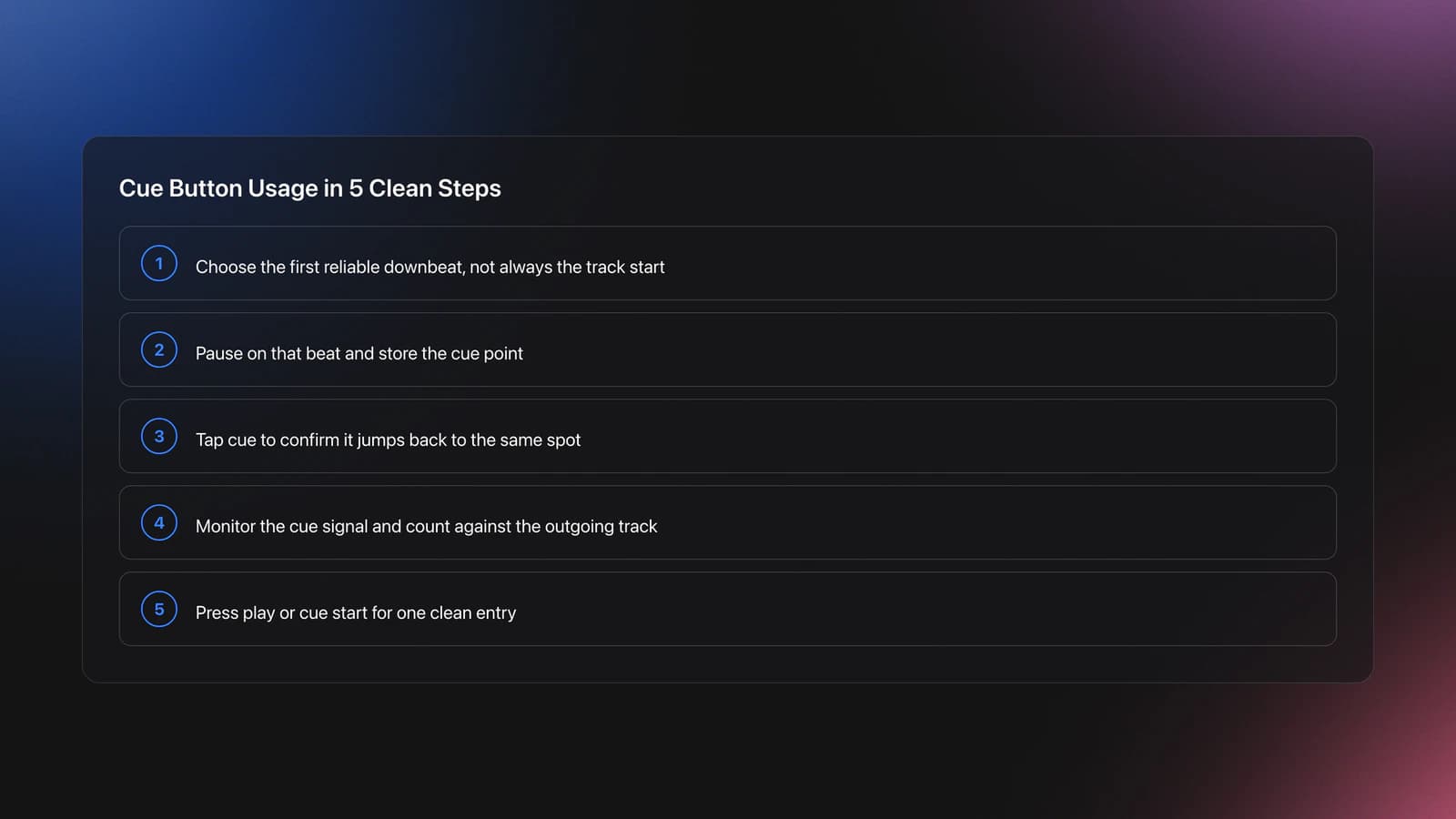
To use the cue button well, first find a reliable start beat, store it, preview it, and then launch on time. The skill is not the button itself. The skill is choosing the right point and triggering it with consistent timing.
Start by loading a track with a clear kick intro. Move to the first downbeat you want the audience to hear. If the track starts with a pickup, vocal breath, or off-grid ambience, move forward to the first usable mix-in point instead of forcing the very beginning.
Pause the deck at that beat and set the cue point. Then press cue a few times to confirm the deck returns to the same place. If the sound lands late or early, nudge the position and reset.
Next, route that deck to headphones and listen only to the cue signal. Count the outgoing track. When the right beat arrives, either press play from the cue point or use a cue start if your gear supports that feel. The goal is one clean launch, not a rushed jab.
If you are still developing timing, start with 8-bar or 16-bar intros. They give you more room to recover. Once that feels stable, combine cue starts with practice phrase alignment for cleaner drops so the new phrase lands where the old one resolves.
After that, compare the standard cue button with pads and saved markers. If you need fast repeated jumps, move into hot cueing for faster jumps. If you need one dependable entry point and cleaner manual starts, the cue button is often the better training tool.
Practice Routine
A short daily routine works better than long, unfocused sessions. In practice, repeating the same cue-start drill on a few well-chosen tracks builds faster timing than constantly changing songs.
Use three tracks with simple intros, three with tricky pickups, and three with vocals near the start. This gives you clean reps and realistic problems. If you keep a practice crate inside Vibes, grouping tracks by intro type or difficulty makes these repetitions much easier to run without wasting time searching.
Keep the same practice set for a week. That removes track familiarity as a moving target. Then swap in new songs and test whether your timing still holds.
A good first checkpoint is simple: hit the cue start cleanly for eight launches in a row at one tempo. A stronger checkpoint is better: launch into a live mix and hold alignment for 16 or 32 bars without obvious drift.
Cue Button vs Hot Cues
The cue button is for immediate control around one working start point. Hot Cues are for saved positions you want to recall later. That is the practical difference most DJs need to understand first.
Crossfader explains Hot Cues as saved markers that jump and play from specific points in a track. The rekordbox manual also treats Hot Cues as stored performance points. By contrast, the standard cue button is the everyday launch tool you use before playback or during quick resets.
Use the cue button when you want a clean first beat, headphone preview, or repeated start practice. Use Hot Cues when you need multiple entry options, vocal stabs, stored phrase markers, or performance jumps inside a track.
Common Mistakes With Cue Button Usage
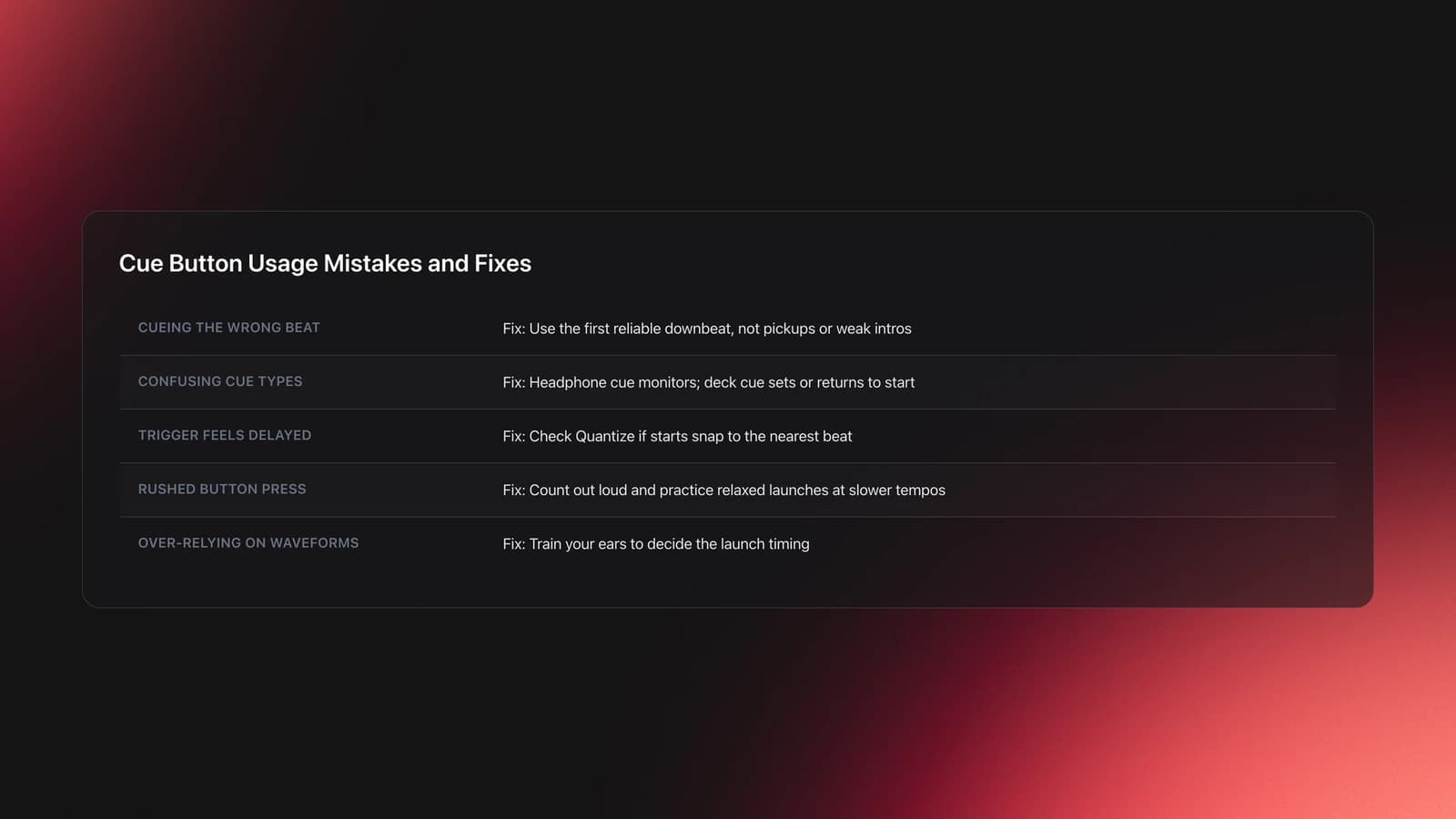
Most cue button problems are not hardware issues. They come from choosing the wrong start point, misunderstanding what the button does, or rushing the launch.
| Mistake | Why It Happens | Fix |
|---|---|---|
| Cueing the wrong beat | The intro has a pickup or weak transient | Set the cue on the first reliable downbeat, not always the song start |
| Confusing cue button with headphone cue | Both use the word cue but do different jobs | Use headphone cue to monitor and deck cue button to set or return to start |
| Feeling a delay on trigger | Quantize may snap to the nearest beat on some systems | Check Quantize settings if starts feel late |
| Pressing too hard or too early | Timing panic during transitions | Count out loud and practice relaxed launches at slower tempos |
Quantize is worth checking. AlphaTheta notes that cue or reloop actions can start on the nearest beat when Quantize is on, which can feel like delay if you expect an immediate trigger. That behavior is useful in some workflows, but it can hide timing errors while you are learning.
Another common issue is over-relying on waveforms. Visual help is fine, but cue button usage becomes much stronger when your ears decide the launch. This is especially true on unfamiliar club setups or darker booths.
Real-World Uses
Cue button usage shows up in basic mixing, but it also appears in creative performance. Crossfader highlights Carl Cox using cue button techniques to build tension by introducing elements with precision rather than relying only on channel faders.
That same idea works at any skill level. You can use cue starts to test a vocal entrance, rehearse the first kick before a drop, or recover after a missed entry without touching stored Hot Cues. For open-format DJs, this is useful when tracks have less predictable intros.
It also helps when moving between gear. DJ TechTools recommends practicing on controller setups with CDJ-style habits, including using the cue button for on-beat starts instead of pre-aligning only by waveforms. That habit transfers well to club booths.
Equipment and Setup
You do not need expensive gear to learn cue button usage. You need a deck with a real cue button, clear headphone monitoring, and tracks with simple rhythm. The learning comes from repetition, not from special hardware.
Still, some features make the process easier. A clear waveform helps with setup. A dedicated cue/mix knob helps you hear the master and the cued deck together. Quantize options can either support or confuse practice, so know whether it is on.
If your software or player supports saved memory cues, use them as reference notes during preparation, then still practice manual launches with the regular cue button. This keeps your timing skill active instead of handing everything to saved markers.
Key Takeaways
Cue button usage is a small technique with big payoff. It improves timing, track preparation, and recovery under pressure. Once you can set the right start point and launch it calmly, your mixes feel more deliberate and much less reactive.
Focus on three things first: choosing the correct downbeat, hearing it clearly in headphones, and starting on time without rushing.
- Set cue points on usable mix-in beats, not blindly at track start
- Practice short daily launches until timing becomes automatic
- Combine cue starts with phrase awareness for cleaner transitions
Start with simple kick intros today. Then add harder intros, vocals, and live transitions. From there, the next logical step is stronger beat matching and phrase control.
The visual way to organize your DJ library
Tag tracks by vibe. See everything at once. Export to rekordbox, Serato, Traktor or Engine DJ.
14-day free trial. Full access, no strings attached.
or see how it works
More Tutorials




Equipment You'll Need
Mixed In Key 11
optionalStandalone harmonic-mixing and library-prep software that detects keys, energy levels, cue points, and tags for DJ sets.
Pioneer DJ DDJ-FLX4
optionalA compact 2-channel DJ controller with built-in audio interface, USB-C connectivity, and beginner-friendly smart mixing features.
Hercules DJControl Inpulse 500
optionalA 2-channel USB DJ controller with built-in audio interface, performance pads, and guided mixing features for home practice and small public sets.
Beatport
optionalBeatport is a DJ-focused electronic music store and streaming platform for discovering, buying, and streaming tracks into supported DJ software and hardware.
VirtualDJ
optionalDJ software for Windows and macOS that handles audio mixing, video mixing, karaoke, stems, and broad hardware support.
Serato DJ Pro
optionalProfessional DJ software for mixing, performance, library management, recording, and hardware-integrated club workflows.
Pioneer DJ DDJ-SB
optionalA compact 2-channel USB DJ controller designed for Serato DJ Intro and later supported with Serato DJ Lite and Serato DJ Pro.
Pioneer DJ DDJ-1000
optionalA 4-channel rekordbox DJ controller with full-size jog wheels, onboard displays, and club-style mixer controls.
Cockos REAPER
optionalA lightweight, deeply customizable digital audio workstation for recording, editing, mixing, MIDI production, and post work on Windows, macOS, and Linux.
Pioneer DJ CDJ-3000
optionalProfessional flagship DJ media player with a 9-inch touchscreen, advanced MPU processing, and club-standard Pro DJ Link workflow.
Native Instruments Traktor Pro 4
optionalA professional 4-deck DJ software platform with stem separation, flexible beatgrids, effects, DVS support, and broad controller integration.
Numark Mixtrack Pro II
optionalA two-channel USB DJ controller with a built-in audio interface, touch-activated jog wheels, and performance pads for Serato-compatible mixing.
Serato DJ Lite
optionalFree two-deck DJ software for Mac and Windows that introduces Serato’s workflow, controller support, and basic mixing tools.
DJControl Inpulse 200 MK2
optionalCompact 2‑deck USB DJ controller with built‑in audio, Beatmatch Guide LEDs, and Serato DJ Lite/DJUCED integration.
Pioneer CDJ-400
optionalA discontinued digital DJ media player that plays CDs and MP3 files from USB storage, and can also work as a MIDI controller and USB audio interface.
Pioneer DJ DDJ-400
optionalA compact 2-channel USB DJ controller built for rekordbox with a club-style layout aimed at new and progressing DJs.
rekordbox
optionalCloud-connected DJ software for music management, performance, export prep, and club-standard hardware integration.
Numark Mixtrack Pro FX
optionalA 2-deck USB DJ controller with a built-in audio interface, capacitive jog wheels, performance pads, and Serato DJ Lite support.
Pioneer CDJ-1000
optionalA discontinued professional CD-based DJ player that helped define the modern club-standard jog-wheel workflow.
VirtualDJ 7
optionalA legacy DJ software platform for audio and video mixing, controller mapping, and DVS playback on Windows and Mac.
Traktor MX2
optionalA 2-channel DJ controller with integrated audio interface and tight Traktor Pro 4 integration for mixing, stems, effects, and performance pads.
Frequently Asked Questions

Hey, it's Ben Modigell 👋
I DJ and produce as so I so: downtempo, minimal, dub house, tech house, and techno (releases on Spotify and SoundCloud, links above). Everything I write here comes from my own gigs, studio sessions, and library cleanups: the rules I follow, the failure modes I have actually hit, and the workflow I use when nobody is watching. If a technique did not earn its place in my own sets, it does not make it into a tutorial.