Cueing Tracks
Cueing tracks is the headphone-monitoring workflow for previewing and timing the next track without the audience hearing it.
Cueing Tracks Tutorials


Cueing tracks is the DJ skill of listening to the next song in your headphones, setting its start point, and releasing it at the right time while the crowd still hears only the current track. In practice, cueing tracks is what turns rushed guessing into controlled mixing. If your transitions feel late, messy, or tense, cueing tracks is usually the missing link.
For beginners, this technique unlocks confidence. You stop throwing tracks in blind. For experienced DJs, it sharpens timing, phrase choices, and recovery when a mix starts going wrong. Good cueing tracks technique also supports beatmatching, drop mixing, and quick changes across genres.
Most systems give you the tools already: a headphone cue button, a cue or PFL mix control, a headphone volume control, and a deck cue point. AlphaTheta's cueing tutorial and support material show that the core workflow revolves around monitoring a selected deck in headphones, balancing cue and master, and setting playback position before the audience hears it. Educational guides from Native Instruments and DJ TechTools also frame cue points and prep work as a practical map for navigation, transitions, and track recall. See the AlphaTheta cueing techniques tutorial, Native Instruments cue points guide, and DJ TechTools track preparation guide.
What Is Cueing Tracks?
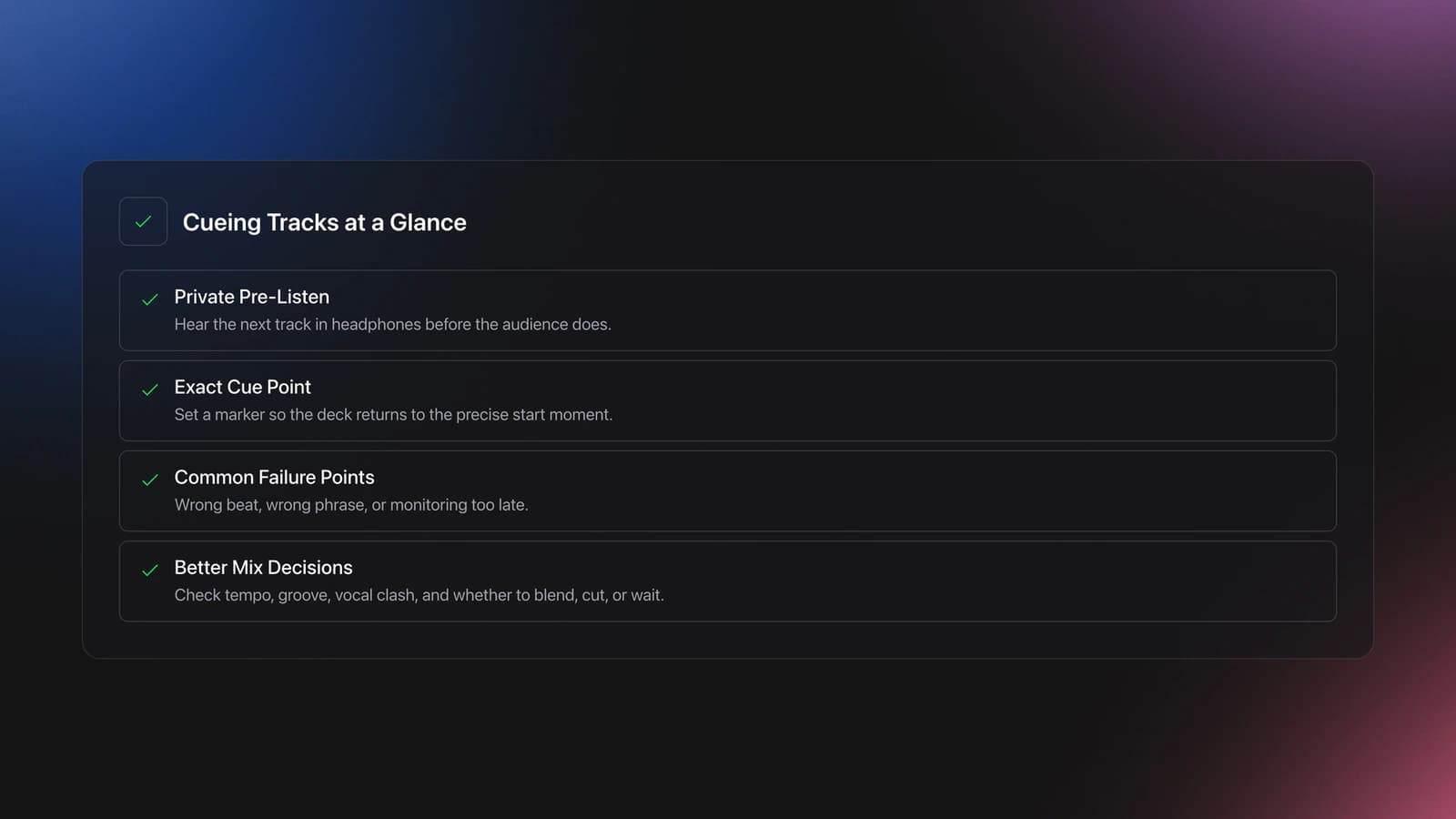
Cueing tracks means privately monitoring the next record, finding the exact entry point, and preparing the transition before you press play live. The goal is simple: know what is coming, when it should start, and how it will sit against the playing track.
There are two linked meanings here. First, cueing can mean headphone pre-listening. Second, it can mean setting a cue point on the deck so the track returns to that exact start position. Native Instruments describes cue points as markers that let DJs return to a precise moment in a song, which makes fast navigation and cleaner transitions much easier.
That matters because a transition rarely fails from one big mistake. It usually fails from three small ones: the track started from the wrong beat, entered at the wrong phrase, or was monitored too late.
When cueing tracks is solid, your next decisions get easier. You can compare tempo, check the groove, hear whether vocals will clash, and decide whether to blend, cut, or wait one more phrase. This is why cueing sits right beside build solid beat matching control and learn phrase mixing timing in every reliable DJ foundation.
Cueing Tracks Fundamentals
The basic process has five parts: select the deck, hear the track in headphones, find the start point, match timing, and launch cleanly. If one part is weak, the whole cueing chain feels unstable.
| Step | Action | Key Point |
|---|---|---|
| 1 | Press the deck's cue or PFL button | Hear only the next source in headphones |
| 2 | Set headphones mix between cue and master | Compare what you plan with what the crowd hears |
| 3 | Find the true start beat or phrase | Do not launch from a random transient |
| 4 | Nudge timing and confirm phrase position | Check both rhythm and structure |
| 5 | Release the track with intention | Start on time, then adjust calmly |
Start with the deck cue button. On most mixers and controllers, this routes that deck to your headphones only. Then use the headphone mix control to lean toward cue, master, or a blend of both. Manufacturer help documentation explains that this control balances the cued deck against the master signal, which is exactly what you need when deciding whether the next record is ready.
Next comes the actual cue point. The most dependable beginner method is to place the cue on the first clean downbeat you want to start from. Native Instruments recommends marking key moments such as intros, verses, drops, and outros so you can jump quickly to musically useful sections instead of hunting during the mix. As your marker library grows, cue point management keeps those markers consistent across software and hardware.
Then listen for phrase position. Phrase mixing guides stress that transitions sound natural when sections line up, often in 8 or 16 bar units. In other words, cueing tracks is not only about landing on the beat. It is about landing on the right part of the song.
This is where many DJs improve fast. They stop thinking, "Is the BPM close enough?" and start thinking, "Is this the right beat, the right phrase, and the right energy level for this moment?"
How to Cue Tracks Step by Step
To cue tracks well, prepare the next song before the current one reaches its transition zone. That gives you enough time to listen, compare, and correct without rushing.
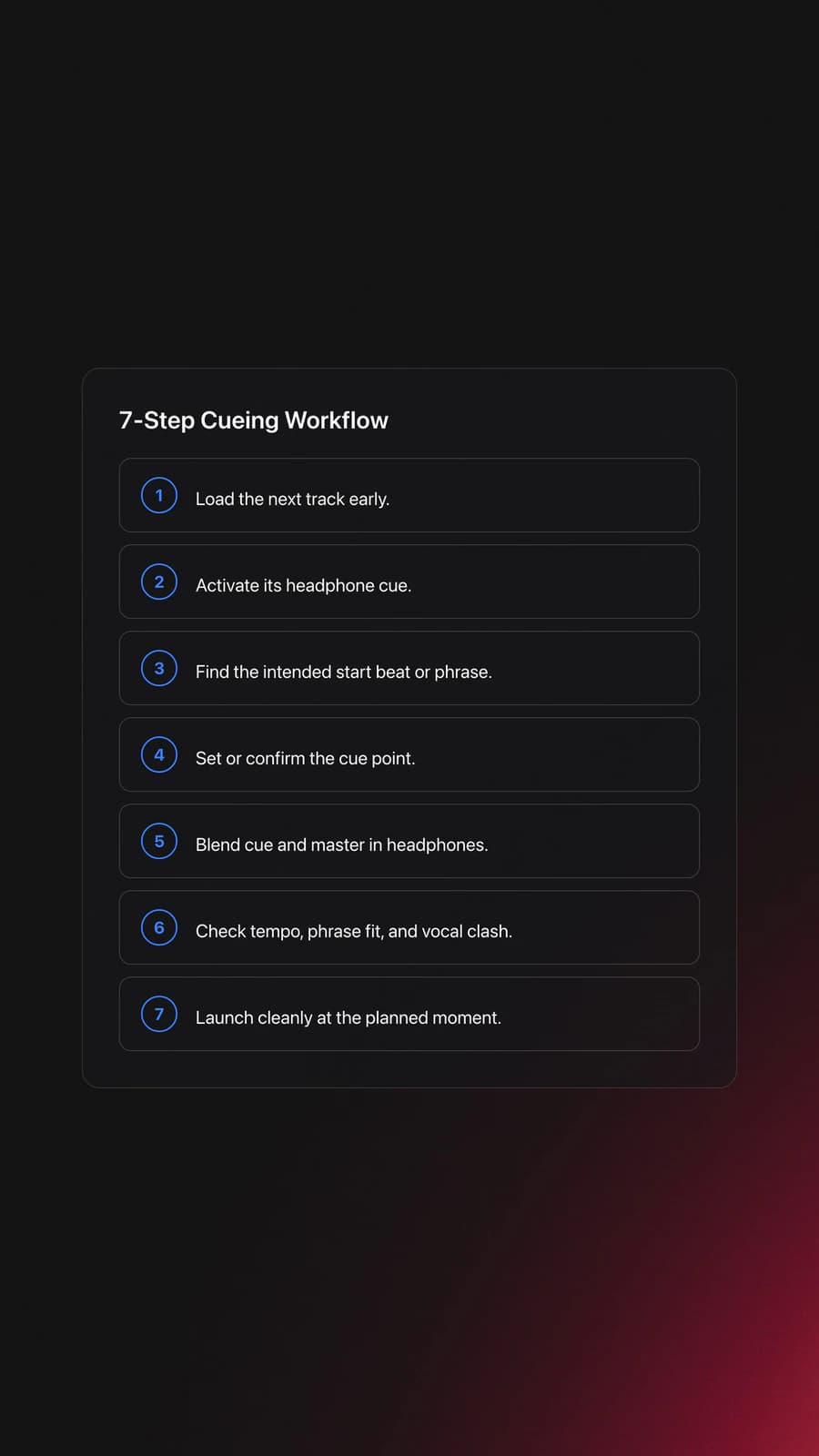
- Load the next track early.
- Press its headphone cue button.
- Find the intended start beat or phrase.
- Set or confirm the cue point.
- Blend cue and master in headphones.
- Check beat timing and phrase timing.
- Launch the track at the planned moment.
Load early enough that you can make decisions. If you wait until the outro is already disappearing, your ears tense up and your choices get reactive.
Find the entry point with intention. For house and techno, that is often the first downbeat of an intro phrase. For hip-hop or open format, it may be the first vocal pickup you want to hit after a cut. The best start point depends on genre, but it should always be musically deliberate.
Now compare cue and master in your headphones. Listen for three things: tempo closeness, phrase fit, and content clash. If the next track's vocal starts over an active vocal, delay the launch or choose another cue. Native Instruments specifically notes that cue points can help DJs avoid overlapping vocals and remember better mix-in and mix-out spots.
When the moment arrives, start the track cleanly and keep your hands calm. Small nudges are normal. Sudden fader moves and constant jog corrections usually mean the cue was rushed, not that your timing is hopeless.
If you want a stronger setup for this stage, mark reliable start and mix-out points before the session. That removes guesswork and makes live cueing far less stressful.
Equipment and Setup
You do not need elite gear to learn cueing tracks. You need a reliable headphone path, a clear cue button layout, and music you know well enough to judge structure.
Essential gear is simple: two decks, a mixer or controller with cue monitoring, and closed-back DJ headphones. Closed-back models help because they isolate outside sound better, which matters in loud booths.
Optional tools can speed up learning. Waveforms help you spot sections. Saved hot cues help you jump to intros, drops, and outros. Booth monitors help you confirm what the room hears. None of these replace ear training, but they reduce friction.
Preparation also matters. DJ TechTools recommends beatgridding, creating cues, and editing track data before gigs because prep turns your library into something playable under pressure. For cueing tracks, this means your next record is not just loaded. It is pre-understood.
If you practice with a larger collection, organized crates help. In Vibes, you can group local tracks by energy, function, or transition purpose, then build a small practice set of easy intros, vocal entries, and short outros. That kind of structure makes repeated cueing drills faster because you spend less time searching and more time listening.
Practice Drills for Cueing Tracks
Practice works best when cueing tracks is isolated into small listening tasks. In practice, short, repeatable drills build cue accuracy faster than long unfocused sessions.
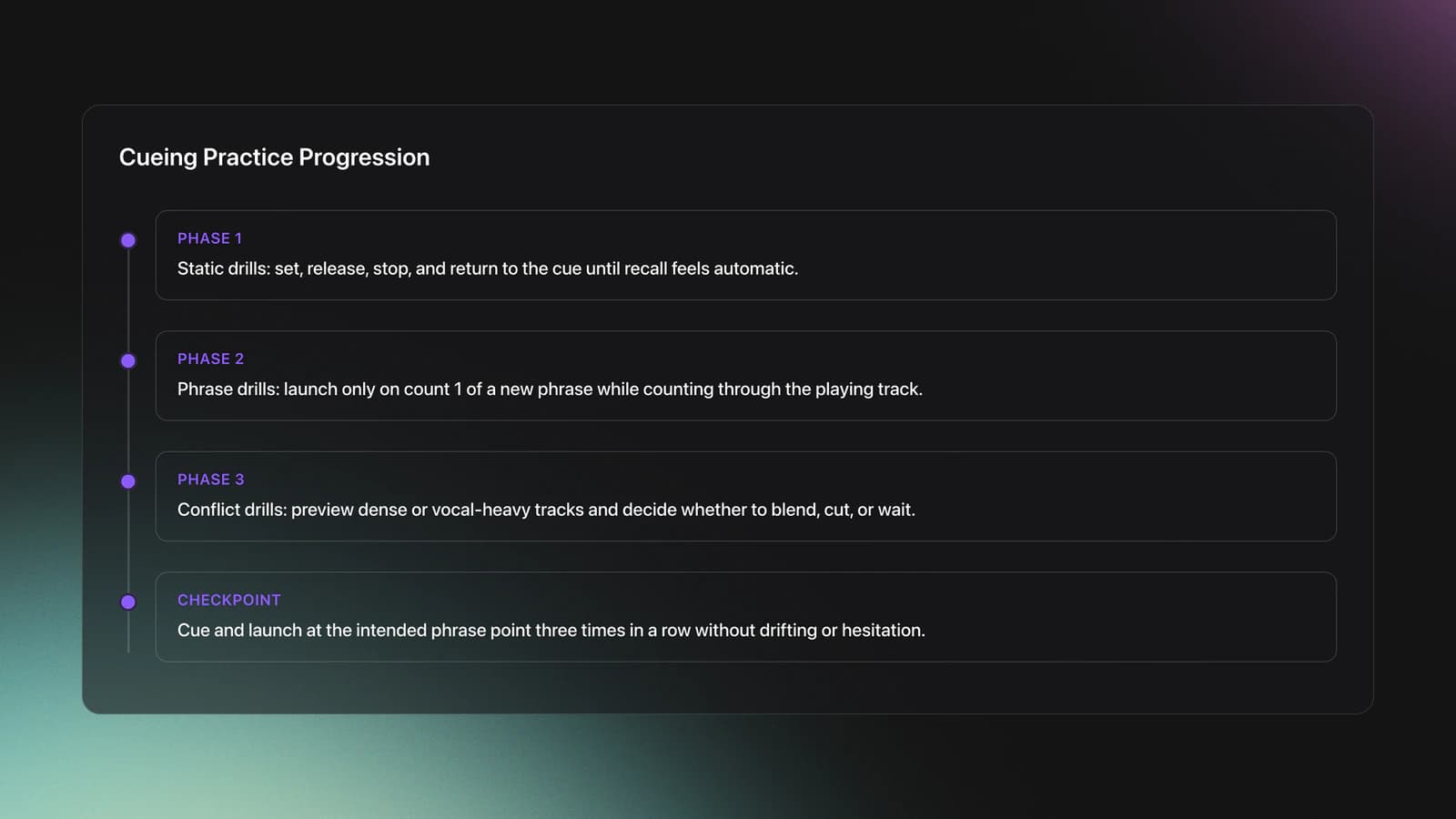
Start with static drills. Load a track, set the cue, release it, stop, and return. Do this until your fingers can place and recall the start point without panic. The goal is boring consistency.
Then move to phrase drills. Use one playing track and one cued track. Count 1 to 32 over the playing track, and only start the next record on count 1 of a new phrase. Phrase mixing resources consistently emphasize that clean structure often matters as much as pure beat alignment.
After that, add conflict drills. Pair tracks with vocals, dense mids, or short intros. Your task is to preview the next track and decide within one phrase whether to blend, cut, or wait. This is much closer to real gig conditions.
A useful checkpoint is simple: can you cue and launch a new track at the intended phrase point three times in a row without drifting, flinching, or second-guessing? If yes, your fundamentals are starting to hold.
Common Mistakes
Most cueing mistakes come from rushing or listening for the wrong thing. The fix is usually simpler than it feels.
| Mistake | Why It Happens | Solution |
|---|---|---|
| Starting from the wrong beat | Cue set on a pickup or random transient | Zoom in, find the true downbeat, and reset the cue |
| Launching at the wrong phrase | Listening only for BPM, not structure | Count bars and enter on a new 8 or 16 bar phrase |
| Hearing only cue or only master | Headphone mix knob not balanced for comparison | Blend both signals while preparing, then shift as needed |
| Headphones too loud | Trying to overcome booth noise with volume | Lower headphone level and use hearing protection when needed |
Why do most beginners struggle here? Because they think cueing tracks is a button skill. It is really a listening skill with buttons attached.
Another common problem is overtrusting visual waveforms. Visuals help, but they do not tell you whether a vocal starts too early, whether the groove swings differently, or whether the phrase energy is wrong for the room.
There is also a mindset mistake. Some DJs wait for a perfect moment that never arrives. A better rule is to make a clear choice early: blend now, cut later, or skip this transition idea and move on.
Safety and Listening Control
Safe cueing means hearing enough detail without turning your headphones into a second PA system. That balance matters more than many DJs realize.
OSHA states that exposure over 85 dBA can damage hearing, and its guidance notes that if you need to raise your voice to speak to someone about three feet away, the environment may already be above that level. Loud booths and clubs can easily push DJs toward unsafe headphone volume habits.
In practice, keep headphone volume only high enough to judge timing and content. If you leave sets with ringing ears or muffled hearing, your monitoring level is too high or your exposure is too long. The OSHA occupational noise overview is a useful baseline reference for venue hearing risk.
Why Cueing Tracks Matters in Real Sets
Cueing tracks gives you time to think before the audience hears the decision. That single buffer changes everything.
You can preview whether the intro is too empty, whether the kick is too heavy, whether the vocal will collide, or whether the transition should wait another phrase. That is why the technique shows up in beginner tutorials, controller workflows, and advanced performance setups alike.
It also improves recovery. If the current track is ending faster than expected, or the room suddenly shifts energy, cueing lets you adapt instead of forcing the plan. Well-prepared cue points and phrase markers make that adaptation faster, which is one reason educational sources keep linking cue work with preparation and transition quality.
Cueing Tracks Recap
Cueing tracks is the bridge between track selection and live execution. When it is strong, your transitions feel calmer, your phrase choices improve, and your mistakes become smaller and easier to recover from.
- Cue the next track early enough to make real decisions.
- Listen for phrase fit, not only BPM alignment.
- Keep headphone levels controlled so accuracy does not cost hearing.
Start by practicing clean cue placement on first downbeats, then add phrase launches, then add harder vocal and energy conflicts. After that, deepen the skill with learn phrase mixing timing or tighten your preparation by learning to mark reliable start and mix-out points.
The visual way to organize your DJ library
Tag tracks by vibe. See everything at once. Export to rekordbox, Serato, Traktor or Engine DJ.
14-day free trial. Full access, no strings attached.
or see how it works
More Tutorials

Beginner DJ Equipment: What You Need
DJ Decks: 2 vs 4 Channel Buying Guide
Starter DJ Controller Buying Guide
Portable DJ Controller Buying Guide

Virtual DJ Tutorial: Beatmatching Basics

What Is a House DJ?
Mixed In Key Database Guide

DJ Key Wheel Decision Framework: Four Safe Moves and Advanced Jumps
Equipment You'll Need
Pioneer DJ DDJ-FLX4
optionalA compact 2-channel DJ controller with built-in audio interface, USB-C connectivity, and beginner-friendly smart mixing features.
Traxsource
optionalTraxsource is a digital music download store focused on house and underground dance music for DJs.
Hercules DJControl Inpulse 500
optionalA 2-channel USB DJ controller with built-in audio interface, performance pads, and guided mixing features for home practice and small public sets.
Beatport
optionalBeatport is a DJ-focused electronic music store and streaming platform for discovering, buying, and streaming tracks into supported DJ software and hardware.
Mixed In Key 11
optionalStandalone harmonic-mixing and library-prep software that detects keys, energy levels, cue points, and tags for DJ sets.
VirtualDJ
optionalDJ software for Windows and macOS that handles audio mixing, video mixing, karaoke, stems, and broad hardware support.
Platinum Notes 10
optionalPlatinum Notes 10 evens loudness, repairs clipped peaks, and prepares DJ files for more consistent playback in Serato, rekordbox, and Traktor.
Serato DJ Pro
optionalProfessional DJ software for mixing, performance, library management, recording, and hardware-integrated club workflows.
Pioneer DJ DDJ-SB
optionalA compact 2-channel USB DJ controller designed for Serato DJ Intro and later supported with Serato DJ Lite and Serato DJ Pro.
Traktor MX2
optionalA 2-channel DJ controller with integrated audio interface and tight Traktor Pro 4 integration for mixing, stems, effects, and performance pads.
Native Instruments Traktor Pro 4
optionalA professional 4-deck DJ software platform with stem separation, flexible beatgrids, effects, DVS support, and broad controller integration.
Serato DJ Lite
optionalFree two-deck DJ software for Mac and Windows that introduces Serato’s workflow, controller support, and basic mixing tools.
Numark Mixtrack Pro II
optionalA two-channel USB DJ controller with a built-in audio interface, touch-activated jog wheels, and performance pads for Serato-compatible mixing.
Pioneer DJ DDJ-1000
optionalA 4-channel rekordbox DJ controller with full-size jog wheels, onboard displays, and club-style mixer controls.
DJControl Inpulse 200 MK2
optionalCompact 2‑deck USB DJ controller with built‑in audio, Beatmatch Guide LEDs, and Serato DJ Lite/DJUCED integration.
rekordbox
optionalCloud-connected DJ software for music management, performance, export prep, and club-standard hardware integration.
Pioneer DJ DDJ-400
optionalA compact 2-channel USB DJ controller built for rekordbox with a club-style layout aimed at new and progressing DJs.
Numark Mixtrack Pro FX
optionalA 2-deck USB DJ controller with a built-in audio interface, capacitive jog wheels, performance pads, and Serato DJ Lite support.
VirtualDJ 7
optionalA legacy DJ software platform for audio and video mixing, controller mapping, and DVS playback on Windows and Mac.
Pioneer CDJ-1000
optionalA discontinued professional CD-based DJ player that helped define the modern club-standard jog-wheel workflow.
Pioneer DJ CDJ-3000
optionalProfessional flagship DJ media player with a 9-inch touchscreen, advanced MPU processing, and club-standard Pro DJ Link workflow.
Pioneer CDJ-400
optionalA discontinued digital DJ media player that plays CDs and MP3 files from USB storage, and can also work as a MIDI controller and USB audio interface.
Frequently Asked Questions

Hey, it's Ben Modigell 👋
I DJ and produce as so I so: downtempo, minimal, dub house, tech house, and techno (releases on Spotify and SoundCloud, links above). Everything I write here comes from my own gigs, studio sessions, and library cleanups: the rules I follow, the failure modes I have actually hit, and the workflow I use when nobody is watching. If a technique did not earn its place in my own sets, it does not make it into a tutorial.