
Watch Complete DJ Method’s tutorial above (6.2K views on YouTube).
This guide is for DJs using the mixed in key database to analyze, sort, and troubleshoot their library. If you are stuck on cue points, BPM, key filtering, or iTunes import behavior, this shows how the database actually works and how to fix the common failure points. You will leave with a repeatable workflow for reading the collection screen, sorting with intent, testing results, and keeping your tags usable in DJ software.
The core idea is simple. The mixed in key database is not just a song list. It is a working analysis layer that stores key, BPM, energy, cue data, and file metadata so you can sort tracks by performance decisions instead of by filename alone.
For the concept behind the key data, see harmonic mixing basics. For running the app and analyzing in the first place, see the Mixed In Key manual.
Mixed In Key Database: What It Stores
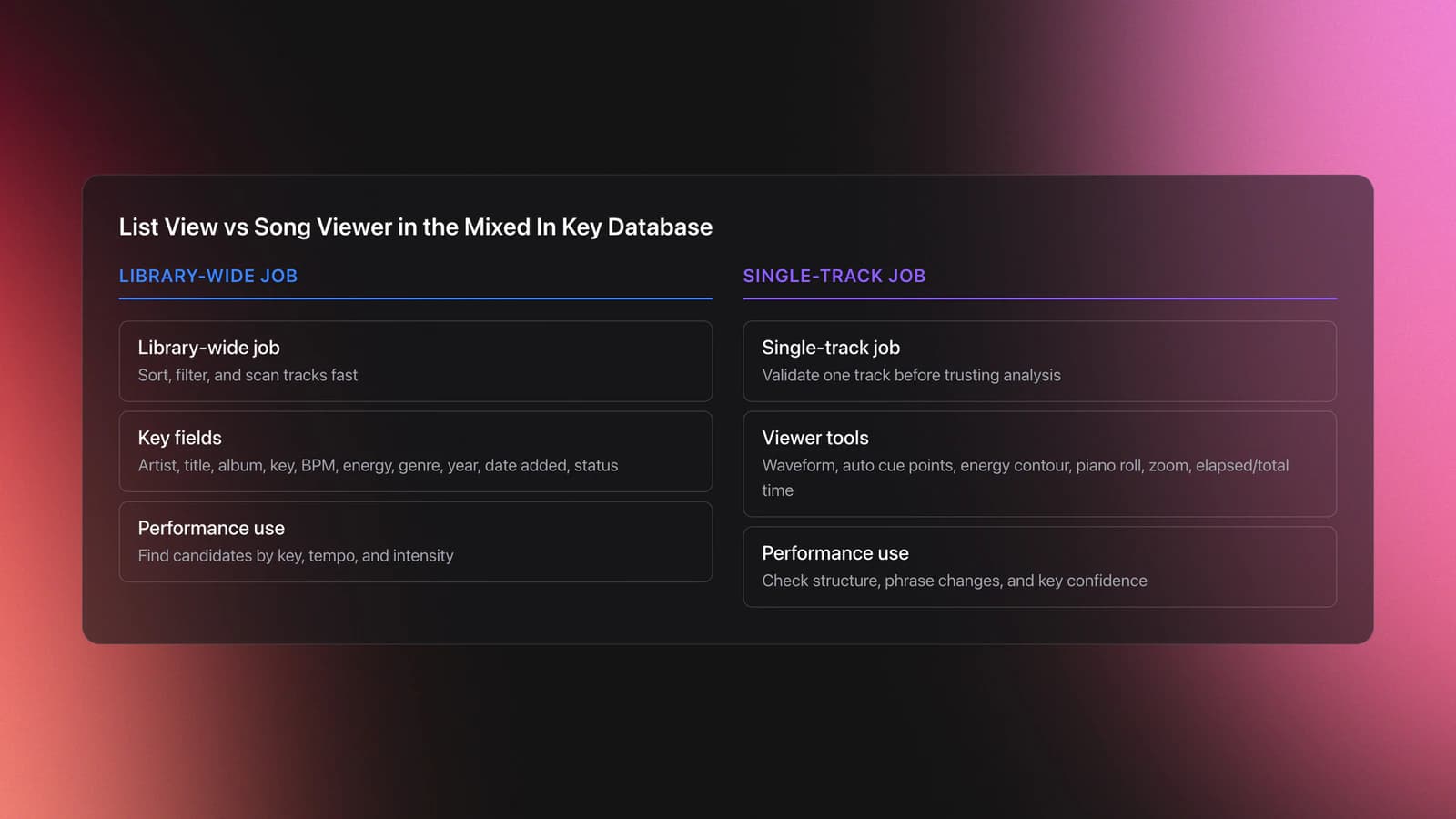
The collection screen is the operational center of the mixed in key database. It shows each analyzed track and the fields you can act on fast: artist, title, album, key result, energy, tempo, cue points, clipped peaks, volume, genre, grouping, year, date added, and analysis status.
That matters because each field supports a different performance decision. Key helps harmonic transitions. BPM helps pace matching. Energy helps sequence intensity. Cue points help phrase awareness.
The song viewer adds a second layer. When you load a track, you see waveform sections, automatically detected cue points, energy contour, elapsed time, total time, zoom controls, and a piano roll for key checking.
This is the right way to think about it: the list view is for sorting across the library, while the viewer is for validating one track. Confusing those two jobs is why many DJs either trust the software too much or ignore useful analysis data.
Cue points are created automatically during analysis. They are placed around structural changes including beginnings, drops, breakdowns, verses, choruses, and outros when the software can detect them.
Tempo and energy are stored per track. Energy runs on a 1 to 10 scale in the interface. That gives you a rough intensity ladder for set flow, not an objective musical truth.
In practice, the mixed in key database is best used as a decision support system. It should speed up choices you were already going to make, not replace listening.
A useful mental model here is the three-pass database check. First, confirm technical fields like BPM and key. Second, confirm structural fields like cue points. Third, confirm practical usefulness by asking whether the data helps you find the next track faster.
Validation Check
Collection Screen Workflow
Most mixed in key database problems are really workflow problems. The software may analyze correctly, but the user does not validate the result, does not sort with intent, or does not understand which fields are safe to trust automatically.
Start by loading a track into the viewer. Double-click the song or use the display-in-viewer option from the right-click menu.
Then read the track in this order: beginning marker, major cue points, energy curve, key label, BPM, and total length. That order mirrors how you actually decide whether a track can enter a set.
Example one: a track shows 124 BPM, 4A, energy 6, and eight auto-generated cue points. You are building a warm-up section. That suggests a restrained groove slot, but preview the first drop and the outro before trusting it.
Example two: another track shows 128 BPM, 4A to 9A key change behavior, and the highest energy peak in the latter half. That suggests a lift later in the set rather than an opener, even before full listening.
The failure mode is obvious once you know what to watch for. DJs see a matching key and BPM, skip the waveform check, and miss that the track starts with dead air, a long breakdown, or a late-arriving kick.
Sorting And Filtering The Database
This is where the database earns its keep. Use sorting and filtering together rather than scrolling.
- Sort by Key result to cluster Camelot neighborhoods, then act on the four safe moves from your anchor key.
- Filter to a single Camelot slot to see only same-key candidates, then widen to adjacent slots.
- Sort by Energy within a tempo band to find a bridge track instead of jumping intensity by accident.
- Sort by Tempo to keep a controlled BPM climb across a section.
- Search by artist, title, or grouping to narrow without losing the current sort context.
A small crate can survive on memory. A large performance library needs structure. The database is the structure: it lets you re-sort the same collection many ways without retagging. Decide which fields you sort by most and keep those columns visible, so prep is scanning rather than hunting. If you want that same re-sortable view as portable crates you can carry into a set, Vibes reads the key, BPM, and energy fields you have already analyzed and lets you slice the collection into saved performance groupings.
My library was a mess from day one, with downloads piling up at random, so I learned the hard way that a sort is only as good as the data underneath it. If the key field is wrong or the BPM is half-time, every filter built on top inherits that error. Clean, reliable fields are what make the database trustworthy enough to act on without re-checking each track.
You will know this workflow is dialed in when you can open an unfamiliar folder, sort it three different ways, and still find a plausible next track in under thirty seconds.
Mixed In Key BPM And Energy
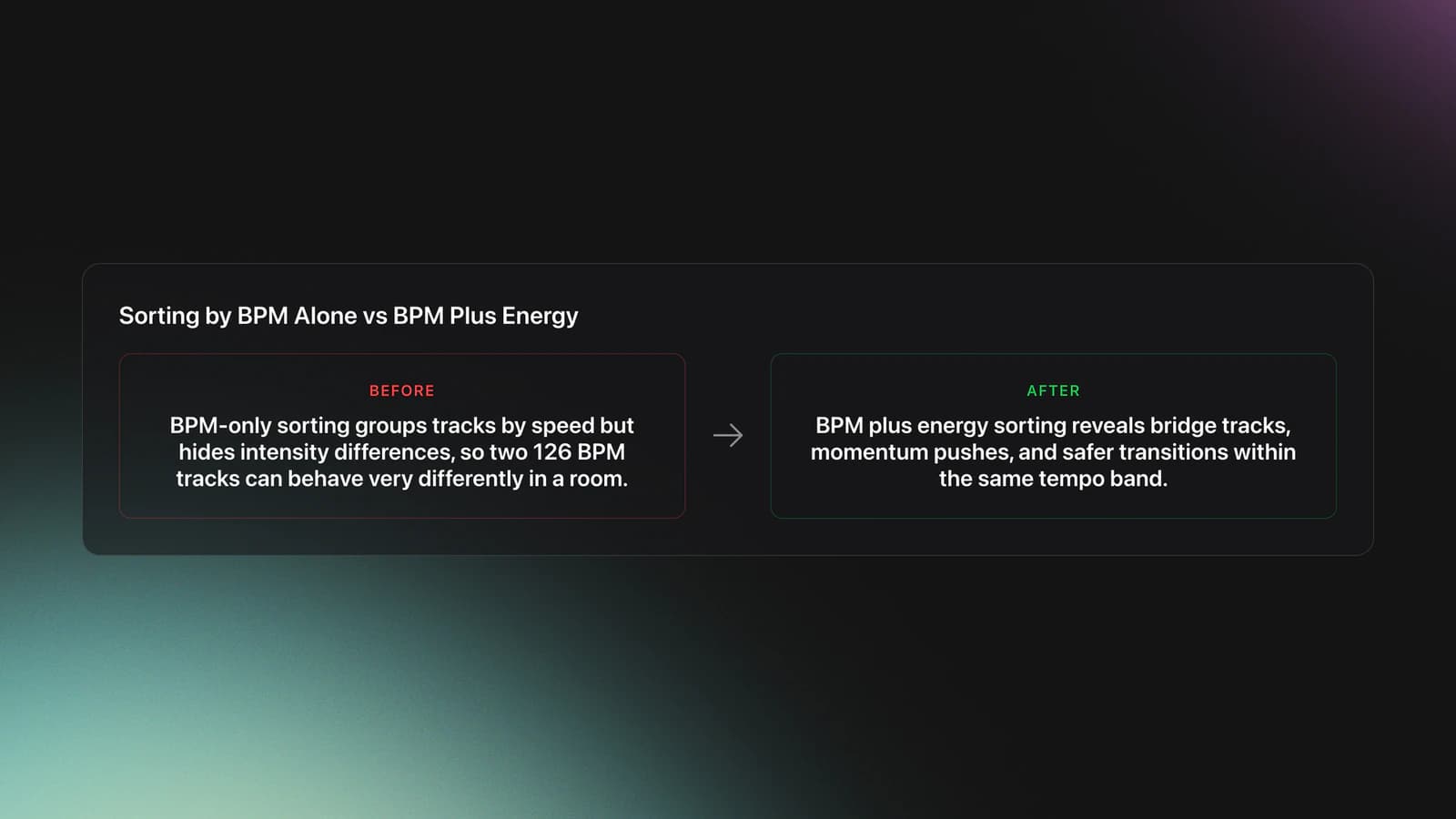
BPM and energy are related, but they are not the same signal. BPM measures speed. Energy estimates intensity. A slower track can still feel bigger than a faster one if the arrangement, sound design, and density are more aggressive.
That is why the database becomes more useful when you read BPM and energy together. Sorting only by tempo can flatten tracks that behave very differently in a room.
Energy is a 1 to 10 rating. A groove-heavy darker track may land around six, while a busier, more explosive track may rate higher.
Use that rating as a sketch, not a law. The software sees macro dynamics. It does not know your crowd, slot time, or what counts as intense in your genre.
Example one: two tracks are both 126 BPM. Track A is energy 5 with sparse drums. Track B is energy 8 with stacked percussion and a larger drop. For a momentum push, Track B is the right choice even though tempo is identical.
Example two: you are moving from 122 BPM warm-up into 124 BPM rolling techno. If you sort by BPM alone, you may jump too hard. If you sort by energy within that BPM band, you can find the bridge track first.
The common failure mode is treating energy as objective across genres. A deep house 7 and a peak-time techno 7 may serve completely different jobs.
A practical fix is to create your own local standard. Pick ten tracks you know well. Compare their software energy ratings against your real-world use. From there, calibrate how much trust to place in the number.
You will know BPM and energy are working for you when the next track you pick needs less second-guessing. The database should reduce audition time, not add another argument with the screen.
Mixed In Key Cue Points
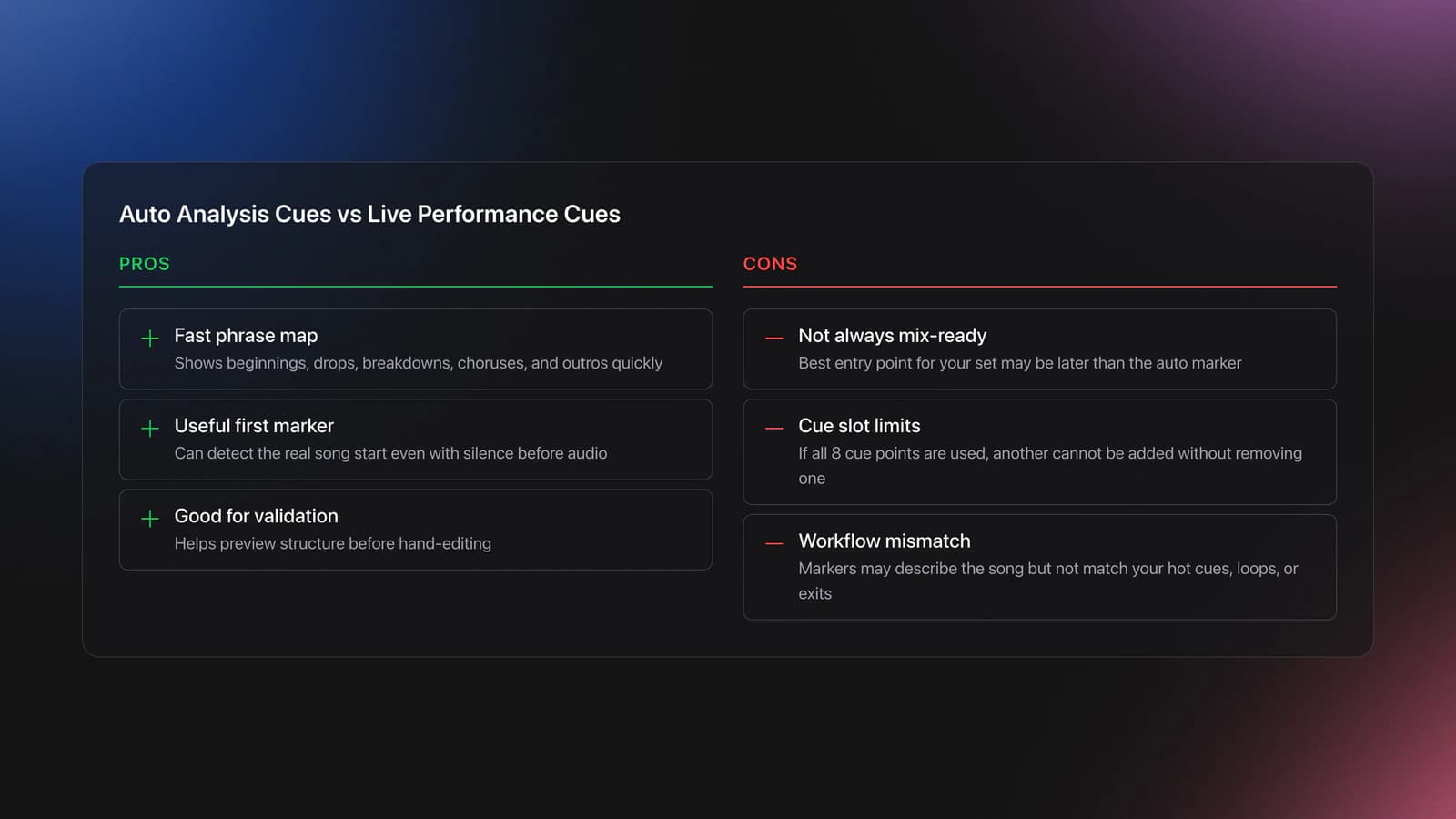
Mixed in key cue points are one of the most useful and most misunderstood parts of the database. The software auto-creates cue markers during analysis, and the viewer breaks the song into playable sections around those markers.
That makes cue points valuable for phrase reading, fast previewing, and rough track mapping. It does not mean every marker is performance-ready.
A few important behaviors. The first cue point can detect the real beginning of the song, even when there is silence before the first audible event. Additional cue points are placed around major structural changes.
On vocal songs, those changes may line up with verses and choruses. On instrumental club tracks, they may line up with intro, drop, breakdown, second drop, and outro zones.
Example one: a house track has a 16-beat drum intro, a bass entry, a short breakdown, and a long outro. If the automatic cue points hit those transitions cleanly, you now have a fast phrase map without hand-tagging every section.
Example two: a hip-hop edit has a loose vocal pickup before the grid feels stable. The software may mark the beginning accurately, but your best mix-in point could be later. Keep the auto marker as information, not as your live hot cue.
A known limitation is cue slot count. Tracks where all eight cue points are already used will not accept another cue until one is removed.
That is a good reminder to separate analysis cues from performance cues. Analysis cues explain the song. Performance cues support your hands.
Official Mixed In Key support materials document iTunes integration settings and playlist import requirements, and the current release notes show the product line is still actively updated. Cue and tag behavior often changes at the integration layer, not in the analysis logic alone. See Mixed In Key's iTunes integration page and the Mixed In Key Pro release notes.
The failure mode here is easy to spot. The cue points exist, but they are not the cue points you actually need. They describe the record, but they do not match your preferred entry, loop, or emergency exit points.
The fix is not to reject auto cues outright. Test them in layers. Keep the structural markers that save time. Replace the ones that get in your way.
You will know your cue setup is healthy when three things happen: the first marker lands where the track really starts, the major transitions are visible at a glance, and your live hot cues still reflect your own mixing habits.
Mixed In Key iTunes Integration
Mixed in key iTunes questions usually come from a mismatch between library source and metadata destination. DJs expect iTunes or Music.app to behave like a full DJ database, but it is mostly acting as a media library reference.
The official integration guide says Mixed In Key can import playlists from Apple iTunes, and on Windows it may require the XML-sharing option to be enabled. It also recommends disabling the setting that copies files into the iTunes Media folder when adding to the library, because import works best when file paths stay stable.
This is the key distinction. Playlists can travel one way, but not every DJ-oriented field behaves like a native iTunes field. That is why some users see tracks and playlists correctly while BPM, key, energy, or cue behavior seems inconsistent across apps.
If your goal is only playlist visibility, mixed in key iTunes integration is usually straightforward. If your goal is full metadata round-trip reliability across several DJ apps, test the exact chain you use.
A clean test looks like this: import ten local files, analyze them, confirm key and BPM in Mixed In Key, check whether the target app reads the same fields, then change one file path and see what breaks. That tells you whether your issue is analysis, tagging, or library linking.
The failure mode is assuming the Apple library is the master truth for DJ metadata. In many setups, it is not. Choose one primary organizational layer for mood and function and keep the rest downstream.
You will know your integration is stable when a track keeps the same file path, appears in the expected playlist, and shows the same useful metadata in the next application without manual repair.
Mixed In Key Test Workflow
A mixed in key test should answer one question at a time. Do not test key accuracy, cue usefulness, BPM reliability, and export behavior all at once. That creates noise and hides the real fault.
Use this order.
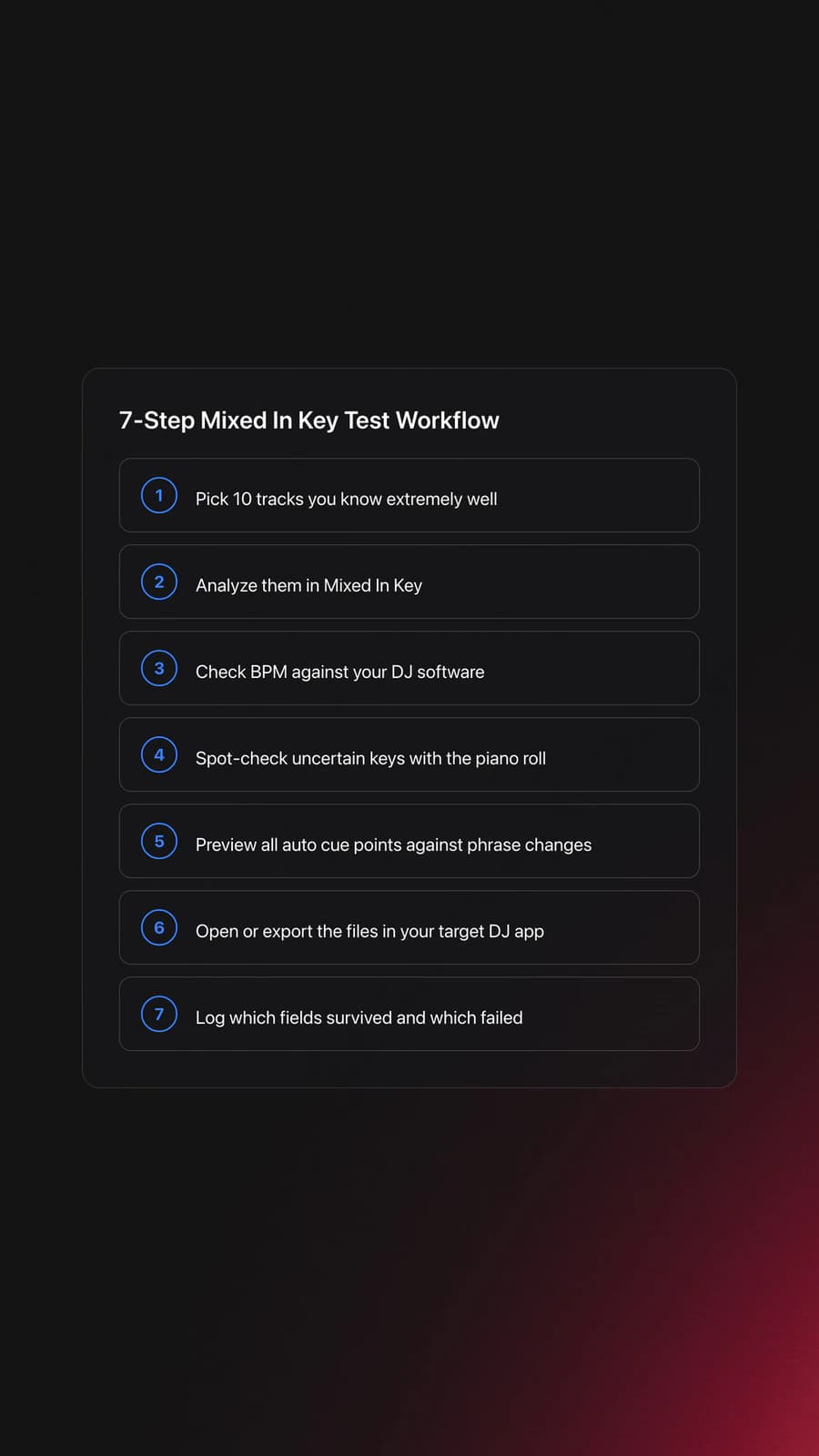
- Pick 10 tracks you know extremely well.
- Analyze them in Mixed In Key.
- Check BPM against your DJ software.
- Check key with the piano roll on two uncertain tracks.
- Preview all auto cue points against phrase changes.
- Export or open the same files in your target DJ app.
- Log which fields survived and which failed.
This gives you a controlled sample. You are not looking for perfection. You are looking for consistent error patterns.
Example one: BPM matches on all ten tracks, keys feel right on nine, but cue points are weak on half. That means your analysis core is fine, but your cue trust threshold should stay low.
Example two: key, BPM, and cues look good inside Mixed In Key, but only title and artist appear correctly in the next app. That points to an integration or tagging issue, not an analysis issue.
The validation criterion is simple. A good mixed in key test produces a usable rule, not just a feeling. For example: trust BPM by default, trust key after spot check, trust auto cues only as structural guides.
For deeper prep, compare this with a DJ cue point strategy and energy flow for DJ sets.
Mixed In Key Not Working
When mixed in key not working is the problem, narrow it fast. Most failures fall into one of five buckets: import, analysis, metadata display, cue transfer, or library path mismatch.
| Mistake | Why It Happens | How to Avoid |
|---|---|---|
| Trusting auto cues without preview | Structural markers are useful, but not always mix-ready | Preview the first drop, breakdown, and outro before exporting |
| Blaming BPM when the file path changed | The track may be linked incorrectly in the target app | Keep paths stable and test with a small known folder first |
| Using iTunes as the master DJ database | Playlist libraries do not always carry DJ metadata cleanly | Treat Apple playlists as references, not as the sole source of truth |
| Sorting by one field only | BPM, key, and energy each describe different things | Combine filters and verify against the waveform |
| Running giant library tests first | Large imports hide the exact failure point | Test ten known tracks before scaling |
Common mixed in key database mistakes
- Start with import. If tracks do not appear where expected, check the source folder or playlist link first.
- Check analysis status. If analysis did not complete, the downstream fields will be partial or missing. Re-run analysis on the affected tracks.
- Check the viewer. If the waveform, BPM, key, and cue points exist there, the analysis layer likely worked and the problem is downstream.
- Check the target app. If the fields vanish after transfer, the problem is usually export, tag interpretation, or library sync.
- Check version age. If your workflow guide is based on older Mixed In Key 10-era advice, verify it against the current official release notes before changing your whole library.
If audio repair is part of your fix (clipped peaks, loudness), that belongs to Platinum Notes, covered in the Mixed In Key manual. Keep repair separate from database troubleshooting so you do not confuse a tagging problem with a sound problem.
Quick Decision Guide
Use this when you need to decide what to trust inside the mixed in key database.
| Scenario | Best Choice | Why | Next Action |
|---|---|---|---|
| BPM matches your DJ app on most tracks | Trust BPM by default | Tempo detection is consistent enough for sorting | Spot-check only unusual edits and live recordings |
| Key sounds right but one track feels off | Use the piano roll to verify | A quick ear check beats blind trust | Compare the strongest tonal center against two nearby keys |
| Auto cues show structure but not your entry points | Keep them as analysis cues | They still save preview time | Replace only the cues you need for live control |
| iTunes playlists import but DJ fields feel inconsistent | Treat iTunes as a source layer only | Playlist visibility and DJ metadata are not the same thing | Test the chain with ten local files |
| Big library import feels messy | Shrink the test set first | Smaller samples reveal the real failure point | Analyze ten known tracks before scaling to the full library |
Conclusion
The mixed in key database works best when you treat it as a fast-reading layer for your library, not as a perfect musical authority. BPM, key, energy, and cue points all help, but each helps in a different way.
Keep the core rules simple.
- Use list view for sorting decisions.
- Use viewer mode for validation.
- Trust repeated patterns, not single-track surprises.
Your next step is to run a ten-track test, define what you trust, and standardize that rule across your prep workflow.
The visual way to organize your DJ library
Tag tracks by vibe. See everything at once. Export to rekordbox, Serato, Traktor or Engine DJ.
14-day free trial. Full access, no strings attached.
or see how it works
Techniques Covered

Track Selection
Energy Analysis

Spotify BPM and Key Analysis

Camelot Key Display Setup in Rekordbox, Serato and Traktor

Cross-Platform Playlist Integration

Track Analysis
Cueing Tracks

Smart Playlists for DJs
Equipment & Software
Continue Your Learning Journey
Start Here First


Related Content

Mixed In Key Manual for DJs
intermediateHow To Mix In Key Live: Worked Transitions And Failure Fixes
intermediateDJ Key Wheel Decision Framework: Four Safe Moves and Advanced Jumps
intermediate
DJ Record Pool Guide for Working DJs
intermediate
DJ Playlist Spotify: Mixing With Streaming Inside Rekordbox
intermediateDJ Library Organization System: Tags, Crates, Keys
intermediate
DJ Transitions: The Three-Layer Handoff for Beginners
intermediate
Harmonic Mixing Guide for DJs: Energy & Workflow
intermediate
Transition DJ Online: Browser Mixer Workflow
intermediateFrequently Asked Questions

Hey, it's Ben Modigell 👋
I DJ and produce as so I so: downtempo, minimal, dub house, tech house, and techno (releases on Spotify and SoundCloud, links above). Everything I write here comes from my own gigs, studio sessions, and library cleanups: the rules I follow, the failure modes I have actually hit, and the workflow I use when nobody is watching. If a technique did not earn its place in my own sets, it does not make it into a tutorial.

