
Camelot Wheel Guide for DJs
The Camelot Wheel helps DJs mix in key by matching same-code, adjacent, and A/B compatible keys for smoother transitions.
Click any key on the wheel to explore mix relationships.
13 named transitions: safe, energy, advanced.
Camelot Wheel Guide for DJs Tutorials



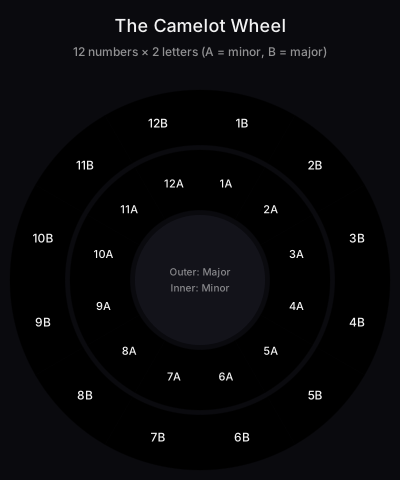
The Camelot Wheel helps DJs mix in key by matching same-code, adjacent, and A/B compatible keys. Use it to choose safer blends, plan energy moves, and spot when a harmonic jump is worth the risk.
The Camelot wheel arranges all major and minor keys as simple codes like 8A or 5B. Use it to plan transitions, build arcs, and keep vocals and melodies clear.
If you already beatmatch and phrase, Camelot Wheel Usage is the next unlock. It turns harmonic mixing into quick, reliable choices you can make under pressure.
Continue readingHarmonic Mixing for DJs: A Complete GuideThe companion pillar, what harmonic mixing is, the three compatibility rules, energy control through key choice, genre-by-genre stance, software setup, and a worked four-track transition example.What Is the Camelot Wheel?
A note on terminology: across DJ forums and software, you'll see the same concept called the Camelot system, the Camelot key chart, the camelot scale, the dj wheel, or simply "the wheel." Each camelot key, every individual code on the diagram, corresponds to one major or minor musical key. The labels are interchangeable with traditional notation; the Camelot system is just a more booth-friendly representation of the same underlying music theory.
You will hear DJs call it different things, the DJ key wheel, the Mixed In Key wheel, or simply "the key wheel." All three names point at the same diagram. The vocabulary around it is just as varied: producers talk about key matching, classical musicians talk about key compatibility, and DJs talk about harmonic mixing. They are describing the same skill, picking two tracks whose tonal centres line up, through different professional lenses.
Who Created the Camelot Wheel?
Camelot ↔ Open Key ↔ Musical Key Conversion
Different DJ software displays keys in different notations. Rekordbox and Mixed In Key use Camelot natively; Traktor uses Open Key (1m–12d); Serato shows musical keys (A minor, C major, etc.) by default. The 24 keys are identical in all three systems, only the labels differ. Use this conversion chart when working across platforms or reading track metadata.
| Camelot | Open Key | Musical Key | Mode |
|---|---|---|---|
| 1A | 6m | A♭ minor | Minor |
| 1B | 6d | B major | Major |
| 2A | 7m | E♭ minor | Minor |
| 2B | 7d | F♯ major | Major |
| 3A | 8m | B♭ minor | Minor |
| 3B | 8d | D♭ major | Major |
| 4A | 9m | F minor | Minor |
| 4B | 9d | A♭ major | Major |
| 5A | 10m | C minor | Minor |
| 5B | 10d | E♭ major | Major |
| 6A | 11m | G minor | Minor |
| 6B | 11d | B♭ major | Major |
| 7A | 12m | D minor | Minor |
| 7B | 12d | F major | Major |
| 8A | 1m | A minor | Minor |
| 8B | 1d | C major | Major |
| 9A | 2m | E minor | Minor |
| 9B | 2d | G major | Major |
| 10A | 3m | B minor | Minor |
| 10B | 3d | D major | Major |
| 11A | 4m | F♯ minor | Minor |
| 11B | 4d | A major | Major |
| 12A | 5m | D♭ minor | Minor |
| 12B | 5d | E major | Major |
Convert between Camelot, Open Key (Traktor), and traditional musical key notation. All three describe the same 24 keys.
The Camelot Wheel was created in 2007 by Mark Davis and the team at Mixed In Key, adapting the music-theoretic circle of fifths into a numbered system DJs could use without formal training in music theory. Each of the 12 keys gets a number (1–12) and a letter (A for minor, B for major), a notation deliberately designed to make harmonic compatibility readable at a glance. Within a few years the system became the industry standard and is now natively supported in Rekordbox, Mixed In Key, Engine DJ, and Serato. The underlying theory is centuries old; what Davis solved was the user-interface problem of getting key information into the hands of working DJs in the middle of a set.
The Camelot Wheel is a DJ-friendly map of musical keys that numbers each key 1–12 and labels minor keys "A" and major keys "B." Tracks with matching or adjacent codes mix smoothly. DJs use it to avoid key clashes and plan harmonic transitions.
The Camelot wheel is a DJ-facing view of the circle of fifths. Each key is a number, 1–12, with A for minor and B for major. Adjacent numbers and matching numbers form safe mixes. Educational guides from Mixed In Key explain the basics and show the wheel clearly. See the Mixed In Key Camelot Wheel overview and Harmonic Mixing 101 for rules and examples.
Core rules are simple. Mix the same code for a perfect match. Move plus one or minus one number within the same letter for smooth shifts. Switch A ↔ B with the same number to use the relative major or minor. These patterns are considered standard practice in harmonic mixing.
Modern DJ software detects musical key and displays it in various notations. You can work in Camelot, Open Key, or classical notes. The Native Instruments article explains Open Key, while Serato’s docs cover key sync and shifting.
For a broader context, the Wikipedia overview of harmonic mixing ties the Camelot wheel back to music theory and modern DJ workflows.
If you want a deeper dive into creative moves like energy boosts and major–minor flips, the DJ TechTools advanced key mixing guide outlines proven transitions.
Why Master This Technique
Camelot Wheel vs. Circle of Fifths
Music students often ask whether the Camelot Wheel is just the circle of fifths with new clothes. Functionally, yes, both diagrams arrange the twelve major and twelve minor keys so adjacent positions sit a perfect fifth apart. The difference is cognitive load. The classical circle of fifths labels each slice with up to seven sharps or flats, asks you to track enharmonic spellings (G♭/F♯), and pairs each major with its relative minor in a separate inner ring you have to read in two passes. Mark Davis's Camelot notation collapses all of that into one number for the relative major / relative minor pair and one letter for mode. The wheels carry identical information, the Camelot version just removes the friction that stops working DJs from doing key matching in a dark booth at 2 a.m.
| Aspect | Circle of Fifths | Camelot Wheel |
|---|---|---|
| Notation | Sharps and flats (B♭, F♯, etc.) | Numbers and letters (1A–12B) |
| Cognitive load | Requires music theory training | Read at a glance |
| Major/minor pairing | Outer + inner ring with separate labels | Same number, A or B |
| Enharmonic spellings | Tracks D♭ = C♯, G♭ = F♯ manually | One number wraps both |
| Use case | Music composition and theory study | DJ booth, real-time mixing |
| Origin | Centuries old (pre-Bach) | 2007, Mark Davis (Mixed In Key) |
Side-by-side: same musical relationships, different cognitive load. The Camelot Wheel wins for booth use; the circle of fifths wins for composition.
- Cleaner blends with fewer key clashes in melodic sections.
- Faster, more confident track selection under pressure.
- Intentional energy shaping without harsh jumps.
- Longer overlays for acapellas and vocals that stay musical.
Camelot Wheel Basics
Under the labels, the Camelot Wheel is a rotated circle of fifths. Move one step clockwise on the outer ring (e.g. 8B → 9B) and you have travelled a perfect fifth up; one step counter-clockwise is a perfect fourth up, the two intervals that ear-test as the smoothest movement between keys. Mark Davis built the Camelot system for Mixed In Key precisely so DJs would not need to remember which sharps and flats are enharmonic equivalents of each other (D♭ major = C♯ major = 3B); the number does the bookkeeping for you. The inner ring sits at the relative minor of each outer-ring major, which is why same-number A ↔ B swaps work, the two keys share every note, only the tonal centre differs. Internalising the music theory underneath the wheel is what separates rule-following from real harmonic mixing.
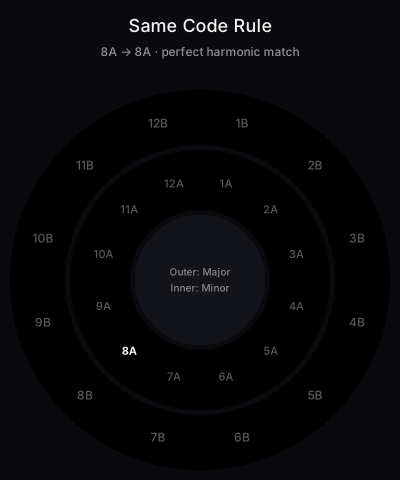
Same code: 8A to 8A or 5B to 5B yields the most predictable harmony, the safest move on the wheel.
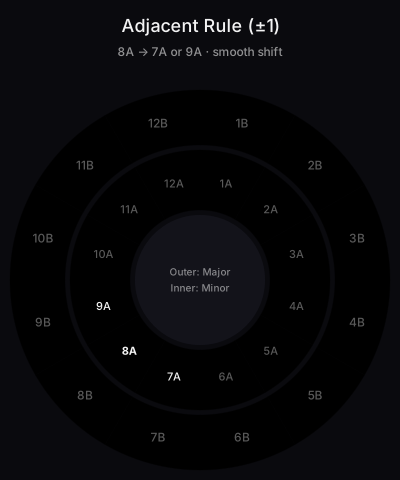
Adjacent numbers: move from 8A to 7A or 9A. Think of numbers as hours on a clock. One hour to either side stays compatible and smooth.
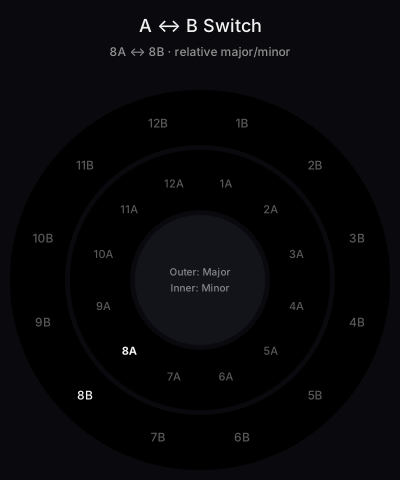
Relative switch: keep the number and change A ↔ B. For example, 7A to 7B. This flips between relative minor and major while retaining shared notes.
Energy lift moves: creative jumps can lift the room when used briefly. One- and two-semitone boosts map cleanly to Camelot number changes.
Diagonal Mixes: Is 8A to 9B Compatible?
Yes, 8A to 9B is compatible: it is the classic diagonal mix, moving up one number and swapping A to B in a single transition. On the wheel that takes you from A minor (8A) to G major (9B), two keys that differ by only one note (F versus F♯). The blend stays clean while the letter swap brightens the mood and the number step lifts the energy, which is why DJs treat the diagonal as an energy boost move.
The same logic works anywhere on the wheel: 9A to 10B (E minor to D major), 5A to 6B, or any plus-one-and-swap move shares all but one note between the two keys. The reverse diagonal, minus one number with the swap (8A to 7B, A minor to F major), is just as compatible but feels softer, a step down instead of a lift. Both directions are safer than a two-number jump because only one scale tone changes.
Timing matters more on diagonal mixes than on same-code or adjacent moves because mood and pitch center shift at once. Mix during a percussive or stripped-back section rather than over sustained vocals or melodic pads, and keep the overlap short. Done at a phrase boundary it lands like a chorus key change: the room feels the lift without hearing a clash.
Core Technique Breakdown
- 1
Analyze keys for your library
Choose one notation (Camelot, Open Key, or classical) and verify your DJ software displays keys consistently across all tracks.
- 2
Sort by BPM and key
Filter your crate to tracks within tempo range, then sort by Camelot code so harmonic and tempo zones overlap visually.
- 3
Pick the next track using one rule
Use same code (perfect match), ±1 number with same letter (smooth shift), or A↔B switch (relative major/minor energy flip).
- 4
Align the blend at a phrase boundary
Even a perfect harmonic match clashes if phrases collide. Mix at 16- or 32-bar boundaries so the arrangements line up.
- 5
Add energy moves sparingly
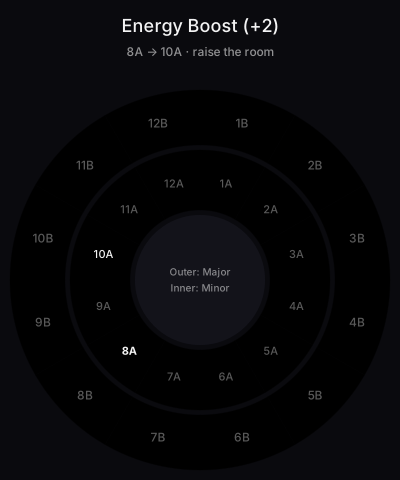
For a lift, jump +2 numbers (8A → 10A) or use the +7/-5 'jaws mix.' Keep these blends short, long overlaps expose tension.
- 6
Use key shift cautiously
Modern software lets you shift keys by semitones. Keep adjustments small (±1) to avoid timbre artifacts and unnatural-sounding vocals.
- 7
Map a set arc across compatible clusters
Stay in a cluster of compatible codes for several tracks, then pivot to a new cluster via a relative switch or short energy lift.
Analyze keys for your library. Choose one notation for consistency and verify the display in your software.
Sort by BPM and key so you can spot mixes that are compatible in tempo and harmony. This pairs well with your ability to master beat matching fundamentals.
Pick your next track using one of three rules: same code, adjacent number, or same number with A ↔ B switch. Start with same-code matches and reach for adjacent or A ↔ B moves as the set demands.
When using key shift or key sync, keep changes modest. Large shifts can introduce artifacts or unnatural timbre, especially on vocals.
Time the blend at phrase boundaries. Good harmonic matches still clash if phrases collide. Practice 16–32 bar phrasing to keep arrangements aligned.
Plan arcs across several transitions. Stay in a cluster of compatible codes, then pivot to a new cluster using a relative switch or a brief energy lift.
| Step | Action | Key Point |
|---|---|---|
| 1 | Analyze key for all tracks | Use consistent notation and verify results |
| 2 | Sort by BPM then key | Filter choices to tempo and harmony zones |
| 3 | Choose next track by rule | Same code, ±1 number, or A ↔ B |
| 4 | Align phrases | Mix at 16–32 bar boundaries for clarity |
| 5 | Add energy moves sparingly | Use short blends for semitone jumps |
| 6 | Optionally key shift | Keep shifts small to avoid artifacts |
| 7 | Map a set arc | Cluster compatible codes before pivoting |
Practice Drills
The terms key matching, key compatibility, and harmonic mixing get used interchangeably online, but each carries a slightly different weight. Key matching is the binary check, are these two tracks in the same key, or in compatible keys? Key compatibility is the broader rule set: same code, ±1, A↔B, plus the energy-letter swap. Harmonic mixing is what you do once compatibility is satisfied, sequencing the harmonic transitions so the dance floor rides an arc instead of a flat line. A DJ who only does key matching will produce technically clean blends that feel boring; a DJ who only chases harmonic mixing without key matching will collide tonal centres and lose the floor. The Camelot Wheel is the tool that lets you do both in one glance.
Daily 15–30 minute sessions build recall faster than marathon attempts. Track measurable progress in 2–4 week cycles.
Organize drill crates by Camelot number and energy so you can practice quickly between codes. Vibes lets you create simple folders like 6A Cluster or 9B Uplift, then reuse them for set prep.
The Rule of 32: Phrase-Aligned Mixing
Most electronic dance music is structured in 32-bar phrases, eight 4-bar groups that build, peak, and release energy together. The rule of 32 says: line up your transition with these phrase boundaries so the structure of both tracks aligns, not just the keys. A perfectly harmonic Camelot match still sounds wrong if the new track's kick drops mid-phrase. Count bars from the first downbeat (1, 2, 3, … 32) and bring the next track in on bar 1 of the new phrase. Pair this with the Camelot rules above and your transitions become musically and harmonically aligned at the same time.
- Find bar 1, usually the first kick drum or downbeat after the intro silence.
- Count to 32, most builds, breakdowns, and drops happen on multiples of 32 bars (32, 64, 96, 128).
- Cue the incoming track, set its first downbeat on the deck so its bar 1 lines up with the outgoing track's bar 33 (or 65, 97…).
- Blend across the phrase boundary, start the mix 8–16 bars before, peak right at the boundary, complete the swap within the new phrase.
Common Mistakes
The most expensive mistake on this list is treating the DJ key wheel as gospel. The Mixed In Key wheel is a probability tool, not a guarantee, every "compatible" transition still depends on which specific notes are playing across the bars you cross over. Two tracks separated by perfect fifths can clash if one is sitting on a leading-tone riff and the other is anchored to a tonic drone. The same logic applies on the dominant side: a chain of three perfect fourths in a row will spiral the energy downward even though each individual step passes the key matching check on paper. The rules narrow your choices from twenty-four keys to four; your ears do the final sort.
| Mistake | Why It Happens | Solution |
|---|---|---|
| Relying on key but ignoring phrasing | Chords align while structures clash | Use phrase grids and tighten your phrase mixing |
| Trusting one analyzer absolutely | Different tools disagree by a semitone | Spot-check signature tracks and correct tags where needed |
| Overusing key sync or big shifts | Artifacts and unnatural tone appear | Limit to small shifts and short blends as Serato documentation advises |
| Forgetting energy and drums | Harmonic match but groove mismatch | Audition drum patterns and energy levels before long overlays |
Equipment and Setup
Enable Camelot Keys in Your DJ Software
Every modern DJ application runs key detection at import time, but the underlying key analysis algorithms disagree on edge cases, modal tracks, key changes, and out-of-tune vocals can all flip a result by one Camelot slot. Treat the song key Rekordbox, Serato, or Traktor stamps on a track key field as a confident guess, not a verdict. Mixed In Key still has the most accurate detector in independent comparisons; if a transition sounds wrong despite Camelot saying it's compatible, re-analyse the offender in Mixed In Key before blaming your ears.
All four major DJ platforms support Camelot notation, but the setting lives in a different place in each. Switch your library to Camelot once and you never have to translate keys mentally again. For step-by-step screenshots and edge cases, see our full Camelot Wheel Setup guide.
| Software | Default notation | How to switch to Camelot |
|---|---|---|
| Rekordbox | Classic (musical notation) | Preferences → View → Key display format → Alphanumeric (Camelot) |
| Serato DJ | Classical (A minor, etc.) | Setup → Library + Display → Show key as → Camelot |
| Traktor Pro | Open Key (1m–12d) | Preferences → Analyze Options → Displayed in Traktor → Open Key (Camelot is not a native option, use the conversion table above) |
| Engine DJ | Sharps (musical notation) | Preferences → Library → Analysis → Key Notation → Camelot |
| Mixed In Key | Camelot (default) | Native, exports tags to other software automatically |
Camelot key display settings per platform. Mixed In Key tags written to file metadata carry over to all four.
Use software that displays key in Camelot. Mixed In Key tags files directly so the codes follow the track into Rekordbox, Serato, and Traktor.
If your platform displays Open Key or classical notation by default, use the conversion table above. The Native Instruments article covers Open Key in depth.
Key shift and key sync are useful when no track in your crate sits at the right code. Keep adjustments to ±1 semitone to avoid artifacts on vocals.
Real-World Application
Real-world application boils down to trusting the track key field about ninety percent of the time. Open the analysed library, sort by Camelot code, then pre-build a thirty-minute window where every song key sits within ±1 of the next. Where Mixed In Key and Rekordbox disagree on key detection, and they will, on roughly one track in twenty, pick the enharmonic equivalent that aligns with the track's bass note rather than its lead melody. The bass tells you the real tonal centre; the lead is often a borrowed colour tone that fooled the analyser.
Worked Example: Three Ways Out of 8A
Theory is easier to remember when you watch it play out on a single key. Imagine the track currently playing is in 8A (A minor), one of the most common keys in house and techno. The Camelot Wheel gives you four legitimate next moves, each with a different musical effect. Cue all four before the gig and trust your ears to pick the right one in the moment.
- 1
Stay flat: 8A → 8A (same code)
Pick another track in 8A. Zero risk, zero energy change. Useful when you want the floor to settle into a vibe rather than push forward. Best for breakdowns and warm-up sections.
- 2
Step up: 8A → 9A (adjacent +1)
9A is E minor. The fifth above A minor on the circle of fifths. Subtle energy lift, the room feels like it just leaned forward without realizing why. The most-used adjacent move in melodic genres.
- 3
Flip the mood: 8A → 8B (A↔B switch)
8B is C major, the relative major of A minor. Same notes, different feeling, A minor sounds melancholy, C major sounds bright. Use this to shift emotional tone without changing tonal center.
- 4
Boost energy: 8A → 10A (+2 jump)
10A is B minor. A two-step jump on the wheel raises the perceived pitch by a whole tone, the classic 'energy boost' that lifts a peak-time room. Mix this transition quickly; long blends expose the dissonance.
Keep a cluster of compatible keys for one section of the night. Pivot to a new cluster during breakdowns using a relative switch or short energy lift.
When vocals dominate, favor same-code or relative switches. Use adjacent moves during instrumental passages where harmony is sparse.
Document successful pairings after gigs. Tag notes like 6A works with 7A at +2 BPM for future recall.
When the Camelot Wheel Doesn't Matter
The Camelot Wheel is a tool, not a rule. In genres dominated by atonal rhythm and percussion, most techno, hip-hop, and stripped-down house, key compatibility matters far less than groove, energy, and timing. Long melodic blends in trance or progressive house are where harmonic mixing really earns its keep; in a peak-time techno set, you can break almost every rule on the wheel and the floor will not notice. Use the Camelot system to inform your selection, not to constrain it.
- Matters most: trance, melodic techno, progressive house, melodic dubstep, vocal-heavy sets
- Matters less: peak-time techno, drum and bass, hip-hop, percussion-driven minimal, breakbeat
- Doesn't matter at all: atonal noise, ambient drone, sets where you cut between tracks rather than blend
Sources & Further Reading
The Camelot Wheel's structure rests on long-established music theory. The arrangement of keys around its outer ring follows the circle of fifths, the same diagram classical composers have used for centuries to plan modulations. Each one-step move around the wheel represents a perfect fifth, the interval that listeners ear-test as the smoothest movement between keys.
For DJs who want to dig deeper into why some key changes feel smoother than others, academic music theory has formal answers. The field of neo-Riemannian theory maps relationships between triads as geometric transformations; tools like the Tonnetz, a lattice of pitch relationships, show why same-number A↔B swaps on the Camelot Wheel preserve more shared notes than larger jumps. The lattice and the wheel are describing the same underlying structure with different notation.
Outside academia, the broader DJ practice has its own documentation. The Wikipedia entry on harmonic mixing covers the historical context and the rule families DJs use today; the Camelot Wheel is one notation system within that practice, alongside Open Key (popularised by Beatport) and traditional sharp / flat key signatures.
On the tooling side: the Camelot system was popularised by Mixed In Key, whose key-detection software remains the most accurate in independent comparisons of DJ software. Pioneer DJ has integrated Camelot keys natively into Rekordbox and CDJ-3000 hardware, making the wheel viable in club booths, not just on laptops. Treat any single application's detected key as a confident guess, not a verdict, re-analyse edge cases (modal tracks, key changes, vocal-driven tracks) in a second tool before blaming your ears.
Quick Reference: All 24 Camelot Codes
One-stop lookup for any Camelot code. Each card shows the traditional musical key, Open Key equivalent, three compatible Camelot codes, and a short mood/genre fingerprint. Anchor links work, bookmark /learn/techniques/camelot-wheel#8a for instant deep-link access to your most-used key.
Emotional and melancholic, a deep house and melodic techno staple.
Bright and victorious, common in trance peaks and uplifting builds.
Brooding and cinematic, used in melodic dubstep and film-score-flavoured tracks.
Sparkling and uplifting, sits well in progressive house drops.
Dramatic and intense, frequent in hardstyle and big-room peak hours.
Heroic and expansive, anthem trance and orchestral build territory.
Solemn and classic, a foundational minor-key techno workhorse.
Dark and mysterious, a techno staple, especially in hypnotic / driving sets.
Tragic and weighty, melodic techno's go-to key for emotional peaks.
Pastoral and peaceful, chillout, organic house, and lo-fi sets.
The most-used key in modern dance music, versatile and balanced.
Pure and simple, pop, acoustic, and accessible mainstream tracks.
Wistful and contemplative, indie dance and melodic house favourite.
Introspective and moody, melodic dubstep and indie crossover.
Triumphant, uplifting trance and festival main-stage anthems.
Exotic and lush, Middle Eastern–flavoured melodic and progressive cuts.
Rare and distinctive, cinematic and dramatic minor-key cuts.
Common misspellings worth flagging, DJs frequently search for camalot wheel, canelot wheel, chamelot wheel, or camlot wheel. They are all variants of the same Camelot Wheel described on this page.
Watch

For quick in-key workflows, try our interactive Camelot Wheel to visualize compatible keys, convert any musical key to its Camelot code before importing tracks, check whether two tracks will blend harmonically, or download a printable Camelot cheat sheet for the booth.
Educational resources like the Mixed In Key Camelot Wheel overview and Harmonic Mixing 101, DJ TechTools’ advanced guide, and Pioneer DJ’s article offer step-by-step explanations and creative ideas.
Continue readingNext: phrase mixingOnce your keys line up, land the mix on the phrase.The visual way to organize your DJ library
Tag tracks by vibe. See everything at once. Export to any DJ software.
14-day free trial. Full access, no strings attached.
or see how it works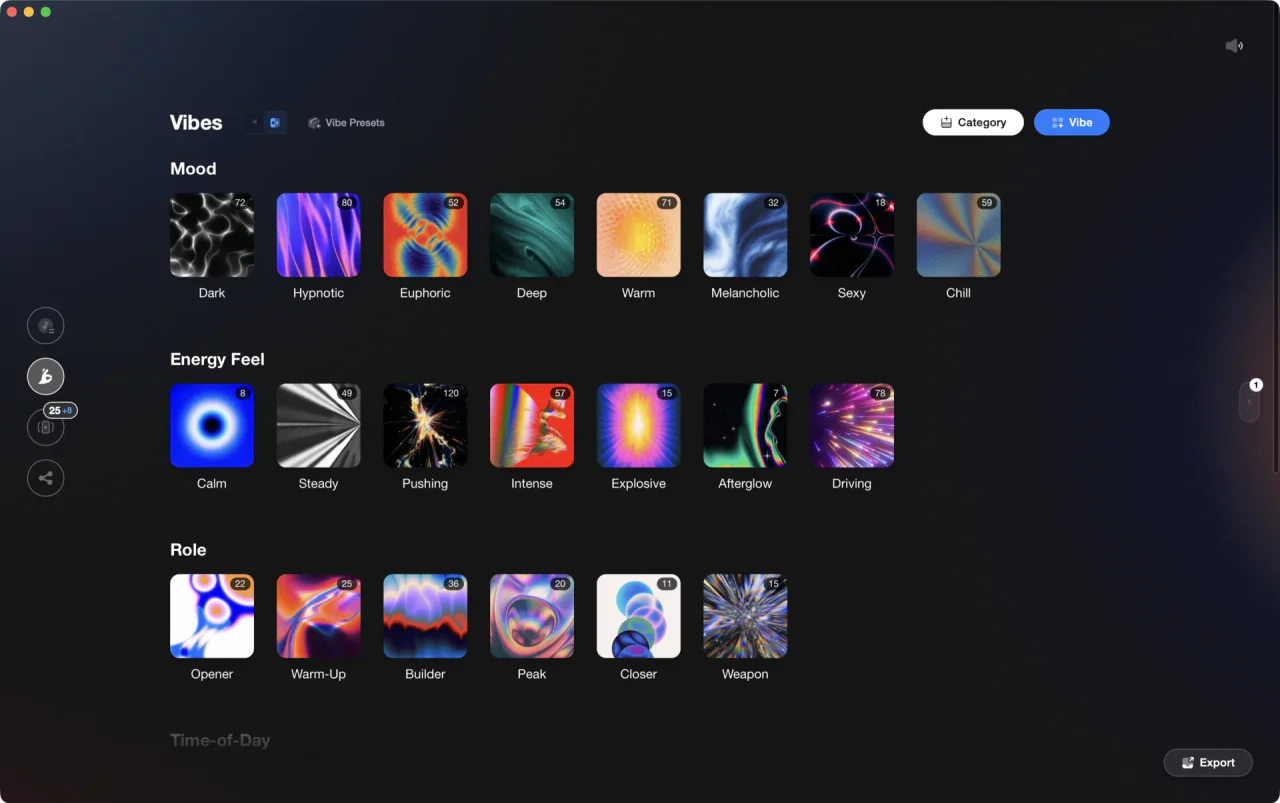
More Tutorials

DJ Transitions: The Three-Layer Handoff for Beginners

How To Mix In Key Live: Worked Transitions And Failure Fixes

How to DJ: First Mix, Step by Step

Mix and Key: Practical Guide to Melodic DJ Mixing

How to Mix and Edit Songs Together
Camelot Wheel DJ: Layered Deck Mixing With EQ and Phrase

Harmonic Mixing Rekordbox Guide
When Mix and Key Actually Matters: A DJ's Guide to Harmonic Decisions

DJ Key Wheel Decision Framework: Four Safe Moves and Advanced Jumps

DJ Library Organization System: Tags, Crates, Keys
Equipment You'll Need
Native Instruments FM8
optionalNative Instruments FM8 is a powerhouse FM synthesizer for hybrid DJ sets and live performance. Its low CPU usage and bright, cutting tones make it ideal for layering over tracks in a live mix. Bounce FM8 basslines as audio loops for Traktor Remix Decks or Ableton clips.
Yamaha REV5
optionalThe Yamaha REV5 is a 2U rackmount digital **reverberator** built for studios and live rigs. If you want hardware ambience with surgical control, the Yamaha REV5 still delivers. Its balanced I/O, per‑program parametric EQ, and MIDI backup make it a reliable problem solver as well as a creative reverb. This page covers Yamaha REV5 features, specifications, pricing context, and the best alternatives.
AlphaTheta rekordbox
optionalProfessional DJ software for library management, USB export, cloud sync, and live performance tightly integrated with Pioneer DJ/AlphaTheta hardware.
Cockos REAPER
optionalA lightweight, deeply customizable digital audio workstation for recording, editing, mixing, MIDI production, and post work on Windows, macOS, and Linux.
Native Instruments Traktor Pro 4
optionalA professional 4-deck DJ software platform with stem separation, flexible beatgrids, effects, DVS support, and broad controller integration.
iTunes
optionalApple iTunes is a Windows media library, playback, device sync, and store application for managing music, video, podcasts, and Apple purchases.
Serato DJ Pro
optionalProfessional DJ software for mixing, performance, library management, recording, and hardware-integrated club workflows.
Pioneer DJ DDJ-1000
optionalA 4-channel rekordbox DJ controller with full-size jog wheels, onboard displays, and club-style mixer controls.
Mixed In Key Camelot Wheel
optionalA numeric key notation system for DJs that labels musical keys 1A–12A (minor) and 1B–12B (major) to simplify harmonic mixing.
Mixed In Key 11
optionalStandalone harmonic-mixing and library-prep software that detects keys, energy levels, cue points, and tags for DJ sets.
Mixed In Key
optionalDJ library preparation software that analyzes key, BPM, energy level, and cue points to speed up harmonic mixing and set planning.
Platinum Notes 10
optionalPlatinum Notes 10 evens loudness, repairs clipped peaks, and prepares DJ files for more consistent playback in Serato, rekordbox, and Traktor.
rekordbox DJ
optionalCloud-connected DJ software for music management, performance, export prep, and club-standard hardware integration.
Pioneer DJ DDJ-400
optionalA compact 2-channel USB DJ controller built for rekordbox with a club-style layout aimed at new and progressing DJs.
Camelot Wheel
optionalA harmonic mixing notation system that maps musical keys into simple 1A to 12B codes for DJs.
VirtualDJ
optionalDJ software for Windows and macOS that handles audio mixing, video mixing, karaoke, stems, and broad hardware support.
DJControl Inpulse 200 MK2
optionalCompact 2‑deck USB DJ controller with built‑in audio, Beatmatch Guide LEDs, and Serato DJ Lite/DJUCED integration.
Numark Mixtrack Pro II
optionalA two-channel USB DJ controller with a built-in audio interface, touch-activated jog wheels, and performance pads for Serato-compatible mixing.
Traktor MX2
optionalA 2-channel DJ controller with integrated audio interface and tight Traktor Pro 4 integration for mixing, stems, effects, and performance pads.
Numark Mixtrack Pro FX
optionalA 2-deck USB DJ controller with a built-in audio interface, capacitive jog wheels, performance pads, and Serato DJ Lite support.
Frequently Asked Questions

Hey, it's Ben Modigell 👋
I DJ and produce as so I so — downtempo, minimal, dub house, tech house, and techno (releases on Spotify and SoundCloud, links above). Everything I write here comes from my own gigs, studio sessions, and library cleanups: the rules I follow, the failure modes I've actually hit, and the workflow I use when nobody's watching. If a technique didn't earn its place in my own sets, it doesn't make it into a tutorial.
