
Watch Zeeshan Khamis’s tutorial above (168K views on YouTube).
This guide is for DJs who can beatmatch but still struggle to make song changes sound clean. Most beginner DJ transitions fail at the handoff, not the timing. After reading, you will understand how DJ transitions work, when to use a bass swap, and how to make simple changes sound intentional.
The key idea is simple. Good dj transitions manage energy, frequency space, and volume at the same time. If you control those three things, even basic dj transitions can sound professional.
For more context on library prep before mixing, see DJ library organization and how to build set-ready playlists.
DJ Transitions: What You Are Really Managing
Most people describe dj transitions as moving from one song to the next. That is true, but it is too vague to be useful.
A better model is this. Every transition is a controlled exchange of rhythm, frequency, and attention. Rhythm keeps the tracks locked. Frequency keeps them from fighting. Attention tells the listener what to focus on.
This is why two perfectly beatmatched tracks can still sound messy. Their low end overlaps. Their vocals compete. Or one track is simply louder.
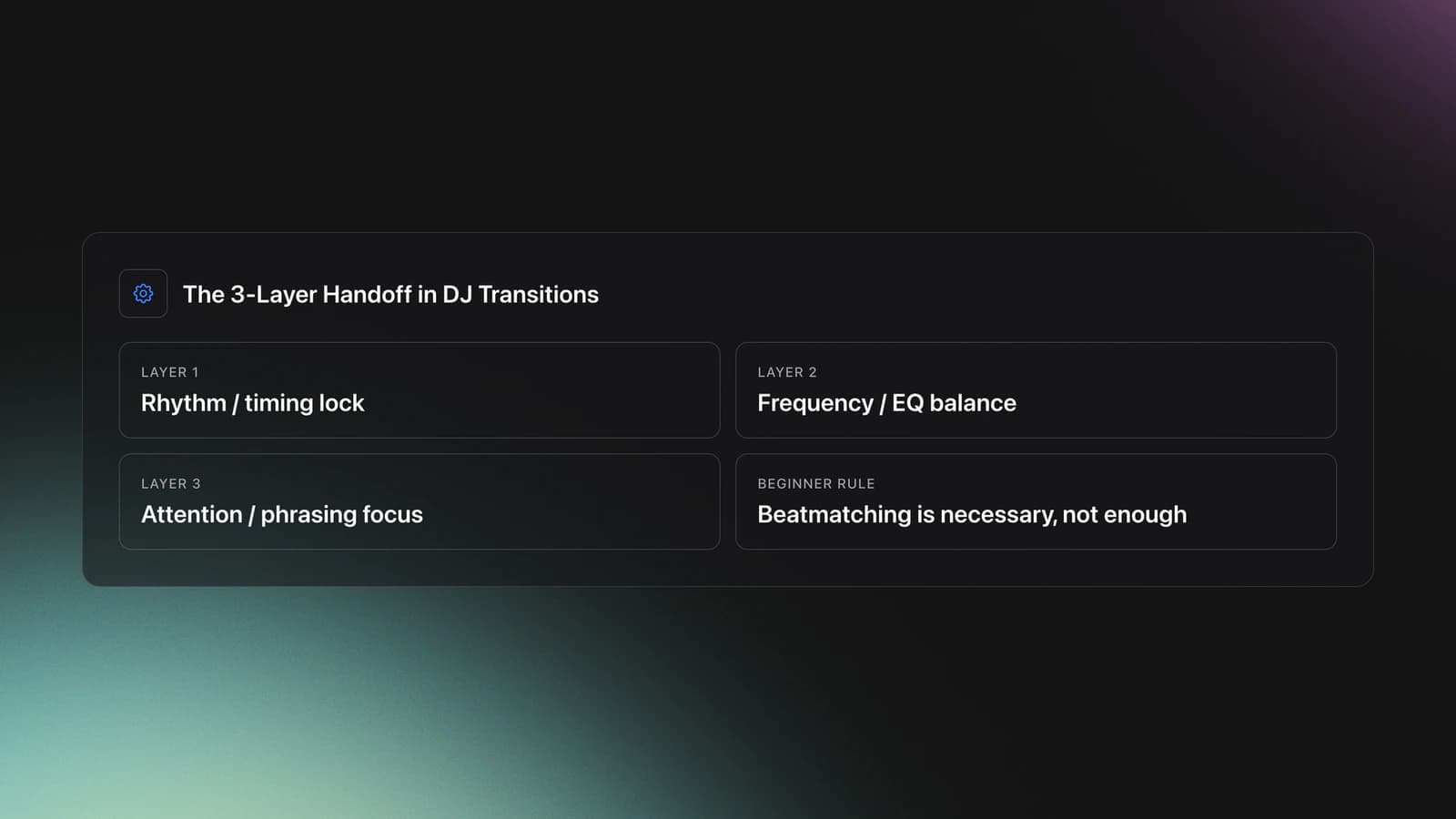
I call this the three-layer handoff. Layer one is timing. Layer two is EQ balance. Layer three is phrasing and crowd attention.
If layer one is wrong, the mix drifts. If layer two is wrong, the mix gets muddy. If layer three is wrong, the transition feels abrupt even when the timing is technically fine.
That framework matters because beginner dj transitions often focus only on beatmatching. Beatmatching is necessary. It is not enough.
In practice, most easy dj transitions rely on one of three moves:
- Fade one track out while the next track comes in.
- Swap one frequency range at a time, usually the bass.
- Use an effect to smooth the exit after the musical handoff is already working.
The bass shift transition sits in the middle. It is more controlled than a simple volume fade, but easier than advanced layered mixing.
That makes it one of the best beginner dj transitions to master first.
Pick Tracks That Can Actually Transition
Most bad dj transitions are decided before you press play. If two songs fight in tempo, key, or arrangement, no amount of fader movement will save the mix once both are in the room.
The first filter is [BPM](/glossary/bpm) compatibility. Start with songs that match exactly or sit close enough that a small tempo adjustment does not introduce obvious artifacts. Beginners should stay in a narrow range until beatmatching becomes automatic.
The second filter is [key compatibility](/dj-tools/key-compatibility-checker). Same key or a related key is the standard harmonic-mixing model. Mixed In Key's official harmonic mixing guide recommends mixing within the same Camelot key, one step up or down, or between relative major and minor pairs.
That gives you a simple decision frame, the [blend](/glossary/blend) triangle: tempo, key, and arrangement. If two sides are strong, you can usually solve the third live. If all three are weak, skip the pair.
A quick example scale helps. Track A at 130 BPM in 8A into Track B at 130 BPM in 8A with clean eight-bar intros is easy: beatmatch, trigger on phrase, and the blend usually works. Track A at 128 BPM in 8A into Track B at 130 BPM in 9A is workable: the tempo gap is small and the keys are adjacent on the Camelot wheel, so a sparse intro can still sound clean. Track A at 124 BPM in 8A into Track B at 138 BPM in 2B, both opening with full drums, bass, and lead, is a pair to skip. Even if you force the beatmatch, the arrangement is crowded and the keys are far apart.
Validation Check
EQ and Gain Control for DJ Transitions
Before you practice any dj transitions, you need to know what each mixer control is doing. Otherwise you are moving knobs by habit instead of by purpose.
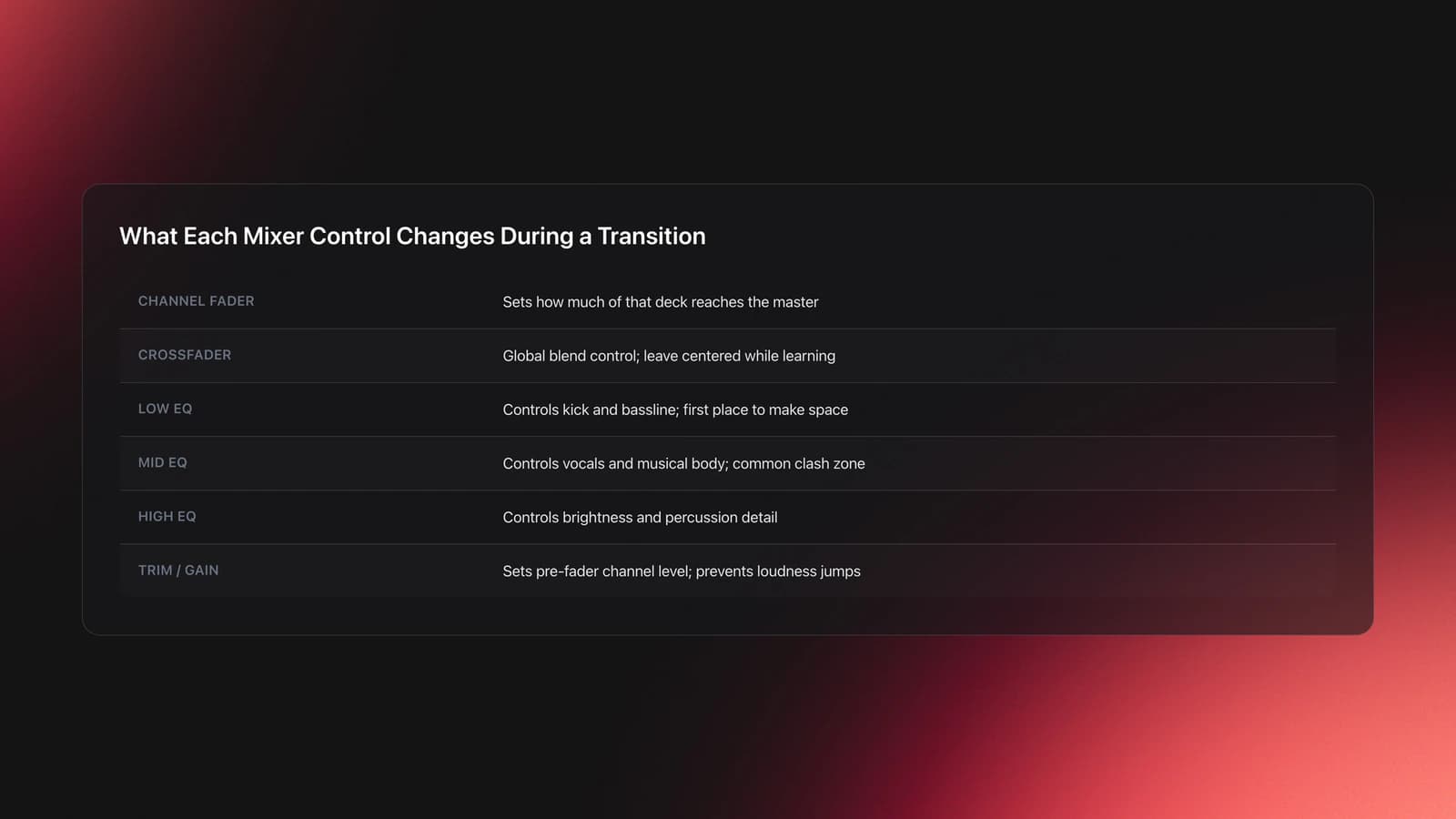
On a standard DJ mixer layout, the channel fader controls how much of that deck reaches the output. The crossfader can do the same globally, but for clean learning it is often easier to leave the crossfader centered and work with channel faders.
The three-band EQ section handles high, mid, and low frequencies. Pioneer DJ describes its mixer EQ isolator as a three-band system that controls the high, mid, and low frequencies on each channel independently. Official Pioneer DJ documentation also notes that isolator mode can fully cut a band when turned all the way left on supported setups. See Pioneer DJ’s EQ isolator documentation and the official rekordbox support note on EQ isolator behavior.
For transitions, lows matter most first. The low band carries the kick and bassline. When two strong basslines play together, the mix usually loses definition fast.
The mids carry most vocals, synth body, and a lot of the musical identity. If both tracks have busy vocals, mids often create the real clash before the bass does.
The highs shape brightness, percussion detail, and air. They can make a mix feel sharper, but they rarely solve a bad transition by themselves.
Then there is trim or gain. This is pre-fader level. Hardware diagrams and manuals from Pioneer DJ identify trim as the control that adjusts the audio level or gain of the channel before fader movement. See the DDJ hardware guide showing TRIM and EQ controls.
This matters because a transition can sound bad even when the EQ move is correct. If track two is hotter than track one, the new song feels like it jumps in. If track two is weak, the mix collapses the moment you swap bass.
Your validation signal is simple. Both tracks should feel equally strong at the handoff, with no sudden jump in perceived loudness.
Failure mode looks like this. You bring in the second track, the beatmatch is right, but the whole room suddenly gets louder and harsher. That is usually gain, not timing.
You also want to watch your level meters. If the red is pinned, you are clipping. Clipping adds distortion and makes your transitions harder to judge.
For background on phrasing before you start these swaps, read DJ phrase matching.
Bass Shift DJ Transitions Step by Step
The bass shift is one of the most reliable dj transitions for beginners because it gives each track a clear role. One track owns the low end. The other track waits its turn.
You are not blending everything at once. You are staging a handoff.
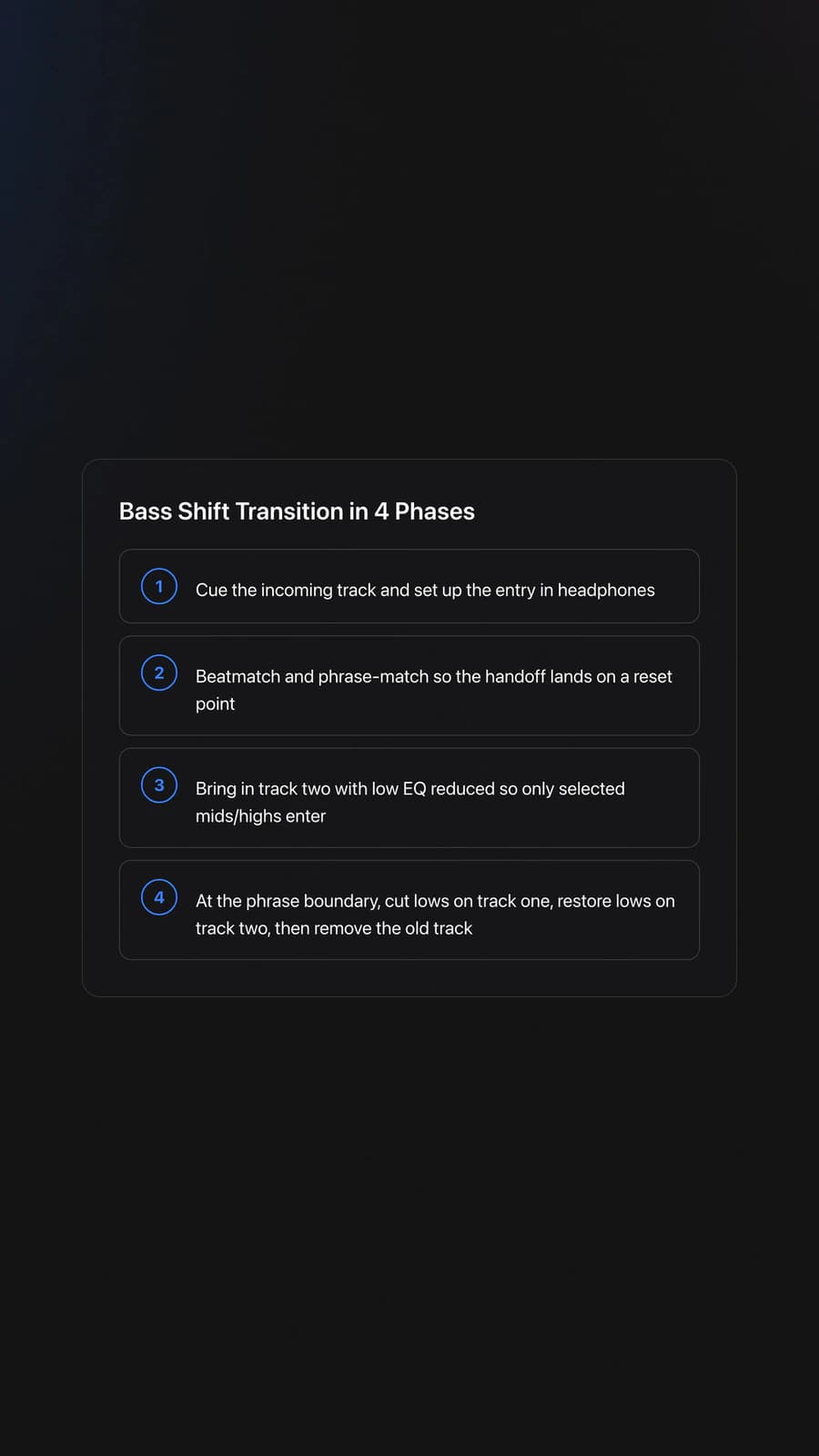
The sequence is straightforward. Cue the incoming track. Beatmatch it in headphones. Bring it in with the low EQ reduced. Then swap the bass from the outgoing track to the incoming one at the right phrase point.
That sounds simple. The timing is what makes it work.
Use these four phases:
- Prepare the next track in headphones.
- Beatmatch and align phrasing.
- Introduce the new track with reduced lows.
- Swap lows and remove the old track.
Worked example one. Track one is a house record at 124 BPM with an 8-bar instrumental outro. Track two is another 124 BPM house record with a clean drum intro. You start track two on the first beat of a new phrase, keep its low EQ cut, then raise its channel fader so the hats and mids enter quietly. At the next phrase boundary, cut the lows on track one and restore the lows on track two. The room feels the bass move forward without hearing a hard jump.
Worked example two. Track one is 126 BPM and vocal-heavy. Track two is 126 BPM with a sparse percussion intro and a stronger bassline. In this case, you keep track two’s mids slightly lower at first so the vocal from track one stays dominant. Once the outgoing vocal phrase ends, you swap bass, then gradually open mids on track two. The result is cleaner than bringing both full mids in together.
Why does this matter for house dj transitions? Because house intros and outros often leave enough drum space for controlled overlap. The genre rewards patience.
If you rush the bass swap, both grooves fight. If you wait too long, the transition loses momentum.
A good checkpoint is the phrase boundary. Swap bass where the structure naturally resets, usually every 8, 16, or 32 beats.
Validation Check
The most common failure mode is overlapping low end for too long. Symptom: the mix suddenly sounds boomy, soft, or unfocused even though the tempo is correct.
The second failure mode is an early vocal collision. Symptom: words from both songs stack on top of each other and the transition feels amateur immediately.
To prevent that, decide in advance which track owns the listener’s attention. Do not let both tracks ask for it at once.
This is also where set prep matters. Some DJs manage this with notes or memory cues. Others use tools built for pre-gig organization. Vibes, for example, lets DJs sort local tracks into hierarchical categories, track progress while organizing, and prepare named sets before export. That does not replace transition skill, but it makes finding the right incoming record faster when you need a clean bass swap under pressure.
If you are teaching yourself, this is a good place to stay practical. Many DJs start the same way. One controller, borrowed space, downloaded tracks, and a lot of trial and error. That self-taught path works if you repeat one transition until you can hear the handoff before you touch the knob.
For adjacent skills, see how to organize tracks by energy and DJ set preparation workflow.
Filters and Effects in DJ Mix Transitions
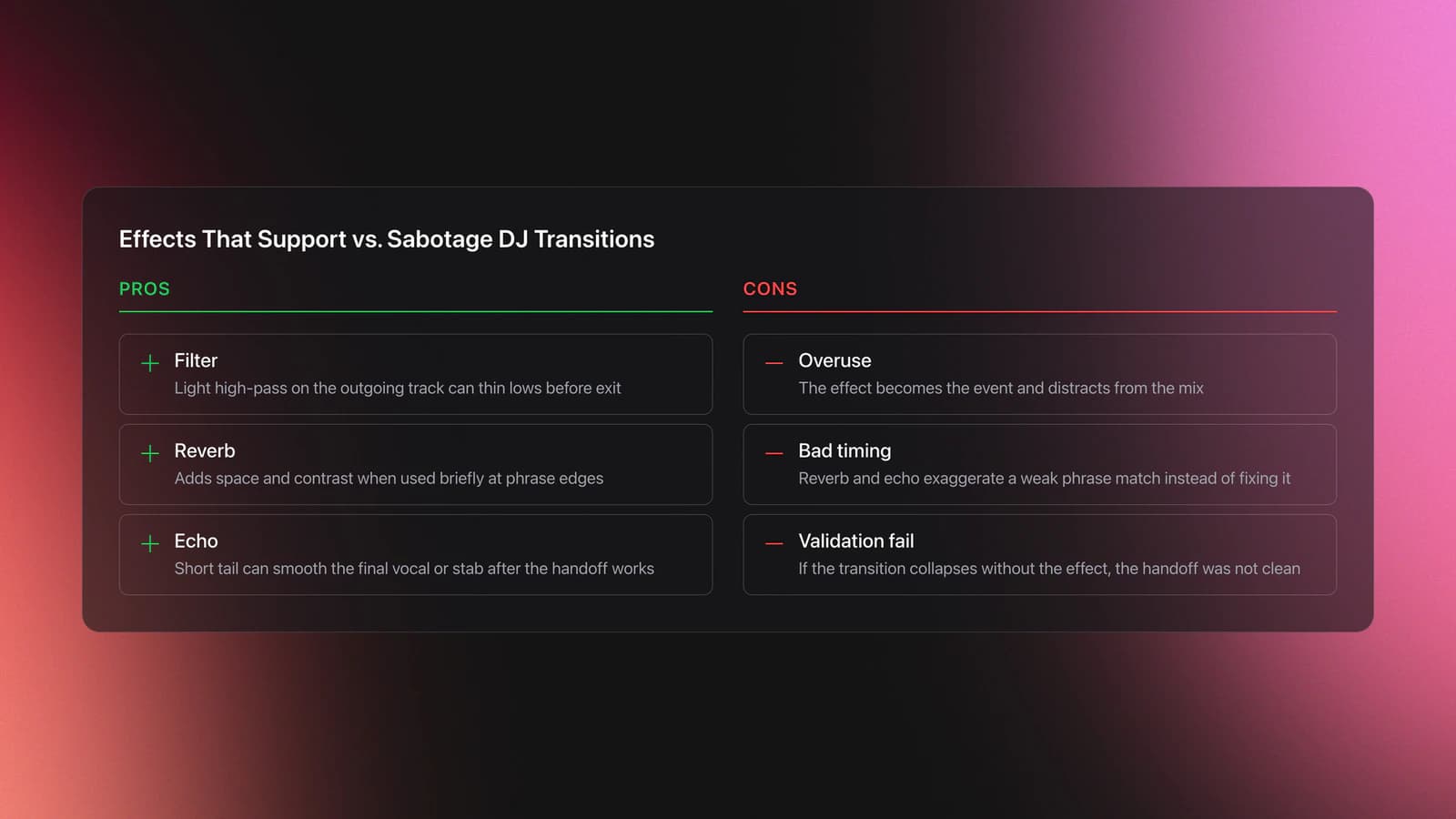
Effects should support the transition, not hide a weak one. If the bass swap does not already sound clean, reverb and echo will usually make the problem bigger.
Start with filters. On many rekordbox and Pioneer-style setups, the color FX filter behaves as a broad high-pass or low-pass move. Think of it as a wide tonal sweep, not a surgical fix.
Use a light high-pass on the outgoing track near the end of the transition when you want to thin the low energy before dropping its fader. That can make the exit feel more intentional.
Reverb works differently. Pioneer DJ’s rekordbox effects documentation and help materials describe reverb and echo as time-based effects, and rekordbox also allows effect tails to continue after a fader is pulled down on supported configurations. See the rekordbox operation FAQ on hearing echo or reverb tails after closing the fader and the official Pioneer DJ effects release notes describing echo and reverb variants.
In plain terms, reverb makes the sound feel bigger. Echo repeats a slice of audio and fades it over time. Both can add color. Neither fixes poor phrase timing.
Worked example one. You are exiting a build section. Just before the drop, you add light reverb to the outgoing track, then cut it right as the new track’s drop lands. This creates contrast because the spacious tail disappears and the dry drop hits harder.
Worked example two. You have already swapped bass and the old track is nearly gone. A short echo on the final vocal stab can smooth the exit while you lower the fader. The key word is short.
Failure mode is easy to spot. The effect becomes the event. Instead of hearing a clean transition, the audience hears a wash of echo or a giant reverb tail covering a rushed mix.
Validation is also easy. If you mute the effect and the transition still works, the effect is helping. If the transition falls apart without the effect, go back and fix the underlying handoff.
From there, the rule is simple. Use effects in quick bursts. Use them at phrase edges. Turn them off with intent.
Beginner DJ Transitions: Common Mistakes
Most bad beginner dj transitions come from a small set of repeatable errors. The good news is that each one has a clear fix.
| Mistake | Why It Happens | How to Avoid |
|---|---|---|
| Overlapping both basslines too long | The incoming track is raised before the outgoing lows are reduced | Cut or heavily reduce one low band before the phrase handoff |
| Ignoring gain balance | The DJ focuses on beatmatch and forgets trim | Set channel gain before the transition and compare meter behavior |
| Mixing vocals on top of vocals | Both mids stay open during busy lyrical sections | Choose one lead vocal and lower mids on the other track |
| Using effects too early | Echo or reverb becomes a cover for uncertainty | Get the dry transition clean first, then add short effects |
| Swapping at the wrong phrase point | Bars are counted loosely or not at all | Use 8, 16, or 32-beat phrase landmarks before changing ownership |
Common mistakes that make simple dj transitions sound messy
Practice DJ Transitions Without Guessing
You do not need ten transition tricks right now. You need one transition you can repeat under pressure.
Use this short routine for seven days:
- Days 1-2, loop two compatible intros and outros for 15 minutes. Practice only gain matching and low EQ swaps.
- Days 3-5, practice the full bass shift for 20 minutes with phrase counting out loud or on screen.
- Days 6-7, record 10 transitions and review only three things: bass clarity, vocal clashes, and loudness jumps.
Keep session volume reasonable. Hearing fatigue lies to you. After long loud practice, harsh transitions can start to sound normal.
If you practice in clubs or underground venues, be even more careful. Heavy low-end systems can hide clipping and make bass overlap feel less obvious in the booth than it is on the floor.
How to Know Your DJ Song Transitions Are Improving
Improvement is easier to spot when you measure a few specific signals instead of relying on vibes alone.
Track these checkpoints when you record practice sets:
- The kick stays clear through the handoff.
- No sudden loudness jump happens when the second track enters.
- Vocals do not fight unless you intend a brief overlap.
- The incoming track feels introduced, not dropped in.
A useful benchmark is consistency. If you can perform five clean bass shift transitions in a row with different track pairs, the skill is becoming reliable.
The next level is decision speed. You stop asking, "Can these tracks mix?" and start asking, "Which phrase point gives me the best handoff?"
That shift matters because advanced dj music transitions are usually just basic moves applied faster, with better track selection.
DJ Transitions: The Core Takeaway
Clean dj transitions are not about doing more. They are about controlling fewer things on purpose.
Start with the bass shift. Learn what the lows, mids, highs, and gain are doing. Add filters and effects only after the dry version works.
- Match timing first.
- Give one track control of the low end at a time.
- Use phrase boundaries to make the handoff feel natural.
Once that becomes automatic, most other DJ transitions start to make sense. If you want to keep building from here, work next on mixing in key and advanced set flow.
The visual way to organize your DJ library
Tag tracks by vibe. See everything at once. Export to rekordbox, Serato, Traktor or Engine DJ.
14-day free trial. Full access, no strings attached.
or see how it works
Techniques Covered

Bass Shift Transition

Auto BPM Transitions Across Genres

Crossfader Use

Track Selection
Phrase Mixing

Beat Matching
Camelot Wheel Guide for DJs

DJ System Configuration
Equipment & Software
Official Manuals
Continue Your Learning Journey


Frequently Asked Questions

Hey, it's Ben Modigell 👋
I DJ and produce as so I so: downtempo, minimal, dub house, tech house, and techno (releases on Spotify and SoundCloud, links above). Everything I write here comes from my own gigs, studio sessions, and library cleanups: the rules I follow, the failure modes I have actually hit, and the workflow I use when nobody is watching. If a technique did not earn its place in my own sets, it does not make it into a tutorial.




