Types of DJ Transitions
Track transition techniques are decisions about timing, frequency, and energy, this guide is the framework for picking and executing the right move.
Types of DJ Transitions Tutorials
Track transition techniques are the methods DJs use to move from one song to the next without losing timing, energy, or musical focus. Learn them well and your set starts to feel intentional instead of accidental. The goal is not only smooth mixing. It is choosing the right kind of transition for the track, the crowd, and the moment.
If your mixes feel rushed, muddy, or flat, better track transition techniques usually fix the real problem. Most transition mistakes come from poor phrasing, weak EQ decisions, or starting the incoming track at the wrong moment. Once you understand those pieces, track transition techniques become much easier to repeat under pressure.
What Are Track Transition Techniques?
Track transition techniques are the practical ways a DJ replaces one playing track with another. Standard methods include fades, phrase-aligned blends, EQ swaps, cuts, drop mixes, and effect-assisted exits. Educational guides from Crossfader and Digital DJ Tips both emphasize phrasing and timing as the foundation of a clean transition, while Pioneer DJ highlights EQ and FX control as tools that shape the handoff between tracks.
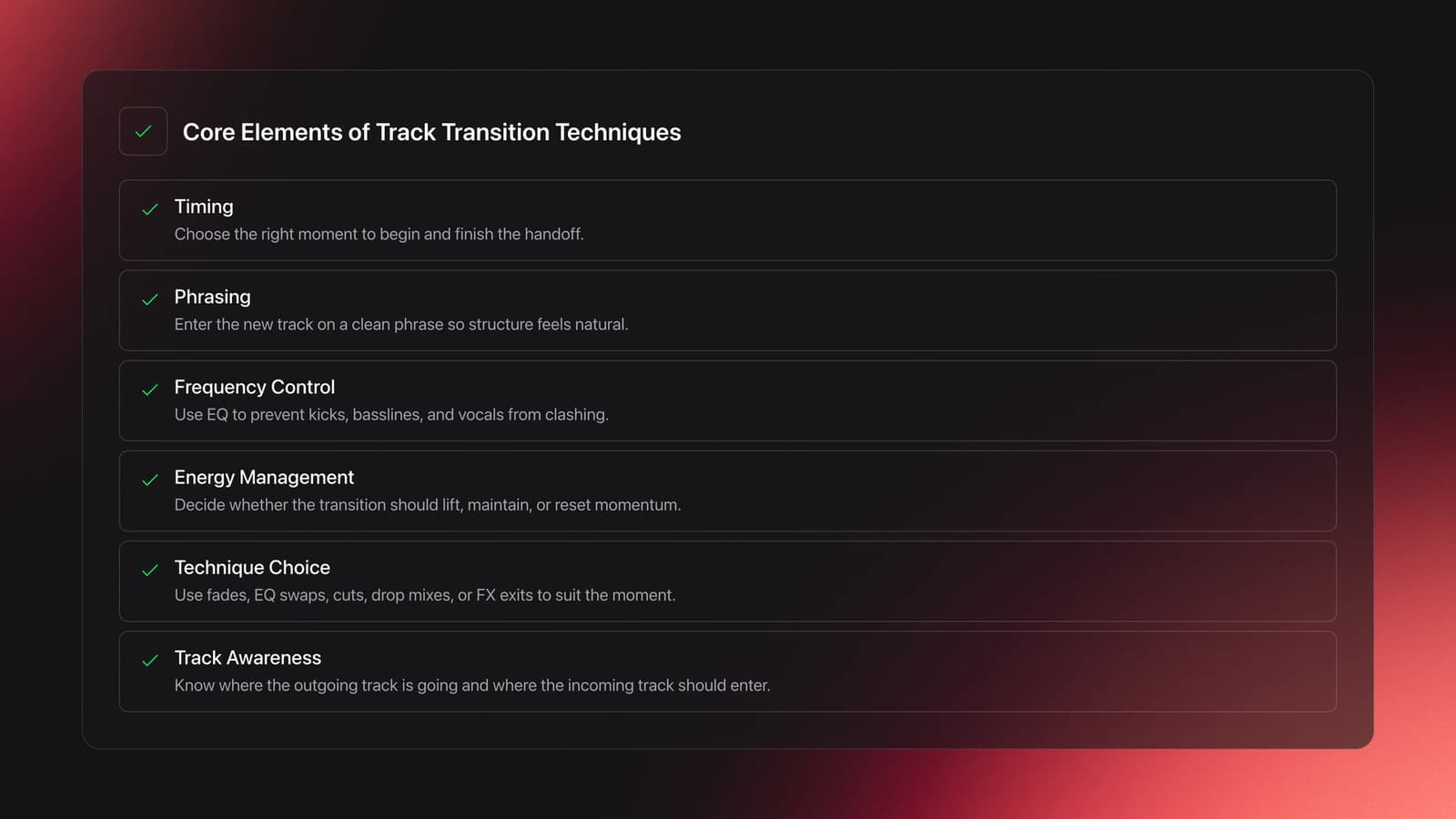
In other words, a transition is not just a crossfader movement. It is a timing decision, a frequency decision, and an energy decision.
That is why strong DJs can make simple blends sound musical. They are not guessing. They know where the outgoing track is heading, where the incoming track should enter, and what needs to stay out of the way.
Why Track Transition Techniques Matter
Track transition techniques matter because the crowd hears the connection between songs more than the songs in isolation. A great selection can still feel awkward if the handoff is late, cluttered, or jarring.
The best transitions do one of three jobs. They preserve groove, redirect energy, or create surprise.
That means you should not use one method for every mix. A long house blend, a hip-hop cut, and a tempo jump between genres all ask for different decisions.
Phrasing guides from Crossfader and Digital DJ Tips both stress that songs often change in 16- or 32-beat blocks, so transitions sound tighter when those structural moments line up. Pioneer DJ also notes that careful EQ use is crucial when multiple tracks overlap, especially in dense or layered mixes.
The 9 Types of DJ Transitions
The main transition families are simple, but each solves a different problem. This catalog covers nine moves: the fade, the phrase blend, the EQ swap, the bass swap, the filter blend, the cut, the drop mix, the drop swap, and the FX exit. Start by knowing what each one is for, then practice choosing the right one instead of forcing the same move every time.
| Technique | Best Use | Main Risk |
|---|---|---|
| Fade | Older songs, quick exits, low-pressure handoffs | Can feel timid if overused |
| Phrase Blend | House, techno, long-form club sets | Sounds messy if phrases do not align |
| EQ Swap | Tracks with similar drums and bass weight | Bass overlap muddies the mix |
| Bass Swap | Long blends where both tracks carry weight | Swapping too early or too late breaks the groove |
| Filter Blend | Busy tracks that need spectrum room | Masks weak timing if overused |
| Cut | Hip-hop, pop, high-impact moments | Bad timing feels abrupt |
| Drop Mix | Genre switches, attention-grabbing changes | Vocals or phrase mismatch can sound clumsy |
| Drop Swap | Modern bass styles, peak-time moments | A mistimed cut kills momentum |
| FX Exit | Creative transitions or emergency saves | Too much effect masks weak timing |
Each transition technique solves a different performance problem.
A fade is the simplest option. You reduce one track while bringing in the next, usually with line faders or the crossfader. It works, but it rarely sounds exciting on its own.
A phrase blend is the core club method. You start the incoming track at the beginning of a phrase so its intro develops while the outgoing track reaches its outro or breakdown. Crossfader and Digital DJ Tips both frame phrase alignment as the secret behind mixes that sound naturally connected.
An EQ swap keeps both tracks playing, but trades frequency space. Usually the low end of one track stays dominant while the other enters with reduced bass. Then the bass roles switch at a structural point. This is where use EQ mixing to avoid frequency clashes becomes essential.
The bass swap is a long-blend essential and deserves its own name. One track carries the low end while the other enters with reduced bass. Then you exchange them at a phrase boundary. This prevents the muddy overlap that many beginners hear when both kick and bass parts remain full.
Filter-assisted blends work when both tracks are busy. By thinning one side of the spectrum during the overlap, you make room without a sudden volume drop. Use this sparingly. Filters should solve a conflict, not hide weak timing.
A cut is instant. One track stops or drops out, and the next takes over on the bar. It works best when the new entry is strong and lands exactly on time.
A drop mix is a timed cut into a phrase start, often used in hip-hop and open format DJing. Digital DJ Tips describes it as an abrupt but on-time move, and notes that it works especially well when the incoming phrase begins cleanly without awkward early vocals.
A drop swap is a timed cut into the incoming track's drop just as the outgoing track peaks. It suits modern bass styles where the drop is the destination. A double drop layers both drops in time, which is harder and riskier, so start with drop swaps. Pioneer DJ's controller tutorials define drop mixing and drop swapping in practical terms.
FX exits can smooth a difficult handoff or add drama. AlphaTheta's Transition FX tutorial shows how hardware and software tools can automate parts of the exit, but effects still work best when the phrase and timing are already right.
How to Execute Track Transition Techniques
To execute track transition techniques well, first match tempo, then align phrasing, then manage frequencies, then commit to the handoff. That order matters because effects and fader moves cannot fix a transition that starts in the wrong place.
Start by listening to the outgoing track's structure. Identify the next 16 or 32 beats. Ask what happens there: outro, break, vocal change, drop, or fill.
Then preview the incoming track in headphones. Find an entry point that starts a phrase cleanly. This is easier once you build solid beat matching control and can hold two tracks together without drift.
Bring the new track in quietly. Keep low EQ reduced if both tracks carry kick and bass. Let the audience hear just enough of the incoming groove to prepare the change.
At the phrase boundary, complete the handoff. That may mean swapping bass, cutting the outgoing track, or using a short fade. The exact move depends on style, but the timing should feel inevitable.
Digital DJ Tips recommends thinking in terms of where each song can be mixed from and to, especially using beats-only intros and outros to avoid melodic clashes. That simple rule solves a large share of beginner transition problems.
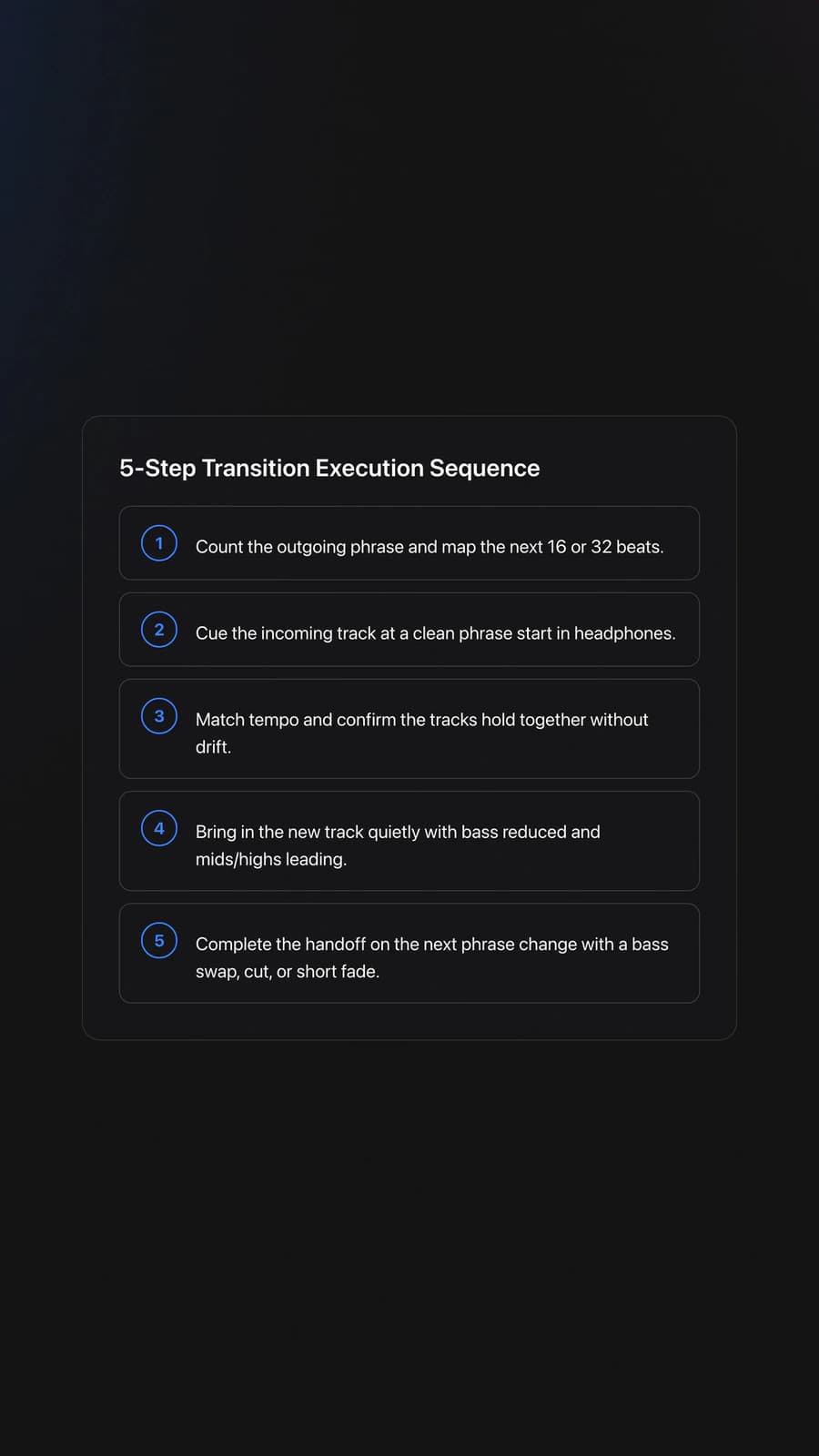
If you are unsure where to start, use this five-step sequence.
- Count the outgoing phrase.
- Cue the incoming track at a phrase start.
- Match tempo and check drift in headphones.
- Bring in mids and highs first, with bass reduced.
- Swap bass or cut cleanly on the next phrase change.
Phrasing for Track Transition Techniques
Phrasing is the skill that tells you when a transition should happen. In most DJ-focused genres, musical changes happen in grouped bars, often every 8, 16, or 32 counts. Crossfader's phrasing lesson and Digital DJ Tips' transition timing guide both center their teaching on this idea because it is what makes a blend feel natural instead of random.
A practical example helps. If the outgoing house track has a 32-beat outro and the incoming track has a 32-beat intro, you can start the new track so both sections unfold together. The result is controlled and musical.
When phrases do not match, transitions usually feel early, late, or crowded. The crowd may not know why, but they feel the awkwardness immediately.
This is why learn phrase mixing for cleaner entries pays off so quickly. It teaches you to hear the structure before you touch the faders.
EQ, Energy, and Space
EQ controls how much room each track gets during overlap. A good transition does not just line up beats. It protects space for the kick, bassline, vocals, and hooks.
Pioneer DJ's pro tips specifically warn that multi-track transitions get messy fast without disciplined EQ decisions. That is especially true when both songs have heavy low end or strong melodic content.
In practice, keep one bassline dominant. If both kicks hit at full power, the mix loses punch. If both vocals run at once, the message gets blurred.
Energy matters just as much. A technically clean blend can still feel wrong if the new track arrives with less drive than the room wants. Some transitions should maintain momentum. Others should intentionally reset it.
This is also where add harmonic mixing when keys matter can help. Key compatibility is not required for every transition, but long melodic blends often sound cleaner when the tracks are harmonically friendly.
Equipment for Track Transition Techniques
You do not need premium gear to practice track transition techniques. Two playable decks, a mixer section, and reliable headphones are enough to build the core skill.
Essential controls are play, cue, tempo adjustment, channel faders, and EQ. Optional tools like hot cues, loops, beat jump, and effects make some transitions easier, but they should support timing rather than replace it.
Waveforms can speed up learning, especially for spotting phrase changes, but they should not become a crutch. Most educators still recommend ear training because club conditions are not always visually forgiving.
For practice, a compact crate of 20 to 30 well-known tracks works better than a giant library. In practice, repeating the same small set of tracks accelerated transition timing much faster than constantly switching material.
If you build practice sets in Vibes, organize them by BPM range, phrase length, and energy level rather than by genre alone. That makes it easier to rehearse one transition problem at a time, such as long blends, quick cuts, or tempo jumps.
Practice Drills for Track Transition Techniques
The fastest way to improve is to isolate one transition type per session. Do not practice everything at once. Clean repetition beats random mixing.
Start with a phrase blend drill. Choose two tracks at similar BPM with clear intros and outros. Mix them at the same 32-beat point ten times in a row.
Next, run an EQ swap drill. Keep both tracks beatmatched for 32 bars, then exchange low end cleanly on the first beat of a new phrase. Record yourself and listen for muddiness.
Then practice a cut drill. Pick tracks with strong one-count entries. Cut from one to the other on the phrase boundary without flamming the timing.
Add a drop-mix drill once your phrasing is stable. Digital DJ Tips notes that drop mixing works best when the cue lands at a phrase start and vocals do not begin awkwardly before the bar.
Then add a decision drill. Use the same two songs three ways: fade blend, bass swap blend, and quick cut. This teaches that the right transition is not always the longest option. It is the option that fits the arrangement.
Keep sessions short. Through years of structured 15 to 30 minute practice, I found that four focused sessions per week produce steadier progress than occasional marathon sessions that blur feedback.
If you use Vibes, tag tracks with notes like "32-bar intro," "safe outro," "vocal early," or "hard cut works." That turns your library into a repeatable training system instead of a pile of songs.
Common Mistakes in Track Transition Techniques
Most transition problems are predictable. The good news is that each one has a clear fix once you know what to listen for.
| Mistake | Why It Happens | Fix |
|---|---|---|
| Starting the new track off-phrase | The DJ counts bars loosely or guesses the entry | Count 8, 16, or 32 beats and cue on a phrase start |
| Bass clash during overlap | Both channels keep full low EQ | Reduce one channel's lows and swap at the phrase change |
| Transitioning in busy musical sections | Vocals, hooks, or melodies overlap too much | Use intros, outros, breaks, or drums-only sections |
| Overusing FX to hide weak timing | Effects are used before the structure is correct | Fix phrasing first, then add minimal FX |
| Holding a blend too long | The DJ does not commit to the handoff | Set a target phrase length before starting the mix |
Common transition errors usually trace back to phrasing, frequency control, or hesitation.
Why do most beginners struggle here? Because they try to solve transition problems at the fader stage, when the real issue began earlier with track choice or phrase timing.
That is also why simple transitions often outperform flashy ones. Clean structure beats decoration.
Troubleshooting Track Transition Techniques
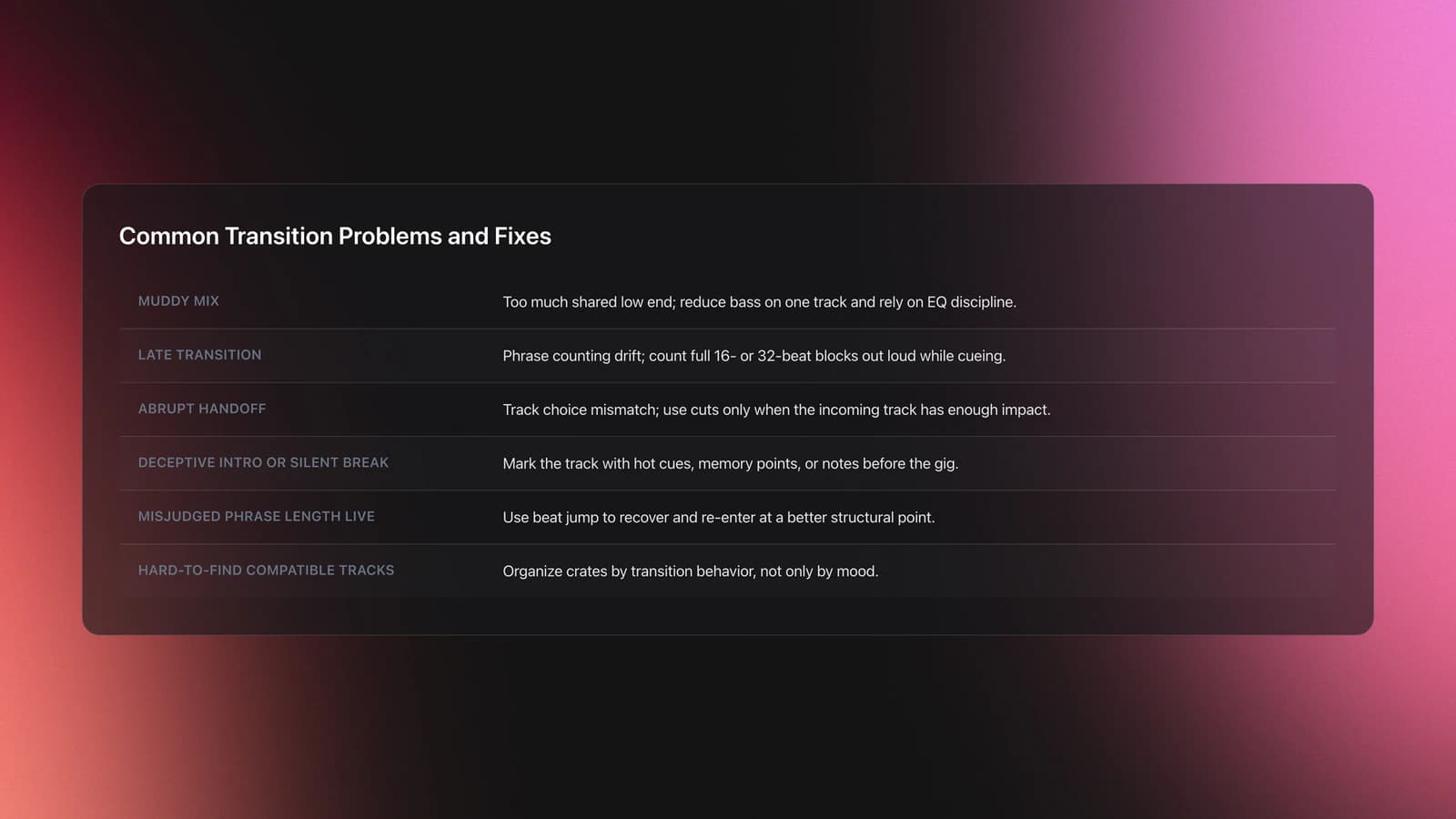
If your transitions sound muddy, first check whether both tracks carry full low end. If they do, the fix is usually EQ discipline, not more effects.
If your transitions feel late, your phrase counting is drifting. Go back to counting full 16- or 32-beat blocks out loud while cueing the incoming track.
If your transitions feel abrupt, the issue may be track selection rather than technique. A cut works only when the incoming track has enough impact to justify the change.
If a track has a deceptive intro or a long silent break, mark it before the gig. Tools like hot cues, memory points, and library notes save real mistakes later. DJ TechTools also highlights beat jump as a practical way to recover from misjudged phrase lengths during performance.
This is one more reason to prepare crates by transition behavior, not just mood. Tracks that mix easily together should be easy to find when pressure rises.
When to Use Different Transition Styles
Use long phrase blends when the groove matters more than surprise. This usually suits house, techno, melodic club music, and steady warm-up sections.
Use cuts and drop mixes when impact matters more than smooth overlap. That is common in hip-hop, pop, edits, and open-format rooms where attention shifts faster.
Use EQ-led blends when both tracks share compatible rhythm but compete in low end. Use FX exits when you need a short bridge, a dramatic release, or a recovery tool.
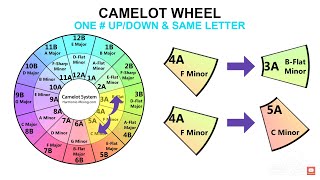
Key awareness sharpens all of these choices. Mixing within the same Camelot code or an adjacent one keeps the midrange clear during long overlaps. For peak moments, an intentional jump of one or two semitones can lift energy, but keep the overlap short to reduce clashes.
Match your crossfader curve to the move as well. A smoother curve suits long blends. A sharper curve suits cuts, drop mixes, and drop swaps. Whatever you choose, reset EQ to neutral after each transition.
In practice, your library should contain options for each case. Once you practice drop mixing for fast switches and master phrase-aligned blends, you can cover most real DJ situations with confidence.
Progress Checkpoints
A learning path works best when you can measure it. Track transition techniques improve faster when you define what success sounds like.
Beginner progress means holding two matched tracks together for 32 bars and completing a basic phrase blend without obvious trainwrecking. Intermediate progress means choosing between fade, EQ swap, cut, and drop mix based on song structure. Advanced progress means adapting the transition live without losing control of the room.
Most practitioners reach dependable basic results within 2 to 6 weeks of focused practice, especially when they repeat the same drill pairs and review recordings after each session.
Final Takeaways on Track Transition Techniques
Track transition techniques are the link between track selection and crowd experience. Once you control phrasing, EQ, and timing, your sets feel calmer, clearer, and far more deliberate.
Keep these points in mind:
- Start with phrasing. Most transition errors begin there.
- Protect the low end. One bassline should lead at a time.
- Match the transition style to the musical moment, not your habits.
Practice phrase blends first, then EQ swaps, then cuts and drop mixes. From there, explore build solid beat matching control, learn phrase mixing for cleaner entries, and add harmonic mixing when keys matter. The result is simple: better track transitions give your whole set more authority.
The visual way to organize your DJ library
Tag tracks by vibe. See everything at once. Export to rekordbox, Serato, Traktor or Engine DJ.
14-day free trial. Full access, no strings attached.
or see how it works
More Tutorials

How to DJ With Just a Laptop (No Controller Needed)
Deep House: Sound, Structure, and Flow
Transition DJ Online: Browser Mixer Workflow
House Trance: Sound, Structure, Mixing
Beginner DJ Equipment: What You Need
Starter DJ Controller Buying Guide
Progressive House Music: How It Works
DJ Starter Equipment: What to Buy First (and What to Skip)
Virtual DJ Tutorial: Beatmatching Basics

What Is a House DJ?
Type of House Music Explained
DJ Key Wheel Decision Framework: Four Safe Moves and Advanced Jumps
Best DJ Controller: How to Choose
DJ Library Organization System: Tags, Crates, Keys

Top Techno Songs That Still Work
Equipment You'll Need
Roland TR-808
optionalThe Roland TR-808 is an analog drum machine whose punchy kick, snappy hats, and step-sequencing workflow helped define hip-hop, electro, pop, and modern electronic music.
Beatport
optionalBeatport is a DJ-focused electronic music store and streaming platform for discovering, buying, and streaming tracks into supported DJ software and hardware.
Traxsource
optionalTraxsource is a digital music download store focused on house and underground dance music for DJs.
Ableton Live
optionalAbleton Live is the go-to DAW for hybrid DJ sets and live electronic performance. Session View enables non-linear clip launching perfect for DJs transitioning from decks. Use it alongside CDJs, with controllers like Push and Launchpad, or as your complete performance rig.
Project Studio
optionalA custom Windows desktop workstation built for music production, recording, mixing, and sample-heavy project studio use.
FL Studio
optionalA pattern-based digital audio workstation for beatmaking, recording, arrangement, mixing, and music production on Windows and macOS.
iZotope RX 8
optionalAudio repair and restoration software for cleaning dialogue, music, and field recordings in a standalone editor and plug-in workflow.
Numark Mixtrack Pro FX
optionalA 2-deck USB DJ controller with a built-in audio interface, capacitive jog wheels, performance pads, and Serato DJ Lite support.
Pioneer DJ DDJ-FLX4
optionalA compact 2-channel DJ controller with built-in audio interface, USB-C connectivity, and beginner-friendly smart mixing features.
Pioneer CDJ-1000
optionalA discontinued professional CD-based DJ player that helped define the modern club-standard jog-wheel workflow.
Hercules DJControl Inpulse 500
optionalA 2-channel USB DJ controller with built-in audio interface, performance pads, and guided mixing features for home practice and small public sets.
Pioneer DJ CDJ-3000
optionalProfessional flagship DJ media player with a 9-inch touchscreen, advanced MPU processing, and club-standard Pro DJ Link workflow.
Pioneer CDJ-400
optionalA discontinued digital DJ media player that plays CDs and MP3 files from USB storage, and can also work as a MIDI controller and USB audio interface.
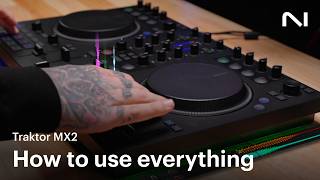
Traktor MX2
optionalA 2-channel DJ controller with integrated audio interface and tight Traktor Pro 4 integration for mixing, stems, effects, and performance pads.
Pioneer DJ DDJ-SB
optionalA compact 2-channel USB DJ controller designed for Serato DJ Intro and later supported with Serato DJ Lite and Serato DJ Pro.
VirtualDJ
optionalDJ software for Windows and macOS that handles audio mixing, video mixing, karaoke, stems, and broad hardware support.
Serato DJ Pro
optionalProfessional DJ software for mixing, performance, library management, recording, and hardware-integrated club workflows.
DJControl Inpulse 200 MK2
optionalCompact 2‑deck USB DJ controller with built‑in audio, Beatmatch Guide LEDs, and Serato DJ Lite/DJUCED integration.
VirtualDJ 7
optionalA legacy DJ software platform for audio and video mixing, controller mapping, and DVS playback on Windows and Mac.
Image-Line Soundgoodizer
optionalA simple stereo maximizer-enhancer plugin for FL Studio that applies one-knob processing based on the Maximus engine.
Serato DJ Lite
optionalFree two-deck DJ software for Mac and Windows that introduces Serato’s workflow, controller support, and basic mixing tools.
Pioneer DJ DDJ-1000
optionalA 4-channel rekordbox DJ controller with full-size jog wheels, onboard displays, and club-style mixer controls.
Mixed In Key 11
optionalStandalone harmonic-mixing and library-prep software that detects keys, energy levels, cue points, and tags for DJ sets.
Platinum Notes 10
optionalPlatinum Notes 10 evens loudness, repairs clipped peaks, and prepares DJ files for more consistent playback in Serato, rekordbox, and Traktor.
rekordbox
optionalCloud-connected DJ software for music management, performance, export prep, and club-standard hardware integration.
Pioneer DJ DDJ-400
optionalA compact 2-channel USB DJ controller built for rekordbox with a club-style layout aimed at new and progressing DJs.
Native Instruments Traktor Pro 4
optionalA professional 4-deck DJ software platform with stem separation, flexible beatgrids, effects, DVS support, and broad controller integration.
Frequently Asked Questions

Hey, it's Ben Modigell 👋
I DJ and produce as so I so: downtempo, minimal, dub house, tech house, and techno (releases on Spotify and SoundCloud, links above). Everything I write here comes from my own gigs, studio sessions, and library cleanups: the rules I follow, the failure modes I have actually hit, and the workflow I use when nobody is watching. If a technique did not earn its place in my own sets, it does not make it into a tutorial.