Layering
Layering is a DJ mixing technique that combines selected elements from two tracks at the same time to create a fuller, more controlled transition or live remix effect.
Layering Tutorials


Layering is a DJ technique for playing parts of two tracks together so the mix feels fuller, more intentional, and more alive. If your transitions sound flat or rushed, layering gives you a way to extend tension, add texture, and shape energy with more control. In practical terms, layering means combining selected elements, not just pressing play on a second deck.
For most DJs, layering sits between clean basic mixing and full live remixing. You still need tight timing, but you also need restraint. Good layering keeps the groove clear while adding a new shaker, synth line, vocal, or bass swap. Bad layering makes the mix crowded fast.
If you cannot yet build solid beat matching control or learn phrase mixing timing, start there first. Layering depends on both. Once those are stable, layering becomes one of the fastest ways to make a set sound more personal.
What Is Layering?
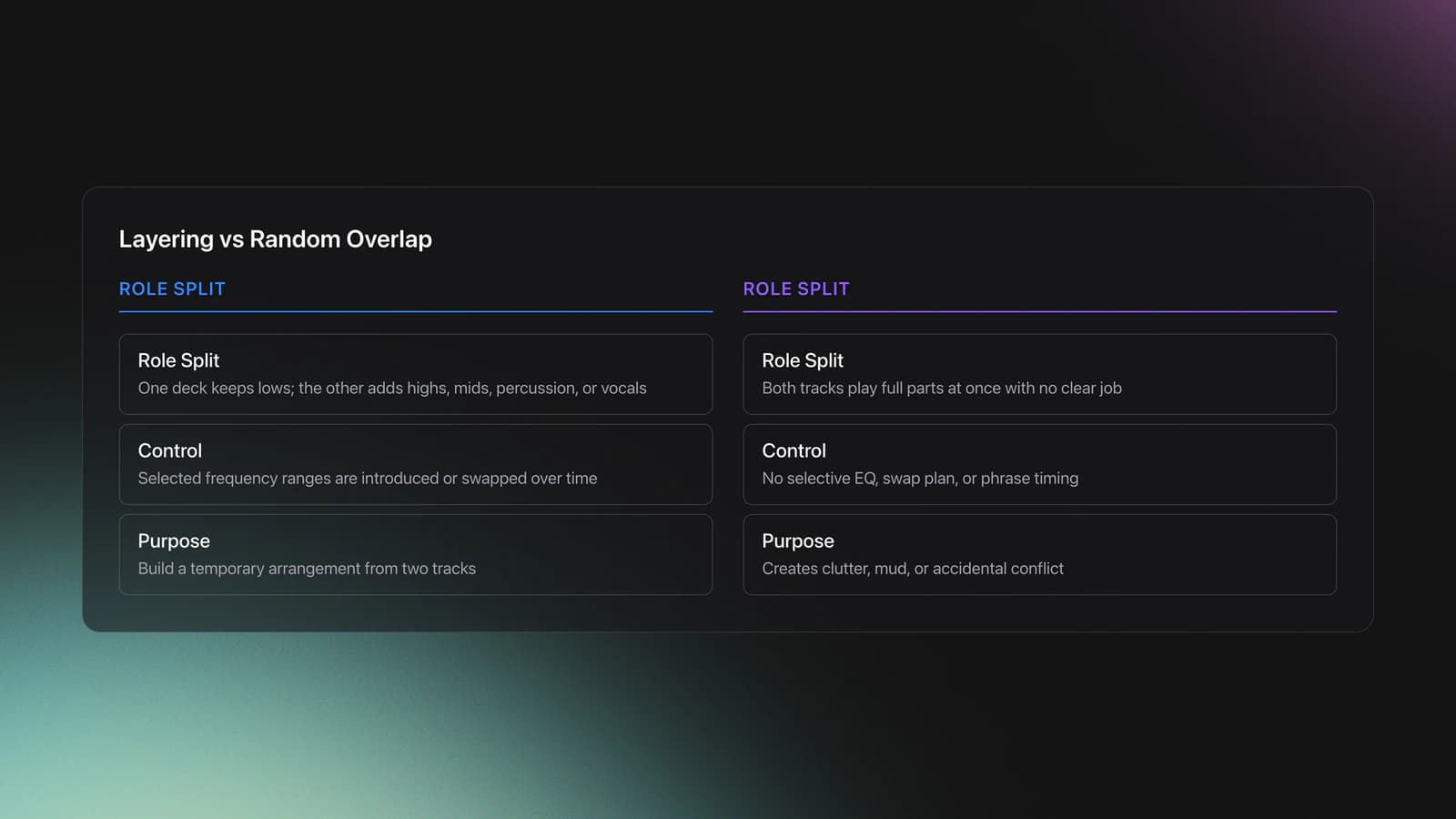
Layering is the controlled overlap of musical elements from different tracks so they work as one temporary arrangement. In DJ practice, that usually means letting one track carry the low end while another contributes highs, mids, percussion, or vocals.
Crossfader describes layering in techno mixing as a method that separates and controls different elements across decks, then swaps selected frequency ranges over time. Native Instruments teaches a related principle through bass-swap transitions, where one low end replaces another to avoid muddy overlap. Mixed In Key frames the more advanced version as live mashup remixing with stems, cue points, and layered vocals over instrumentals.
In other words, layering is not random overlap. It is selective arrangement during performance. One deck leads. The other deck adds or replaces a specific job in the mix.
Why Layering Matters
Layering matters because it gives you more energy control than a simple fade. Instead of moving from track A to track B in one gesture, you can introduce texture first, switch bass later, and hold the audience in a transition that feels deliberate.
That is especially useful in techno, house, and other loop-driven genres where percussion and repeated phrases leave room for added parts. A shaker from one track, a synth line from another, or an acapella over drums can make a familiar record feel new.
- Extends tension without stopping the groove.
- Creates custom transitions from standard tracks.
- Lets you control energy in smaller steps.
- Prepares you for multi-deck and stems performance.
The result is a set that feels less like track selection alone and more like real-time arrangement.
Gear and Track Selection
You only need two decks and channel EQ to start layering. A mixer or controller with isolated high, mid, and low controls works best because you can mute a frequency band completely rather than only reduce it.
Pioneer DJ describes EQ isolator mode as independent control of high, mid, and low frequencies on each channel. That matters in layering because low-frequency overlap is usually where mixes become muddy first.
Track choice matters as much as hardware. Pick records with compatible tempo, clear phrase structure, and parts that leave space for each other. Techno and house are forgiving because repetitive drums and longer intros make overlap easier. Open-format layering works too, but usually with shorter windows and stricter phrase discipline.
For cleaner results, improve your EQ mixing decisions and use harmonic mixing for cleaner overlays. Matching key is not mandatory for every percussion layer, but it matters when you combine melodies, basslines, or vocals.
| Element to Layer | Works Best When | Main Risk |
|---|---|---|
| Hi-hats or shakers | The base track has spare top-end space | Harsh brightness |
| Synth stab or lead | Keys and phrases align | Melodic clash |
| Bassline swap | Only one low end dominates | Mud and loss of punch |
| Acapella | The instrumental leaves vocal space | Lyrical clutter |
How to Start Layering
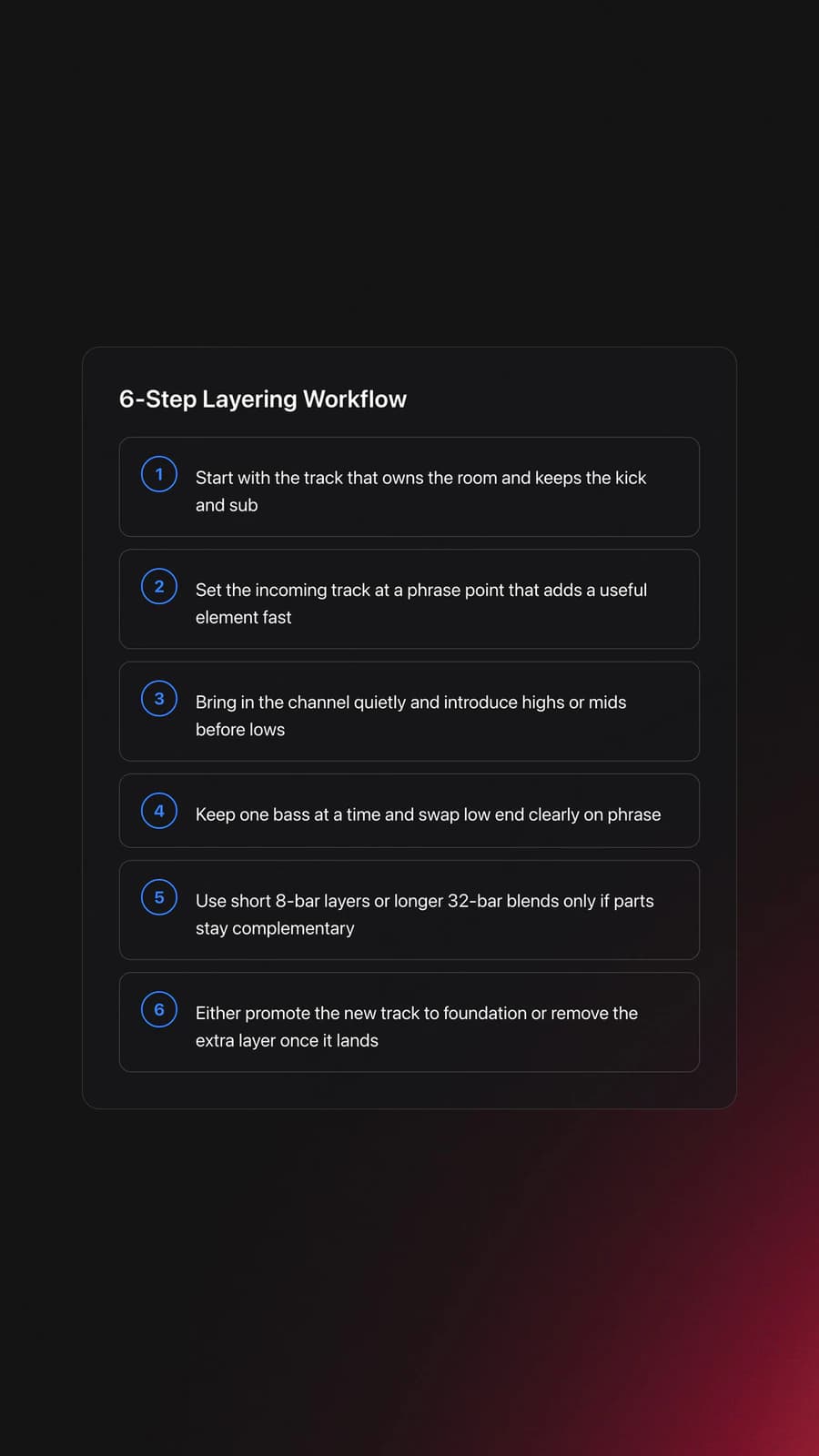
To start layering, choose one track as the foundation, beatmatch the second track, mute the incoming low end, and bring in only the part you want to add. Then swap or remove frequencies in phrase with the music.
That is the short version. The useful version is slower.
First, pick a strong base track that already carries the room. Let that track own the kick and sub at the start of the blend. If both tracks fight for the lows, the audience hears blur instead of power.
Second, cue the incoming track at a phrase point that adds a useful element right away. Crossfader shows this with a techno example where the incoming deck first adds top-end movement, then later takes over the low frequencies across an 8-bar swap.
Third, bring the new layer in quietly. Open the channel fader, then add highs or mids first. Listen for whether the layer fills a gap or competes with an existing part.
Fourth, commit to the low-end decision. Native Instruments' bass-swap guidance is a good rule here: one bass at a time. If you are switching the groove driver, do it on phrase and do it clearly.
Fifth, decide how long the overlap should last. Sometimes the layer only needs 8 bars. Sometimes it works for 32 bars if the parts are sparse and complementary.
Finally, exit cleanly. Either the incoming track becomes the new foundation, or the layer fades back out after adding a moment of interest. Do not leave a weak extra layer hanging once it has done its job.
Practice Drills for Layering
The fastest way to learn layering is to isolate one decision at a time. In practice, short focused drills build cleaner layering habits much faster than long unfocused sessions.
Start with two tracks in the same genre and similar energy. Use the same pair for several days. Repetition matters because your ears need to learn what each frequency move actually changes.
Keep your practice library tight. A small folder of proven layer-friendly tracks is more useful than scrolling through everything you own. If you organize local files in Vibes, it makes sense to tag tracks by role such as drum tools, acapellas, sparse intros, and bass-light overlays so the same drills stay easy to repeat.
Track your progress in 2-week cycles. Most DJs improve faster when they can measure one clear win, like an 8-bar bass swap that stays punchy, rather than chasing vague ideas of being more creative.
Common Mistakes in Layering
Most layering problems come from too much sound, not too little. Beginners often assume more overlap means more impact. Usually the opposite is true.
| Mistake | Why It Happens | Fix |
|---|---|---|
| Running two basslines together | Both tracks sound strong alone | Mute or swap one low end decisively |
| Entering off phrase | Focus stays on beatmatching only | Count 8 or 16 bars before adding layers |
| Choosing busy tracks | Both records feel exciting on their own | Use sparse intros, loops, or tool tracks |
| Leaving the layer too long | Fear of committing to the next track | Set an exit point before you bring it in |
Why do most beginners struggle with layering? Because they are trying to mix whole tracks, not functions. Once you start hearing one deck as drums, another as texture, and a third as vocal or melody, the technique becomes much easier to manage.
Where Layering Works Best
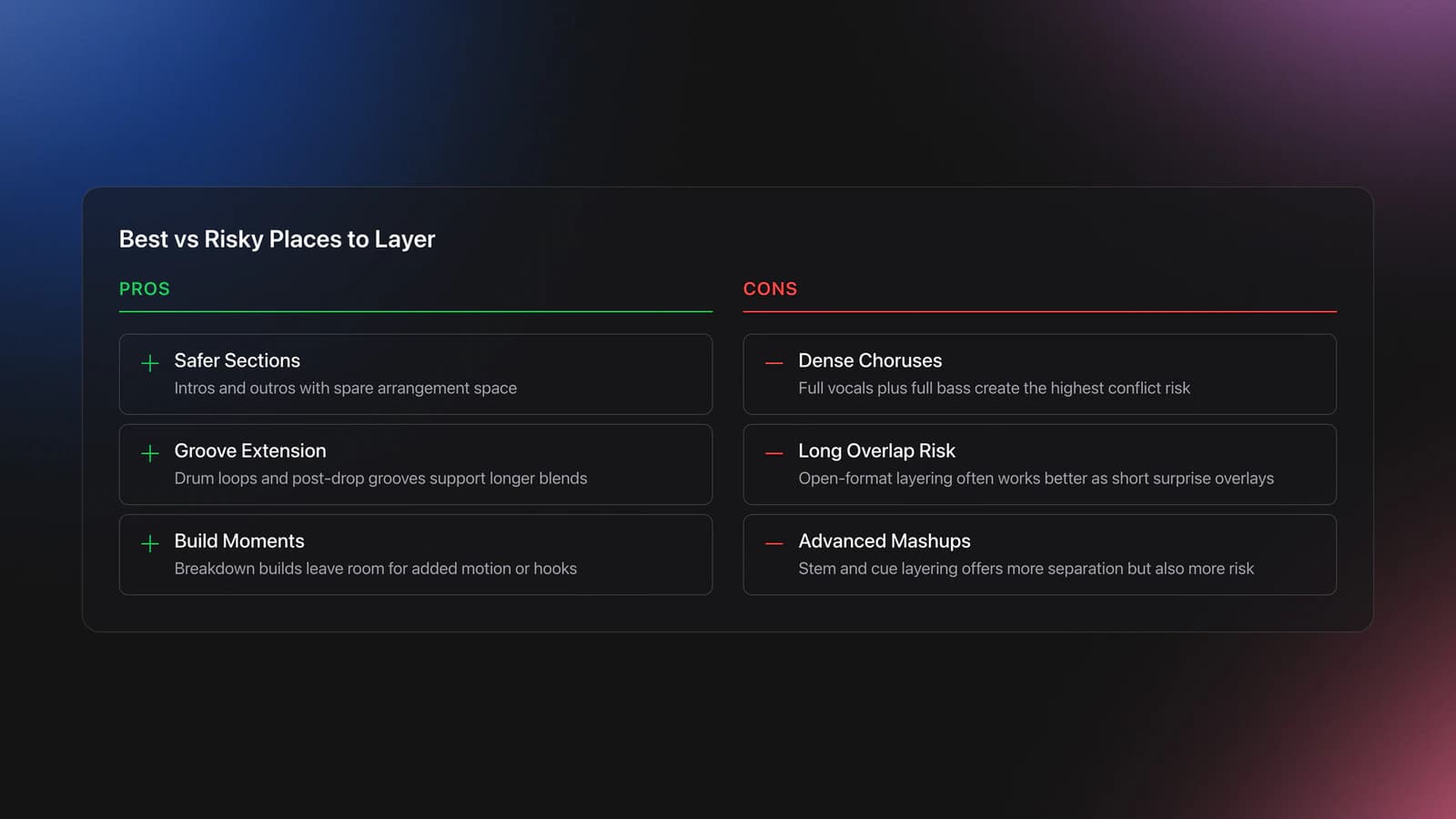
Layering works best in sections with spare arrangement space. Intros, outros, breakdown builds, drum loops, and post-drop grooves are usually safer than dense choruses with full vocals and full bass.
Techno DJs often use layering to create long rolling blends. House DJs use it to extend groove and tease incoming hooks. Open-format DJs often use short acapella or percussion overlays for surprise rather than long continuous overlap.
Mixed In Key's live mashup examples show the more performance-driven end of the spectrum, where stems and cues let you layer vocals over instrumentals on purpose. That is still layering, just with more separation and more risk.
Safety and Monitoring
Layering demands close listening, which can tempt you to turn booth monitors or headphones up too far. Resist that habit. The CDC and NIOSH recommend an exposure limit of 85 dBA over 8 hours, and allowable time drops as level rises.
In practice, keep cue volume only as loud as needed to hear timing and frequency balance. If you play long sets or rehearse often, use hearing protection and give your ears recovery time after sessions.
How to Know You Are Improving
You are improving at layering when the audience hears one bigger groove instead of two competing songs. The transition should feel intentional even if no one can describe exactly what changed.
Use these checkpoints. Can you hold a high-percussion layer for 16 bars without drift? Can you swap the low end over 8 bars without losing punch? Can you identify within 4 bars when a layer is too busy and remove it cleanly?
This is where it clicks. Layering stops being a trick and starts becoming arrangement control.
Layering Summary
Layering helps you move beyond basic transitions by combining selected elements from two tracks in a controlled way. When beatmatching, phrase timing, and EQ choices are solid, layering makes your sets sound fuller, more dynamic, and more personal without requiring full live production skills.
Key takeaways:
- Think in functions, not whole tracks.
- Let only one low end dominate at a time.
- Practice short, measurable drills until the moves feel automatic.
Start with percussion layers and bass swaps, then expand to vocals, loops, and multi-deck blends. From there, explore live mashup remixing next if you want layering to become a headline part of your performance style.
The visual way to organize your DJ library
Tag tracks by vibe. See everything at once. Export to rekordbox, Serato, Traktor or Engine DJ.
14-day free trial. Full access, no strings attached.
or see how it works
Equipment You'll Need
Beatport
optionalBeatport is a DJ-focused electronic music store and streaming platform for discovering, buying, and streaming tracks into supported DJ software and hardware.
Mixed In Key 11
optionalStandalone harmonic-mixing and library-prep software that detects keys, energy levels, cue points, and tags for DJ sets.
rekordbox
optionalCloud-connected DJ software for music management, performance, export prep, and club-standard hardware integration.
Pioneer DJ DDJ-FLX4
optionalA compact 2-channel DJ controller with built-in audio interface, USB-C connectivity, and beginner-friendly smart mixing features.
VirtualDJ
optionalDJ software for Windows and macOS that handles audio mixing, video mixing, karaoke, stems, and broad hardware support.
Serato DJ Pro
optionalProfessional DJ software for mixing, performance, library management, recording, and hardware-integrated club workflows.
Pioneer DJ DDJ-1000
optionalA 4-channel rekordbox DJ controller with full-size jog wheels, onboard displays, and club-style mixer controls.
Pioneer DJ CDJ-3000
optionalProfessional flagship DJ media player with a 9-inch touchscreen, advanced MPU processing, and club-standard Pro DJ Link workflow.
DJControl Inpulse 200 MK2
optionalCompact 2‑deck USB DJ controller with built‑in audio, Beatmatch Guide LEDs, and Serato DJ Lite/DJUCED integration.
Traktor MX2
optionalA 2-channel DJ controller with integrated audio interface and tight Traktor Pro 4 integration for mixing, stems, effects, and performance pads.
Pioneer DJ DDJ-400
optionalA compact 2-channel USB DJ controller built for rekordbox with a club-style layout aimed at new and progressing DJs.
Numark Mixtrack Pro FX
optionalA 2-deck USB DJ controller with a built-in audio interface, capacitive jog wheels, performance pads, and Serato DJ Lite support.
Pioneer CDJ-1000
optionalA discontinued professional CD-based DJ player that helped define the modern club-standard jog-wheel workflow.
VirtualDJ 7
optionalA legacy DJ software platform for audio and video mixing, controller mapping, and DVS playback on Windows and Mac.
Frequently Asked Questions

Hey, it's Ben Modigell 👋
I DJ and produce as so I so: downtempo, minimal, dub house, tech house, and techno (releases on Spotify and SoundCloud, links above). Everything I write here comes from my own gigs, studio sessions, and library cleanups: the rules I follow, the failure modes I have actually hit, and the workflow I use when nobody is watching. If a technique did not earn its place in my own sets, it does not make it into a tutorial.