
Native Instruments FM8
·Native InstrumentsNative Instruments FM8 is a powerhouse FM synthesizer for hybrid DJ sets and live performance. Its low CPU usage and bright, cutting tones make it ideal for layering over tracks in a live mix. Bounce FM8 basslines as audio loops for Traktor Remix Decks or Ableton clips.
Live Sound Design
Software synths bring unlimited sonic possibilities to hybrid DJ sets. Use them for live basslines, pads, leads, and textures that make your performances unique.
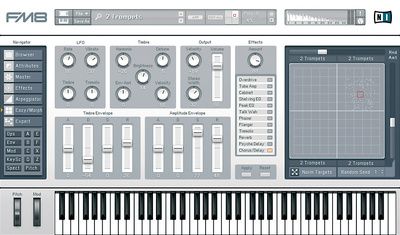
Native Instruments FM8 is a digital FM synthesizer plugin known for clear, bright tones and a fast programming workflow. It wraps a flexible FM matrix, morphing and a deep preset library into a stable VST3/AU/AAX package.
If you want classic DX textures, modern metallic basses, or evolving pads without wrestling a hardware menu maze, FM8 is still worth a look. It runs natively on Apple Silicon and supports current plugin formats.
FM8 appears in Komplete bundles, but you can buy it à la carte. The engine goes past fixed DX algorithms, and the Morph Square lets you blend four timbres for movement that is easy to automate.
Hybrid DJ Use Cases
The line between producer and DJ has dissolved. Hybrid performers use FM8 to create signature sounds that work in live contexts:
- Traktor [Remix](/glossary/remix) Decks – Bounce FM8 bass loops and stabs as one-shots or 4-bar loops. Tag them by key and energy for fast recall during sets.
- Ableton Live DJ sets – Run FM8 as a live instrument alongside CDJs or controllers. Layer bright FM stabs over incoming tracks for harmonic tension.
- DJ edits and bootlegs – Design custom bass hits, risers, and impacts that give your edits a unique sonic fingerprint.
- Low CPU stability – FM8 efficient engine leaves headroom for Traktor, Serato, or Ableton running alongside without dropouts.
Library Integration
Organize self-made FM8 loops by key and energy level. Use folders like 128-Aminor-high so you can grab the right loop mid-set. Export stems at multiple tempos if you play across BPM ranges.
Product Overview
FM8 focuses on getting you from idea to sound quickly. The main Operator page exposes core parameters across operators so you can set carriers and modulators without diving through pages.
Unlike classic hardware, FM8 matrix is freeform. You can draw routings, add feedback, and save templates for reuse. According to the official specifications, it runs on Windows 10/11 and macOS 13–15 with native Apple Silicon support.
The library covers bells, keys, plucks, brass, basses and motion patches. Native Instruments lists 960 factory presets, while some retailers cite larger numbers; the official figure is the reliable one.
If you are comparing against wavetable or analog-modeled synths, FM8 brings a different vocabulary. It excels at harmonically rich, time-varying tones that cut in a mix.
Key Features
- Flexible FM matrix with user-defined algorithms and operator feedback.
- Morph Square for crossfading four timbres with MIDI or DAW automation.
- Extended envelopes and per-operator waveforms for detailed dynamics.
- Built-in arpeggiator with templates for rhythmic lines and sequences.
- SysEx import reads DX/TX patches for instant classic tones.
- Native VST3/AU/AAX support including Apple Silicon. See the official specifications.
Technical Specifications
| Specification | Details |
|---|---|
| Plugin formats | Windows: VST, VST3, AAX; macOS: VST, VST3, AU, AAX (64-bit). |
| OS support | Windows 10/11; macOS 13/14/15; Apple Silicon native or Rosetta 2. |
| Operators | 6 main operators (A–F) plus X and Z utility operators. |
| Factory presets | 960 presets per Native Instruments. |
| Effects | 12 onboard effects including overdrive, talk wah, EQ, phaser and flanger. |
| Installation | Download via Native Access; internet required for activation. |
Core specs from Native Instruments. Pricing and formats verified on the FM8 pages.
Who Is This For
Perfect for hybrid DJs and producers who want the FM sound without hardware complexity. If you perform live with Ableton, Traktor, or a controller-plus-laptop rig, FM8 gives you cutting tones that layer well over existing tracks.
Not ideal if you only need analog-style tones or want one-knob macro control. Consider layering FM8 with subtractive tools like Native Instruments Massive for breadth.
In Practice
Start with a bell or key preset and move the Morph handle over 8 bars for motion. Automate matrix levels subtly to add grit without destroying pitch stability.
Import DX7 SysEx banks to reuse classic patches, then modernize them with FM8 effects and envelopes. The arpeggiator handles rhythmic gating and octave motion when you want instant movement.
For basses, keep modulation indices moderate and use the shelving EQ or tube amp to focus low mids. For pads, lengthen multiple envelopes together on the Envelope page to keep motion coherent.
FM8 is easy to slot into current Macs and PCs. It supports VST3/AU/AAX and runs natively on Apple Silicon per the official specs.
Pros and Cons
Pros
- Fast visual workflow for complex FM.
- Morphing encourages musical movement.
- DX/TX SysEx import extends the library.
- Mature, stable instrument with current plugin formats.
- Low CPU makes it live-performance friendly.
Cons
- -UI and effects feel dated next to newer synths.
- -Some retailers list preset counts differently than NI own pages.
Price and Value
FM8 lists for $99 on the official store; see Native Instruments FM8 pricing. Thomann typically shows around €98–99 in the EU and runs periodic sales.
Sweetwater lists FM8 with current system specs and formats, useful for compatibility checks. See the Sweetwater product page and the Thomann product description for regional pricing snapshots.
Value is strong if you want FM staples with a gentle learning curve. If you prefer a more modern FM workflow, compare with Korg opsix native.
Alternatives
| Product | Price | Key Difference |
|---|---|---|
| Arturia DX7 V | $149 | DX7-focused tone and polished effects; excellent for classic timbres. |
| Korg opsix native | $199 (often $99 on sale) | Altered FM with operator mixer and expanded engines for faster results. |
| Plogue chipsynth OPS7 | $49.95 | Lightweight, hardware-inspired 6-op FM with faithful behavior. |
Verified prices: Arturia store, Korg shop, and Plogue store.
Bottom Line
FM8 remains a practical, musical path into FM for both studio work and live performance. The matrix, morphing and envelopes let you program expressive sounds quickly. Hybrid DJs will appreciate the low CPU footprint and bright tones that cut through a live mix.
If you want modern FM with a different workflow, check Korg opsix native. If you want a DX-centric flavor with modern FX, look at Arturia DX7 V.
For hybrid DJs and producers alike, FM8 earns its place as a dependable FM workhorse at a fair price.
Where to Buy
Manufacturer: Native Instruments FM8 pricing
Retailers: Sweetwater product page · Thomann product description
Looking for broader context? See our FM synth buying guide for tips on operator counts, modulation depth, and workflow.
Building a Hybrid Setup?
Vibes helps you organize tracks by energy, key, and vibe, perfect for hybrid performers who need quick access during live remixing.
14-day free trial. Full access, no strings attached.
or see how it works
Tutorials Using Native Instruments FM8

DJ Techniques Using This Gear
See how DJs and live performers incorporate Native Instruments FM8 into their workflow.





Frequently Asked Questions

Hey, it's Ben Modigell 👋
I DJ and produce as so I so: downtempo, minimal, dub house, tech house, and techno (releases on Spotify and SoundCloud, links above). Everything I write here comes from my own gigs, studio sessions, and library cleanups: the rules I follow, the failure modes I have actually hit, and the workflow I use when nobody is watching. If a technique did not earn its place in my own sets, it does not make it into a tutorial.