

Set and save loops in Engine DJ.
Set a loop with Loop In and Loop Out or with Auto Loop, then click a free performance pad in Loop mode and Engine DJ stores it on the track, up to 8 saved loops per track. Right-click a populated pad to rename it, recolor it, or make it an Active Loop that starts on its own when playback reaches the region. The loop points sit in the Engine library, so they travel with the track when you export to a drive.
$49$79USD one-time purchase. First 250 licenses at this price. 14-day free trial.
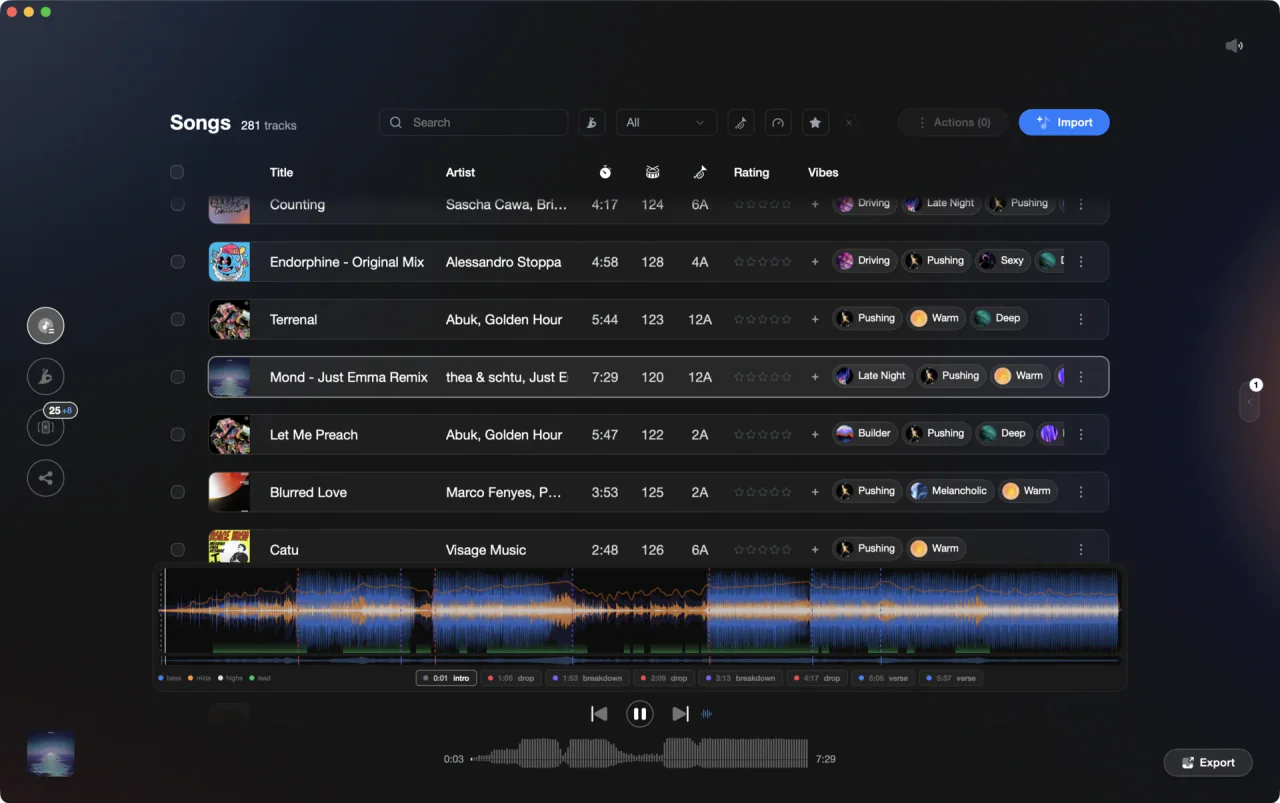
Spot the eight bars worth looping in Vibes, set the loop itself in Engine DJ.
Save and recall loops in Engine DJ, step by step.
Loops are performance data that Engine DJ Desktop writes to the track, so anything you set at home is on the pads at the gig. Here is the full path, from loading the track to getting the loops onto a drive.
Load the track into a deck
In Engine DJ Desktop, double-click the track in the track list, or drag it onto the waveform, to load it into a deck. The waveform and beat grid appear above the editing controls. Loop points show as white lines with shading between them, so you can see any loop the track already carries before you add another.
Open the Loop and Beat Jump Controls
In the Deck Modes row at the top of the deck, click the icon for Loop & Beat Jump Controls. Pick Auto / Jump for a loop of a set size, or Manual to place the loop points yourself. The /2 and X2 buttons set the resolution, from 1/32 of a beat up to 64 beats.
Set the loop
With Manual selected, click Loop In where the loop should start and Loop Out where it should end. Playback begins looping immediately. With Auto / Jump selected, click Auto Loop and Engine DJ builds a loop of the chosen beat length from the playhead. X2 and /2 double or halve it, and Shift Left or Shift Right move the whole loop by one measure.
Store it on a performance pad
Click the Loop icon to switch the performance pads to loops, then click any unlit pad while the loop is running: Engine DJ saves the loop to that slot. You can also skip the deck controls entirely and click an available pad once at the loop in point and again at the loop out point. Eight slots per track.
Name it, color it, or make it active
Right-click a populated pad to rename the loop with your keyboard, choose a color, or clear it. Choose Active Loop and the loop starts by itself when playback reaches the region: an A appears on the pad and the region gets a striped pattern on the waveform. You can set up to 8 Active Loops per track.
Set how saved loops behave
Open Preferences and go to the Cues/Loops section. Saved Loop Behavior decides whether pressing a populated pad re-triggers the loop from the start (Reloop) or switches it off (Disable). Cue/Loop Quantization snaps loop points to 1/8, 1/4, 1/2, 1 or 4 beats, and Smart Loops rounds a manual loop to a conventional length.
Export to your drive
Click Sync Manager in the bottom-left corner, or Export in the toolbar, choose your drive and check the playlists you want. Engine DJ writes its own database onto the drive, and that database carries loop points along with playlists, cue points, beat grids and waveform data, so the pads are already loaded on the player.
The catch
Engine DJ wins any conflict with imported loops. After adding tracks from a third-party source such as a Serato or Rekordbox library, any cues or loops you apply in Engine DJ override the performance data that came in with them. Getting the originals back means removing the track from your collection and importing it again.
Where Vibes fits
Know which eight bars are worth looping before you load the deck.
Vibes does not set or store loops. It has no decks and no loop controls, and every loop point is written by Engine DJ. What it does is the pass before that: it analyzes each track for BPM, key, energy curve and sections, so intro, buildup, drop, breakdown and outro are marked when you open the file. Export the prepped playlist back to Engine DJ and do the loop work there.
See how it worksOrganize in Vibes, export to Engine DJ.
Your playlists, tags, ratings, and cue points travel back to the gear you play on, so nothing you do in Vibes is locked away.

Track 001
Artist A
Afterhours Mysterious
 Introspective
Track 002
Artist B
 Cozy FloorPeaceful
 Home
Home
Track 003
Artist C
Rave Aggressive
 Festival
 Build & Release
Frequently asked questions
The honest answers, including the trade-offs.
From a Vibes customer
The import worked perfectly. Have created several sets now and my life is so much easier
One-time purchase
Get Vibes with a single payment. No subscription.
Vibes is the step before you open your DJ software, not a replacement for it.
First 250 licenses at this price, then $79.
14 days • Full access
No strings attached
Secure checkout with Stripe
Already have Companion Pro? Upgrade instead


Methodology
How we keep this honest.

Verified against the app
Every step is checked against the current version of Engine DJ.
We own our bias
We make Vibes. We show the native way first and honestly, then where Vibes genuinely helps, and we say when it does not.
Live pricing
The Vibes price shown comes straight from our checkout, never a hardcoded marketing number.
Kept current
Last reviewed September 2026.
Keep exploring
Compare Vibes
DJ apps head to head
Works with your software
Vibes for DJs
Vibes features
How-to guides
Best DJ software
Move between apps
Learn to DJ