
Vibes for Apple Music.
Your Apple Music DJ library is the local half of your Music app collection: the files you actually own, exported as a Library.xml that Rekordbox, Serato, Traktor, and Engine DJ can all read. Streaming catalog tracks are licensed rather than owned, so they only load inside a DJ app signed in to your subscription and never leave as files. Vibes reads that XML directly, keeps your playlist folders intact, and hands the result back to your DJ software as a clean, tagged playlist tree.
$49$79USD one-time purchase. First 250 licenses at this price. 14-day free trial.
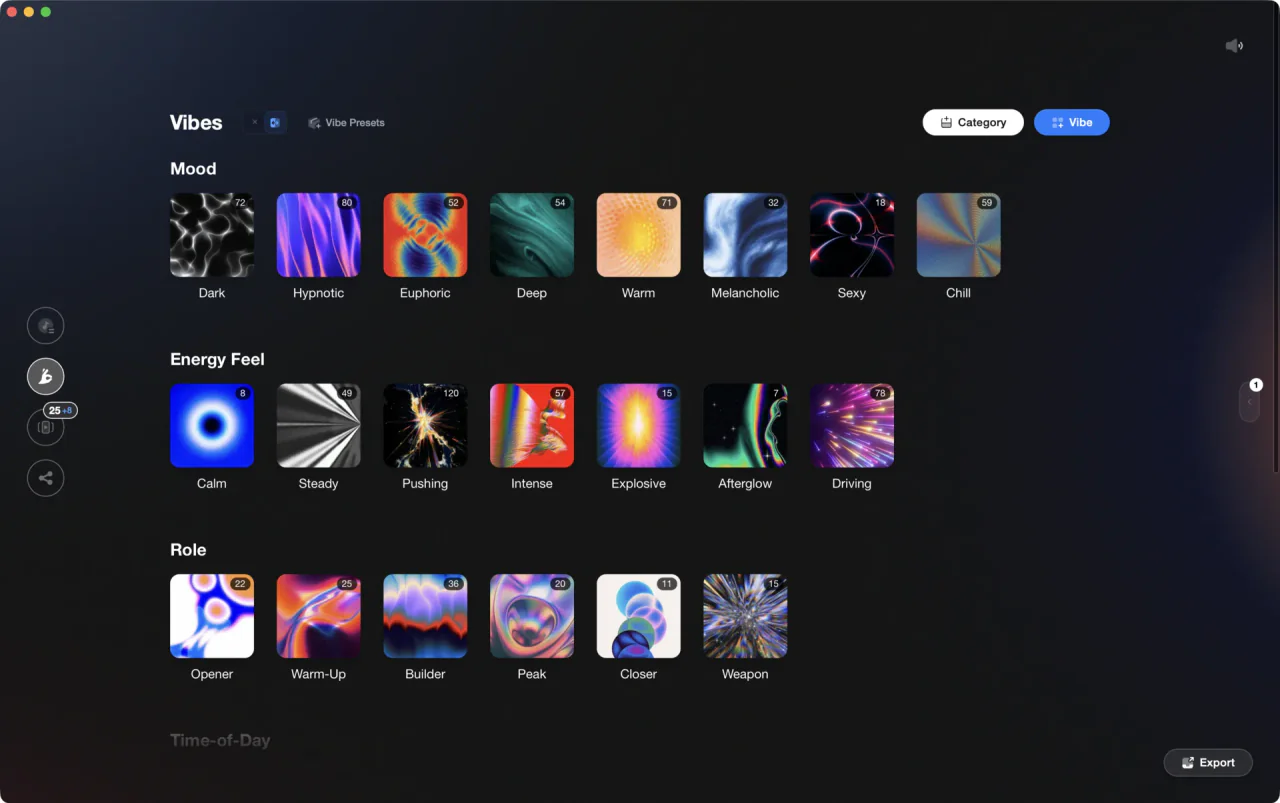
Vibes & categories are fully customizable.
Vibes reads your Apple Music library through the Library.xml the Music app exports, or straight from your music folders, then sends tagged playlists out to Rekordbox, Serato, Traktor, and Engine DJ. Nothing is written back into Apple Music.
From Apple Music and back, in three steps.
01
Export your library as XML
In the Music app on Mac, choose File > Library > Export Library to write your whole collection to XML. For a single playlist, select it and choose File > Library > Export Playlist, then set the Format menu to XML. iTunes on Windows exports the same file from File > Library > Export Library.
02
Open it in Vibes
Pick the file in the Import Wizard. Vibes reads what is inside the file rather than trusting the extension, rebuilds your folder hierarchy from Apple's persistent IDs, and skips Apple's own Library, Music, and Downloaded rows so you never end up with a vibe holding your entire collection.
03
Tag, build, export
Sort at speed in Vibe Sort, let Auto-Tagging propose vibes, design the running order on the Set Designer canvas with Energy Flow, then export playlists to Rekordbox, Serato, Traktor, or Engine DJ.


Step one
One file, the whole collection.
Playlists come across with their folder structure intact, along with track names, artists, times, any BPM already stored in your library, and your star ratings. Cloud only entries carry no file location, so they are left out of the preview instead of importing as dead rows, and the Music app itself is never touched.
What Vibes adds on top of Apple Music.
Apple Music stays your performance software. Vibes covers the preparation layer.
| Apple Music alone | With Vibes | |
|---|---|---|
| Library organization | ||
| Mood and energy tagging | Genre, Grouping, and Comments fields, filtered with Smart Playlists | Unlimited vibes in your own categories, with tags read in from Genre, Mood, or Grouping |
| Speed of sorting | Edit fields track by track under Song > Get Info | Vibe Sort: keyboard-first tagging, plus Auto-Tagging suggestions |
| Duplicates | File > Library > Show Duplicate Items, matched by name and artist | Duplicate finder with exact, metadata, and audio-similarity layers |
| Set preparation | ||
| Key and BPM | Whatever the files already carry, typed in by hand under Song > Get Info | Analyzed BPM and key, shown in Camelot, musical, or Open Key |
| Next-track suggestions | Autoplay picks what sounds similar | Find Compatible: harmonic Camelot neighbors inside a BPM window, half and double time aware |
| Building a running order | A playlist you drag into shape, with AutoMix smoothing playback | Set Designer canvas with Energy Flow sorting: ascending, descending, or arc |
| Getting it into a DJ app | ||
| What the DJ app sees | Each app hooks up its own way: a Setup checkbox in Serato, an XML file path in Rekordbox, an iTunes node in Traktor, a Library toggle in Engine DJ | One export writes a folder tree Rekordbox, Serato, Traktor, and Engine DJ read natively |
| Streaming catalog tracks | Play inside apps signed in to Apple Music, never exportable to USB | Not supported: Vibes works on files you own |
| Track sections and cue points | Auto-detected intro, buildup, drop, breakdown, and outro, exported as cues |
What lands in your DJ software.
Export runs one way, outward. Vibes writes your Apple Music sourced library into Rekordbox, Serato, Traktor, or Engine DJ as a plain playlist tree, so the structure is waiting for you the next time you open the app.

Track 001
Artist A
Afterhours Mysterious
 Introspective
Track 002
Artist B
 Cozy FloorPeaceful
 Home
Home
Track 003
Artist C
Rave Aggressive
 Festival
 Build & Release
- A Vibes Library folder with one playlist per vibe, nested under your category names
- Your original Music app playlist folders, kept in the shape you built them
- Combination playlists for tracks that share several vibes
- Your DJ sets as playlists in the exact order you designed
- Star ratings carried over to Rekordbox, Traktor, and Engine DJ; Serato's crate format has no rating field
- Vibes written into the comment field, like [House] [Peak Time], ready for filtering
- Auto-detected cue points for intros, buildups, drops, breakdowns, and outros
- Optional Camelot key or BPM subfolders inside each vibe playlist
Nothing is written back to Apple Music. The Music app is a source only: Vibes never edits your Library.xml, your playlists, or your Music library, and there is no route back in. Apple Music streaming tracks cannot be imported at all, because a catalog track is a license rather than a file on your disk, and its library entry carries no file location to read.
The preparation layer
DJ library management, finally done right.
Turn your collection into clear categories. Moods, functions, or your own system, so every track feels ready to play.
Afterhours
Aggressive
Build & Release

Club
Cozy Floor

Euphoric

Evolving
Festival
Home
Introspective

Melancholic
Mysterious
Peaceful
Playful
Rave
Sectional
Sustained

Tense
Afterhours
Aggressive
Track 001
Artist A
AfterhoursMysteriousIntrospectiveTrack 001
Artist A
AfterhoursMysteriousIntrospectiveTrack 002
Artist B
Cozy FloorPeacefulHomeTrack 002
Artist B
Cozy FloorPeacefulHomeTrack 003
Artist C
RaveAggressiveFestivalBuild & ReleaseTrack 003
Artist C
RaveAggressiveFestivalFrequently asked questions
The honest answers, including the trade-offs.
From a Vibes customer
The import worked perfectly. Have created several sets now and my life is so much easier
One-time purchase
Get Vibes with a single payment. No subscription.
Vibes is the step before you open your DJ software, not a replacement for it.
First 250 licenses at this price, then $79.
14 days • Full access
No strings attached
Secure checkout with Stripe
Already have Companion Pro? Upgrade instead


Methodology
How we keep this honest.

Verified against the app
What transfers both ways is tested against the current version of Apple Music.
We own our bias
Vibes is our product, and we are upfront about format limits, like Serato's eight cue slots per track and its crate files not carrying star ratings.
Live pricing
The Vibes price shown comes straight from our checkout, never a hardcoded marketing number.
Kept current
Last reviewed September 2026.
Keep exploring
DJ apps head to head
Works with your software
Vibes for DJs
Vibes features
How-to guides
Best DJ software
Move between apps
Learn to DJ