

See phrases in Rekordbox.
Open Preferences > [View] > [Layout] and tick [Phrase (Full Waveform)], then tick [Always Show types of phrases] so the labels stay on screen instead of appearing only on mouse-over. Nothing draws unless the track was analyzed with [Phrase] ticked under Preferences > [Analysis] > [Track Analysis Setting], so anything imported before you turned that on needs a re-analyze.
$49$79USD one-time purchase. First 250 licenses at this price. 14-day free trial.
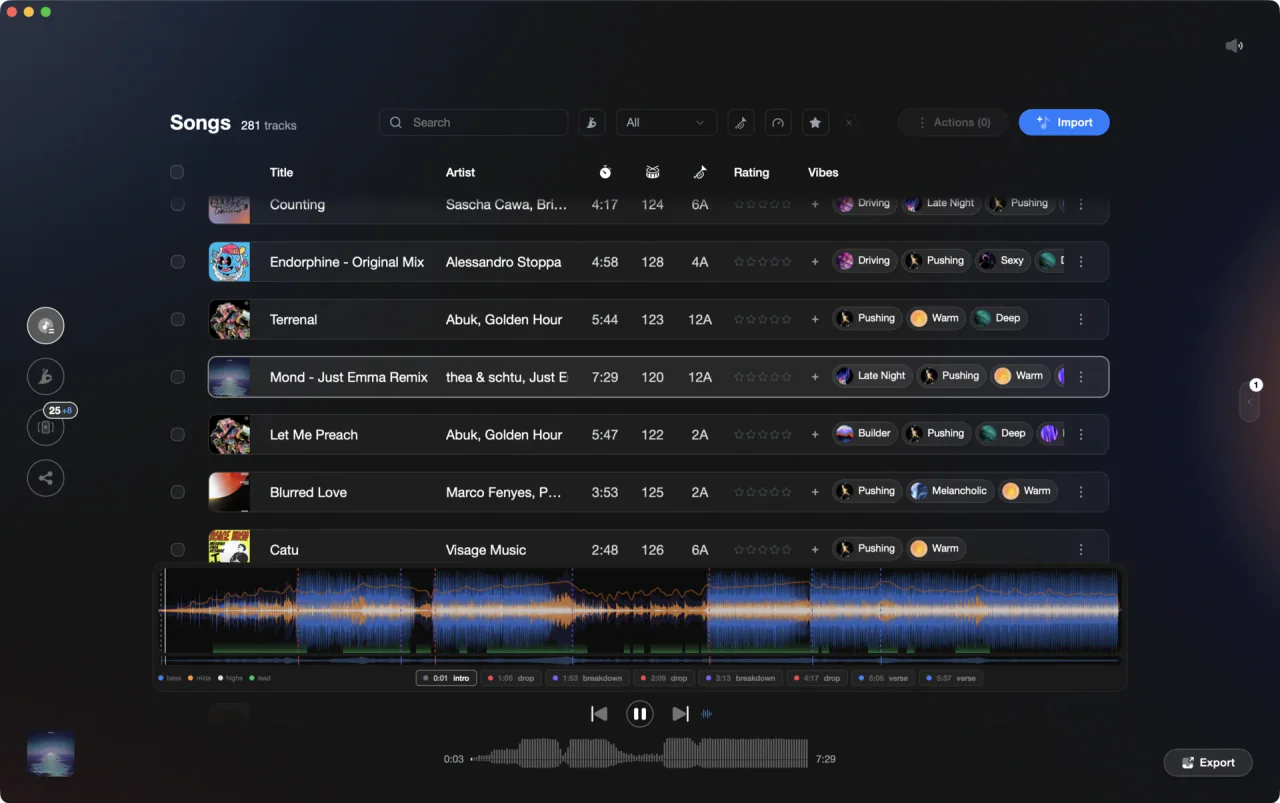
Vibes marks the same track structure on its own waveform while you prep.
See phrases on the waveform in Rekordbox, step by step.
Phrase analysis is a separate pass from BPM and key: rekordbox has to be told to run it, and the display layer has to be switched on separately. Here is the whole sequence in rekordbox 7, from the analysis checkbox through to the [PHRASE EDIT] panel.
Tick [Phrase] before you analyze anything
Click the settings icon to open the [Preferences] window, select the [Analysis] category, then the [Track Analysis] tab. Under [Track Analysis Setting] you choose what each analysis pass produces: [BPM / Grid], [KEY], [Phrase] and [Vocal]. Tick [Phrase]. This is the checkbox most people miss, and without it rekordbox never generates phrase data no matter what the view settings say.
Analyze or re-analyze the tracks
If [Auto Analysis] on the same tab is set to [Enable], every file you add to [Collection] is analyzed on import. Tracks already in your library keep whatever data they were given the first time, so select them, right-click and choose [Analyze Track], or use [Analyze Track] in the [Track] menu. Tracks carrying Analysis Lock are skipped during analysis.
Turn on the phrase layer in Preferences > [View]
Back in the [Preferences] window, open the [View] category and the [Layout] tab. Find the [Phrases] group. [Phrase (Full Waveform)] draws the phrase strip on the full waveform, and [Phrase (Enlarged Waveform)] draws it on the enlarged waveform. These are two independent checkboxes, so tick both if you want phrases visible wherever you are looking.
Set [Always Show types of phrases]
In the same [Phrases] group there is a third option, [Always Show types of phrases]. With it off, the phrase names only appear when your mouse hovers over the strip, which is the reason a lot of DJs think the feature is broken. Tick it and the labels stay printed on the strip all the time, which is what you want while you are prepping.
Load a track and read the strip
Load an analyzed track onto a deck. The phrase result is drawn under the waveform in the track information panel: colored blocks labelled [Intro], [Up], [Down], [Chorus], [Bridge], [Verse] and [Outro]. On the enlarged waveform you also get a [Fill in] marker, the short improvisational passage rekordbox detects at the end of an [Intro], [Up] or [Chorus], up to four beats long.
Correct a wrong phrase in [PHRASE EDIT]
With [Phrase (Full Waveform)] ticked you can open the editor: the [GRID] panel in EXPORT mode, or the [GRID/PHRASE EDIT] panel in PERFORMANCE mode, one deck at a time. Click [CUT] to split a phrase in two, drag the white split line to move a boundary or merge two phrases, use the drop-down to change a phrase type, and click [CLEAR] to wipe every phrase except [Intro].
The catch
Phrase edits are fragile. If you run analysis on that track again, every phrase you moved, cut or retyped is cleared and replaced by the fresh automatic result, and a [Fill in] marker disappears the moment the phrase it sits on is divided or dragged. Fix beatgrids and keys first, then edit phrases last.
The faster way
See the shape of every track before it reaches a deck.
Vibes analyzes the files you own and marks the sections on each track: intro, buildup, drop, breakdown and outro, plus the lead and vocal regions. It works across the whole library in one pass, so you are reading structure while you sort, not one loaded deck at a time. BPM, key and an energy curve come out of the same analysis. The playlists and vibes you build on top of that export back to rekordbox.
See how it worksOrganize in Vibes, export to Rekordbox.
Your playlists, tags, ratings, and cue points travel back to the gear you play on, so nothing you do in Vibes is locked away.

Track 001
Artist A
Afterhours Mysterious
 Introspective
Track 002
Artist B
 Cozy FloorPeaceful
 Home
Home
Track 003
Artist C
Rave Aggressive
 Festival
 Build & Release
Frequently asked questions
The honest answers, including the trade-offs.
From a Vibes customer
The import worked perfectly. Have created several sets now and my life is so much easier
One-time purchase
Get Vibes with a single payment. No subscription.
Vibes is the step before you open your DJ software, not a replacement for it.
First 250 licenses at this price, then $79.
14 days • Full access
No strings attached
Secure checkout with Stripe
Already have Companion Pro? Upgrade instead


Methodology
How we keep this honest.

Verified against the app
Every step is checked against the current version of Rekordbox.
We own our bias
We make Vibes. We show the native way first and honestly, then where Vibes genuinely helps, and we say when it does not.
Live pricing
The Vibes price shown comes straight from our checkout, never a hardcoded marketing number.
Kept current
Last reviewed September 2026.
Keep exploring
DJ apps head to head
Works with your software
Vibes for DJs
Vibes features
How-to guides
Best DJ software
Move between apps
Learn to DJ