

Set and save loops in Traktor.
To save a loop in Traktor, activate the loop, open the Advanced panel, select the CUE page, and click an empty Hotcue button: that button lights up green and the loop is stored on the track for later sessions. If all eight Hotcue buttons are taken, click the STORE button on the same page and the loop lands in the Cue list instead.
$49$79USD one-time purchase. First 250 licenses at this price. 14-day free trial.
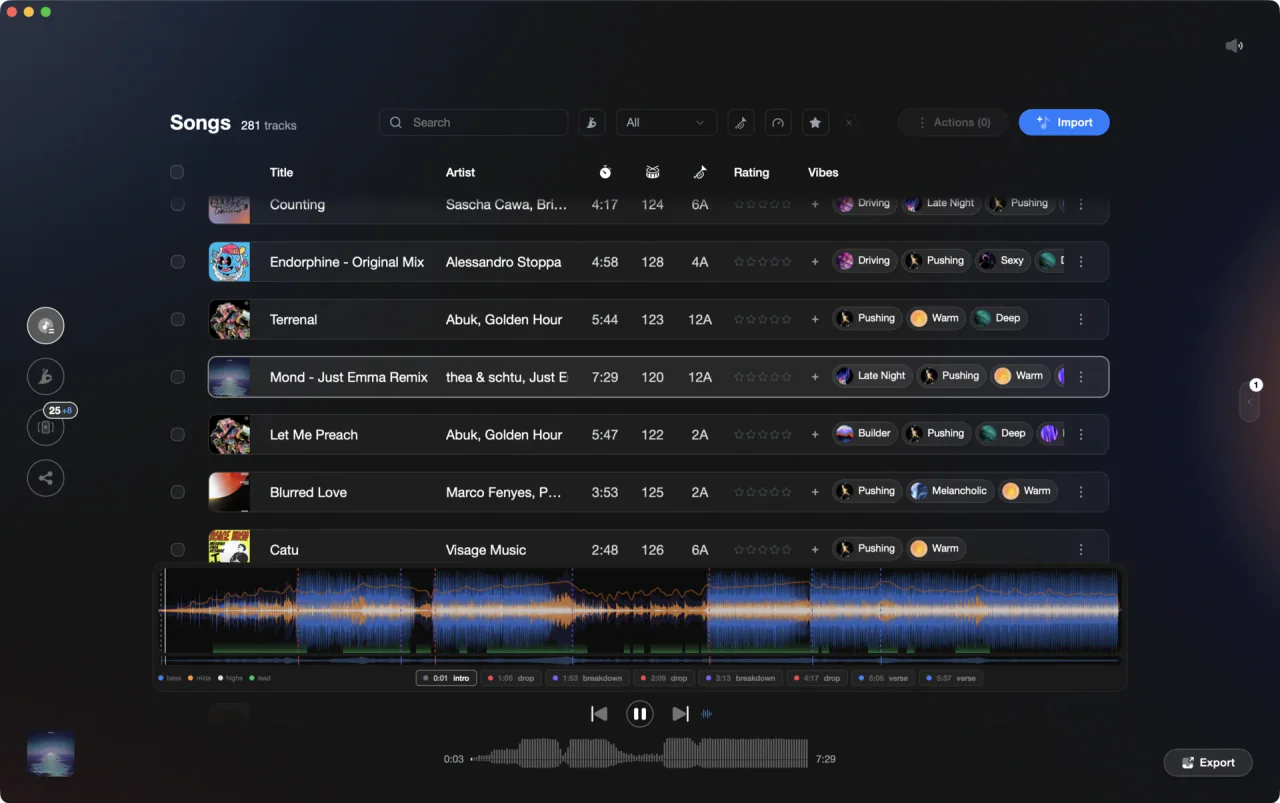
Traktor sets the loop. Knowing which bars are worth looping happens before you open the deck.
Set and save loops in Traktor, step by step.
Traktor keeps loops in the same place as cue points: the CUE page of the Advanced Panel. Set the loop first, then decide whether it lives on a Hotcue button or in the Cue list.
Open the Advanced Panel and its CUE page
Click the Advanced Panel button to display the Advanced Panels for Deck A and B, and for Deck C and D. In the Advanced Panel, select CUE to show the CUE page. This page holds the eight Hotcue buttons, the STORE button and the Cue list, and it is where every stored loop ends up.
Set a loop with a preset size
On a playing deck, use the Loop size control at the bottom of the deck to choose a size, then click the Auto Loop button for that size. Traktor starts looping at the current playback position, marks the loop green in the Waveform display, and lights the ACTIVE button green. Preset sizes run from 1/32 of a beat up to 32 beats.
Or set your own loop with IN and OUT
For a custom length, click the Loop In button where you want the loop to start, wait as long as you want the loop to run, then click the Loop Out button. Looping switches on as soon as both points are set. The arrow buttons next to the Loop size control flash when the size you picked is out of range.
Store the loop on a Hotcue button
With the loop running, click any empty Hotcue button on the CUE page. The loop is stored on that button and the button lights up green, where a plain cue point lights blue. Click the same Hotcue button later to jump back and start the loop again. You get eight Hotcue buttons per track, shared between cue points and loops.
Or use STORE to put it in the Cue list
If the Hotcue buttons are full, click the STORE button on the CUE page and the loop goes into the Cue list. From there you can rename it, nudge it with the Move Cue BWD and Move Cue FWD buttons, switch its type in the Cue Type menu, or delete it permanently with the bin icon.
Switch looping off without losing the points
Click the lit ACTIVE button to stop looping. Playback carries on as normal and the Loop In and Loop Out markers stay where they are, so you can drop back in. Clicking ACTIVE when no loop is running enables the next loop stored in the track, which is a fast way to check your saved loops.
The catch
Storing a loop stores a marker, not audio. If you want the looped audio itself as a file, capture it into a Remix Deck instead: activate SNAP in the Master Control panel, run the loop, drag the track title from the Deck Header into a Sample Cell, then rename the Remix Set in the Deck Header and drag it into the All Remix Sets list to save it to your Track Collection.
Where Vibes fits
Know which bars are worth looping before you load the deck.
Vibes does not set loops, does not touch your Traktor cue points, and has no decks, mixing or recording. What it does is analyze the tracks first: BPM, key, an energy curve, and section markers for the intro, buildup, drop, breakdown and outro. That is the part that tells you where a loop is actually useful, so the work in Traktor is just clicking a Hotcue button.
See how it worksOrganize in Vibes, export to Traktor.
Your playlists, tags, ratings, and cue points travel back to the gear you play on, so nothing you do in Vibes is locked away.

Track 001
Artist A
Afterhours Mysterious
 Introspective
Track 002
Artist B
 Cozy FloorPeaceful
 Home
Home
Track 003
Artist C
Rave Aggressive
 Festival
 Build & Release
Frequently asked questions
The honest answers, including the trade-offs.
From a Vibes customer
The import worked perfectly. Have created several sets now and my life is so much easier
One-time purchase
Get Vibes with a single payment. No subscription.
Vibes is the step before you open your DJ software, not a replacement for it.
First 250 licenses at this price, then $79.
14 days • Full access
No strings attached
Secure checkout with Stripe
Already have Companion Pro? Upgrade instead


Methodology
How we keep this honest.

Verified against the app
Every step is checked against the current version of Traktor.
We own our bias
We make Vibes. We show the native way first and honestly, then where Vibes genuinely helps, and we say when it does not.
Live pricing
The Vibes price shown comes straight from our checkout, never a hardcoded marketing number.
Kept current
Last reviewed September 2026.
Keep exploring
Compare Vibes
DJ apps head to head
Works with your software
Vibes for DJs
Vibes features
How-to guides
Best DJ software
Move between apps
Learn to DJ