

Build a DJ set in Traktor.
Traktor is where you perform, but the real work happens before you open it. Plan your set by energy, key, and BPM in Vibes, then export a finished playlist straight into your Traktor collection.
$49$79USD one-time purchase. First 250 licenses at this price. 14-day free trial.
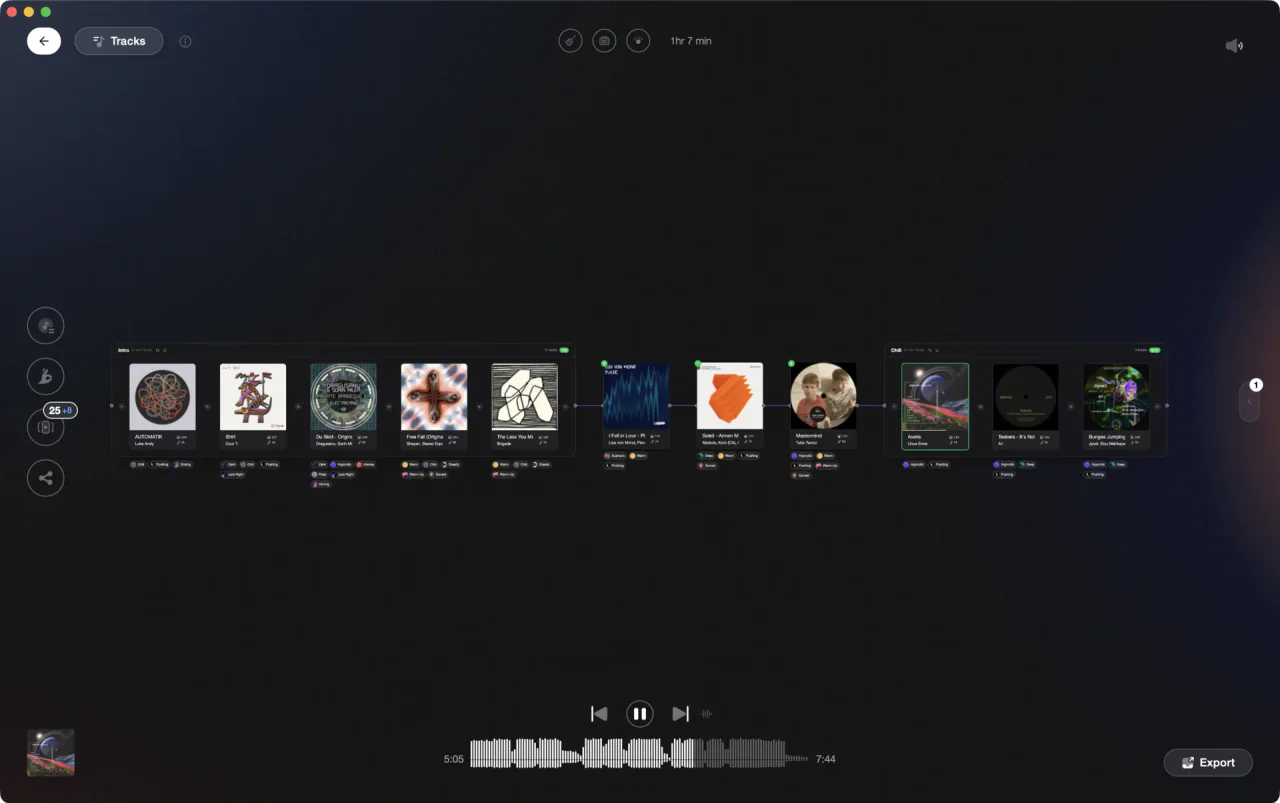
Set Designer builds your set before you open Traktor.
Build a DJ set in Traktor, step by step.
Traktor lets you load tracks into decks and mix them live, but it does not have a dedicated set-planning view. Most DJs build sets by browsing their collection, dragging tracks into a playlist, and adjusting the order manually.
Open your collection browser
In Traktor, open the browser panel and navigate to your track collection or a playlist folder. You can see BPM and key columns in the track list, which helps when ordering tracks manually. Use the search bar to filter by genre, BPM, or key as needed.
Create a playlist for the set
Right-click in the Playlists section of the browser tree and create a new playlist for your set. Give it a clear name so you can find it quickly at the gig. Drag tracks from your collection into the playlist one by one.
Order tracks by BPM and key
Reorder the playlist by dragging tracks up and down until the energy arc feels right. Check the BPM column to avoid jarring tempo jumps, and use the key column to spot harmonic clashes. This is a manual process with no built-in compatibility suggestions.
Prepare cues and load for performance
Set hot cues and loop points on tracks you plan to use for transitions. When you are satisfied with the order, the playlist is ready to load into your decks on the night. Traktor will remember the playlist across sessions as long as you do not move the files.
The catch
Traktor has no recommendation engine and no set-planning assistant: building an ordered set is a manual process. However, since version 3.2, the browser's key column can highlight tracks that are harmonically adjacent to whatever is playing on the master deck, giving you a visual nudge when scouting for the next track. BPM and energy arc decisions remain entirely your own call, so set planning still demands real crate-digging time.
Opening

Track 002
Artist B
Track 004
Artist D

Track 001
Artist A
Track 003
Artist C
The faster way
Set Designer does the sequencing for you.
Vibes Set Designer is a visual canvas that builds and sequences your set around BPM flow, harmonic key, and your own vibe tags. When you are done, it exports the set as a playlist directly into Traktor's NML collection, ready to load.
See how it worksOrganize in Vibes, export to Traktor.
Your playlists, tags, ratings, and cue points travel back to the gear you play on, so nothing you do in Vibes is locked away.

Track 001
Artist A
Afterhours Mysterious
 Introspective
Track 002
Artist B
 Cozy FloorPeaceful
 Home
Home
Track 003
Artist C
Rave Aggressive
 Festival
 Build & Release
Frequently asked questions
The honest answers, including the trade-offs.
From a Vibes customer
The import worked perfectly. Have created several sets now and my life is so much easier
One-time purchase
Get Vibes with a single payment. No subscription.
Vibes is the step before you open your DJ software, not a replacement for it.
First 250 licenses at this price, then $79.
14 days • Full access
No strings attached
Secure checkout with Stripe
Already have Companion Pro? Upgrade instead


Methodology
How we keep this honest.

Verified against the app
Every step is checked against the current version of Traktor.
We own our bias
We make Vibes. We show the native way first and honestly, then where Vibes genuinely helps, and we say when it does not.
Live pricing
The Vibes price shown comes straight from our checkout, never a hardcoded marketing number.
Kept current
Last reviewed September 2026.
Keep exploring
Compare Vibes
DJ apps head to head
Works with your software
Vibes for DJs
Vibes features
How-to guides
Best DJ software
Move between apps
Learn to DJ