

Find harmonic tracks in Traktor.
Traktor shows you key values, but filtering for Camelot neighbors takes manual effort. Vibes does the harmonic matching for you in prep and exports a ready playlist into your NML library.
$49$79USD one-time purchase. First 250 licenses at this price. 14-day free trial.
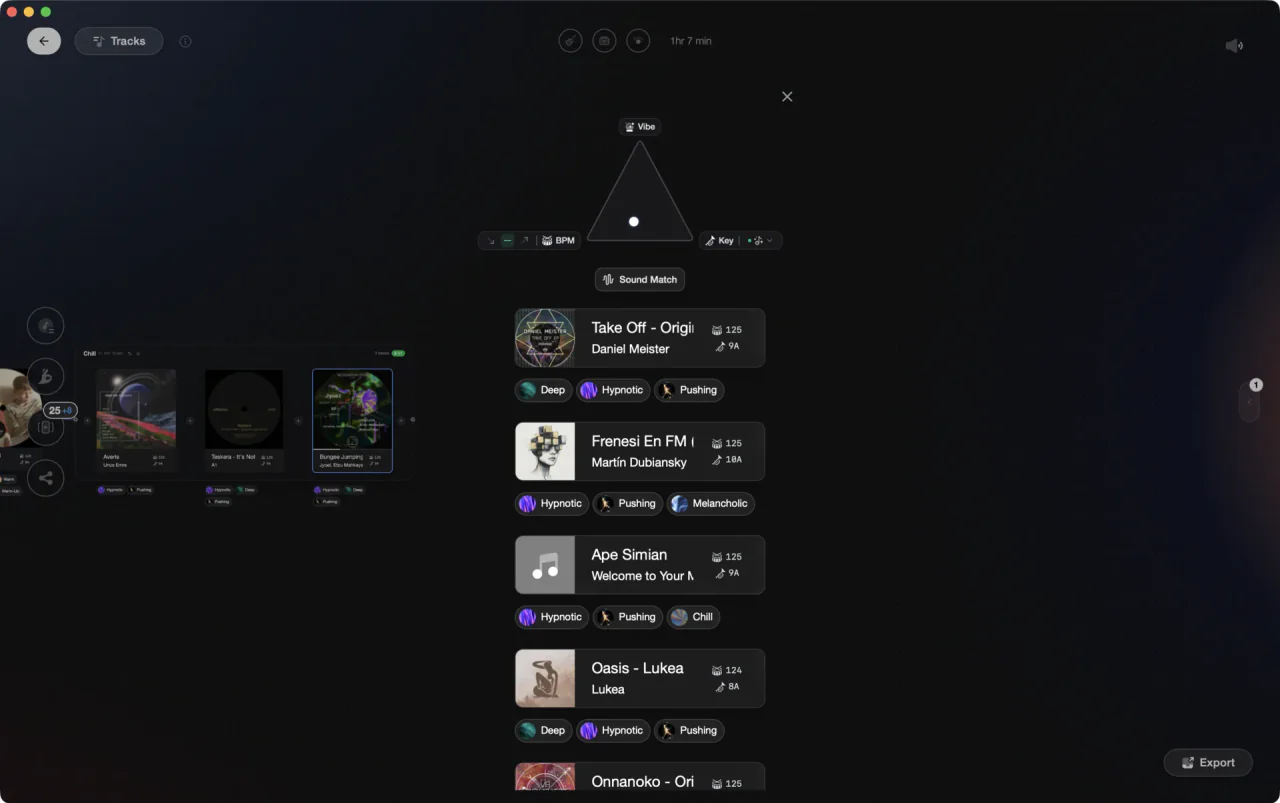
Vibes identifies Camelot neighbors and exports a harmonic playlist into Traktor before your set.
Find harmonic tracks in Traktor, step by step.
Traktor analyses key for every track in your collection. Since Traktor Pro 3.2, engaging Key Lock on the Master Deck causes the browser to automatically color-highlight harmonically compatible tracks in the Key column, so you can visually scan for candidates without manual searching. You can also filter by key text for deeper digs.
Analyse your collection
Open Traktor and go to your track browser. Select all tracks, right-click, and choose Analyze Files to detect BPM and key. Before running this, confirm that key detection is enabled under Preferences > Analyze Options so results populate the Key column.
Note the key of your chosen track
Click a track to see its key in the Key column or the deck header. By default Traktor shows keys in Musical notation (e.g. Am, Cmaj). To see Open Key notation instead (e.g. 8m, 10d), go to Preferences > Analyze Options and change the 'Displayed in Traktor' option to Open Key. Note: Traktor does not support Camelot notation natively. Open Key uses a similar numeric system with m/d suffixes rather than A/B.
Use Key Lock highlighting to surface compatible tracks
Load your chosen track into a deck and set it as Master. Engage Key Lock on that deck. Traktor will automatically highlight tracks with harmonically compatible keys in the browser Key column using color coding. You can customize this behavior in Preferences > Browser: choose to color only matching keys (default), also color adjacent keys, or color all keys. This is the fastest way to find harmonic candidates without manual calculation.
Browse and cue candidates
Scan the highlighted tracks, load candidates into a deck, and compare energy and phrasing before committing. If you need to search beyond what is currently highlighted, type a key value directly into the browser search bar to filter manually. Save the tracks you want to use into a Playlist for quick access during your set.
The catch
Traktor does not support Camelot notation natively. The available key display formats are Musical and Open Key; switch between them in Preferences > Analyze Options. The browser key-highlighting feature (engaged via Key Lock on the Master Deck) does the heavy lifting of showing compatible tracks automatically, so manual key searching is only needed as a secondary step.
The faster way
Vibes maps every harmonic neighbor before you play.
Import your Traktor NML library into Vibes, select any track, and Find Compatible fills in the Camelot neighbors automatically. Build a harmonic playlist in prep and export it straight back into Traktor as a new playlist in your NML file.
See how it worksOrganize in Vibes, export to Traktor.
Your playlists, tags, ratings, and cue points travel back to the gear you play on, so nothing you do in Vibes is locked away.

Track 001
Artist A
Afterhours Mysterious
 Introspective
Track 002
Artist B
 Cozy FloorPeaceful
 Home
Home
Track 003
Artist C
Rave Aggressive
 Festival
 Build & Release
Frequently asked questions
The honest answers, including the trade-offs.
From a Vibes customer
The import worked perfectly. Have created several sets now and my life is so much easier
One-time purchase
Get Vibes with a single payment. No subscription.
Vibes is the step before you open your DJ software, not a replacement for it.
First 250 licenses at this price, then $79.
14 days • Full access
No strings attached
Secure checkout with Stripe
Already have Companion Pro? Upgrade instead


Methodology
How we keep this honest.

Verified against the app
Every step is checked against the current version of Traktor.
We own our bias
We make Vibes. We show the native way first and honestly, then where Vibes genuinely helps, and we say when it does not.
Live pricing
The Vibes price shown comes straight from our checkout, never a hardcoded marketing number.
Kept current
Last reviewed September 2026.
Keep exploring
Compare Vibes
DJ apps head to head
Works with your software
Vibes for DJs
Vibes features
How-to guides
Best DJ software
Move between apps
Learn to DJ