

The Lexicon DJ alternative that fits your job.
For DJ library management and cross-app playlist conversion, the working alternatives to Lexicon are Mixo, DJCU2 (the DJ Conversion Utility), and Mixxx. The detail most shortlists leave out is the one that decides it: DJCU2 runs on macOS only, Mixo works through cloud storage and adds iOS and Android, and Mixxx organizes only the tracks it plays itself.
$49$79USD one-time purchase. First 250 licenses at this price. 14-day free trial.
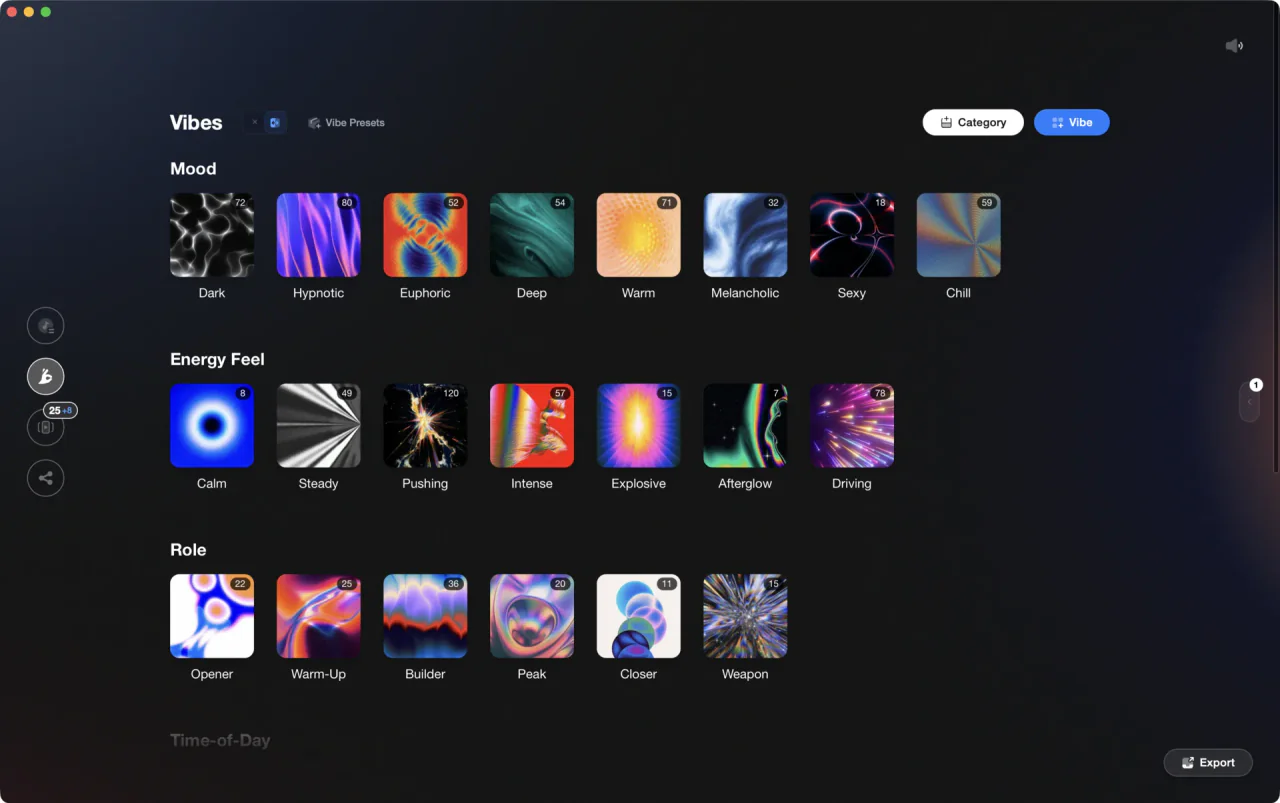
One library, prepped once, sent to whichever app you play on.
Lexicon alternatives split by job: Mixo syncs one library across machines and a phone, DJCU2 converts once on a Mac, Mixxx is free, and Vibes is the one-time purchase for organizing and prepping rather than converting.
The alternatives, compared.
Lexicon DJ is a desktop library manager that converts and syncs libraries across Rekordbox, Serato, Traktor, VirtualDJ, Engine DJ, djay Pro, and iTunes or Apple Music, and its conversion is free. People still look for something else for three reasons: they want a one-time purchase, they are on a Mac and want a smaller tool, or they want organizing and set prep rather than conversion. One option below, Vibes, is ours.
| Option | Strengths | Trade-offs |
|---|---|---|
| MixoBest for Syncing one library across computers and a phone |
|
|
Our verdict The closest match if what you liked about Lexicon was one library across several machines. The mixo download costs nothing, so the honest test is to load your own collection and see whether working through cloud storage suits you. | ||
| DJCU2 (DJ Conversion Utility)Best for One conversion, on a Mac, for a fixed price |
|
|
Our verdict Buy it for a migration, not for daily library work. It converts and then stops, which is exactly what some people want and nowhere near enough for others. | ||
| MixxxBest for A free library and a free DJ app in one |
|
|
Our verdict The right answer when the real requirement was free and you are happy to perform on it too. The wrong one when your gigs run on other software. | ||
 VibesBest for Organizing and prepping once, then exporting to whichever app you play on VibesBest for Organizing and prepping once, then exporting to whichever app you play on |
|
|
Our verdict Built for the prep, not the migration. If what bothered you about Lexicon was paying a subscription to organize, this is a one-time purchase that does the organizing, the analysis, and the set building offline. | ||
| At a glance | Pricing | Model | Platforms |
|---|---|---|---|
| Mixo | Free plan; Gold is 7 days free, then $7 per month | Freemium subscription | Desktop, plus iOS and Android |
| DJCU2 (DJ Conversion Utility) | One-time purchase, current price on atgr.nl | One-time purchase | macOS only |
| Mixxx | Free | Free and open source | Windows, macOS, Linux |
 Vibes Vibes | $49 one-time | One-time purchase | macOS and Windows |
How we compared, and what the names mean.
Every tool here was checked on its own site in August 2026, and nothing is listed on reputation alone. Lexicon DJ software is the reference point: conversion between all supported apps is free, the Lexicon DJ download runs on Windows 10 or 11 and macOS Catalina or newer with Apple Silicon support, and the paid Essential and Ultimate plans add track and playlist editing, cloud storage, priority support, and the phone app.
Two products share the Mixo name and they have nothing to do with each other. Searches for mixo dj software land on the conversion and sync tool in the table above. Searches for mixo ai or mixo website builder land on mixo.io, an AI site builder with no connection to music. So if you are reading mixo reviews, check which of the two the reviewer actually used before you trust a word of it.
The advice you find searching lexicon dj reddit converges on the same four names, which is why this table is short. What those threads rarely spell out is the fit: DJCU2 is a Mac-only converter, Mixo is a cloud library with a phone app, and Mixxx is a DJ app whose library only serves itself.
We make Vibes, so treat its row as an interested party talking. That is why its trade-offs are listed as plainly as everyone else's, and why the other picks keep the ground they win: DJCU2 is the cheaper way to convert once on a Mac, and Mixxx costs nothing at all.

What to check before you switch.
Which job you are replacing
Conversion, sync, and organizing are three jobs sold as one package. A lexicon dj review usually grades all three at once, so decide which one you actually need first, then read only that part of the review.
One-time or subscription
This is why most people start looking. Check what the free tier already covers before you compare plans, and whether a lifetime option exists at all: two of the tools here have no subscription to leave.
Where your library lives
Local tools need no account and no connection. Cloud tools sync between machines and phones, but they want an account, and reaching audio stored in the cloud needs a connection at the moment you want the track.
One organized library, every app.
Vibes imports from and exports to Rekordbox, Serato, Traktor, and Engine DJ, so the software you pick is never a lock-in.

Track 001
Artist A
Afterhours Mysterious
 Introspective
Track 002
Artist B
 Cozy FloorPeaceful
 Home
Home
Track 003
Artist C
Rave Aggressive
 Festival
 Build & Release
Frequently asked questions
The honest answers, including the trade-offs.
From a Vibes customer
The import worked perfectly. Have created several sets now and my life is so much easier
One-time purchase
Get Vibes with a single payment. No subscription.
Vibes is the step before you open your DJ software, not a replacement for it.
First 250 licenses at this price, then $79.
14 days • Full access
No strings attached
Secure checkout with Stripe
Already have Companion Pro? Upgrade instead


Methodology
How we keep this honest.

Verified against the source
Every claim about each app is checked against its official site and current pricing.
We own our bias
We make Vibes, a library tool, not DJ mixing software. The picks above are independent, and we recommend the app that fits you, not the one paired with us.
Live pricing
The Vibes price shown comes straight from our checkout, never a hardcoded marketing number.
Kept current
Last reviewed September 2026.
Keep exploring
DJ apps head to head
Works with your software
Vibes for DJs
Vibes features
How-to guides
Best DJ software
Move between apps
Learn to DJ