

Record your set in Engine DJ.
To record on Engine DJ, open the Control Center on the unit itself, tap Record, choose the drive you want the file written to, then tap Start. Recording lives on the hardware and not in the desktop software, and the take is saved into a folder called Sessions on that drive. Plan the set before you start, because a standalone booth gives you one pass and no edit.
$49$79USD one-time purchase. First 250 licenses at this price. 14-day free trial.
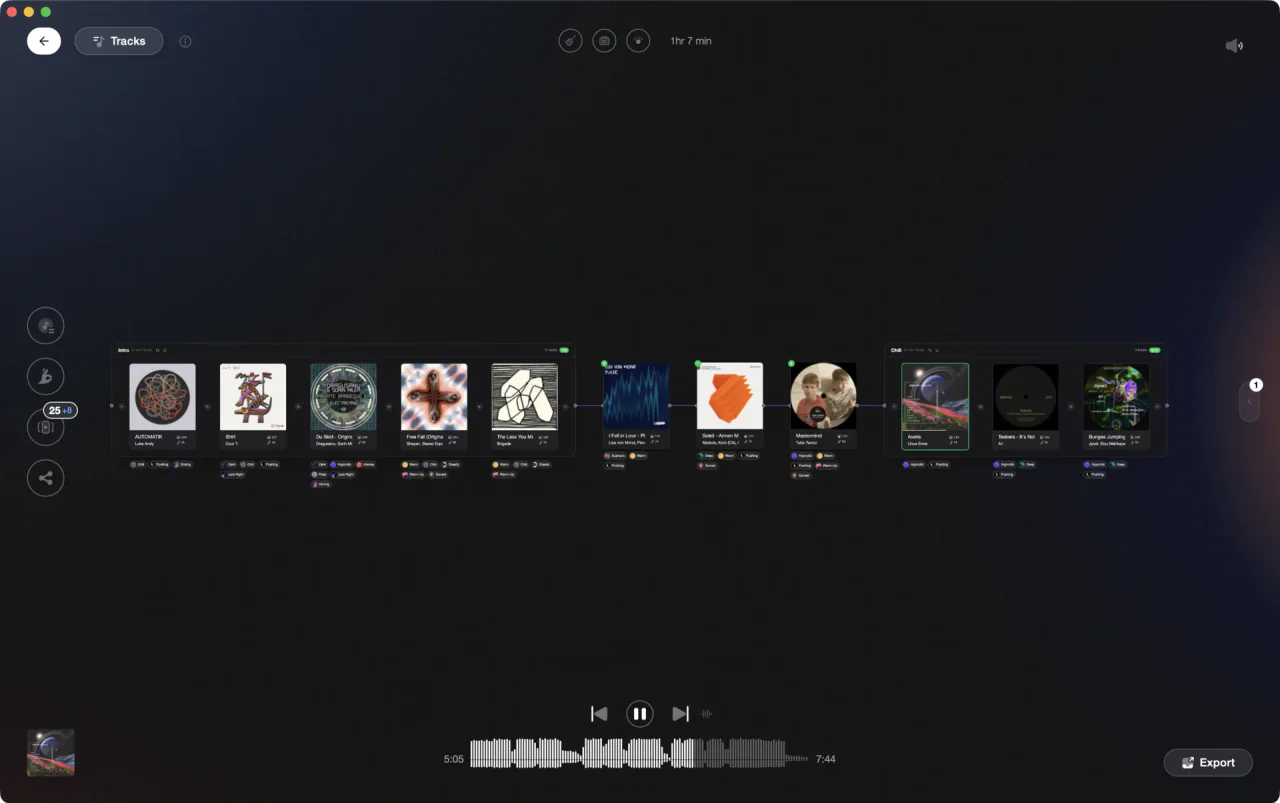
Plan the set in Vibes, export it to the drive, then let the unit capture the take.
Record your set in Engine DJ, step by step.
EngineOS hardware has a recorder built into the Control Center that writes your main mix straight to a connected drive. The Engine DJ desktop software has no recording screen at all, so every step below happens on the unit.
Get the drive in before you start
The recording is written to a connected media device, so plug it in first. The Engine DJ user guide lists exFAT, which it recommends, and FAT32 as the supported file systems for USB drives and SD cards. Prepare the music side in the desktop software with Sync Manager and Export to Drive, then connect the drive to a USB port or the SD slot.
Open the Control Center
Press and hold the View button, swipe down from the toolbar, or tap the gear icon. The Control Center opens with pages for Layout, Profile, Settings, Source, Wi-Fi, Bluetooth on the newer models, Record and Engine Lighting. Record is the screen used for recording and saving your performances. Tap it.
Choose the drive that stores the recording
The Record screen asks you to select the media device destination for the recording. The drive you are playing from shows Source next to its name, and the drive you pick for recording shows Rec next to its name back in the Source menu. Denon DJ says the PRIME 4+ records to any connected drive, including the one hosting the tracks currently playing.
Tap Start and play
Tap Start and the timer on the touchscreen shows the total length recorded. Tap Pause to hold it, then Resume to carry on from the point where you paused. Denon DJ documents that a PRIME 4+ recording can include both microphone inputs, so anything you say over the mix goes into the same file.
Stop, then save before you touch anything else
Tap Stop and you are offered the option to save. Tap Save As, type a title on the keyboard that appears, and tap Done. The file only reaches the drive once you have done that. Tap Clear instead and a warning screen appears before the take is deleted, so answer No if you meant to keep it.
Find the file and check the level
Maximize Recording Volume normalizes the recording at -1 dBFS and is enabled by default, which can take a while after a long set. Saved files land in a folder called Sessions on the media device, and you can play them back on the unit under Files in the Library. Denon DJ documents PRIME 4+ takes as 24-bit, 44.1 kHz WAV.
The catch
The recorder captures one continuous pass of the main mix, so there is no punch-in and no editing on the unit. A long uncompressed take also fills a drive quickly, which is one reason the user guide recommends exFAT.
Opening

Track 002
Artist B

Track 004
Artist D

Track 001
Artist A
Track 003
Artist C
Where Vibes fits
A set worth keeping is decided before you tap Start.
Vibes does not record audio and does not play back to DJ hardware, so the take itself is entirely Engine DJ's job. What it does is the preparation. Analysis, tagging and a set built in Set Designer, exported back to Engine DJ as playlists, so the drive you record from already holds the right tracks in a shape you have reviewed.
See how it worksOrganize in Vibes, export to Engine DJ.
Your playlists, tags, ratings, and cue points travel back to the gear you play on, so nothing you do in Vibes is locked away.

Track 001
Artist A
Afterhours Mysterious
 Introspective
Track 002
Artist B
 Cozy FloorPeaceful
 Home
Home
Track 003
Artist C
Rave Aggressive
 Festival
 Build & Release
Frequently asked questions
The honest answers, including the trade-offs.
From a Vibes customer
The import worked perfectly. Have created several sets now and my life is so much easier
One-time purchase
Get Vibes with a single payment. No subscription.
Vibes is the step before you open your DJ software, not a replacement for it.
First 250 licenses at this price, then $79.
14 days • Full access
No strings attached
Secure checkout with Stripe
Already have Companion Pro? Upgrade instead


Methodology
How we keep this honest.

Verified against the app
Every step is checked against the current version of Engine DJ.
We own our bias
We make Vibes. We show the native way first and honestly, then where Vibes genuinely helps, and we say when it does not.
Live pricing
The Vibes price shown comes straight from our checkout, never a hardcoded marketing number.
Kept current
Last reviewed September 2026.
Keep exploring
DJ apps head to head
Works with your software
Vibes for DJs
Vibes features
How-to guides
Best DJ software
Move between apps
Learn to DJ