

Export played history in Rekordbox.
Rekordbox logs every track you play for a minute or more and files each session under [Histories] as [HISTORY yyyy-mm-dd]. Right-click that history to copy it into a playlist, then right-click the playlist and choose [Export a playlist to a file] to save it as a .txt tracklist or an .m3u8 other music apps can open.
$49$79USD one-time purchase. First 250 licenses at this price. 14-day free trial.
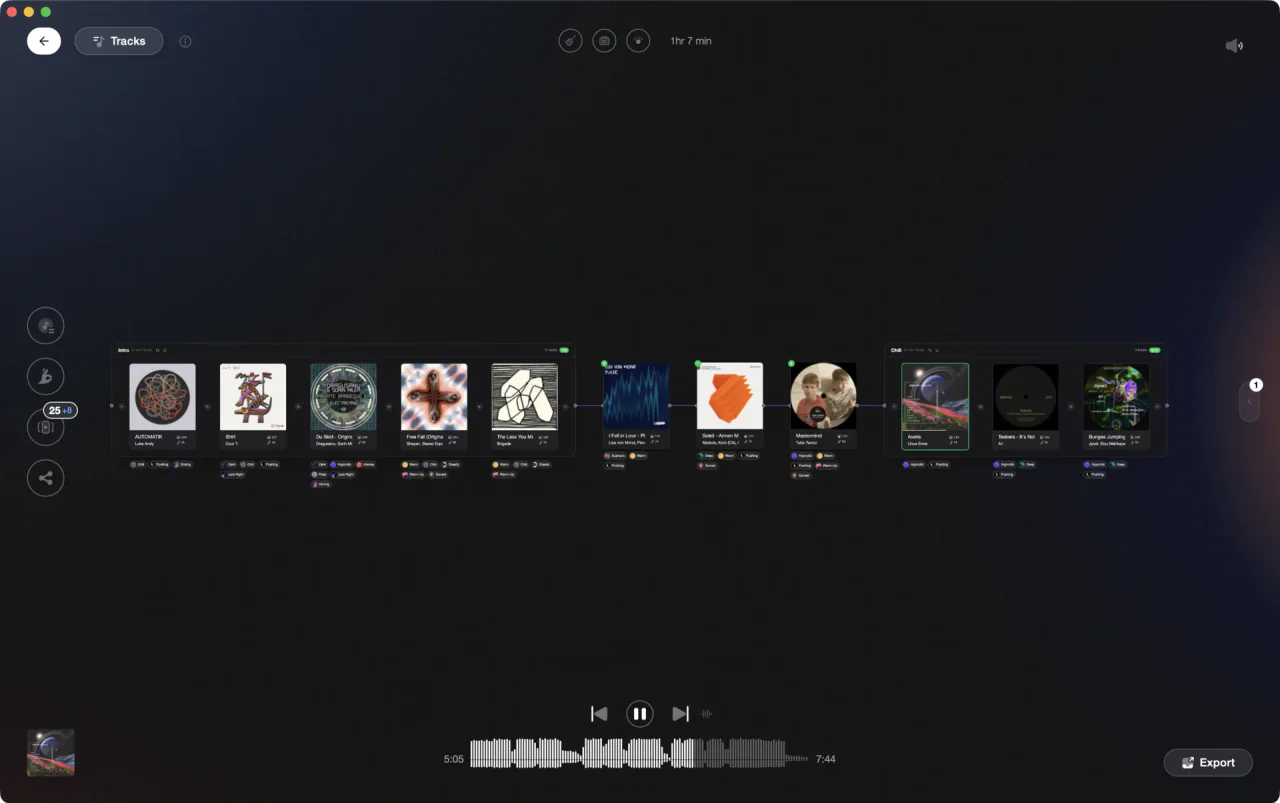
Turn the session Rekordbox logged into a playlist, then rebuild it for the next gig.
Export played history in Rekordbox, step by step.
The rekordbox export history playlist job is really two small jobs: turn a session log into a real playlist, then write that playlist out to a file. Both live in EXPORT mode, and both take seconds once you know where the [Histories] folder is.
Open the Histories folder in EXPORT mode
Switch Rekordbox to EXPORT mode, then look at the Media Browser tree on the left and double-click [Histories]. Your sessions are filed into year and month folders. A set played in PERFORMANCE mode shows up as [HISTORY yyyy-mm-dd], and a set played over PRO DJ LINK shows up as [LINK HISTORY yyyy-mm-dd].
Pull the session off your USB drive first
If you played from a drive on club players, connect it to your computer while Rekordbox is in EXPORT mode. The play history is saved into [Histories] automatically when [Preferences] > [DJ System] > [Device] > [History] > [Import the play history automatically] is on. To do it by hand, open [Devices], expand the [Histories] folder on the drive, right-click the session and select [Import History].
Select the date and check what was logged
Click the history for the night you want and the track list shows what played, in the order it played. Only tracks that ran for a minute or more are logged. Tracks exported from another Rekordbox, or tracks you have since removed from your [Collection], are excluded, so a history can be shorter than the set you remember playing.
Copy the history into a playlist
A history is a log, not a playlist, so make a playlist out of it before you export anything. Right-click the history and use the option to copy it to a playlist. Rekordbox creates an ordinary playlist under [Playlists] holding the same tracks in the same order, which you can rename, trim, and reorder like any other playlist.
Export the playlist to a file
Right-click the new playlist and select [Export a playlist to a file]. Rekordbox offers [Export a playlist to a file for KUVO (*.txt)] for a plain tracklist you can paste into a post or send to a promoter, and [Export a playlist to a file for music apps (*.m3u8)] for a playlist file other music apps can open. Pick a format, choose where to save it, and confirm.
Or send the same set to a drive or another computer
To carry the set to a gig rather than to a text file, select the playlist and use [Export Playlist] to write it to a connected USB storage device. To move it to another machine, export it to a drive, plug the drive into that computer, then right-click the playlist or folder under [Devices] and select [Import Playlist] or [Import Folder].
The catch
Importing play histories only works in EXPORT mode. Connect the drive while Rekordbox sits in PERFORMANCE mode and the [Import History] item stays greyed out. Rekordbox also deletes the history from the drive once it has imported it, unless you turn off [Delete from the device after importing the play history] in [Preferences] > [DJ System] > [Device] > [History].
Opening

Track 002
Artist B

Track 004
Artist D

Track 001
Artist A
Track 003
Artist C
The faster way
Turn the set that worked into the set you play next.
Import your Rekordbox library into Vibes and the playlist you made from that history comes in intact, with BPM, key, and ratings attached. Set Designer lays the session out so you can see the energy curve you actually played, swap the tracks that dragged, and reorder the rest with Energy Flow sorting. Export the finished order back to Rekordbox as a playlist, exactly as you designed it.
See how it worksOrganize in Vibes, export to Rekordbox.
Your playlists, tags, ratings, and cue points travel back to the gear you play on, so nothing you do in Vibes is locked away.

Track 001
Artist A
Afterhours Mysterious
 Introspective
Track 002
Artist B
 Cozy FloorPeaceful
 Home
Home
Track 003
Artist C
Rave Aggressive
 Festival
 Build & Release
Frequently asked questions
The honest answers, including the trade-offs.
From a Vibes customer
The import worked perfectly. Have created several sets now and my life is so much easier
One-time purchase
Get Vibes with a single payment. No subscription.
Vibes is the step before you open your DJ software, not a replacement for it.
First 250 licenses at this price, then $79.
14 days • Full access
No strings attached
Secure checkout with Stripe
Already have Companion Pro? Upgrade instead


Methodology
How we keep this honest.

Verified against the app
Every step is checked against the current version of Rekordbox.
We own our bias
We make Vibes. We show the native way first and honestly, then where Vibes genuinely helps, and we say when it does not.
Live pricing
The Vibes price shown comes straight from our checkout, never a hardcoded marketing number.
Kept current
Last reviewed September 2026.
Keep exploring
Compare Vibes
DJ apps head to head
Works with your software
Vibes for DJs
Vibes features
How-to guides
Best DJ software
Move between apps
Learn to DJ