
Color-code your tracks in Rekordbox.
Rekordbox lets you assign a color to individual tracks. Vibes goes further: tag tracks with color-coded Vibes across custom Categories, then export organized crates straight into Rekordbox.
$49$79USD one-time purchase. First 250 licenses at this price. 14-day free trial.
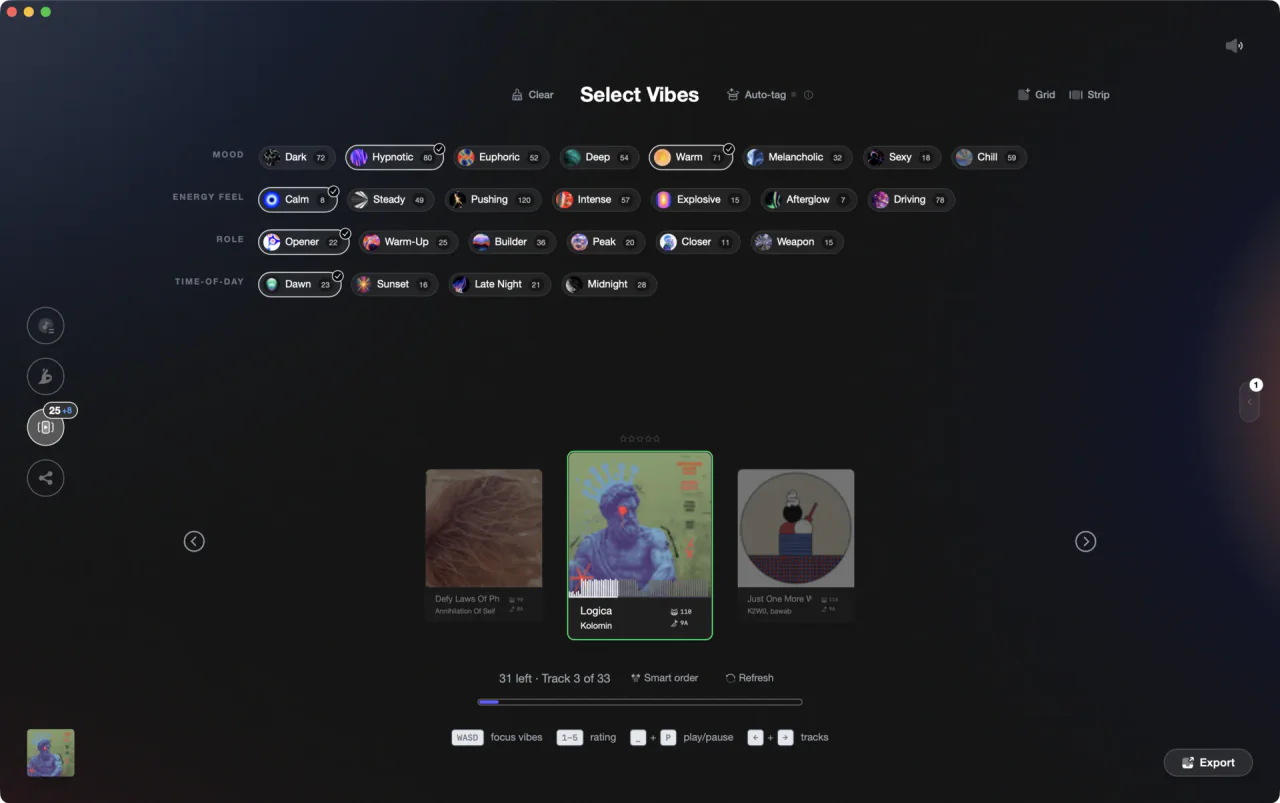
Vibes tags export as labeled crates in Rekordbox, giving you richer visual organization than track colors alone.
Color-code your tracks in Rekordbox, step by step.
Rekordbox lets you assign a color label to any track from the track list. It takes a few clicks per track and helps you spot tracks visually while browsing.
Open your collection
Launch Rekordbox and select Collection from the left sidebar. Make sure you are in the track list view so you can see individual tracks with their metadata columns. If the Color column is not visible, right-click any column header and enable it.
Assign a color to a track
Click directly in the Color column field for the track you want to label. A color picker appears; choose one of the available colors. The selected color fills that column cell, giving you a visual indicator across your list. You can also set a color via the track Info panel on the left side of the interface.
Assign a color to multiple tracks at once
Select multiple tracks using Shift-click or Cmd/Ctrl-click. Then open the Info panel (track details pane on the left) and set the Color field there. The chosen color applies to all selected tracks simultaneously, making it practical to categorize large groups quickly.
Browse and filter by color
You can sort your collection by clicking the Color column header to group tracks by their label visually. For more structured filtering, create an Intelligent Playlist and use Color as one of the criteria to automatically surface tracks with a specific label. To give each color a memorable name, go to Preferences > Advanced > Browse and rename the color labels there.
The catch
Rekordbox gives you a small fixed set of colors, but you can rename each one in Preferences > Advanced > Browse to attach a meaningful label (for example, renaming Blue to 'Daytime'). Without doing that, the meaning of each color defaults to the color name only, which can become easy to misread after a few months if you have not documented your own system.
 Euphoric
 Melancholic
 Mysterious
 Aggressive
 Peaceful
 Rave
Rave Afterhours
 Club
Club Home
HomeThe faster way
Tag by feel. Export ready-made crates.
Vibes replaces ad-hoc color guessing with a proper tagging system. You build Categories and Vibes (for example: Energy - Peak Time, Role - Opener), tag tracks fast in Vibe Sort, and export a crate per Vibe directly into Rekordbox.
See how it worksOrganize in Vibes, export to Rekordbox.
Your playlists, tags, ratings, and cue points travel back to the gear you play on, so nothing you do in Vibes is locked away.
Track 001
Artist A
AfterhoursMysterious Introspective
Track 002
Artist B
 Cozy FloorPeacefulHome
Track 003
Artist C
RaveAggressive Festival
 Build & Release
Frequently asked questions
The honest answers, including the trade-offs.
From a Vibes customer
The import worked perfectly. Have created several sets now and my life is so much easier
One-time purchase
Get Vibes with a single payment. No subscription.
Vibes is the step before you open your DJ software, not a replacement for it.
First 250 licenses at this price, then $79.
14 days • Full access
No strings attached
Secure checkout with Stripe
Already have Companion Pro? Upgrade instead


Methodology
How we keep this honest.

Verified against the app
Every step is checked against the current version of Rekordbox.
We own our bias
We make Vibes. We show the native way first and honestly, then where Vibes genuinely helps, and we say when it does not.
Live pricing
The Vibes price shown comes straight from our checkout, never a hardcoded marketing number.
Kept current
Last reviewed September 2026.
Keep exploring
Compare Vibes
DJ apps head to head
Works with your software
Vibes for DJs
Vibes features
How-to guides
Best DJ software
Move between apps
Learn to DJ