

Plan a wedding DJ set in Rekordbox.
A wedding is planned block by block, not as one long mix: ceremony, cocktail hour, dinner, first dance, then the dance floor, each block with its own playlist and its own energy level. Build those blocks as separate playlists in Rekordbox, put the couple's must-play and do-not-play lists into them before anything else, then order each block so the tempo climbs instead of stalling.
$49$79USD one-time purchase. First 250 licenses at this price. 14-day free trial.
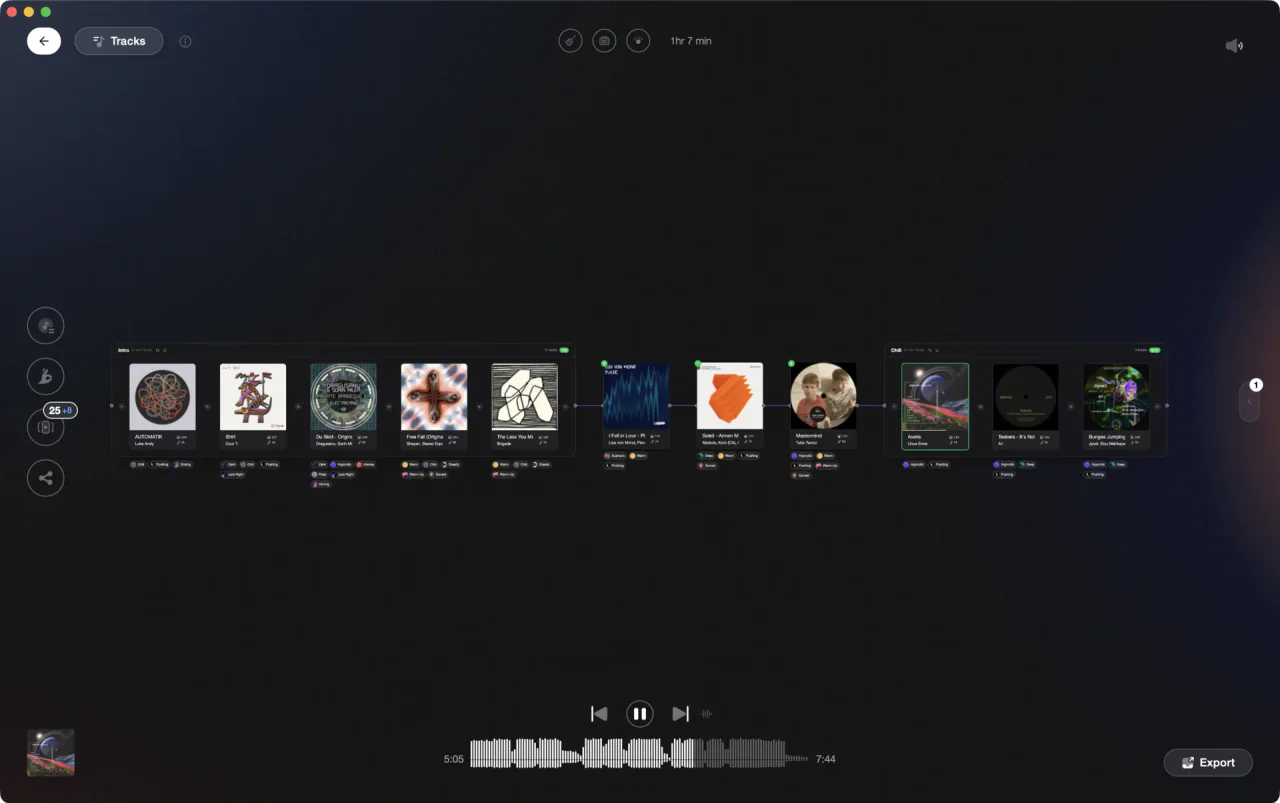
Shape every block of the night long before you get near the booth.
Plan a wedding set in Rekordbox, step by step.
Rekordbox has no wedding planner, so the timeline lives in your playlist tree. One folder for the wedding, one playlist per block, and My Tag to pull candidates fast.
Make a folder for the wedding, a playlist per block
Right-click [Playlists] in the tree view and select [Create New Folder]. Type the couple's name and press [Enter]. Then add one playlist per block with [Create New Playlist] from the [Playlists] menu: Ceremony, Cocktail Hour, Dinner, First Dance, and two or three dance blocks. Drag each playlist into the folder so the whole night sits in one place.
Put the requests in before your own picks
Click [Collection] in [Media Browser] and drag every song the couple asked for into the block where it belongs. Keep a separate playlist for the songs they have ruled out, so the ban list lives inside Rekordbox and not on a napkin. Buy or find anything you are missing now, then fill the gaps around the requests from your own crates.
Tag the candidates with My Tag
Click the My Tag icon on the right side of the screen to open the My Tag configuration window. Rename a category to Wedding and add tags such as Ceremony, Dinner, Slow, Parents, and Floor Filler. Select a track and tick the checkboxes. To pull tracks out again, click the filter icon left of the search filter and combine My Tag with [BPM], [KEY], [RATING], and [COLOR].
Set the running order inside each block
Open a block and click the column heading that shows the track order, then drag tracks up and down into position. Rekordbox only lets you reorder by dragging while the list is sorted that way, so sorting by BPM or artist stops it working. When the order feels right, select [Renumber Track Order] in the [Playlists] menu to renumber the tracks as they now sit.
Check the handovers by key and phrase
Open the [Preferences] window > [View] category > [Display Type] tab and set [Key display format] to [Alphanumeric] so keys read as Camelot codes such as 8A and 9A. Sort a block by key or BPM to spot the jumps, then put it back in order. Rekordbox analyzes [BPM/Grid], [KEY], [Phrase], and [Vocal], so the phrase display above the waveform shows where a track is safe to cut.
Transfer the night to a USB drive
Switch to EXPORT mode, plug in the drive, and open [Devices] in the tree view. Drag each wedding playlist onto the device: the playlist and the tracks it contains transfer together. Or open SYNC MANAGER from the bottom of [Media Browser], tick [Synchronize playlists with a device], and let Rekordbox keep the drive current. Never disconnect the drive while data is still transferring.
The catch
Rekordbox shows you one playlist at a time. Each block is a flat list with no energy view and no way to see five hours in sequence, so the shape of the night lives in your head. When a request lands at ten o'clock, you are scrolling playlists looking for something that fits the tempo and the key you are already in.
Opening

Track 002
Artist B

Track 004
Artist D

Track 001
Artist A
Track 003
Artist C
The faster way
See the whole night, block by block, before you play it.
Import your Rekordbox collection with the Import Wizard, then tag tracks into vibes such as Ceremony, Dinner, Slow, and Floor Filler using Vibe Sort or Auto-Tagging. Set Designer lays each block on a canvas with Energy Flow sorting, so the dance blocks climb and the dinner block stays where you put it. When a request lands, Find Compatible surfaces harmonic Camelot neighbours inside a BPM window. Export the finished blocks back to Rekordbox as playlists and play the night from your own gear.
See how it worksOrganize in Vibes, export to Rekordbox.
Your playlists, tags, ratings, and cue points travel back to the gear you play on, so nothing you do in Vibes is locked away.

Track 001
Artist A
Afterhours Mysterious
 Introspective
Track 002
Artist B
 Cozy FloorPeaceful
 Home
Home
Track 003
Artist C
Rave Aggressive
 Festival
 Build & Release
Frequently asked questions
The honest answers, including the trade-offs.
From a Vibes customer
The import worked perfectly. Have created several sets now and my life is so much easier
One-time purchase
Get Vibes with a single payment. No subscription.
Vibes is the step before you open your DJ software, not a replacement for it.
First 250 licenses at this price, then $79.
14 days • Full access
No strings attached
Secure checkout with Stripe
Already have Companion Pro? Upgrade instead


Methodology
How we keep this honest.

Verified against the app
Every step is checked against the current version of Rekordbox.
We own our bias
We make Vibes. We show the native way first and honestly, then where Vibes genuinely helps, and we say when it does not.
Live pricing
The Vibes price shown comes straight from our checkout, never a hardcoded marketing number.
Kept current
Last reviewed September 2026.
Keep exploring
Compare Vibes
DJ apps head to head
Works with your software
Vibes for DJs
Vibes features
How-to guides
Best DJ software
Move between apps
Learn to DJ