

Color-code your tracks in Serato DJ.
Serato lets you assign colors to individual tracks in your library. Vibes takes it further by building a vibe-based color system in prep and exporting it as named crates that land ready to use in Serato.
$49$79USD one-time purchase. First 250 licenses at this price. 14-day free trial.
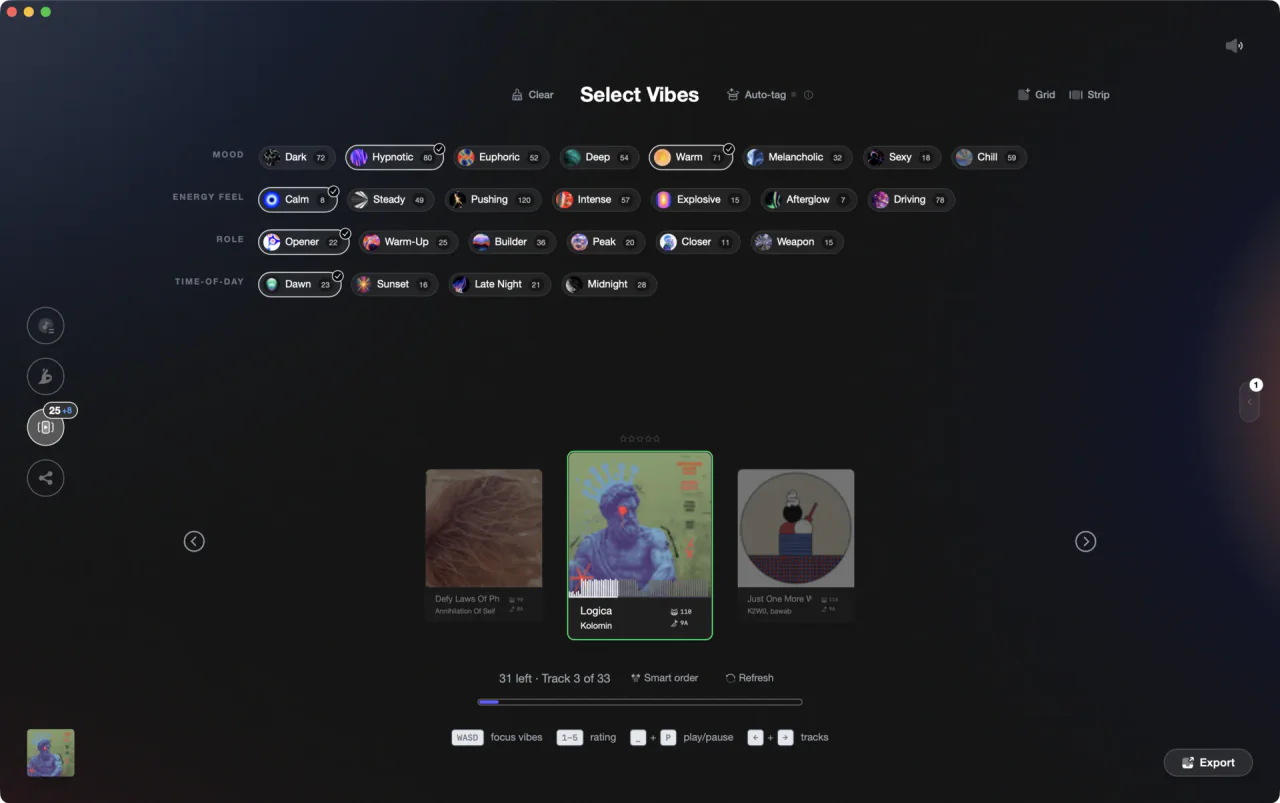
Build your color system once in Vibes, export named crates straight into Serato.
Color-code your tracks in Serato DJ, step by step.
Serato DJ lets you assign a colour label to any track directly in the library view. Here is how to do it using the built-in native workflow in Serato DJ Pro 3.x.
Open your library in Serato DJ Pro
Launch Serato DJ Pro and make sure your library is loaded and visible in the main library panel. You do not need to be in a live session to manage track colours. The library view is available any time the software is open.
Make sure the Colour column is visible, then click it to assign a colour
In Serato DJ Pro 3.x, the colour column appears as a small grey dot or coloured dot near the left side of each track row. If you do not see it, right-click any column header in the library to open the column picker and enable the Colour field. Once visible, click the dot on the track you want to colour. A colour palette pops up - select the colour you want. The track dot updates immediately and the virtual-deck spinning circle will also reflect that colour when the track is loaded to a deck. There is no colour option in the right-click track context menu; you must click the colour column dot directly.
Assign colours consistently across your library
Work through your library applying colours that match your system, for example red for peak-time tracks or green for openers. To save time, multi-select tracks using Shift+click or Ctrl+click (Cmd+click on Mac), then click the colour dot on any highlighted track - the chosen colour is applied to the entire selection at once. Serato saves the colour against the track in its library database.
Use coloured crates to group by feel
Create crates in Serato and name them to match your colour categories, for example 'Peak Time' or 'Deep Opener'. Drag colour-tagged tracks into the matching crate. This gives you a second layer of organisation: a colour on the track itself plus a named crate you can browse quickly during a set. In Serato DJ Pro 4.0 you can also assign colours directly to crates via right-click on the crate, but that is a 4.0-only feature not available in 3.x.
The catch
Serato saves colours per track and multi-select (Shift+click or Ctrl+click) lets you apply a colour to a batch of tracks at once, which speeds up the process significantly. There is still no automated rule-based colouring or global bulk-replace, so building a consistent system across a large library still requires manual selection and tagging in batches. If you do not see the colour column, enable it by right-clicking any library column header and ticking Colour.
The faster way
Build your color system once. Export it to Serato automatically.
Vibes lets you define Categories and Vibes (your own tags for energy, mood, and role) during prep, then exports each vibe as a named crate directly into Serato. Your color-coded system is ready before you even open Serato.
See how it worksOrganize in Vibes, export to Serato DJ.
Your playlists, tags, ratings, and cue points travel back to the gear you play on, so nothing you do in Vibes is locked away.

Track 001
Artist A
Afterhours Mysterious
 Introspective
Track 002
Artist B
 Cozy FloorPeaceful
 Home
Home
Track 003
Artist C
Rave Aggressive
 Festival
 Build & Release
Frequently asked questions
The honest answers, including the trade-offs.
From a Vibes customer
The import worked perfectly. Have created several sets now and my life is so much easier
One-time purchase
Get Vibes with a single payment. No subscription.
Vibes is the step before you open your DJ software, not a replacement for it.
First 250 licenses at this price, then $79.
14 days • Full access
No strings attached
Secure checkout with Stripe
Already have Companion Pro? Upgrade instead


Methodology
How we keep this honest.

Verified against the app
Every step is checked against the current version of Serato DJ.
We own our bias
We make Vibes. We show the native way first and honestly, then where Vibes genuinely helps, and we say when it does not.
Live pricing
The Vibes price shown comes straight from our checkout, never a hardcoded marketing number.
Kept current
Last reviewed September 2026.
Keep exploring
DJ apps head to head
Works with your software
Vibes for DJs
Vibes features
How-to guides
Best DJ software
Move between apps
Learn to DJ