Transfer your library to Traktor in Rekordbox.
Switching to Traktor does not mean starting over. Your Rekordbox playlists and track data can follow you, whether you go the manual route or use Vibes to bridge the gap cleanly.
First 500 licenses at $49. Be the first to know when we launch.
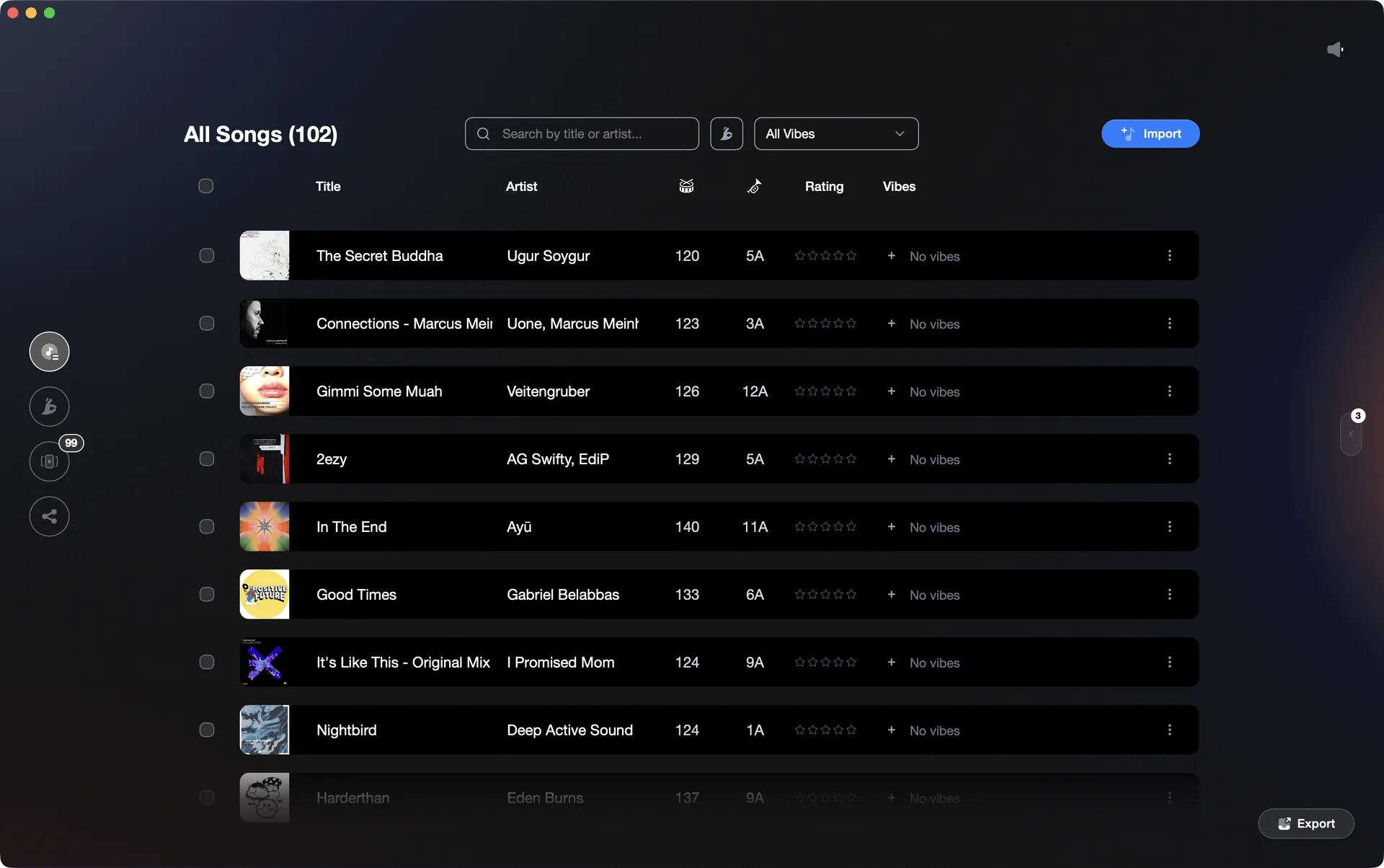
Vibes reads your Rekordbox library and writes a Traktor NML file with playlists and metadata intact.
Transfer your library to Traktor in Rekordbox, step by step.
Rekordbox does not export directly to Traktor's NML format, so the native path goes through an XML intermediary that Traktor can import. It takes a few steps but works reliably for playlists and basic track data.
Export an XML file from Rekordbox
In Rekordbox, go to the File menu and select Export Collection in xml format. Choose a location you can find easily and save the file. This file contains your track paths, playlists, cue points, and BPM and key values.
Convert the Rekordbox XML to a Traktor-compatible format
Traktor cannot natively read Rekordbox's XML format. You need a third-party conversion tool such as Lexicon (Mac/Windows) or DJ Conversion Utility (Mac). Point the tool at your exported Rekordbox XML and export a Traktor NML collection or an iTunes-schema XML that Traktor can read. This is the required step the native workflow cannot skip. Note: Rekord Buddy is discontinued and does not support Rekordbox 6 or 7.
Point Traktor to the converted library
If your conversion tool produced an iTunes-schema XML, open Traktor Preferences, go to File Management, and set the iTunes Music Library XML path to that converted file. If it produced a Traktor NML file directly, import it by right-clicking on Track Collection in Traktor's browser panel and selecting Import Another Collection from the context menu. Browse to the NML file and select it. In Traktor's browser, look for the iTunes node or the imported collection node to find your playlists and tracks.
Re-analyze tracks in Traktor
Once tracks are in Traktor's collection, run Traktor's own analysis to confirm beatgrids and BPM values. Hot cues and beatgrids generally transfer when using a current conversion tool, but Rekordbox memory cues do not survive: Traktor has no memory cue concept, so they are either merged into the hot cue list or dropped depending on the tool. Cue point color coding also does not carry over, as Traktor does not render cue colors. Check any tracks with complex tempos or live edits manually.
The catch
There is no fully native path from Rekordbox to Traktor. A third-party conversion tool is required because Traktor cannot parse Rekordbox's XML format. Current tools such as Lexicon and DJ Conversion Utility transfer playlists, hot cues, and beatgrids with reasonable fidelity. What does not carry over: Rekordbox memory cues (Traktor has no equivalent, so they are merged into hot cues or dropped), and cue point color coding (Traktor does not render cue colors). Plan on reviewing any tracks with complex BPM or manual beatgrid edits after import.
 Euphoric
 Melancholic
 Mysterious
 Aggressive
 Peaceful
 Rave
Rave Afterhours
 Club
Club Home
HomeThe faster way
Vibes reads Rekordbox and writes Traktor's NML directly.
Vibes imports your Rekordbox library (master.db or XML), lets you review and clean up your collection, then exports a Traktor NML file with playlists, vibes tags, and cue points written in. No manual XML wrangling required.
See how it worksOrganize in Vibes, export to Rekordbox.
Your playlists, tags, ratings, and cue points travel back to the gear you play on, so nothing you do in Vibes is locked away.
Track 001
Artist A
AfterhoursMysterious Introspective
Track 002
Artist B
 Cozy FloorPeacefulHome
Track 003
Artist C
RaveAggressive Festival
 Build & Release
Frequently asked questions
The honest answers, including the trade-offs.
Methodology
How we keep this honest.

Verified against the app
Every step is checked against the current version of Rekordbox.
We own our bias
We make Vibes. We show the native way first and honestly, then where Vibes genuinely helps, and we say when it does not.
Live pricing
The Vibes price shown comes straight from our checkout, never a hardcoded marketing number.
Kept current
Last reviewed June 2026.
One-time purchase
Get Vibes with a single payment. No subscription.
First 500 licenses at this price. Be the first to know when we launch.

Keep exploring
Works with your software
Vibes for DJs
How-to guides
Best DJ software
Move between apps