
Auto-tag your tracks in Rekordbox.
Rekordbox has no automatic mood or energy tagging. Vibes fills that gap with on-device AI that learns your taste and exports labeled playlists straight back into Rekordbox.
First 500 licenses at $49. Be the first to know when we launch.
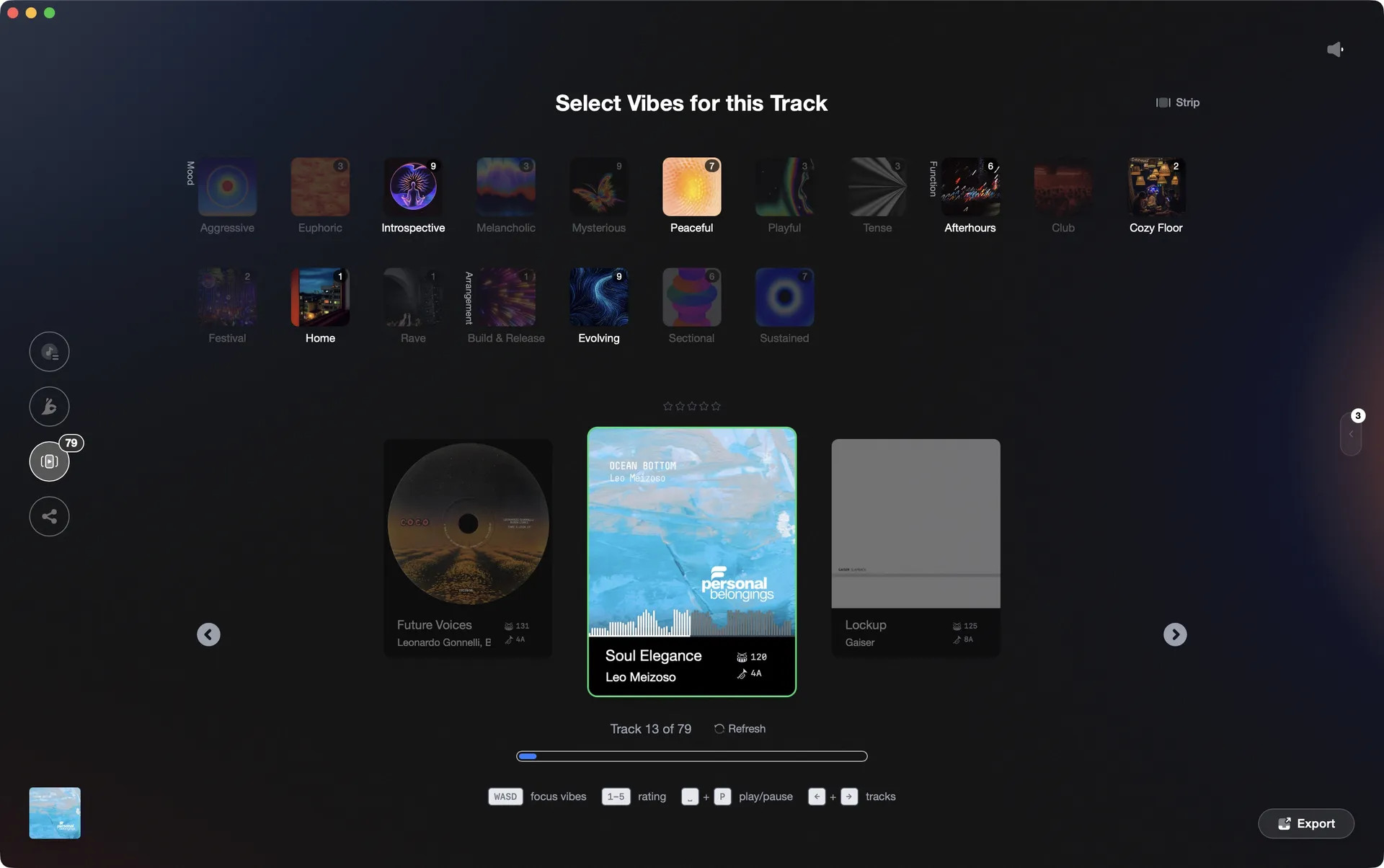
Tag tracks by energy and mood in Vibe Sort, then export organized playlists back to Rekordbox.
Auto-tag your tracks in Rekordbox, step by step.
Rekordbox does not have automated mood or energy tagging built in. The closest native workflow is to manually assign MyTags, ratings, or comments to each track, then use those to filter your collection.
Open your collection in Rekordbox
Launch Rekordbox and navigate to your Collection in the left panel. Make sure your tracks are analyzed so BPM and key data are available. This gives you the metadata foundation you will build on manually.
Create MyTags for energy and mood
In Rekordbox, open the MyTag pane by clicking the tag icon on the right side of the screen. You will see up to 4 categories. The three presets are Genre, Components, and Situation, and there is one blank group for your own use. Click a category or tag name to rename it. You can add or remove individual tag values within each category. Rekordbox caps you at 4 categories total (each holding up to 50 tags), so plan your taxonomy before you start tagging.
Assign tags to tracks
Select one or more tracks in your collection, then tick the desired tag in the MyTag pane on the right. Ticking a tag while multiple tracks are selected applies it to all of them at once, which makes bulk tagging by genre or BPM range practical. There is no AI or automatic suggestion, so every label still requires a manual decision.
Use Intelligent Playlists or filters to surface tagged tracks
Once tracks are tagged, use the search and filter bar to narrow your collection by MyTag values, or build Intelligent Playlists (the official Rekordbox name, sometimes informally called Smart Playlists) based on those tags. Right-click in the Playlists section and choose 'Create new Intelligent Playlist', then set your criteria including My Tag, BPM, key, and more. This lets you pull up, for example, all High Energy tracks in a particular BPM range before a set. MyTag data is also exported to USB drives so you can filter by tag directly on CDJ-3000s and compatible XDJ hardware.
The catch
Rekordbox has no automated or AI-assisted tagging: every energy or mood label must be assigned manually. However, multi-selecting tracks and ticking a tag in the MyTag pane applies it to all selected tracks at once, so batch-by-selection is possible even if batch-by-rule is not.
 Afterhours
 Mysterious
 Introspective
 Evolving
The faster way
Let AI tag your Rekordbox library by feel.
Vibes imports your Rekordbox library, runs on-device AI to suggest energy and mood tags for every track, and writes the results back into Rekordbox as ready-to-use playlists. No cloud, no subscription per-use, and it learns your taste the more you tag.
See how it worksOrganize in Vibes, export to Rekordbox.
Your playlists, tags, ratings, and cue points travel back to the gear you play on, so nothing you do in Vibes is locked away.
Track 001
Artist A
AfterhoursMysteriousIntrospective
Track 002
Artist B
 Cozy FloorPeaceful
 Home
Home
Track 003
Artist C
Rave Aggressive
 Festival
 Build & Release
Frequently asked questions
The honest answers, including the trade-offs.
Methodology
How we keep this honest.

Verified against the app
Every step is checked against the current version of Rekordbox.
We own our bias
We make Vibes. We show the native way first and honestly, then where Vibes genuinely helps, and we say when it does not.
Live pricing
The Vibes price shown comes straight from our checkout, never a hardcoded marketing number.
Kept current
Last reviewed June 2026.
One-time purchase
Get Vibes with a single payment. No subscription.
First 500 licenses at this price. Be the first to know when we launch.

Keep exploring
Works with your software
Vibes for DJs
How-to guides
Best DJ software
Move between apps